

 TL;DR:
Replace Aniwatch with Zoro as your primary streaming platform for reliable 1080p playback and fewer intrusive ads, while utilizing 9anime or Gogoanime as extensive, fast-updating backup catalogs.
● Select AnimeOwl for a clean, mobile-friendly interface with minimal ads, or AnimeDao if you rely on a slower internet connection and prioritize fast-loading pages with accurate subtitles.
● Expect occasional domain downtime or regional blocks across all unofficial streaming alternatives, making a reputable VPN and multiple bookmarked mirrors practical for uninterrupted access.
● To restore accidentally deleted local anime recordings such as MP4 or MKV files, run a deep scan using Wondershare Recoverit and save the recovered videos to a separate drive to prevent data overwriting.
Ask AI for a summary
 ChatGPT
 Perplexity
 Gemini
 Claude
 Grok
Grok
aniwatch became popular for quick, free anime streaming, but frequent shutdowns, mirrors, and safety concerns leave many fans searching for more stable, trustworthy alternatives. Below is a simple guide to the best replacement sites, how they stack up against aniwatch, and how to protect your own anime recordings from accidental loss.
In this article
Part 1. aniwatch vs other free anime streaming sites
Before settling on a new anime home, it helps to compare aniwatch with other popular free streaming platforms. The table below highlights differences in ad load, video quality, library size, and overall usability so you can decide which aniwatch alternative fits your needs best.
| Website Name | Ad Density | Subtitles | Video Quality | Anime Catalog | UI/UX | Notes |
|---|---|---|---|---|---|---|
| aniwatch | Medium-High | Multi-language, community-driven | Up to 1080p, varies by mirror | Large but inconsistent availability | Simple but cluttered by pop-ups | Popular but frequently taken down; mirrors can be risky. |
| Zoro | Low-Medium | Strong sub/dub coverage | Consistent 1080p on most titles | Very large, updated quickly | Clean, modern, easy navigation | Great main replacement if you want fewer intrusive ads. |
| 9anime | Medium | Extensive subs and many dubs | 720p to 1080p; multiple servers | Massive, including niche shows | Feature-rich but can feel busy | Best for new releases and multiple mirror choices. |
| Gogoanime | Medium-High | Good balance of sub and dub | Mostly 720p, some 1080p | Huge library with classics | Functional but dated design | Reliable fallback when others are down or geo-blocked. |
| AnimeOwl | Low | Focused on English subs | Stable HD playback | Growing library, popular titles | Minimal, mobile-friendly layout | Excellent for users who value a clean, lightweight experience. |
| AnimeDao | Low-Medium | Accurate and well-timed subs | 720p and 1080p options | Strong for mainstream series | Fast-loading, straightforward | Good pick for slower connections and binge sessions. |
The top choices all improve on aniwatch in at least one key area: fewer intrusive ads, better stability, or cleaner design. Using more than one site also gives you a backup when a domain goes offline or gets blocked in your region.
Part 2. Top 5 aniwatch alternatives for safe free anime streaming
1. Zoro
Zoro is a feature-rich anime streaming site known for its clean interface, stable HD streams, and wide selection of subbed and dubbed series. It is best for users wanting a primary aniwatch replacement with fewer ads and a huge catalog.
2. 9anime
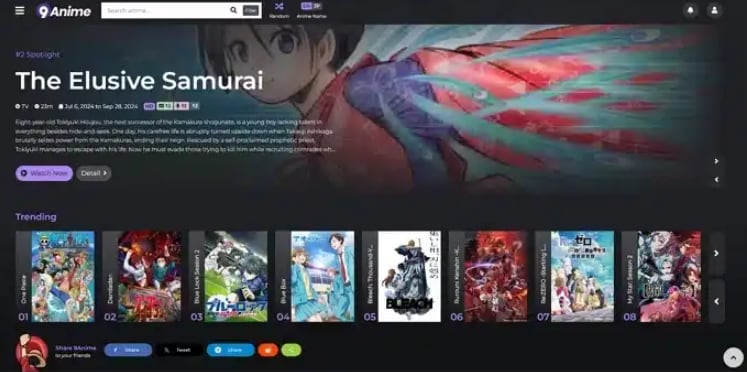
9anime offers one of the largest anime collections online, with quick episode updates and various servers to keep streams available. It is best for viewers who prioritize fast updates, new episodes, and multiple streaming mirrors.
3. Gogoanime
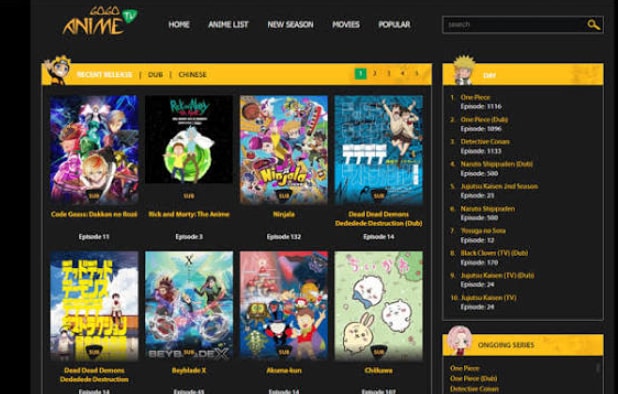
Gogoanime has long been a staple in free anime streaming thanks to its huge catalog and simple, predictable layout. It is ideal for fans who want reliable subs and dubs with straightforward navigation.
4. AnimeOwl
AnimeOwl focuses on a clean, responsive design with smooth HD playback for many popular anime titles. It is best for users looking for a modern, lightweight, and mobile-friendly anime streaming site.

5. AnimeDao
AnimeDao is built around speed and subtitle quality, offering a smooth experience even on less powerful devices or networks. It is best for users on slower connections who value fast-loading pages and dependable subtitles.

Part 3. How to recover deleted anime recordings with Recoverit
If you like to record your anime streams for offline watching, accidentally deleting those files can be painful. Instead of giving up on lost recordings, use Recoverit from Wondershare to scan your drive, SD card, or external disk and restore deleted video files before they are overwritten.
Key Features Offered by Recoverit
- Supports recovery of over 1000 file formats, including MP4, MKV, MOV, and other common anime video types.
- Works across internal drives, SD cards, USB flash drives, external HDDs/SSDs, and more.
- Offers preview of recoverable videos before restoring so you can verify the correct episodes.
Step-by-Step Guide on How To Recover Lost Videos
1. Choose a Location to Recover Data
Install and launch Recoverit, then select the drive, partition, or external device where your anime recordings were stored before deletion. This could be your system disk, a dedicated media drive, or a memory card from a portable device.

2. Deep Scan the Location
Click Start to begin a deep scan. Recoverit will thoroughly analyze the selected location for deleted or lost video files. You can monitor progress in real time and pause or stop the scan if you already see the recordings you need.

3. Preview and Recover Your Desired Data
When the scan finishes, filter results by video format or use search to find specific titles. Preview the clips to confirm they play correctly, then select the desired files and click Recover, saving them to a different drive or folder to avoid overwriting data.

Part 4. Final thoughts on choosing the right aniwatch replacement
aniwatch helped many fans discover new shows, but its instability and safety concerns mean it should not be your only streaming option. By pairing Zoro or 9anime as your main site with backups like Gogoanime, AnimeOwl, and AnimeDao, you can keep watching even when one domain goes down.
Whichever site you choose, protect your own downloaded or recorded anime files with a recovery plan. Tools like Recoverit can often bring back accidentally deleted recordings, making your anime library far more resilient in the long run.
Next: Animeowl
FAQ
-
Is aniwatch still working?
aniwatch domains frequently change or go offline due to legal and hosting issues, so availability depends on which mirror you try and your region. -
What is the safest alternative to aniwatch?
No unofficial site is perfectly risk free, but Zoro, AnimeOwl, and AnimeDao are popular choices thanks to relatively lower ad density and cleaner interfaces. -
Do I need a VPN to use aniwatch alternatives?
A VPN is not strictly required, but it can help bypass regional blocks and add privacy; always choose a reputable VPN provider if you decide to use one.


