

 TL;DR:
Hoopla alternatives like JustWatch, Reelgood, TV Time, and Letterboxd do not replace your library but help you discover, track, and organize streaming content across various platforms without hosting the videos themselves.
● Use JustWatch for instantly checking regional availability and prices across paid and free services, and JustWatch Anime for filtering legal anime streams.
● Reelgood is ideal for power users managing multiple subscriptions as it centralizes services and auto-tracks watched items across devices.
● TV Time suits binge-watchers needing detailed episode-by-episode progress tracking and release notifications.
● Letterboxd is best for movie enthusiasts who want a social film diary, ratings, and curated lists, though it lacks TV series tracking.
● If downloaded or recorded streaming files are accidentally deleted, use Wondershare Recoverit to scan the storage location, preview the files, and restore formats like MP4 or MKV to a safe drive before they are overwritten.
Ask AI for a summary
 ChatGPT
 Perplexity
 Gemini
 Claude
 Grok
Grok
Hoopla makes it easy to borrow digital movies, shows, and more from your local library, but its catalog and availability can be limited. If you want a broader view of what to watch and where to stream it, several free discovery platforms help you track, compare, and organize content across Netflix, Prime Video, Disney+, and dozens of other services. Below, you will find the best Hoopla alternatives, how they compare, and how to protect your streaming recordings from accidental deletion.
In this article
Part 1: Hoopla vs Top Streaming Discovery Platforms
Before switching away from Hoopla, it helps to see how it stacks up against popular streaming discovery tools. Use the comparison below to understand differences in ads, catalogs, and usability so you can decide which services fit best alongside your library account.
| Website Name | Ad Density | Subtitles | Video Quality | Anime Catalog | UI/UX | Notes |
|---|---|---|---|---|---|---|
| Hoopla | None in-library content; separate ads on website promos only | Dependent on library-supplied files; not customizable | Up to HD; capped by library licensing | Very limited, hit-or-miss | Simple but dated; focused on borrowing, not discovery | Requires participating library card; catalog varies widely by region. |
| JustWatch | Light banner ads and optional promoted titles | Not applicable (discovery only); links to platform-native subs | Tracks HD/4K availability per service | Good coverage via major services and niche apps | Modern filters, watchlist, price and availability alerts | Excellent to see where a title is streaming or rentable instantly. |
| Reelgood | Moderate on web, lighter in mobile apps | Not applicable; relies on linked streaming services | Shows 4K/HD tags where supported | Solid but not as deep as niche anime trackers | Strong personalization, watch next queues, cross-platform lists | Great for users juggling many subscriptions and free channels. |
| TV Time | Low to moderate, mainly in free mobile app | Not applicable; focused on tracking watched episodes | No direct playback; tracks platforms that offer HD | Decent for popular anime series discovery | Excellent progress tracking, notifications, and social comments | Ideal for binge-watchers who want to organize episodes and seasons. |
| Letterboxd | Very low; optional paid tier removes remaining promos | Not applicable, film diary and social reviews only | Does not host video; can link to streaming locations via partners | Decent for anime films; weak for series | Highly polished for film logging, lists, and reviews | Best for movie lovers who rate, review, and build public lists. |
Part 2: 5 Best Free Hoopla Alternatives
The tools below do not replace your library, but they dramatically improve how you discover, track, and organize what you watch across all streaming platforms.
1. JustWatch
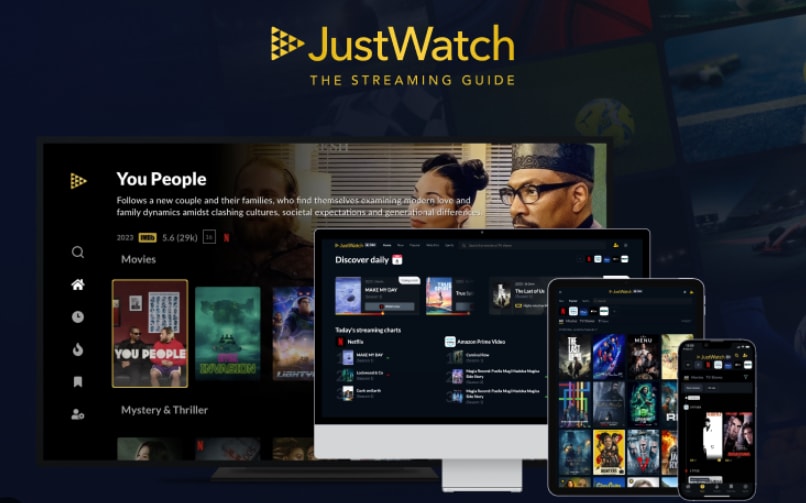
JustWatch is a free streaming discovery engine that shows you exactly where titles are available across paid and free services in your region. It is best for instantly checking where any movie or show is streaming or rentable worldwide so you can avoid endless app-hopping.
2. Reelgood
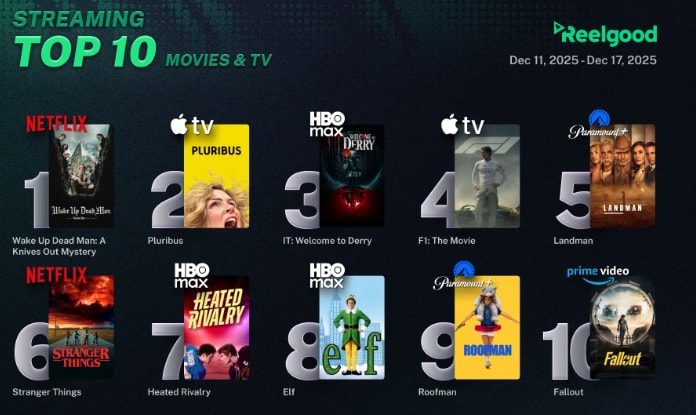
Reelgood centralizes your streaming services, watchlists, and recommendations in one dashboard so you always know what to watch next and where. It is best for power users juggling multiple subscriptions and free channels.
3. TV Time
TV Time is a show and movie tracker that keeps a detailed log of what you have watched, what is next, and when new episodes are released. It is best for tracking episode-by-episode progress for binge TV watchers.
4. JustWatch Anime (via JustWatch filters)
JustWatch Anime uses genre filters inside JustWatch so you can quickly locate legal, licensed anime movies and series across services you already use. It is best for finding legal anime streams across mainstream and niche platforms.
5. Letterboxd
Letterboxd is a social platform for logging movies you watch, rating, reviewing, and discovering new films through lists and community activity. It is best for movie fans who want a social film diary and curated lists.
Part 3: How To Recover Deleted Streaming Recordings
If you record streams or save downloads for offline viewing, it is easy to accidentally delete or lose those files. Recoverit by Wondershare can scan hard drives, SD cards, and other storage devices to restore lost recordings from OBS, browser capture tools, or native apps before they are overwritten.
Key Features Offered by Recoverit
- Supports recovery of more than 1000 file formats, including MP4, MKV, MOV, and other popular streaming video types.
- Scans internal drives, external HDDs, SSDs, memory cards, and USB sticks used for saving recordings.
- Offers file preview so you can confirm recovered clips before restoring them to a safe location.
Step-by-Step Guide on How To Recover Lost Videos
1. Choose a Location to Recover Data
Launch Recoverit and select the drive, partition, SD card, or external device where your streaming recordings were stored. If you kept captures in a specific folder, choose the corresponding location so the scan focuses on the right area.

2. Deep Scan the Location
Click Start to begin a deep scan. Recoverit will search the selected location sector by sector for deleted or lost video files. You can monitor progress in real time and pause or stop scanning once you see the files you need.

3. Preview and Recover Your Desired Data
When the scan finishes, filter by video format or use search to locate specific filenames. Preview the recovered clips to verify quality, then click Recover and save them to a different drive or folder to avoid overwriting remaining lost data.

Part 4: Which Hoopla Alternative Should You Use?
Hoopla is a valuable free option when your library participates, but its catalog and borrowing model mean it works best alongside broader discovery tools. Pairing Hoopla with platforms like JustWatch, Reelgood, or TV Time gives you a unified view of where to watch, how to track progress, and which titles are worth prioritizing.
Choose the alternative that matches your habits: quick availability checks with JustWatch, deep organization via Reelgood, detailed progress tracking in TV Time, or social film logging with Letterboxd. Whichever you use, remember to safeguard your downloaded or recorded content so a simple mistake does not erase hours of viewing time. If you do lose files, act quickly and let Recoverit search your drives before new data overwrites your favorite recordings.
Next: Justwatch
FAQ
-
Is Hoopla completely free to use?
Yes, Hoopla is free if your local library supports it, but you are limited by monthly borrow caps and your library's specific digital catalog. -
Why should I use Hoopla alternatives alongside my library apps?
Hoopla's selection and availability depend on your library and region, so alternatives like JustWatch or Reelgood help you see the entire streaming landscape, compare prices, and organize watchlists across all your services. -
Do Hoopla alternatives host or stream movies themselves?
Most Hoopla alternatives mentioned here do not host content. Instead, they show where titles are legally available on platforms you already use or can subscribe to, such as Netflix, Prime Video, or free ad-supported services.


