

 TL;DR:
An agentic AI workflow transforms generative AI from reactive responders into autonomous orchestrators that iteratively plan, execute external tools, evaluate results, and adapt to achieve predefined business goals.
● Unlike rigid classic automation, agentic systems dynamically handle ambiguous instructions and unstructured data by utilizing memory and continuous perception-planning-action loops.
● Implementations range from single task-oriented agents managing specific APIs to multi-agent configurations requiring human-in-the-loop approvals for critical financial or production decisions.
● Because autonomous execution introduces risks like unintended system modifications or overwritten project artifacts, deployments require strict role-based access controls, staging environments, and data recovery tools like Wondershare Recoverit to restore accidentally deleted datasets or configuration files.
Ask AI for a summary
 ChatGPT
 Perplexity
 Gemini
 Claude
 Grok
Grok
Agentic AI workflow describes a new way of building systems where AI agents can plan, take actions, and coordinate tasks with minimal human input. Instead of single prompts that return one-off answers, an agentic AI workflow focuses on chains of decisions, tools, and feedback loops that let AI move toward a defined goal, like drafting reports, analyzing data, or orchestrating business processes. Understanding how these workflows are structured will help you design more reliable, transparent, and secure AI-driven operations while keeping control over your data and outcomes.
Try Recoverit to Perform Data Recovery
 Security Verified. 3,591,664 people have downloaded it.
In this article
What Is Agentic AI Workflow
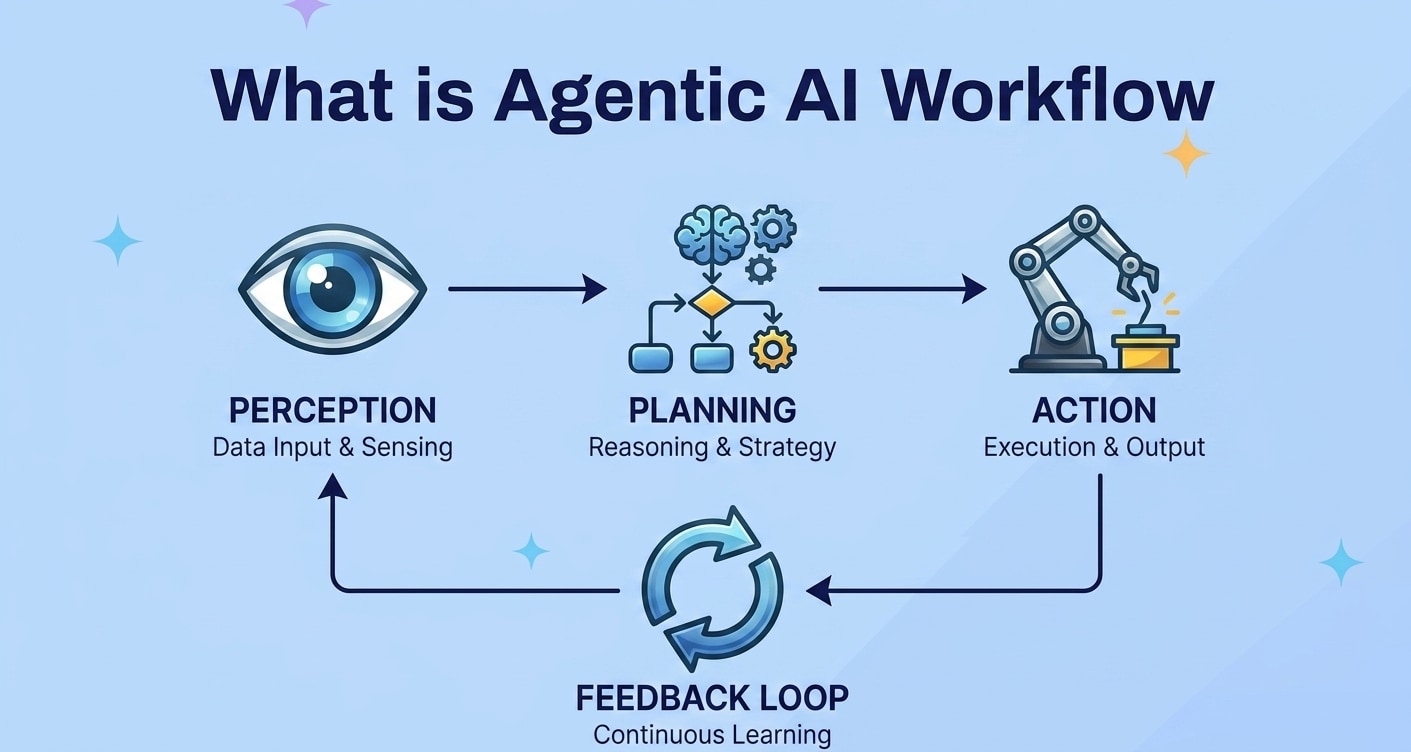
An agentic AI workflow is a structured process where one or more AI agents plan, act, and adapt over time to accomplish a goal. Instead of responding once to a single prompt, the agent follows a repeatable loop: understand the goal, decide next steps, call tools or APIs, evaluate results, then iterate.
In practice, this model turns generative AI and LLM agents into orchestrators of work. They can coordinate data pipelines, content creation, analytics, and even software operations. The workflow encodes rules and guardrails so that autonomous actions remain aligned with business requirements, compliance policies, and safety expectations.
Compared to classic workflow automation, which is often rule-based and rigid, agentic AI adds reasoning and flexibility. Agents can handle ambiguous instructions, break down tasks into substeps, and adapt when an API fails or data looks incomplete. This makes them suitable for knowledge work, complex support journeys, and cross-system operations.
How Does Agentic AI Workflow Work
An effective agentic AI workflow is usually built around a repeated perception-planning-action loop. Below is a simplified breakdown of the moving parts and how they interact.
Core Building Blocks of an Agentic AI Workflow
Behind the scenes, most agentic systems share a similar set of components:
- Agents: The reasoning engines that interpret instructions, decompose tasks, and decide what to do next. They are often powered by generative AI and large language models.
- Tools and APIs: External capabilities the agent can invoke, such as databases, search engines, code runners, CRM systems, or workflow platforms.
- Memory: Short-term and long-term storage where the agent keeps track of previous steps, context, and intermediate results.
- Policies and guardrails: Constraints, role definitions, and safety rules that restrict what the agent is allowed to do.
- Observability: Logs, traces, metrics, and dashboards that let humans inspect behavior, debug issues, and audit outcomes.
Typical Agentic AI Workflow Lifecycle
A typical autonomous workflow progresses through a series of stages from goal definition to human review.
- Goal intake and context gathering
A user or system defines the target outcome, such as "summarize this dataset and flag anomalies" or "draft a customer support reply using knowledge base entries." The agent collects relevant context, historical data, and constraints. - Planning and task decomposition
The agent outlines a plan: which tools to call, what substeps to run, what success criteria to track, and how to handle errors. - Tool execution and interaction
Using the plan, the agent invokes tools: querying a database, calling an internal API, running a script, or producing draft content. - Evaluation and feedback
The agent checks outputs against rules and metrics, potentially asking for human feedback or using automated validation checks. - Iteration and refinement
Based on feedback, the agent revises, retries failed calls, or escalates to a human when confidence is low. - Handoff and logging
When the result is acceptable, the workflow hands off to a person or downstream system, while logging all steps for traceability.
Why Agentic AI Changes Automation
In traditional autonomous workflows, every path and rule must be encoded in advance. Agentic AI, by contrast, lets systems reason in real time about novel situations. This has several implications:
- More adaptive operations: Agents can replan when tools fail, data is missing, or inputs are ambiguous, instead of halting with an error.
- Richer use of unstructured data: LLM-based agents can make sense of emails, documents, and logs, feeding insights back into the workflow.
- Closer alignment with human intent: Natural language instructions reduce friction between business stakeholders and automation builders.
- Higher risk if not controlled: Without proper oversight, agents may call the wrong tools, write to unintended locations, or overwrite critical project files, raising the importance of versioning, backups, and robust data recovery options like Recoverit.
| Classic Workflow Automation | Agentic AI Workflow |
|---|---|
| Rule-based flows with fixed steps and conditions. | Reasoning agents plan steps dynamically from goals. |
| Struggles with ambiguous or incomplete inputs. | Handles natural language, unstructured data, and partial context. |
| Predictable but rigid behavior. | Flexible, adaptive decisions with feedback loops and memory. |
What are the Types of Agentic AI Workflow
An agentic AI workflow can be designed in different patterns depending on the complexity of the task, the tools involved, and the level of autonomy allowed. Understanding these categories helps you pick the right structure for your use case and risk profile.
Goal-Driven and Tool-Calling Agent Workflows
The most common pattern is a single agent orchestrating tools to achieve a specific business goal. These workflows are often used in analytics, content generation, and back-office operations.
- Single-agent, multi-tool workflows: One agent coordinates multiple tools such as databases, search APIs, and internal services to complete complex tasks end to end.
- Task-oriented agents: Each agent is scoped to a narrow domain like "code assistant," "marketing writer," or "incident analyst" to reduce risk and increase reliability.
- Guardrailed autonomy: Agents can read and write to systems, but only within specified environments and with strict permission checks.
Multi-Agent and Human-in-the-Loop Workflows
For more advanced scenarios, teams combine several agents and humans into a coordinated workflow. This improves robustness and creates natural checkpoints for oversight.
- Multi-agent collaboration: Different agents own distinct roles such as planning, execution, and quality control, reviewing each other's work for accuracy.
- Human-in-the-loop review: Critical steps like approvals, financial decisions, and production deployments require human confirmation before moving forward.
- Supervisory agents: A higher-level coordinator agent manages subordinate agents, monitors progress, and triggers data recovery or rollback routines when something goes wrong.
In both patterns, carefully defined responsibilities, permissions, and logging practices reduce the risk of silent failures or hidden data loss.
Practical Tips for Agentic AI Workflow
Designing an agentic AI workflow is as much about safety and resilience as it is about capability. The following recommendations help you build robust systems that remain transparent and recoverable when issues arise.
Design for Observability and Control
- Log every important action: Record which agent did what, which tool was called, with which parameters, and when. This is vital for debugging and audits.
- Track versions of prompts, policies, and tools: Small changes in prompt templates or access scopes can drastically alter behavior.
- Enforce role-based access control: Restrict write operations, configuration updates, and deletion rights to specific agents or stages in the workflow.
Protect Your Data Throughout the Workflow
- Use staging environments: Run experimental AI agents and new workflows in isolated environments before promoting them to production.
- Snapshot critical assets: Regularly snapshot datasets, prompts, configuration files, and generated artifacts that are expensive to rebuild.
- Have a clear rollback strategy: Plan how you will restore state if an agent misconfigures a system or overwrites key project files.
- Combine backups with recovery tools: Even with backups, accidental deletions or disk issues can occur. Tools like Recoverit help you respond when data is missing from local machines or external drives.
Start Small and Iterate
- Pilot in a narrow domain: Begin with small, high-value use cases such as drafting emails, summarizing logs, or triaging tickets.
- Measure quality and impact: Track resolution time, error rates, and human satisfaction to justify broader rollout.
- Continuously refine prompts and policies: Treat your workflow design as a living artifact that adapts to changing business needs and insights.
How to Use Recoverit to Recover Lost Data
Recoverit by Wondershare is a dedicated data recovery solution designed to rescue lost, deleted, or formatted files from computers, external drives, and other storage devices. When an agentic AI workflow accidentally overwrites project assets, deletes datasets, or is interrupted by a system crash, Recoverit provides a guided process to scan and restore your important files. You can learn more and download it from the Recoverit official website.
Key Features Offered by Recoverit
- Recover lost or deleted files from computers, external drives, and memory cards, including assets produced by workflow automation and AI experiments.
- Support for a wide range of file types, including documents, images, videos, archives, and configuration files used in agentic AI workflow projects.
- Straightforward, guided recovery process suitable for both beginners and advanced users who manage complex autonomous workflows.
Step-by-Step Guide on How To Recover Lost Data
1. Choose a Location to Recover Data
Open Recoverit and select the specific drive, partition, or external device where your AI workflow files were stored. This narrows the search area so the software can focus on the most likely location of your missing data before starting the scan. In practice, this might be the project folder on your workstation, an external SSD dedicated to datasets, or a memory card storing generated media.

2. Deep Scan the Location
Start the scan and let Recoverit perform a thorough search across the chosen location. The program automatically looks for traces of deleted or lost files, listing the results in real time so you can monitor progress while the deep scan completes. During this step, avoid writing new data to the same drive to maximize your chances of recovering AI-generated reports, prompt libraries, or workflow configuration files.

3. Preview and Recover Your Desired Data
When the scan finishes, browse the results, use filters or search to find the files connected to your agentic AI workflow, and preview supported formats. Select the items you want to restore, then click to recover them and save the files to a secure, different storage path. Once restored, you can plug those assets back into your AI agents and pipelines to resume experiments or production operations.

Conclusion
Agentic AI workflow brings structure and autonomy to how AI systems plan, act, and iterate toward clear goals. Instead of isolated prompts, you design agents, tools, and feedback loops that mirror robust business processes and technical pipelines. When combined with careful permissions, observability, and human oversight, these AI agents can orchestrate complex tasks that were difficult to automate with traditional rule-based systems.
However, the increased autonomy and system access also introduce new failure modes, including accidental deletions, misconfigured storage locations, and overwritten project artifacts. By pairing well-designed agentic workflows with strong data management practices and reliable recovery tools like Recoverit, you keep experiments, models, and project assets safe. If files are lost or corrupted along the way, Recoverit can help you bring critical data back so you can refine, rebuild, and scale your AI initiatives with confidence.
Next: Chatgpt
FAQ
-
What is an agentic AI workflow?
An agentic AI workflow is a structured process where AI agents plan tasks, call tools or services, evaluate results, and adapt their actions to reach a target outcome with minimal human intervention. -
How is an agentic AI workflow different from simple prompts?
Simple prompts trigger one-off responses, while an agentic AI workflow coordinates multiple steps, tools, memory, and feedback. It behaves more like a guided process or pipeline than a single interaction. -
Where can agentic AI workflows be used in practice?
They are used in software development, customer support, data analysis, content production, and operations automation, where agents can fetch data, run checks, and hand off results to humans or other systems. -
What are the main risks of agentic AI workflows?
Key risks include data loss, incorrect or biased decisions, tool misuse, and security issues. Careful design, human oversight, logging, backups, and recovery plans help reduce these risks. -
How does Recoverit help AI workflow projects?
If experiments, datasets, or configuration files are deleted or corrupted during an AI project, Recoverit can scan the storage device and help you restore those critical assets so you can continue your work.


