 TL;DR:
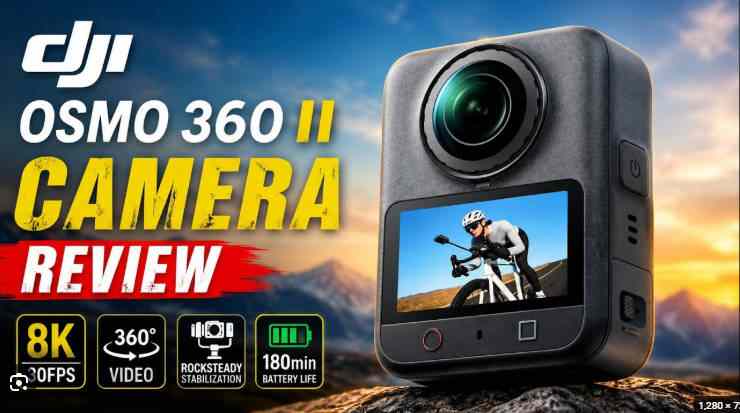
The DJI Osmo 360 II targets serious 360 creators and action shooters with a hardware-heavy upgrade featuring a 1-inch sensor, native 8K/60fps capture, 14.5 stops of dynamic range, replaceable lenses, and 105GB of built-in storage.
● Choose the DJI Osmo 360 II for spec-driven 8K60 frame-rate headroom and internal storage fallbacks, but opt for the Insta360 X5 if you prioritize a mature mobile editing experience and established social templates.
● Recording in 8K/60fps produces massive OSV and MP4 HEVC files that demand strict backup habits; creators must retain the original OSV master files to maintain reframing capabilities and avoid relying solely on exported MP4s.
● If high-value source footage is lost, users must immediately stop recording to prevent overwriting and scan the mounted internal memory or microSD card using recovery software, while international buyers should verify local pricing and warranties since current specs are confirmed only via DJI China.
Ask AI for a summary
 ChatGPT
 Perplexity
 Gemini
 Claude
 Grok
Grok
Short verdict: DJI Osmo 360 II is official on DJI China's product pages, and it is a bigger creator upgrade than a simple 360-camera refresh. DJI lists 1-inch panoramic imaging, native 8K/60fps 360 video, 14.5 stops of dynamic range, AI Super Night 2.0, replaceable lenses, 105GB built-in storage, and microSD expansion. For travel vloggers, action shooters, and 360 creators, the appeal is clear: higher-quality source footage, more room for reframing, stronger night-scene capture, and a storage setup that can keep shooting even when you forget a card.
This DJI Osmo 360 II review looks at the camera from a creator workflow angle: video quality, low-light performance, lens durability, built-in storage, microSD card risk, editing value, pros and cons, and footage recovery. If an 8K 360 clip is deleted, lost during transfer, missing from built-in storage, or disappears from a microSD card, Recoverit camera recovery software is a relevant first step for scanning readable camera storage, memory cards, computers, and external drives before the data is overwritten.
One publishing note matters: the currently verified official pages are DJI China pages, including DJI Osmo 360 II and the Osmo 360 II specs page. Before making market-specific claims for the U.S., UK, EU, or other regions, verify local DJI Store pricing, bundles, support, and warranty language.
DJI Osmo 360 II: Quick Verdict
- Overall rating: 4.6/5 for serious 360 creators, action-camera users, travel vloggers, and DJI ecosystem shooters.
- Best for: 8K/60fps 360 video, reframed social content, outdoor action footage, low-light travel scenes, invisible selfie-stick shots, and creators who want built-in storage plus microSD expansion.
- Not ideal for: casual vloggers who only need front-facing video, users who dislike large 8K files, or buyers who want the simplest possible mobile editing workflow.
- Official headline specs: 1-inch panoramic imaging, native 8K/60fps 360 video, 14.5 stops dynamic range, AI Super Night 2.0, replaceable lenses, 105GB built-in storage, and microSD support.
- Storage risk: 8K 360 footage is large and high-value. Losing one source clip can mean losing multiple horizontal, vertical, POV, and reframed edits.
- Best recovery angle: use Recoverit for deleted DJI videos from readable microSD cards, mounted camera storage, import folders, external drives, and computer storage.
In this article
Part 1. DJI Osmo 360 II Review: Quick Verdict
DJI Osmo 360 II is built for creators who want to shoot first and frame later. A single 360 clip can become a horizontal YouTube sequence, a vertical Reel, a first-person action crop, an invisible selfie-stick travel shot, or several social edits from the same source file. That is why the camera's 8K/60fps 360 capture matters: it gives editors more motion and cropping headroom before the final export loses detail.
The camera's most important upgrade is not one isolated spec. It is the combination of 1-inch panoramic imaging, 14.5 stops of dynamic range, AI Super Night 2.0, replaceable lenses, and flexible storage. Those features speak directly to outdoor creators who shoot in high contrast, low light, water, snow, crowds, helmets, mounts, and fast movement.
The tradeoff is file discipline. 8K 360 clips are large. Source files matter more than normal flat video because the original 360 file feeds every reframed export. If a file is deleted, overwritten, corrupted, or lost during transfer, the creator may lose multiple planned edits at once.
Who Should Buy It?
- Travel creators who want one compact camera for cities, landscapes, museums, night streets, and walking scenes.
- Action-camera users who shoot cycling, skiing, diving, motorcycling, hiking, or water sports.
- 360 editors who reframe one source file into horizontal, vertical, POV, and third-person shots.
- Low-light vloggers who need better night-scene handling than older small-sensor 360 cameras.
- DJI ecosystem users who already work with DJI microphones, DJI Studio, DJI Mimo, and Osmo accessories.
Who Should Skip It?
- Casual vloggers who only need simple front-facing 4K video.
- Users with weak storage discipline because 8K 360 footage requires careful backup and transfer habits.
- Creators who edit only on older phones where 8K 360 handling may feel heavy.
- Buyers outside China who need local price, warranty, and availability confirmed before purchase.
Part 2. DJI Osmo 360 II Specs: What DJI Officially Confirms
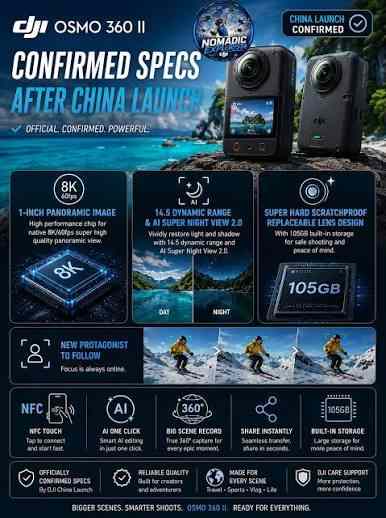
DJI China's official Osmo 360 II product and specs pages confirm the key positioning: this is a 360 creator camera with 1-inch panoramic imaging, native 8K/60fps 360 video, 14.5 stops of dynamic range, AI Super Night 2.0, replaceable lenses, 105GB built-in storage, and microSD expansion. DJI's download data also lists Osmo 360 II release notes and user manual entries dated August 13, 2026.
| Spec area | DJI Osmo 360 II | Why it matters |
| Camera type | 360 camera / action camera | Built for immersive capture, reframing, and outdoor creator workflows. |
| Imaging | 1-inch panoramic imaging | Useful for low-light scenes, dynamic range, and cleaner source footage. |
| Video | Native 8K/60fps 360 video | Gives editors more detail and motion headroom when cropping 360 footage. |
| Dynamic range | 14.5 stops listed on DJI China page metadata | Important for skies, shadows, snow, water, tunnels, and backlit scenes. |
| Night mode | AI Super Night 2.0 | Targets city walks, night rides, low-light travel, and evening action scenes. |
| Lens design | Replaceable lenses | More practical for action use where 360 lenses are exposed to scratches. |
| Built-in storage | 105GB built-in storage | Useful when creators forget a card or need fast internal capture. |
| Expansion | microSD card support, up to 1TB on the specs page | Essential for long travel days and high-bitrate 8K shooting. |
| Video format | OSV/MP4 (HEVC) | Creators should keep original OSV files as well as exported MP4 files. |
| Software | DJI Studio and DJI Reframe support | Important for reframing, export, and Premiere workflows. |
For SEO accuracy, mention that this verification is based on DJI China pages. If the article targets a U.S. or European audience, local availability and store bundles should be checked again before publication.
Part 3. Image Quality: 8K/60fps, 14.5 Stops, and AI Super Night 2.0
The main reason to buy Osmo 360 II is image flexibility. A normal action camera records one direction. A 360 camera records the scene around the camera, then lets the editor choose the direction later. That means the source file must be high quality enough to survive cropping.
Why 8K/60fps Matters for Reframing
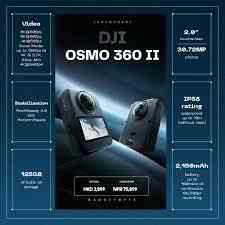
Native 8K/60fps 360 video gives creators more resolution and smoother motion before reframing. This matters when exporting:
- vertical TikTok, Instagram Reels, or YouTube Shorts edits;
- horizontal YouTube travel videos;
- POV cycling, skiing, or motorcycle footage;
- invisible selfie-stick third-person shots;
- slow pans across landscapes, streets, and interiors;
- multiple crops from one unrepeated travel moment.
The cost is storage pressure. 8K/60fps 360 files are not small, and transfer interruptions are more consequential. A creator may record one 360 scene and later export five different edits. Losing the source file means losing every future crop from that scene.
Low Light and Dynamic Range
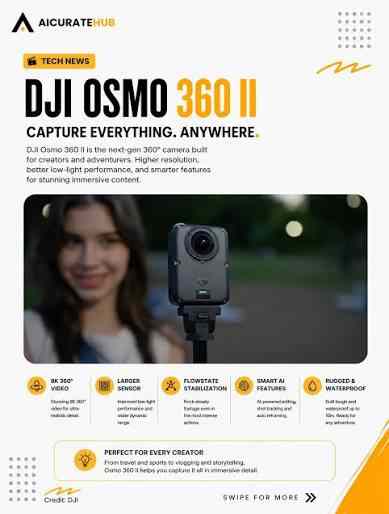
DJI's China page highlights 14.5 stops of dynamic range and AI Super Night 2.0. These are meaningful because 360 cameras capture every direction at once. The camera may face bright sky, dark street, neon signs, reflective snow, and backlit subjects in the same clip.
That makes Osmo 360 II especially relevant for:
- night city walks;
- motorcycle rides after sunset;
- travel markets, concerts, and indoor attractions;
- skiing, beach, water, and snow scenes with strong highlights;
- sunset and blue-hour creator footage.
These clips often have high recovery value because the moment cannot be reshot. If a night ride or travel scene disappears, stop recording immediately and recover from the original storage location before creating new files.
Photos, D-Log M, and Creator Exports
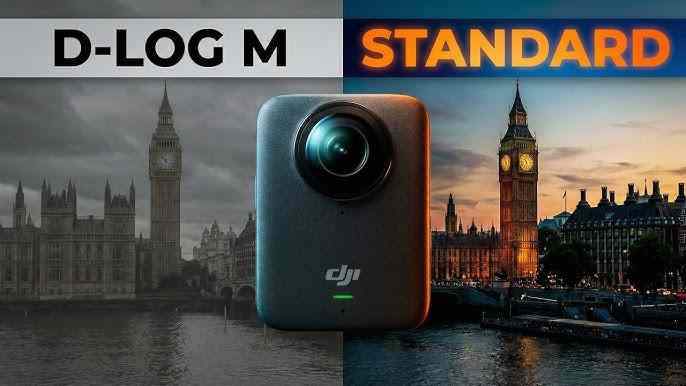
Osmo 360 II also matters for stills and post-production. High-resolution 360 photos, D-Log M workflows, OSV source files, MP4 HEVC exports, and DJI Studio reframing all create multiple file layers. The original source matters most. If you only keep the exported MP4, you may lose the ability to reframe the scene later.
For professional or semi-professional work, use a simple rule: back up the original OSV source file, the exported MP4, and the project or edit timeline separately.
Part 4. Design and Durability: Replaceable Lenses for Action Use
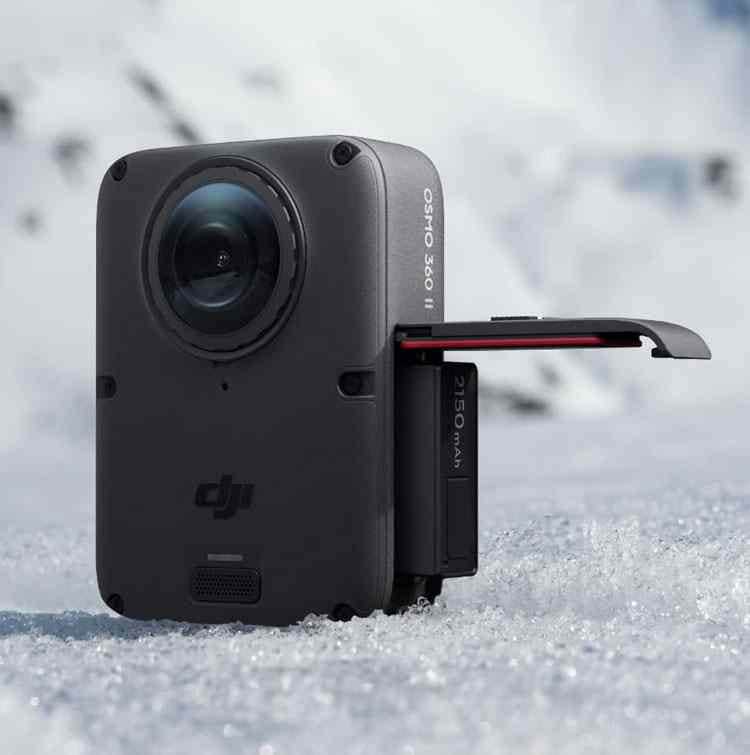
Replaceable lenses are a major practical upgrade for 360 action cameras. A 360 camera has exposed front and rear optics by design. That makes it vulnerable during skiing, biking, hiking, diving, surfing, motorcycling, beach shooting, and crowd scenes. If the lens surface is scratched, every future clip may show flare, smearing, or visible marks.
For action creators, replaceable lenses lower the fear of using the camera in real environments. They do not remove the need for care, but they make the camera more realistic for repeat outdoor use. The feature also supports Recoverit-related content because action shoots are where storage errors and transfer mistakes often happen: wet cards, rushed imports, low battery shutdowns, unsafe ejects, and quick formatting before the next activity.
| Action scenario | Camera risk | Data risk |
| Skiing or snowboarding | Lens scratches, cold battery drain, snow/water exposure. | Interrupted clips, card errors, rushed transfers. |
| Motorcycling or cycling | Vibration, dust, bug impact, wind noise. | Long high-bitrate files and sudden shutdowns. |
| Diving or water sports | Water sealing, pressure, saltwater residue. | Unreadable microSD card or corrupted import folder. |
| Travel vlogging | Crowds, drops, quick pocket use, mixed light. | Accidental deletion, full storage, failed app export. |
Part 5. Storage Workflow: 105GB Built-in Storage and microSD
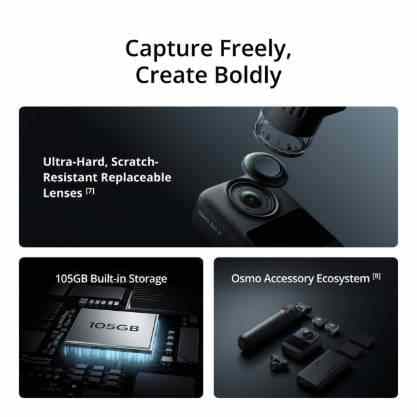
The 105GB built-in storage is one of Osmo 360 II's most important creator features. It reduces dependence on a microSD card and gives users a fallback when they forget a card or fill one during travel. But bigger storage can also increase recovery urgency: creators may store more clips for longer before backing up, so one accidental deletion or failed transfer can affect more valuable footage.
The microSD slot is still essential for long recording days. DJI's specs page lists microSD support up to 1TB. For 8K 360 video, creators should use recommended high-speed cards and avoid filling cards completely.
Where Osmo 360 II Footage Can Be Lost
| Loss location | Common trigger | Recovery advice |
| Built-in storage | Accidental deletion, failed USB transfer, app export issue, or recording over old clips. | Stop recording. Connect the camera to a computer and recover to another drive if storage is readable. |
| microSD card | Formatting, card error, interrupted recording, water exposure, or unsupported card speed. | Remove the card, use a card reader, and scan with SD card recovery software. |
| Computer import folder | Deleted during cleanup, overwritten by exports, lost after a crash, or moved to the wrong folder. | Scan the computer drive before installing large apps or saving new exports. |
| External SSD | Unsafe eject, bad cable, file-system error, accidental format. | Do not run destructive repair before copying recoverable files from unstable storage. |
| DJI Studio export | Export interrupted, project cache cleared, or wrong destination chosen. | Recover original OSV source files first, then recover exported MP4 files if needed. |
How to Reduce 8K 360 Footage Loss
- Back up before formatting: confirm the original OSV and exported MP4 open correctly before clearing storage.
- Keep source files: do not keep only reframed exports; the original 360 file is the creative master.
- Use reliable cards: choose DJI-recommended high-speed microSD cards for 8K 360 recording.
- Avoid full storage: leave free space on both built-in storage and microSD cards.
- Use stable transfer: avoid loose USB-C cables and do not disconnect during import.
- Format cards properly: after backup, the official SD Memory Card Formatter is a credible reference for card maintenance.
Part 6. DJI Osmo 360 II Pros and Cons
| Pros | Why it matters |
| Native 8K/60fps 360 video | Strong source quality for smoother action and more flexible reframing. |
| 1-inch panoramic imaging | Better creator positioning for dynamic range and low light. |
| 14.5 stops dynamic range | Useful for difficult contrast in snow, water, sunsets, streets, and backlit scenes. |
| AI Super Night 2.0 | Targets night travel, city walks, and low-light action clips. |
| Replaceable lenses | More practical for outdoor action use where lenses are exposed. |
| 105GB built-in storage | Helpful backup path when users forget or fill a card. |
| microSD support | Essential for long shoots and travel days. |
| OSV/MP4 HEVC workflow | Supports 360 source retention and practical export formats. |
| Cons | Why it matters |
| Large 8K/60fps files | Requires careful storage, transfer, backup, and recovery planning. |
| Built-in storage can hide the loss location | Users may not know whether the original file was internal, on microSD, or already imported. |
| 360 editing is workflow-heavy | Reframing, export, and archiving take more effort than flat action-camera footage. |
| Regional availability needs checking | China pages are verified; other markets may differ in pricing, bundles, and warranty timing. |
| Recovery is time-sensitive | Continuing to record after deletion can overwrite missing footage. |
Part 7. DJI Osmo 360 II vs Insta360 X5: Which Should Creators Pick?
The natural SERP comparison is DJI Osmo 360 II vs Insta360 X5. DJI's strongest argument is hardware-led: 8K/60fps 360 video, 1-inch panoramic imaging, 14.5 stops dynamic range, AI Super Night 2.0, built-in storage, and DJI ecosystem integration. Insta360's strength is still its mature 360 editing ecosystem, mobile templates, reframing workflow, and creator community.
| Comparison area | DJI Osmo 360 II | Insta360 X5 | Best fit |
| 360 video headline | Native 8K/60fps | 8K-focused consumer 360 workflow | DJI for frame-rate headroom. |
| Low-light angle | 1-inch panoramic imaging and AI Super Night 2.0 | Strong low-light processing and mature app support | Depends on actual scene and workflow. |
| Dynamic range | 14.5 stops listed by DJI China | Competitive creator camera performance | DJI for spec-driven buyers. |
| Lens durability | Replaceable lenses | Known for replaceable lens guards/covers | Both appeal to action users. |
| Storage | 105GB built-in storage plus microSD | microSD-focused workflow | DJI for internal fallback. |
| Editing ecosystem | DJI Studio, DJI Reframe, DJI Mimo | Very mature Insta360 app and desktop tools | Insta360 for mobile-first editing comfort. |
| Best buyer | DJI users, spec-focused creators, action shooters, 8K60 editors. | Creators who prioritize app templates, fast sharing, and established 360 workflow. | Choose based on workflow, not only specs. |
Choose DJI Osmo 360 II if you value 8K/60fps 360 source capture, built-in storage, low-light upgrades, and DJI ecosystem integration. Choose Insta360 X5 if the mobile editing experience, templates, and long-established 360 software workflow matter more than headline specs.
Part 8. How to Recover Deleted DJI Osmo 360 II Videos
DJI Osmo 360 II recovery starts with one rule: stop writing to the source storage. Do not record new clips, do not format again, and do not save recovered files back to the same camera storage, microSD card, or external drive. New data can overwrite missing footage.
Recoverit is relevant because Osmo 360 II creates high-value OSV/MP4 HEVC files on storage that a computer can often scan: microSD cards, mounted camera storage, computer import folders, and external backup drives. Recoverit cannot repair physical hardware, bypass encryption, or restore overwritten data. It can help recover files from readable storage before destructive actions.
Recover from a microSD Card
Step 1. Remove the microSD card.
Stop using the camera and remove the card. Insert it into a reliable card reader instead of continuing to record.
Step 2. Scan the card with Recoverit.
Open Recoverit, select the microSD card under external devices, and start scanning. For more context, see Recoverit's camera memory card recovery guide.
Step 3. Recover to another drive.
Filter by video or photo files, choose needed OSV/MP4/JPEG results where visible, and recover them to a separate healthy drive.
Try Wondershare Recoverit to Perform Data Recovery
 Security Verified. Over 7,302,189 people have downloaded it.
Recover from Built-in Storage or a Computer Import Folder
If footage was saved internally, connect Osmo 360 II to a computer with a stable USB-C cable and check whether the camera storage mounts. If it appears as readable storage, scan it before recording more video. If the file was deleted from a computer import folder, scan the computer drive or external SSD where the original files were saved.
For DJI-specific data loss scenarios, Recoverit's DJI data recovery guide can help users identify whether the loss happened on a card, camera storage, computer, or transfer destination.
What If Recovered DJI Videos Will Not Play?
Recover files first, then test copies in DJI Studio, DJI Mimo, or a compatible player. If recovered videos are incomplete, interrupted, or structurally damaged, use a video repair workflow after saving recovered copies to a safe location. Recoverit's guide to repair corrupt DJI video files is useful for this separate repair stage.
Do not run repair attempts on the only recovered file. Keep one untouched copy, duplicate it, and repair the duplicate.
Part 9. Final Verdict
DJI Osmo 360 II is a strong 360 action camera for creators who need high-resolution immersive capture, stronger dynamic range, night-scene capability, replaceable lenses, and flexible storage. Its biggest value is not just 8K/60fps, but how that source quality supports reframing across YouTube, TikTok, Reels, Shorts, travel films, and action clips.
For Recoverit's audience, the connection is direct. Osmo 360 II creates large, valuable footage that is easy to lose through accidental deletion, formatting, microSD errors, transfer interruption, or file corruption. The safest advice is simple: stop shooting, scan the affected storage with camera recovery software, and recover files to another drive before the data is overwritten.
If you publish this review outside China, recheck local DJI Store availability, bundles, pricing, and warranty details. The technical product-page claim itself is now clear: DJI China has published Osmo 360 II as an official product.
FAQ
-
Is DJI Osmo 360 II officially released?
Yes. DJI China has published official Osmo 360 II product and specs pages, and DJI download data lists Osmo 360 II release notes and user manual entries dated August 13, 2026. -
Does DJI Osmo 360 II shoot 8K/60fps 360 video?
Yes. DJI China describes Osmo 360 II as supporting native 8K/60fps panoramic video. -
How much built-in storage does DJI Osmo 360 II have?
DJI China lists 105GB built-in storage. The camera also supports microSD expansion, with the specs page showing support up to 1TB. -
Does DJI Osmo 360 II support microSD cards?
Yes. The DJI China specs page lists microSD card support. Use recommended high-speed cards for 8K 360 recording and back up files before formatting. -
What file formats does DJI Osmo 360 II use?
The specs page lists OSV/MP4 (HEVC). Keep original OSV files when possible because they preserve the 360 source for reframing. -
Can Recoverit recover deleted DJI Osmo 360 II videos?
Recoverit can help recover deleted DJI videos from readable storage such as microSD cards, mounted camera storage, computer drives, external drives, and import folders. Recovery depends on overwriting, file condition, and device detectability. -
What should I do if DJI Osmo 360 II footage is missing?
Stop recording immediately, do not format the storage again, remove the microSD card if applicable, scan the affected storage, and recover files to a separate healthy drive. -
What if recovered DJI Osmo 360 II videos are corrupted?
Save recovered files first, keep an untouched copy, then use a video repair workflow on a duplicate. Do not keep writing repaired files back to the original card or camera storage.



