How to Recover Files from DJI Drone Camera

Sep 02, 2026 • Filed to: Photo/Video/Audio Solutions • Proven solutions
 TL;DR:
You can recover lost or deleted DJI drone footage from the microSD card using data recovery software like Recoverit, provided you immediately stop recording to prevent overwriting the files.
● If the original microSD recording is missing or your specific model lacks internal storage like the DJI Mavic Mini, check the DJI Fly app album or your phone's local storage for cached previews and downloaded fallback copies.
● For incomplete MP4 files caused by a drone crash or sudden power loss, reinsert the card into the drone and power it on to see if the video finalizes before attempting any software recovery or video repair.
● Never format the SD card or run CHKDSK commands when prompted by a computer, as repairing the file system prior to extracting the data can alter metadata and ruin the chances of rebuilding fragmented drone videos.
Ask AI for a summary
 ChatGPT
 Perplexity
 Gemini
 Claude
 Grok
Grok
Can I Recover Files from a DJI Drone Camera?
Yes, DJI drone videos and photos can often be recovered if the original storage has not been overwritten. Most DJI drone file recovery cases start from the microSD card because the original MP4 videos, JPEG photos, and related media files are usually stored there. Some DJI models may also have internal storage, phone app cache, or exported files on a computer.
The recovery method depends on the file situation. Deleted files, formatted cards, RAW cards, corrupted recordings, cached app previews, and computer transfer problems require different actions. Start by protecting the source storage before trying any repair or restore method.
- Use Recoverit for deleted or formatted DJI files on microSD cards, external drives, computer folders, and exported media locations.
- Use DJI Fly or mobile albums only when the original file is gone but a cached or downloaded copy may still exist on the phone or tablet.
- Use video repair when the DJI file is recovered but cannot play because the recording was interrupted by crash, low battery, or sudden power loss.
- Use driver and Disk Management checks when Windows cannot detect the DJI card or card reader.
| DJI File Loss Scenario | Recommended First Action | Best Tool or Method | Risk to Avoid |
| Deleted photos or videos from microSD card | Stop recording and connect the card to a computer with a reader. | Recoverit Data Recovery or another SD card recovery tool. | Recording new flights on the same card. |
| Formatted DJI card | Do not format again and scan the full card. | Deep scan or enhanced video recovery for large MP4 files. | Reinitializing, repartitioning, or copying new files to the card. |
| Crash or sudden shutdown during recording | Reinsert the card into the DJI drone and power it on to check whether the file finalizes. | Recover the file first, then repair corrupted MP4 if it cannot play. | Editing or converting the broken file before preserving the original. |
| File missing from card but preview exists on phone | Check DJI Fly album, phone Photos or Gallery, and app cache. | Export cached copy as a fallback. | Assuming cache equals the full-resolution original. |
| Card asks to format or shows RAW | Cancel the format prompt and scan before repair. | Recovery software first, CHKDSK only after important files are recovered. | Running repair commands before copying recoverable footage. |
| Computer cannot detect the DJI card | Try another card reader, USB port, computer, and Device Manager. | Driver reinstall, Disk Management check, or professional recovery. | Repeatedly forcing a damaged card to connect. |
Part 1. What is a DJI Mavic Mini?
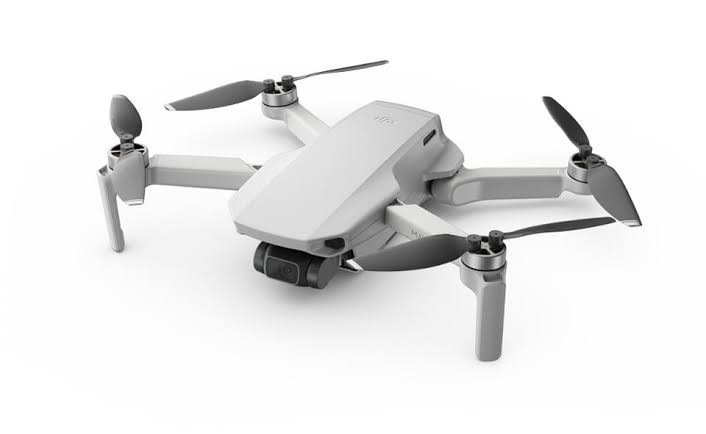
DJI Mavic Mini is a compact lightweight DJI drone released as part of the Mavic series. It is no longer accurate to describe it as the latest DJI Mavic drone, but it remains a common model in DJI file recovery cases because many users still record travel, wedding, event, and aerial footage with it.
| Mavic Mini Detail | Recovery-Relevant Meaning | Official Calibration |
| Storage | Mavic Mini does not have internal storage for original footage, so recovery usually starts from the microSD card. | DJI Support: Mavic Mini |
| App | Mavic Mini works with DJI Fly, not DJI GO. App cache and mobile downloads should be described as fallback copies. | |
| Photo format | Photo recovery should filter for JPEG images when targeting Mavic Mini originals. | |
| Video format | Video recovery should filter for MP4 files using H.264 or MPEG-4 AVC. | |
| Video resolution | Mavic Mini records up to 2.7K, so recovered files can be large and fragmented. | |
| microSD requirement | DJI lists UHS-I Speed Class 3 or above and recommends tested microSD cards up to 256GB for this model. | |
| File system | The DJI support specs list FAT32 for cards up to 32GB and exFAT for cards above 32GB, which matters for formatted-card recovery. |
| Where DJI Files May Be Stored | What It Contains | How to Recover or Export |
| microSD card in the drone | Original DJI photos, MP4 or MOV videos, and sometimes subtitle or metadata sidecar files depending on settings and model. | Use a card reader and scan the card before recording anything new. |
| Internal storage on selected DJI models | Original photos and videos when the model includes built-in storage. | Connect the drone to a computer or use the official export path for that model, then scan exported locations if local files were deleted. |
| DJI Fly app or mobile device album | Cached previews, downloaded media, edited clips, and shared versions. | Check DJI Fly album, mobile Photos or Gallery, Files, Downloads, and app cache as fallback locations. |
| Computer import folder | Files copied by USB, card reader, Finder, File Explorer, editing software, or backup tools. | Check Recycle Bin, Trash, backup folders, and scan the local drive if the imported copy was deleted. |
| External drive or project drive | DJI footage copied for editing, client delivery, or long-term storage. | Scan the external drive or project folder with data recovery software if files were deleted or formatted. |
| Cloud storage | Uploaded exports, edited clips, synced folders, and shared deliverables. | Check cloud recycle bin, version history, synced devices, and project backups before scanning physical media. |
Why Do DJI Camera Recordings Get Lost?
DJI files usually disappear because the storage index, file system, recording process, transfer workflow, or backup workflow fails. A crash does not always mean all footage is gone, but it can interrupt video finalization or damage the microSD card.
| Cause | What Happens to DJI Files | Recovery Impact |
| Accidental deletion | The file entry is removed from the card or computer folder. | Often recoverable before new recordings overwrite the card space. |
| Formatting the microSD card | The file system is reset and existing DJI media becomes invisible. | Quick format may still be recoverable; full overwrite is much harder. |
| Drone crash or sudden shutdown | The MP4 or MOV file may be incomplete, unfinalized, or corrupted. | Recover the original file first, then use video repair if it cannot play. |
| Removing the card while files are being written | The file system or video container can become damaged. | Stop using the card and scan before running repair tools. |
| Full card or low battery during recording | Recording may stop unexpectedly or fail to finalize. | Recovered files may require video repair after data recovery. |
| Using the same card across devices | Different cameras, phones, or computers may create incompatible folders or file system changes. | Recover first, then format the card in the DJI drone after backup. |
| Virus or hidden-file issue on computer | Files may be hidden, renamed, quarantined, or deleted after connecting the card to a PC. | Check hidden files and antivirus quarantine before deep recovery. |
How to Recover Videos and Photos from DJI Camera
Use a safe recovery order. First, check whether the original file can still be copied from the drone or microSD card. Second, check DJI Fly and mobile albums for cached or downloaded copies. Third, scan the microSD card or computer storage for deleted files. Fourth, repair the recovered video only if the file is corrupted or unplayable.
- Protect the source: Stop recording, remove the microSD card, and avoid formatting or CHKDSK before recovery.
- Check visible files: Use File Explorer, Finder, DJI Fly album, phone album, or the original editing folder.
- Recover deleted files: Scan the microSD card, computer folder, Recycle Bin location, or external drive with recovery software.
- Repair corrupted video: If recovered MP4 or MOV files cannot play, use video repair after preserving the original recovered file.
- Back up and reformat: After recovery, copy good files to another location and format the card in the DJI drone before reuse.
Solution 1. Recover Missing DJI Recordings with Recoverit
Recoverit Data Recovery is useful when DJI drone videos or photos were deleted, formatted, lost from a microSD card, removed from a computer import folder, erased from an external editing drive, or missing after a storage error. For DJI drone recovery, connect the microSD card through a card reader whenever possible instead of continuing to use the drone.

| Recoverit DJI Recovery Point | How to Present It | Source Calibration |
| Storage support | Recover local files from SD cards, microSD cards, cameras, drones, external drives, USB drives, and computer folders. | Recoverit Data Recovery Free official page |
| File type support | Filter scan results for DJI video and photo formats such as MP4, MOV, JPG, JPEG, DNG, and other media formats when supported by the model. | Recoverit supported file types |
| Enhanced Video Recovery | Use Enhanced Video Recovery for large, fragmented, or high-resolution DJI recordings, including 2.7K, 4K, or 8K footage from supported models. | Recoverit Enhanced Video Recovery |
| Free version | Recoverit official free page currently lists free recovery up to 500MB, while Premium provides unlimited recovery. | Recoverit Free vs Premium |
| Recovery boundary | Recoverit scans local storage devices. It cannot reconstruct overwritten footage or fix severe physical card damage by software alone. | Recoverit product page |
- Remove and connect the card. Power off the DJI drone, remove the microSD card, and connect it to the computer with a reliable card reader.
- Select the DJI storage location. Launch Recoverit and choose the microSD card, drone storage, external drive, Recycle Bin location, or folder where the DJI files were stored.
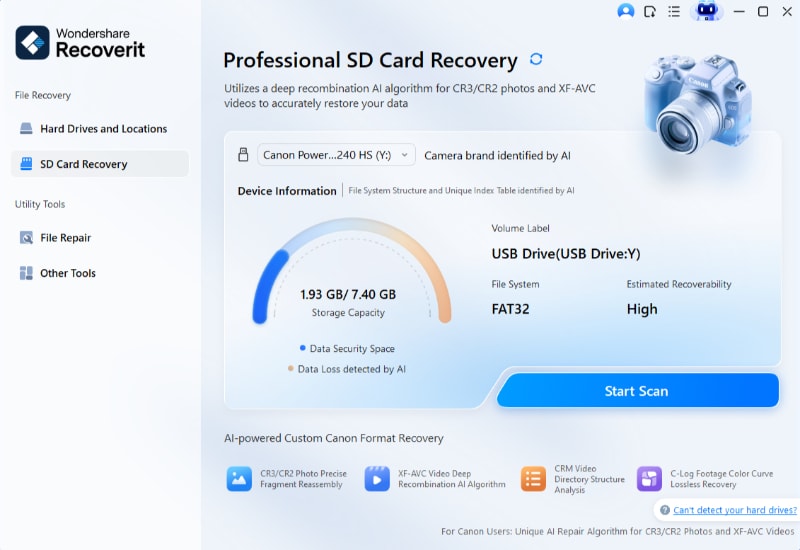
- Scan the full storage. Let the scan finish. Use filters for MP4, MOV, JPG, JPEG, DNG, SRT, or other DJI-related files.
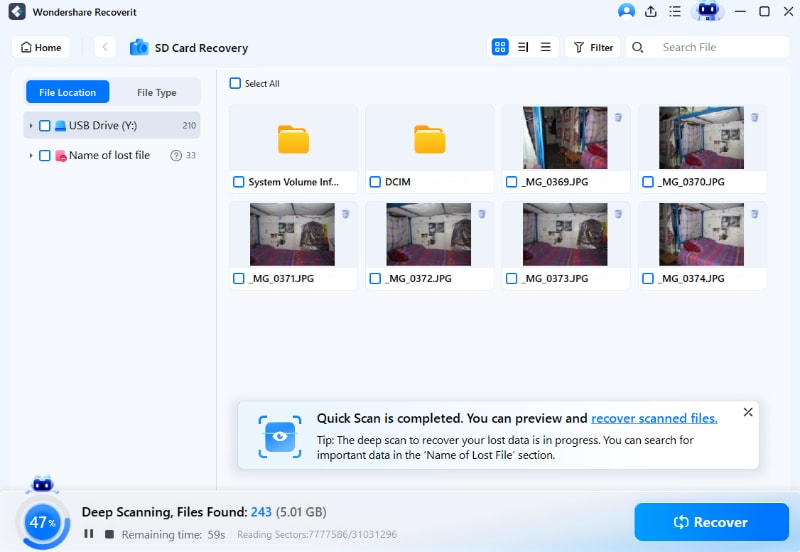
- Use Enhanced Video Recovery if needed. For large drone videos, use the enhanced scan to locate and rebuild video fragments where supported.
- Preview recoverable files. Check file size, date, resolution, and preview to separate original files from thumbnails or cache.

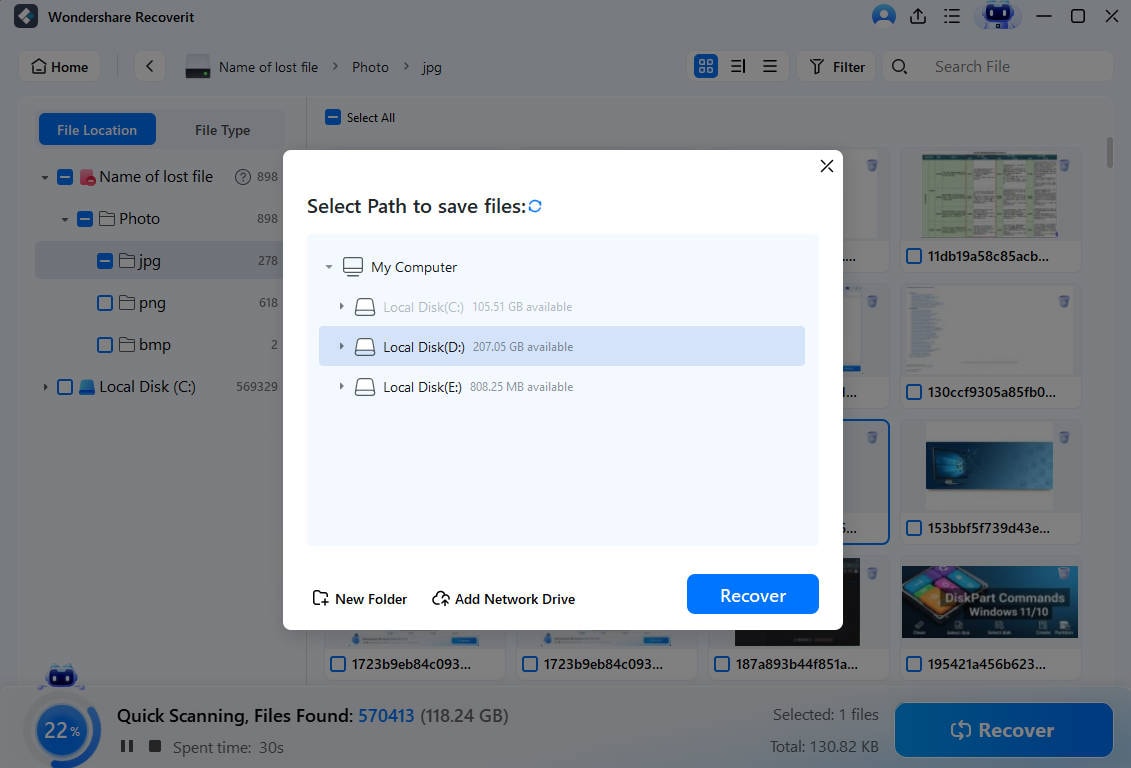
- Recover to another drive. Save recovered files to a computer drive or external disk, not back to the same DJI microSD card.
- Repair after recovery if needed. If the recovered video cannot play, use video repair on a copy of the recovered file.
Video Guide on How to Recover Deleted or Corrupted Videos from Drone | CES 2026 Drone Highlights

Solution 2. Check DJI Fly App, Phone Album, and Cache
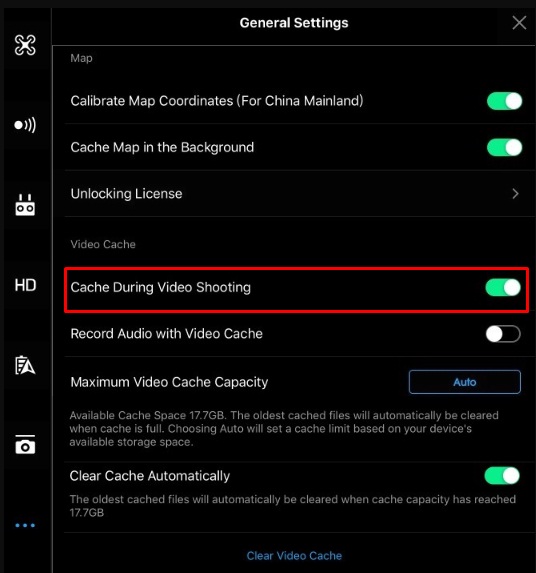
For DJI Mavic Mini, use DJI Fly rather than DJI GO. If the original microSD recording is missing, the DJI Fly app or the phone album may still contain a cached preview, downloaded clip, edited version, or shared copy. This is a fallback method, not a replacement for recovering the original microSD file.
| Mobile Location | What to Check | Recovery Boundary |
| DJI Fly album | Open DJI Fly and check Album or saved media for cached or downloaded flight footage. | Some files may be preview quality or app-generated exports. |
| Phone Photos or Gallery | Search recently saved DJI videos, edited clips, and shared exports. | Only works if the media was downloaded or saved to the device. |
| Files or Downloads folder | Check local folders for exported DJI clips, social sharing files, or copied footage. | File names may differ from the original DJI camera file names. |
| App cache | Look for low-resolution previews or recent flight media cached by the app. | Cache can be cleared automatically and may not contain audio, full resolution, or complete frames. |
| Cloud photo backup | Check iCloud Photos, Google Photos, OneDrive, or phone cloud backup for saved exports. | Cloud backups usually contain downloaded or synced copies, not the original card if it was never imported. |
Solution 3. Use CHKDSK Only After Protecting DJI Files
CHKDSK can check and repair file system errors on a Windows drive, but it should not be presented as the main method for recovering deleted DJI videos or photos. If the microSD card asks to format, becomes RAW, or shows corruption, recover important files first and repair the card later.
chkdsk first when the DJI files are critical. File system repair can change file records and make some deleted or fragmented video recovery harder.- Cancel the format prompt. If Windows says the card must be formatted, click cancel.
- Create a safe recovery path. Scan the card with recovery software or create a disk image before repair if the footage is important.
- Recover visible and deleted files. Save recovered files to another drive.
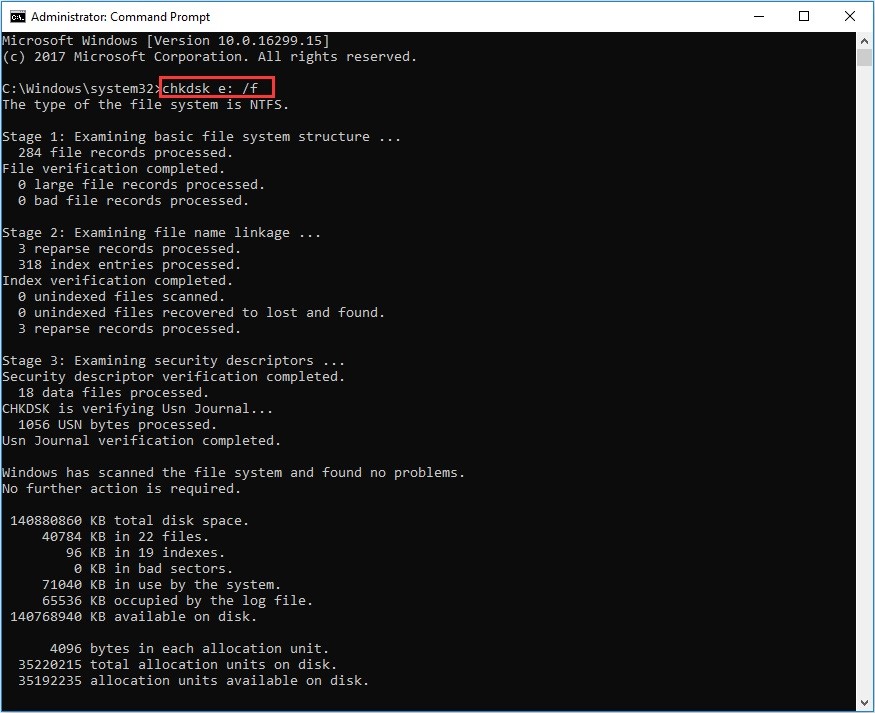
- Run CHKDSK only after recovery. If you only need to repair the card after copying files, open Command Prompt as administrator and use
chkdsk E: /f, replacingE:with the correct drive letter.
- Format in the DJI drone after backup. Once files are safe, format the card in the drone or DJI app to rebuild the expected folder structure.
For deleted-file recovery on Windows, add a separate reference to Microsoft Support: Windows File Recovery. For storage repair, describe CHKDSK as a repair step, not a guaranteed recovery step.
Solution 4. Fix DJI microSD Card Not Detected on Computer
If the computer cannot detect the DJI microSD card, do not format it immediately. Detection issues can come from the card reader, USB port, cable, driver, partition table, or physical damage.
| Check | Action | What It Means |
| Card reader or USB port | Try another reader, another USB port, and another computer. | If the card appears elsewhere, the issue is likely the reader or port. |
| Disk Management | Open Disk Management and check whether the card appears without a drive letter, as RAW, or as unallocated. | If it appears there, recovery software may still scan it. |
| Device Manager | Expand Disk drives, uninstall the removable drive device, disconnect it, restart Windows, and reconnect. | This can refresh a driver issue but does not recover deleted files by itself. |
| Format prompt | Cancel the prompt and scan before formatting. | Formatting before recovery can reduce the chance of restoring files. |
| Physical damage | Stop trying if the card is cracked, overheats, disconnects repeatedly, or is not detected by any reader. | Professional recovery is safer than repeated software scans. |
- Try a direct card reader workflow. Remove the microSD card from the DJI drone and connect it through a quality card reader.
- Open Disk Management. Check whether the card is listed and avoid formatting if Windows asks.
- Refresh the driver. In Device Manager, uninstall the removable drive device, restart, and reconnect the card.
- Scan if detected. If recovery software can see the card, scan it before repair or formatting.
- Escalate if not detected anywhere. If no reader or computer detects the card, treat it as possible physical failure.
What If the Recovered DJI Video Cannot Play?
A DJI video may be recovered but still fail to open if recording stopped during a crash, battery drain, forced shutdown, or card removal. In that case, keep the recovered file unchanged and work on a copy.
| Corruption Symptom | Likely Cause | Best Next Step |
| MP4 file is present but will not play | The video container may not have been finalized. | Reinsert the card into the DJI drone and power it on to see whether the file finalizes, then copy it to a computer. |
| Recovered video has correct size but black screen | Video data may be fragmented, partially overwritten, or missing header information. | Use enhanced video recovery or a video repair tool on a copy. |
| Video plays with stutter or missing frames | The card may have write-speed issues or damaged sectors. | Recover all files, replace the card, and use a DJI-recommended speed class for future recording. |
| Audio or subtitles are missing | Some sidecar files, cache files, or export settings may not have been recovered. | Search for related files by date and base file name, including sidecar metadata files if used by the model. |
| Only thumbnails are recovered | The scan found preview files instead of original media. | Run a deeper scan and filter by larger MP4, MOV, JPEG, or DNG files. |
How to Prevent DJI Drone Crash and File Loss in Future
DJI file loss prevention is mainly about stable flight, reliable microSD storage, safe transfer, and repeated backups. Use the following checklist before and after each important flight.
| Stage | Prevention Checklist | Why It Protects DJI Files |
| Before flight | Charge batteries, inspect propellers, check gimbal, update firmware when appropriate, verify GPS status, and review DJI Fly warnings. | Reduces crash, forced landing, and sudden shutdown risks. |
| Before recording | Use a DJI-recommended microSD card, keep at least 20 percent free space, and format the card in the drone after backup. | Reduces write errors, fragmentation, and recording interruption. |
| During flight | Avoid indoor flight when unsuitable, avoid extreme wind, keep visual line of sight, and monitor low-battery and storage warnings. | Helps prevent crashes and incomplete recordings. |
| After landing | Stop recording before powering off, wait for file writing to finish, and power off the drone before removing the card. | Protects the MP4 or MOV container from corruption. |
| During transfer | Use a reliable card reader, copy instead of move, verify file playback, and eject the card safely. | Prevents transfer loss and card corruption. |
| After backup | Keep three copies of important footage across two storage types, with one cloud or offsite copy. | Backups are more reliable than recovery after overwrite. |
| DJI File Type | Common Meaning | Recovery Filter Tip |
| MP4 | Common DJI video container, including Mavic Mini footage. | Filter by MP4 and sort by file size and recording date. |
| MOV | Common DJI video container on many DJI camera and drone workflows. | Include MOV in video scans, especially for Pro or editing-focused workflows. |
| JPG or JPEG | Standard DJI photo output on Mavic Mini and many other drones. | Filter by image date, resolution, and camera folder such as DCIM. |
| DNG or RAW | Raw photo format supported by selected DJI models, not all drones. | Scan the full card and filter by raw extensions if the model supports raw capture. |
| SRT or subtitle files | Optional telemetry or subtitle sidecar files on supported settings and models. | Recover matching sidecar files by base name and recording date when needed for editing. |
| Thumbnail, cache, or preview files | Small app-generated or system preview files. | Do not mistake them for the original full-resolution footage. |
Conclusion
To recover files from a DJI drone camera, start with the original storage. If the files were deleted from the microSD card, stop using the card and scan it before formatting or repair. If a copy exists in DJI Fly, the phone album, a computer folder, or cloud backup, export that copy before trying deeper recovery.
Use Recoverit Data Recovery for local DJI files on microSD cards, external drives, internal drives, computer folders, and formatted storage. If the recovered DJI video cannot play after a crash or sudden shutdown, keep the recovered file unchanged and repair a copy with video repair software.
After recovery, back up the files to another drive, verify playback, and format the card in the DJI drone before reuse. This workflow helps protect future Mavic Mini, Mavic Air, Mavic 2 Pro, Inspire, and other DJI drone footage.
People Also Ask
-
Can I recover deleted videos from a DJI drone microSD card?
Yes, recovery is often possible if the deleted video data has not been overwritten. Stop recording immediately, remove the microSD card, connect it to a computer with a card reader, scan it with recovery software, and save recovered files to another drive. -
Does DJI Mavic Mini have internal storage?
No. DJI support states that Mavic Mini requires a microSD card to store images and footage. This means Mavic Mini file recovery should usually begin with the microSD card, not the drone body. -
Can DJI Fly recover original deleted videos?
DJI Fly may contain cached, downloaded, edited, or shared copies, but it should not be treated as a guaranteed source of original full-resolution videos. Check DJI Fly album and the phone album as fallback locations, then scan the microSD card for original files. -
Should I run CHKDSK on a corrupted DJI SD card?
Run recovery first if the footage is important. CHKDSK can repair file system errors, but it can also change file records. Use it after recovering or imaging the card, especially when the card asks to format or contains critical DJI videos. -
Can Recoverit recover DJI drone videos?
Yes. Recoverit can scan local storage such as DJI microSD cards, camera cards, computer import folders, external drives, and formatted media. Use Enhanced Video Recovery for large or fragmented drone videos when needed, and recover files to a different drive. -
Why is my recovered DJI MP4 video not playing?
The MP4 may be incomplete or unfinalized because recording stopped during a crash, low battery, forced shutdown, or card removal. Recover the original file first, keep an untouched copy, and then repair a duplicate with video repair software. -
What file formats should I scan for DJI drone recovery?
Scan for MP4 and MOV videos first, then JPG, JPEG, and DNG photos depending on the DJI model. For Mavic Mini, DJI support lists JPEG photo format and MP4 video format using H.264 or MPEG-4 AVC.
Fix Media File Issues
- Recover & Repair Photos
- Recover deleted photos.
- Recover photo booth.
- How to repair JPEG images?
- What is JPG File?
- What is GIF File?
- Guide for PNG File
- Recover Videos
- Best video recovery software for Windows
- Best video recovery software for Mac
- Recover DVR recordings
- Recover CCTV footage
- Recover deleted Vivint videos
- Recover deleted MKV files
- Recover deleted Youtube videos
- Recover deleted CapCut videos
- Recover After Effects Project
- Recover Premiere Pro Project
- Recover iMovie Project
- Recover videos from GoPro
- Repair Videos
- Fix error code 0xc00d36c4.
- Repair corrupted MP4 video.
- Fix 0xc10100be video error.
- Solve blurry videos.
- Fix MOV can't play on QuickTime.
- Free video repair software.
- Fix frozen video files.
- Recover & Repair Audio
- Moov Atom Not Found ?
- Repair your MP4 file online.
- Can't play recorded video?
- AVI/MP4/MKV cannot render?
- Fix 0xc00d5212 error of AVI.
- Recover & Repair Cameras


Eleanor Reed
staff Editor