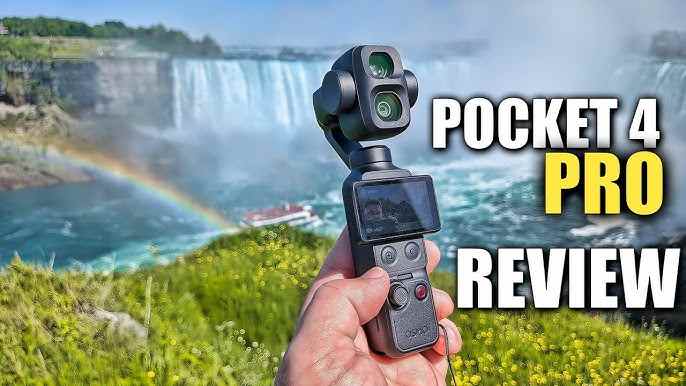
 TL;DR:
The DJI Osmo Pocket 4P is a worthwhile upgrade for solo travel creators who edit their footage, as its dual-camera system provides both a 20mm wide-angle and a 60mm med-tele lens for immediate shot variety without requiring a lens swap.
● Choose the Osmo Pocket 4P for stabilized, 10-bit D-Log 2 handheld travel scenes and portraits, but rely on a GoPro-style camera for rugged, waterproof action sports, or the standard Osmo Pocket 4 if you only require a single wide-angle perspective.
● The mechanical 3-axis gimbal and exposed dual lenses demand careful physical protection during transit, and video editors must monitor potential exposure or color shifts when switching between the 1-inch and 1/1.28-inch sensors.
● If 4K or slow-motion video files disappear, immediately stop recording to prevent data overwriting, leave the microSD card unformatted, and scan the readable card with recovery software to extract the footage to an entirely separate storage drive.
Ask AI for a summary
 ChatGPT
 Perplexity
 Gemini
 Claude
 Grok
Grok
DJI Osmo Pocket 4P: The Quick Verdict
Is the DJI Osmo Pocket 4P worth buying? Yes, if you want a pocket-sized creator camera that can move beyond one wide vlogging angle. Its 20mm wide-angle camera is built for travel, walk-and-talk clips, rooms, streets, and landscapes, while the new 60mm med-tele camera is the real upgrade for portraits, food, product details, street scenes, and cinematic B-roll.
- Overall editorial rating: 4.3/5 for travel creators and solo video makers.
- Best for: travel vlogs, lifestyle content, product shots, creator videos, compact B-roll, and social-first filming.
- Not ideal for: underwater filming, helmet-mounted POV, rough action sports, or buyers who need official local availability and warranty in every region.
The DJI Osmo Pocket 4P changes the usual pocket gimbal camera question. Older Pocket models were already strong for smooth handheld video, but they mostly asked creators to accept one wide field of view. The 4P adds a second camera, so the more useful question is not only whether it is better than a phone or GoPro, but whether a 20mm plus 60mm pocket gimbal can replace part of a small travel camera kit.
This updated DJI Osmo Pocket 4P review looks at official specs, current availability signals, early independent review findings, travel use cases, creator workflow, storage risks, and what to do if DJI footage disappears from a microSD card or internal storage backup. It does not invent lab benchmarks. Where DJI claims are mode-dependent, this review treats them as official specifications rather than guaranteed performance in every setting.

Important buyer note: DJI availability, price, bundles, service coverage, and warranty support vary by country or region. If you are buying in the United States or importing from another market, check official DJI Store availability and local support terms before relying on third-party listings.
Try Wondershare Recoverit to Perform Data Recovery
 Security Verified. Over 7,302,189 people have downloaded it.
In this article
Part 1. DJI Osmo Pocket 4P Review Verdict
The Osmo Pocket 4P is best understood as a dual-focal-length travel camera with a built-in gimbal. Its value is not just that it is small. Its value is that it gives creators a wide scene-setting camera and a tighter portrait/detail camera in one handheld device.
That makes it more useful than a one-angle pocket camera for travel stories. You can film a street, then switch to a compressed detail shot of a sign, plate, product, performer, or face without mounting another lens or pulling out a larger camera. For creators who edit their footage and care about visual rhythm, this matters more than a simple spec bump.
Review Scorecard
| Review Area | Rating | 2026 Review Notes |
| Travel creator value | 4.6/5 | The 20mm and 60mm pairing gives travel footage more variety than a single wide camera. |
| Image quality potential | 4.5/5 | Official specs list a new 1-inch wide camera, 17-stop dynamic range in supported modes, and 10-bit D-Log 2. |
| Stabilization | 4.6/5 | DJI's 3-axis mechanical gimbal remains a major advantage for walking, panning, and handheld B-roll. |
| Ease of use | 4.2/5 | Strong for automatic shooting, but D-Log 2, high frame rates, and lens switching reward users who understand editing. |
| Durability | 3.4/5 | More delicate than an action camera. The gimbal and exposed lenses need careful travel handling. |
| Value for casual buyers | 3.7/5 | Excellent if you use both lenses; harder to justify if you only shoot basic selfies and do not edit. |
| Availability confidence | 3.2/5 | Regional price, stock, import risk, and warranty support must be checked before purchase. |
How We Evaluated It
This review is based on the original Recoverit draft, DJI's official product and support information, DJI's launch announcement, current DJI Store comparison data, and current independent review coverage from sources such as TechRadar and The Verge. The review focuses on buyer decisions rather than repeating the launch sheet: what the second lens changes, what the 4P does better than GoPro-style cameras, where the tradeoffs are, and how creators should protect high-value footage.
| Evaluation Question | Why It Matters | Finding |
| Does the second lens solve a real creator problem? | Many pocket cameras look repetitive because every clip uses the same wide angle. | Yes. The 60mm camera adds portraits, product details, compressed street scenes, and cleaner B-roll. |
| Is it a GoPro replacement? | Many buyers compare pocket gimbals with action cameras. | Only for smoother handheld creator footage. It is not the better choice for rough waterproof action. |
| Does it suit beginners? | High-end profiles and frame rates can complicate editing. | Yes in Normal mode, but D-Log 2 and slow motion are more useful for editors. |
| Is storage planning important? | 4K, slow motion, and travel shooting can create large, valuable files quickly. | Yes. Backup and recovery planning should be part of the workflow. |
Part 2. DJI Osmo Pocket 4P Specs at a Glance
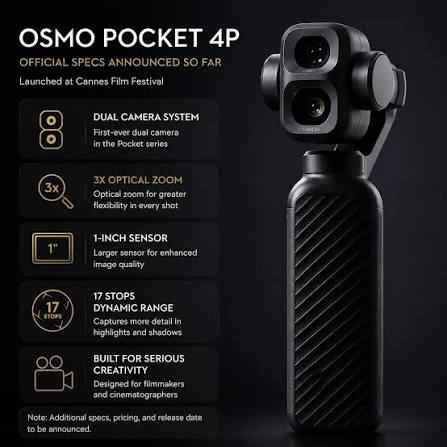
The headline specs are strong, but the details matter. The wide camera and med-tele camera do not do exactly the same job, and some high-end claims apply only in certain modes. Treat the 4P as a flexible creator camera rather than a magic cinema camera.
| Feature | DJI Osmo Pocket 4P | Review Interpretation |
| Camera type | Dual-lens pocket gimbal camera | More versatile than a single-lens Pocket model for edited travel stories. |
| Wide camera | 20mm equivalent, f/2.0, new 1-inch CMOS | Best for handheld vlogging, landscapes, interiors, markets, streets, and group clips. |
| Med-tele camera | 60mm equivalent, f/1.8, new 1/1.28-inch CMOS | Best for portraits, products, food, signs, details, and compressed background shots. |
| Dynamic range | Up to 17 stops in supported modes | Useful for sunset, city lights, backlit scenes, and high-contrast travel shots, but mode-dependent. |
| Color profile | 10-bit D-Log 2 in supported modes | Strong for color grading; Normal mode remains easier for quick social posts. |
| Max video specification | Wide: 4K/240fps; med-tele: 4K/200fps | High-frame-rate B-roll is a major creator feature, but storage and editing load increase. |
| Stabilization | 3-axis mechanical gimbal | Still the main advantage over phone-only handheld shooting. |
| Tracking | ActiveTrack 8.0, tracking at up to 12x zoom according to DJI Store comparison data | Helpful for solo creators, but always verify framing when subjects move quickly. |
| Screen | 2-inch OLED | Good for compact framing; still smaller than a phone monitor or mirrorless screen. |
| Built-in storage | 103GB listed in DJI Store comparison data | Useful as a buffer, but creators should still offload and back up daily. |
| Operating time | Up to 210 minutes in DJI-controlled conditions | Real runtime depends on settings, temperature, screen use, wireless transfer, and accessories. |
| Regional price signal | DJI Store Singapore listed the Standard Combo at USD $609 at the time checked | Prices and stock differ by market; check your local DJI Store before purchase. |
Part 3. Design, Handling, and Travel Durability
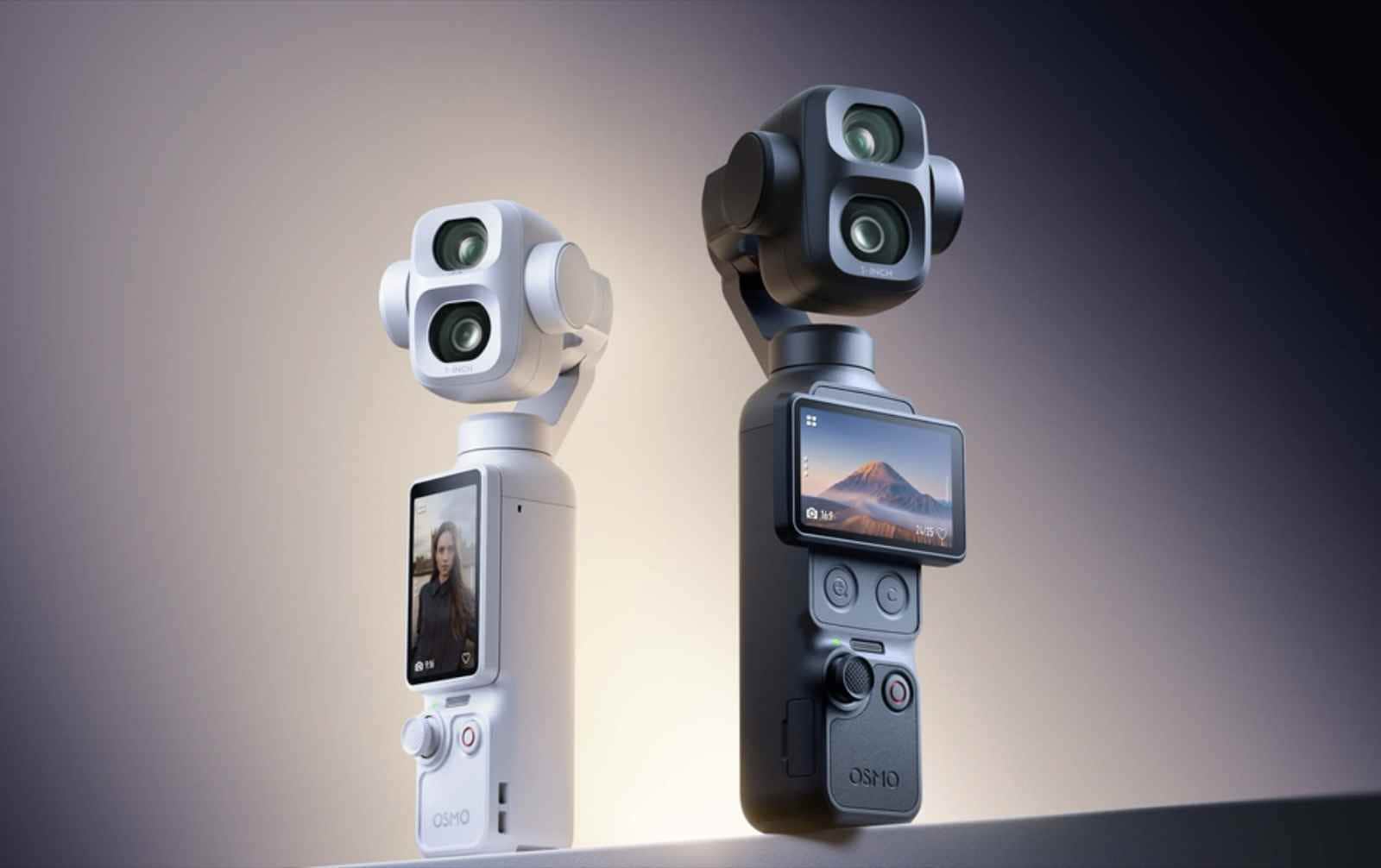
The Osmo Pocket line has always been about the same promise: turn on the camera, hold it in one hand, and get smoother footage than a phone held at arm's length. The 4P keeps that identity, but the dual-camera module makes it feel more serious and more delicate at the same time.
For travel, this is both good and bad. The good part is obvious: a small camera is easier to carry through airports, city walks, restaurants, museums, and short trips where a mirrorless kit feels intrusive. The bad part is that a pocket gimbal has moving parts. It should not be treated like a waterproof action camera or tossed loose in a backpack with keys, chargers, and loose adapters.
| Travel Handling Point | What It Means | Practical Advice |
| Dual-camera head | More optical flexibility, more exposed glass. | Use the case, clean lenses gently, and avoid pocketing it without protection. |
| Mechanical gimbal | Smoother motion than electronic-only stabilization. | Lock or protect the gimbal during transport and avoid forcing the arm by hand. |
| Small body | Great for everyday carry and low-profile filming. | Add a handle or mini tripod for longer walking clips. |
| Battery and heat | 4K, slow motion, and wireless transfer can increase power draw. | Carry power, avoid filming long takes in direct heat, and let the camera cool if needed. |
| Not action-rugged | It is not built like a waterproof GoPro-style camera. | Use an action camera for surfing, rain-heavy rides, helmet POV, or impact-prone sports. |
Part 4. Dual-Camera Experience: Why 20mm and 60mm Matter
The biggest reason to choose the DJI Osmo Pocket 4P over a normal pocket gimbal is the lens pairing. A single wide camera is useful, but too much wide-angle footage can make a travel video feel flat. The 4P gives you two distinct perspectives without changing devices.
| Lens | Use It For | Avoid Relying on It For |
| 20mm wide camera | Selfie vlogs, city walks, room tours, markets, architecture, landscapes, and establishing shots. | Flattering close-up portraits, product compression, or distant subjects. |
| 60mm med-tele camera | Portraits, food close-ups, product details, signage, stage details, street compression, and B-roll inserts. | Very tight indoor spaces, group selfies, or fast walk-and-talk framing. |
Why it matters in editing: good creator videos usually mix wide, medium, and detail shots. The 20mm lens tells viewers where you are. The 60mm lens tells them what to look at. If you shoot only wide clips, your timeline may feel repetitive. If you shoot only tight clips, viewers lose location context. The 4P's real advantage is letting one tiny camera cover both jobs.
- Travel vlog sequence: 20mm for the street, 60mm for the cafe sign, 60mm for the drink, 20mm for the walk-in shot.
- Product review sequence: 20mm for the talking head, 60mm for buttons, ports, texture, packaging, and hands-on details.
- Food video sequence: 20mm for the table scene, 60mm for plating, steam, sauce, texture, and reaction shots.
- Street video sequence: 20mm for movement and place, 60mm for people, lights, signs, and background compression.
The tradeoff is lens matching. Early independent reviews have noted that switching focal lengths can introduce slight framing, exposure, or color differences depending on the scene. That is not unusual for multi-camera systems, but creators who color grade should check clips carefully before committing to a final look.
Part 5. Video Quality, Stabilization, and Creator Workflow
The DJI Osmo Pocket 4P is built for creators who want polished footage without carrying a full camera rig. Its best features are not isolated specs; they work together. A larger sensor helps quality, D-Log 2 helps grading, the gimbal helps movement, and the second lens helps shot variety.
Image Quality and D-Log 2
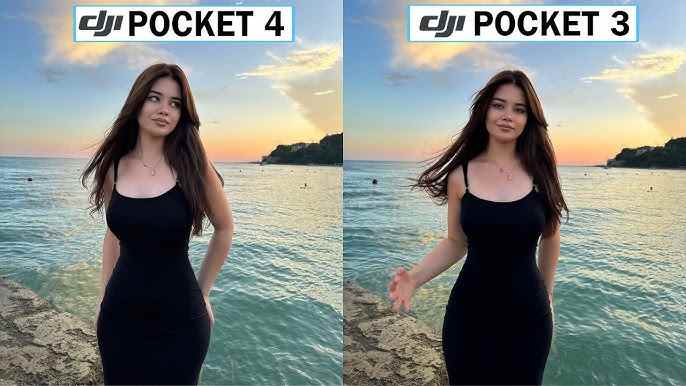
DJI promotes the 4P's new wide-angle 1-inch CMOS sensor, LOFIC-enabled 17-stop dynamic range in supported modes, and 10-bit D-Log 2. In plain English, this means the camera is designed to hold more highlight and shadow information in difficult light. That matters for real travel conditions: bright skies over dark streets, sunsets, backlit portraits, hotel interiors, night markets, and mixed indoor lighting.
For beginners, Normal color is still the easier option. It produces a more finished look straight out of camera and is better for quick posts. D-Log 2 is better if you edit in tools such as DaVinci Resolve, Premiere Pro, Final Cut Pro, or CapCut desktop and want more control over contrast, saturation, and highlight rolloff.
| Shooting Mode | Best For | Workflow Note |
| Normal color | Fast social posts, casual travel, family clips, beginner workflows. | Less grading flexibility, but faster turnaround. |
| D-Log 2 | Color-graded travel films, commercial content, high-contrast scenes. | Needs exposure discipline and post-production grading. |
| High-frame-rate 4K | B-roll, action details, motion emphasis, product reveals. | Creates larger files and may reduce available shooting time. |
| Vertical video | TikTok, Instagram Reels, YouTube Shorts, social-first edits. | Plan framing before shooting; do not assume horizontal footage can always be cropped cleanly. |
Stabilization and Tracking
The 3-axis mechanical gimbal remains the Osmo Pocket series' biggest practical advantage. Smartphone stabilization has improved, but a tiny mechanical gimbal still gives walking footage, pans, reveals, and handheld movement a smoother, less digitally processed look.
ActiveTrack 8.0 is especially useful for solo creators. If you film yourself walking through a city, presenting a product, or moving around a room, reliable tracking reduces the number of unusable takes. The 4P's med-tele lens also makes tracking more ambitious because tighter focal lengths show framing errors more clearly. Use it, but do not stop checking the screen.
Slow Motion, Vertical Video, and Audio
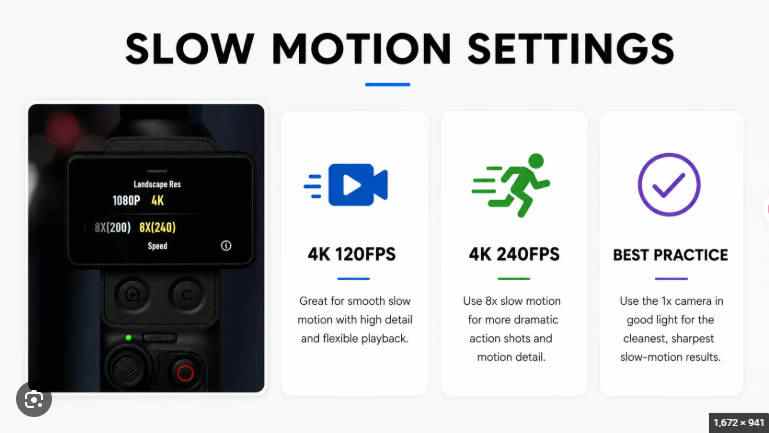
The 4P's 4K high-frame-rate recording is valuable for creator B-roll. Slow motion can make ordinary travel footage feel more intentional: waves, fabric, traffic lights, hands preparing food, pouring coffee, moving hair, sports details, or product rotations.
Audio is still a workflow decision. Built-in microphones can be fine for ambient travel sound, but serious talking-head clips usually benefit from an external wireless mic. If you buy a bundle, compare the included microphone, remote, tripod, handle, filters, and storage accessories against what you already own. A cheaper standard kit plus the right mic may be better than the largest combo for some creators.
Part 6. DJI Osmo Pocket 4P vs GoPro and Osmo Pocket 4
The Osmo Pocket 4P, GoPro-style action cameras, and Osmo Pocket 4 overlap, but they are not built for the same job. Choose based on the footage you actually shoot, not the biggest spec number.
| Camera Choice | Choose It If You Need | Skip It If You Need |
| DJI Osmo Pocket 4P | Dual-lens creator footage, smoother handheld movement, portraits, product details, travel B-roll, and D-Log 2 workflow. | Waterproof ruggedness, helmet POV, surf, heavy rain, or impact-heavy sports. |
| DJI Osmo Pocket 4 | A simpler one-lens pocket gimbal with strong 4K footage, longer listed operating time, and lower cost. | You want the 60mm med-tele look without cropping. |
| DJI Osmo Pocket 3 | A cheaper older model for compact stabilized video and basic creator needs. | You want newer tracking, higher slow motion specs, built-in storage, or the 4P's second lens. |
| GoPro-style action camera | Waterproof action, helmet/chest mounting, cycling, skiing, surfing, diving, and wide POV footage. | You want gimbal-like pans, portrait compression, product shots, or less action-camera distortion. |
| Smartphone | Convenience, instant sharing, apps, maps, calls, and quick social capture. | You want a dedicated gimbal, optical dual-focal workflow, longer uninterrupted camera use, or separate creator storage. |
Best two-camera travel setup: many creators will still pair the Osmo Pocket 4P with an action camera. Use the 4P for city walks, food, hotels, talking clips, product shots, and B-roll. Use a GoPro-style camera for wet, mounted, rough, or POV scenes. That division gives you better footage and reduces the chance of damaging the wrong device.
Comprehensive comparison: DJI Osmo Pocket 4P vs Osmo Pocket 4: Which Is Better for Travel Vlogging?
Part 7. Storage and Data Safety for DJI 4K Creators
Better cameras create bigger files. That is the quiet cost of shooting high-quality 4K, slow motion, and 10-bit footage. The Osmo Pocket 4P's built-in storage is useful, but travel creators should still treat every shoot as fragile until it is backed up in at least two places.
- Accidental deletion: clips are deleted in-camera or during file cleanup.
- Wrong format: a microSD card is formatted before all footage is copied.
- Interrupted transfer: USB cable, card reader, laptop sleep, or low battery interrupts copying.
- Card corruption: the card asks to format, shows wrong capacity, or becomes unreadable.
- Fragmented high-bitrate video: recovered MP4 or MOV files may be incomplete if large clips were fragmented.
- Travel handling damage: heat, moisture, dust, pressure, and cheap card readers can cause errors.
| Before You Shoot | During Travel | After Backup |
| Use reliable, fast cards that match DJI's current compatibility guidance. | Rotate cards instead of filling one card for the entire trip. | Verify copied clips open before formatting the card. |
| Format cards in the camera or with the official SD Association tool when appropriate. | Do not delete in-camera unless you are certain backups exist. | Keep one local copy and one cloud or external-drive copy. |
| Label cards and cases by day or project. | Keep used cards separate from empty cards. | Only reuse cards after the footage is confirmed safe. |
Before formatting a card for reuse, the SD Association provides official SD Memory Card Formatter downloads. Do not format a card if you still need to recover missing DJI footage from it.
Part 8. How to Recover Lost DJI Osmo Pocket 4P Videos
If Osmo Pocket 4P videos disappear, stop using the affected storage first. Do not record new clips, format the card, run disk repair, or save recovered files back to the same card. Recovery depends on whether the deleted or lost data has not been overwritten and whether the card or drive is still readable.
For DJI Osmo cases, Recoverit has a dedicated guide on how to restore videos from a DJI Osmo camera. For broader camera footage loss, Wondershare Recoverit Video Recovery can help scan readable storage devices such as microSD cards, SD cards, external drives, computers, and camera storage backups for lost video files.
- Stop shooting and remove the card. If the missing footage was on a microSD card, stop using the Osmo Pocket 4P and remove the card to reduce overwrite risk.
- Check simple locations first. Look for copied files on your laptop, external drive, cloud backup, editing project folder, or trash folder if deletion happened on a computer.
- Connect the card with a reliable reader. Avoid unstable hubs. If the card disconnects repeatedly, stop and consider professional help for important footage.
- Scan the readable card or backup drive. Open Recoverit, select the card or drive, and scan for lost DJI videos and photos. Use filters for formats such as MP4, MOV, JPG, JPEG, and DNG when available.
- Preview and recover to another drive. Save recovered footage to a different healthy drive, never back to the same microSD card.
- Test recovered clips before reuse. Play the files, check duration and audio, and confirm they import into your editor before formatting the card.
| Problem | What It Usually Means | Safe Next Step |
| Card asks to format | File system may be corrupted. | Cancel the prompt and scan before formatting or repair. |
| Deleted clips are missing | Directory entries may be removed while data still exists. | Stop recording and run recovery before reuse. |
| Recovered video will not play | The file may be fragmented, incomplete, or corrupted. | Recover to another drive first, then use a repair workflow on a copy. |
| Card is not detected | Reader, port, card controller, or physical damage may be involved. | Try another reader once; stop repeated attempts if the card is unstable. |
| New clips were recorded after deletion | Old sectors may have been overwritten. | Scan quickly, but do not expect overwritten data to return. |
For creators comparing ecosystems, Recoverit also provides current guides for recovering deleted GoPro videos and recovering lost videos from an SD card.
Try Wondershare Recoverit to Perform Data Recovery
Security Verified. Over 7,302,189 people have downloaded it.
Part 9. Pros, Cons, and Buying Advice
The DJI Osmo Pocket 4P is easy to like, but it is not for everyone. The second lens is valuable only if you actually use it. If you mostly film quick selfies in auto mode, the added cost and complexity may be unnecessary.
| Pros | Cons |
| Dual-camera system adds real shot variety. | Less rugged than a waterproof action camera. |
| 20mm lens is practical for travel vlogs and interiors. | Gimbal and lens module need careful protection. |
| 60mm lens improves portraits, food, products, and detail shots. | Lens switching may need extra attention in editing. |
| 1-inch wide camera and D-Log 2 make it attractive for creators who grade footage. | D-Log 2 workflow is not ideal for users who never edit. |
| 3-axis mechanical gimbal produces smooth handheld movement. | Regional availability, warranty, and bundle pricing can vary. |
| 103GB built-in storage is useful as a backup or overflow option. | High-quality 4K and slow motion still require disciplined backup habits. |
| Buyer Type | Recommendation | Reason |
| Travel vlogger | Buy or strongly consider. | The 20mm plus 60mm combination fits real travel storytelling. |
| Product reviewer | Strong fit. | The 60mm camera makes close details look more intentional. |
| Beginner who never edits | Consider Osmo Pocket 4 or a phone first. | The 4P's best features are more valuable when you edit and grade. |
| GoPro/action user | Use as a companion, not a replacement. | The 4P is smoother and more cinematic; GoPro-style cameras are tougher. |
| U.S. buyer | Verify official availability and support first. | Import listings may create warranty, service, or return complications. |
| Pocket 3 owner | Upgrade only if the second lens and newer workflow matter. | The 4P is not just a resolution upgrade; the focal-length change is the key reason. |
Part 10. Final Verdict
The DJI Osmo Pocket 4P is worth it for creators who understand why a second lens matters. The 20mm camera gives you the familiar wide travel view. The 60mm med-tele camera gives you portraits, products, food, signs, compressed backgrounds, and stronger B-roll without changing devices. That makes the 4P feel less like a small gadget and more like a tiny travel video system.
It is not the best camera for every situation. A GoPro-style action camera is still better for waterproof, mounted, high-impact, and extreme sports footage. A smartphone is still faster for instant sharing. A larger mirrorless camera still wins when you need interchangeable lenses, larger sensors, and advanced manual control. The Osmo Pocket 4P wins when you want smooth, discreet, edited creator footage from something that fits in a small bag.
For Recoverit readers, the most practical takeaway is simple: high-quality footage is expensive to lose. If DJI videos disappear, stop using the card, avoid formatting, recover to another drive, and build a backup workflow before the next trip.
FAQ
-
Is the DJI Osmo Pocket 4P good for travel vlogging?
Yes. Its 20mm wide camera, 3-axis gimbal, compact body, vertical shooting support, tracking features, and 60mm med-tele camera make it a strong travel vlogging camera, especially for creators who edit their footage. -
Is the Osmo Pocket 4P better than a GoPro?
It depends on the shooting style. The Osmo Pocket 4P is better for smooth handheld creator footage, portraits, products, and travel B-roll. A GoPro-style camera is better for waterproof action, helmet mounts, rough sports, and wide POV footage. -
What is the main difference between Osmo Pocket 4P and Osmo Pocket 4?
The key difference is the 4P's second camera. DJI Store comparison data lists Osmo Pocket 4P with a 20mm wide-angle camera and a 60mm f/1.8 med-tele camera, while Osmo Pocket 4 uses a single 20mm camera. -
Does DJI Osmo Pocket 4P support D-Log 2?
Yes. DJI promotes 10-bit D-Log 2 for Osmo Pocket 4P in supported modes. Use it when you plan to color grade; use Normal color when you need faster, simpler sharing. -
Can Osmo Pocket 4P shoot 4K slow motion?
Yes. DJI lists up to 4K/240fps on the wide-angle camera and up to 4K/200fps on the med-tele camera in its Store comparison data. Availability depends on the selected mode and settings. -
What should I do if DJI Osmo Pocket 4P videos are deleted from a microSD card?
Stop using the card immediately, do not format it, connect it to a computer with a reliable card reader, scan the readable card with recovery software, and save recovered videos to another drive. Recovery depends on whether the data has not been overwritten. -
Can Recoverit recover overwritten DJI videos?
No. Recoverit can help recover lost files from readable storage when recoverable data still exists, but no software can restore DJI footage after the same storage sectors have been overwritten by new recordings.



