 TL;DR:
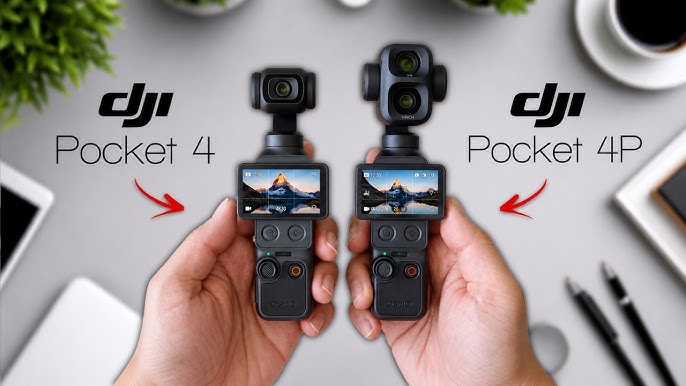
Choose the DJI Osmo Pocket 4 for simple, single-lens travel vlogging with a longer listed runtime, or select the DJI Osmo Pocket 4P if your editing workflow requires a dedicated 60mm med-tele camera alongside the standard 20mm wide lens.
● The Osmo Pocket 4 is best for casual solo creators needing 107GB of available built-in storage and up to 240 minutes of operating time, while the 4P is built for cinematic edits requiring 103GB of storage, up to 17 stops of dynamic range in D-Log 2, and compressed B-roll.
● As of August 5, 2026, the Osmo Pocket 4P lacks a formal U.S. launch or authorized U.S. stock, requiring buyers in the United States to independently verify local warranty and repair support before purchasing an imported unit.
● If video files disappear from either camera's internal storage or a supported 1TB microSD card, users must stop recording immediately to prevent permanent data overwrite and recover the files to a separate drive before formatting.
Ask AI for a summary
 ChatGPT
 Perplexity
 Gemini
 Claude
 Grok
Grok
DJI Osmo Pocket 4P vs Osmo Pocket 4: Quick Verdict
Choose DJI Osmo Pocket 4 if you want the easier travel vlogging camera. It gives you a 20mm f/2.0 wide lens, 3-axis mechanical stabilization, a 2-inch OLED touchscreen, 107GB available built-in storage, microSD expansion, and up to 240 minutes of listed operating time under DJI test conditions. For most daily creators, it is the cleaner and more practical buy.
Choose DJI Osmo Pocket 4P if your footage needs more than one perspective. The 4P adds a dedicated 60mm f/1.8 med-tele camera alongside the 20mm wide camera, plus a higher dynamic range claim and D-Log 2 in supported modes. It is better for portraits, food, products, interviews, cafe scenes, compressed street details, and edited travel B-roll.
- Best default choice: DJI Osmo Pocket 4 for most travel vloggers and casual solo creators.
- Best creative choice: DJI Osmo Pocket 4P for creators who edit and want wide plus portrait-style framing.
- Best recovery takeaway: both cameras can store valuable clips on built-in storage and microSD cards, so users should back up before formatting and stop recording immediately after deletion or card errors.
The DJI Osmo Pocket 4P vs Osmo Pocket 4 question is not just about which model has the bigger spec sheet. Both are pocket gimbal cameras for travel vloggers, solo creators, daily shooters, and people who want stabilized video without a mirrorless camera and gimbal. The real decision is whether the 4P's second lens changes the kind of footage you make.
This comparison looks at official DJI specifications, real travel use, lens behavior, stabilization, battery, storage, transfer workflow, regional availability, and footage recovery risk. It also explains when Recoverit fits naturally: not as a camera repair tool, but as a data recovery option when DJI videos or photos disappear from readable storage such as microSD cards, external drives, computer backups, or accessible camera storage exports.

Availability note for U.S. readers: current buying coverage from Digital Camera World describes Osmo Pocket 4P as officially available in the UK and parts of Europe while noting no formal U.S. launch or authorized U.S. stock at the time checked. If you are in the United States, confirm official support and warranty before buying an imported 4P listing.
Recover Lost DJI Osmo Videos with Wondershare Recoverit
 Security Verified. Over 7,302,189 people have downloaded it.
In this article
Part 1. DJI Osmo Pocket 4P vs Osmo Pocket 4: Decision Summary
The simplest answer: Osmo Pocket 4 is the better everyday travel vlogging camera; Osmo Pocket 4P is the better creative pocket camera. The difference is not stabilization because both use DJI's pocket gimbal concept. The difference is visual language. Pocket 4 gives you the clean wide-angle vlogging workflow. Pocket 4P gives you wide scenes plus tighter 60mm shots for a more edited, cinematic timeline.
If you usually film yourself walking through a city, talking to camera, recording a hotel room, or capturing family travel clips, the Pocket 4 is enough. If you also want portraits, food close-ups, product details, compressed backgrounds, cafe shots, and more polished B-roll without switching devices, the 4P has a real purpose.
The recovery angle matters for both. These cameras are designed to make recording easier, so users may store more clips before offloading. Built-in storage and large microSD cards are convenient, but they also concentrate more valuable footage in fewer places. If a card is formatted, a transfer is interrupted, or the camera storage is cleared too early, the urgency to recover can be higher than with older low-capacity workflows.
Who Should Buy Each Model?
| Buyer Type | Better Choice | Reason |
| Casual travel vlogger | Osmo Pocket 4 | It is simpler, wide enough for self-recording, and has slightly more available built-in storage. |
| Solo YouTube creator | Depends on editing style | Choose Pocket 4 for quick talking clips; choose 4P if you build sequences with portraits, products, food, and B-roll. |
| Food, cafe, and lifestyle creator | Osmo Pocket 4P | The 60mm med-tele lens makes details and subjects look more intentional than a wide-only view. |
| Family traveler | Osmo Pocket 4 | Lower complexity and longer listed runtime matter more than cinematic lens switching. |
| Product reviewer | Osmo Pocket 4P | The 60mm lens helps avoid the distorted close-up look of wide-angle product footage. |
| Beginner who does not color grade | Osmo Pocket 4 | D-Log 2 and a second lens are less valuable if you mostly post straight out of camera. |
| Creator who edits and grades | Osmo Pocket 4P | The higher dynamic range claim, D-Log 2, and lens variety give more room in post. |
| U.S. buyer who wants official warranty clarity | Osmo Pocket 4 | 4P availability is more region-sensitive, so local support needs extra checking. |
How We Compared Them
This comparison uses official DJI specification and support information, DJI Store comparison data, current independent review coverage from sources such as The Verge and TechRadar, and Recoverit search intent around DJI footage loss, SD card video recovery, and camera recovery. We separate official claims from practical interpretation, because a VS article should help readers choose, not just list specs.
| Comparison Lens | Why It Matters | Main Finding |
| Lens system | This is the biggest difference between the two models. | 4P wins for visual variety; Pocket 4 wins for simplicity. |
| Travel workflow | Creators often shoot alone and move quickly. | Pocket 4 is faster for basic vlogging; 4P rewards planning. |
| Storage behavior | Built-in storage changes how often users offload and back up. | Both models need backup discipline despite large internal storage. |
| Recovery risk | Deleted or corrupted footage is a common high-intent problem. | Both models are relevant to camera and SD card recovery topics. |
| Availability | Some buyers may face regional support differences. | U.S. readers should be more cautious with 4P imports. |
Part 2. Specs Comparison Table
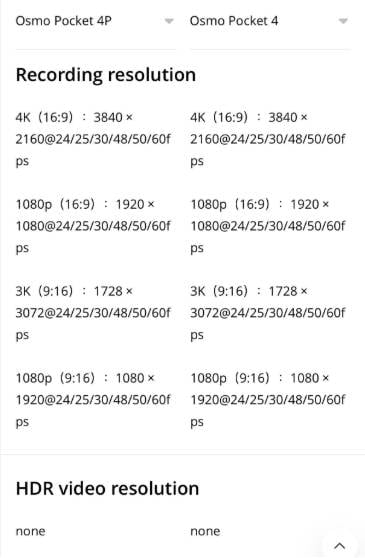
The table below shows the specs that matter most to creators. Some values are official DJI listing data, while real-world runtime, heat, transfer speed, and file sizes depend on settings, temperature, accessories, cable quality, card quality, and screen or wireless use.
| Feature | DJI Osmo Pocket 4P | DJI Osmo Pocket 4 |
| Camera type | Dual-lens pocket gimbal camera | Single-lens pocket gimbal camera |
| Main lens | 20mm wide-angle, f/2.0 | 20mm wide-angle, f/2.0 |
| Second lens | 60mm med-tele, f/1.8 | No dedicated second lens |
| Sensor setup | Wide: new 1-inch CMOS; med-tele: 1/1.28-inch CMOS | 1-inch CMOS |
| Dynamic range claim | Up to 17 stops in supported D-Log 2 mode | Up to 14 stops in supported modes |
| Color profile | 10-bit D-Log 2 in supported mode, with limitations by zoom mode | 10-bit D-Log |
| Max video specification | Wide: up to 4K/240fps; med-tele: up to 4K/200fps | Up to 4K/240fps |
| Stabilization | 3-axis mechanical stabilization | 3-axis mechanical stabilization |
| Touchscreen | 2-inch OLED touchscreen | 2-inch OLED touchscreen |
| Tracking | ActiveTrack support up to higher zoom levels in DJI Store comparison data | ActiveTrack support up to lower zoom levels in DJI Store comparison data |
| Built-in storage | 103GB available | 107GB available |
| microSD expansion | Supported; DJI guidance includes 1TB recommended models | Supported; DJI guidance includes 1TB recommended models |
| Internal storage export | DJI guide lists wired export up to 800 MB/s under supported conditions | DJI guide lists internal storage export workflow and DJI Store lists 800 MB/s transfer |
| Wireless export | DJI guide lists Wi-Fi export up to 90 MB/s under supported conditions | Supports wireless export workflow through DJI app ecosystem |
| Listed operating time | Up to 210 minutes under DJI test conditions | Up to 240 minutes under DJI test conditions |
| Best for | Cinematic travel edits, portraits, food, products, interviews, street details, and B-roll | Daily vlogs, walking travel clips, family footage, fast operation, and simpler solo shooting |
The short spec interpretation: Pocket 4P wins on lens flexibility and creative ceiling. Pocket 4 wins on workflow simplicity, available storage capacity by a small margin, and listed runtime. For many buyers, the best choice depends less on specs and more on whether they will actually use the 60mm lens.
Part 3. Lens Difference: One Great Vlogging Lens vs Two Storytelling Lenses
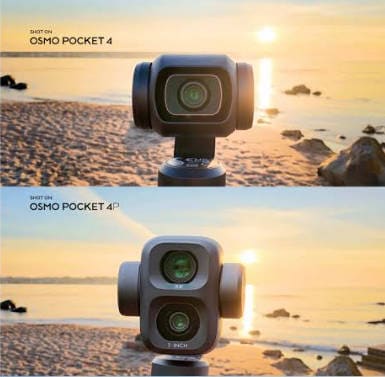
The lens system is the real comparison. Everything else is secondary. Both cameras are pocket gimbals. Both stabilize movement. Both are small. The 4P matters because it changes the shape of your footage.
The Osmo Pocket 4 uses a 20mm wide-angle lens. That is the right focal length for travel vlogging because it captures you, your movement, and enough background context. It works for walking clips, room tours, landscapes, city streets, group shots, and handheld self-recording.
The Osmo Pocket 4P keeps that wide-angle view and adds a 60mm f/1.8 med-tele camera. That second lens is not just "more zoom." DJI's Store information describes it as a dedicated optical lens with its own sensor, not a digital crop of the wide-angle shot. That matters for portraits, food, products, signs, street compression, and more professional-looking B-roll.
Where Osmo Pocket 4 Is Better
Osmo Pocket 4 is better when speed is more important than shot variety. A travel vlogger does not always want to decide between focal lengths. Sometimes the right camera is the one that powers on, frames the scene, records, and gets out of the way.
- Walking vlogs: the 20mm view is wide enough to show both the creator and the location.
- Room and hotel tours: wide framing helps show small interiors.
- Family travel: users can record quickly without thinking about lens switching.
- Beginner workflows: fewer lens choices reduce missed moments.
- Longer casual days: the listed operating time is longer than 4P under DJI test conditions.
For creators who mostly shoot social clips and do light edits, the Pocket 4's simplicity is a strength. A second lens is useful only if you remember to use it and if it improves the final edit.
Where Osmo Pocket 4P Is Better
Osmo Pocket 4P is better when a wide-only timeline starts to feel flat. Good travel edits usually mix establishing shots, movement, people, details, food, products, and cutaways. A single wide lens can capture all of those things, but it often makes everything look like the same perspective.
| 4P Lens | Best Use | Why It Improves the Edit |
| 20mm wide | Selfie vlogs, streets, landscapes, interiors, groups, and establishing shots. | It shows where you are and gives the viewer context. |
| 60mm med-tele | Portraits, food, products, signs, cafe details, stage details, interviews, and street B-roll. | It tells the viewer what to look at and gives scenes more compression and subject separation. |
| Wide plus tele sequence | Travel story, food review, product scene, city vlog, creator campaign. | The timeline feels more edited and less repetitive. |
There are tradeoffs. Independent reviews have noted that switching lenses can show small visual changes, and the 4P can feel slightly more complex than a wide-only Pocket camera. If you are not editing carefully, the 60mm lens may be underused.
Part 4. Video Quality, Dynamic Range, and Color Workflow
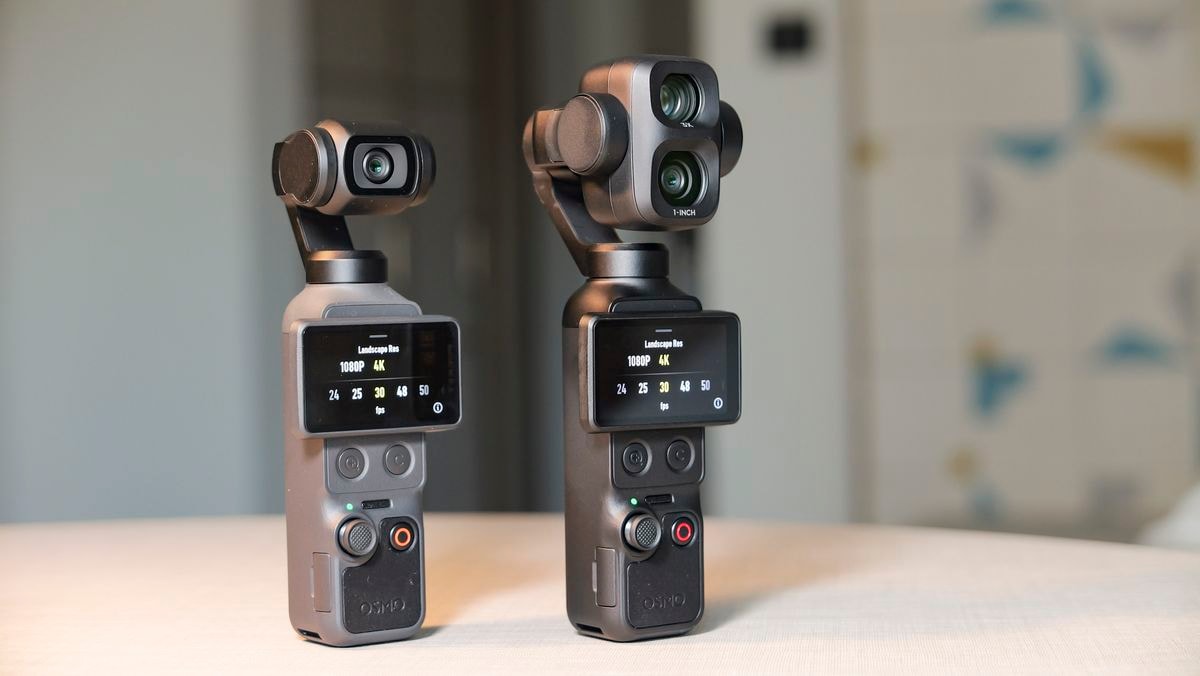
Both cameras are serious for their size, but they are aimed at slightly different editing habits. Pocket 4 is strong for users who want good footage quickly. Pocket 4P is stronger for users who color grade, shoot contrast-heavy scenes, and want more cinematic shot variety.
| Video Question | Osmo Pocket 4P | Osmo Pocket 4 |
| Do you color grade? | Better fit if you use supported D-Log 2 modes and understand post-production. | Good fit if you want D-Log flexibility but do not need the 4P's full creative ceiling. |
| Do you shoot difficult light? | Better for high-contrast scenes where the supported 17-stop D-Log 2 workflow applies. | Still strong, with up to 14 stops listed in DJI Store comparison data. |
| Do you shoot portraits or products? | Better because the 60mm lens avoids some wide-angle distortion. | Usable, but close shots can look wider and less compressed. |
| Do you need fast social clips? | Capable, but the extra lens and color features may be more than you need. | Better default if you want to shoot, transfer, and post quickly. |
| Do you need slow motion? | Wide lens supports up to 4K/240fps and med-tele supports up to 4K/200fps in DJI Store listing data. | Supports up to 4K/240fps in DJI Store listing data. |
D-Log 2 is not automatically better for every user. It can preserve more editing flexibility in supported modes, but it also requires grading knowledge. If you shoot normal color and post quickly, Pocket 4 may be the better experience. If you want to match shots, grade shadows and highlights, and build polished travel sequences, the 4P makes more sense.
High-quality 4K and HEVC workflows also create larger, more valuable files. That raises the stakes if files disappear during transfer or if a memory card becomes unreadable. For creator footage loss, Recoverit's camera recovery software and video recovery software are relevant when the storage is readable and the missing files have not been overwritten.
Part 5. Stabilization, Tracking, and Solo Shooting
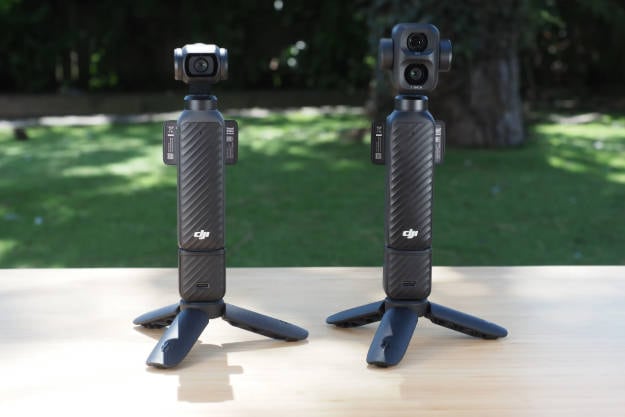
Stabilization is not the biggest reason to pick one over the other because both models use 3-axis mechanical stabilization. That is the core Osmo Pocket advantage over a phone held at arm's length. The gimbal helps walking shots, slow pans, product reveals, room tours, and handheld B-roll feel smoother.
The difference is how stabilization combines with framing. On Pocket 4, stabilization supports a straightforward wide vlogging workflow. On Pocket 4P, stabilization supports both wide movement and tighter 60mm shots. This means you can record a city walk, then switch to a compressed street detail without pulling out a different camera.
| Solo Creator Task | Better Model | Why |
| Walk-and-talk vlog | Osmo Pocket 4 | Simple wide framing and less setup pressure. |
| Street B-roll sequence | Osmo Pocket 4P | Wide plus 60mm shots give more visual rhythm. |
| Restaurant or cafe video | Osmo Pocket 4P | Food, hands, products, signage, and table details benefit from tighter framing. |
| Family travel memory | Osmo Pocket 4 | Fewer choices help capture moments quickly. |
| Product review at a desk | Osmo Pocket 4P | The med-tele camera helps create cleaner subject separation. |
| Fast event recording | Osmo Pocket 4 | Simplicity and longer listed runtime may matter more than lens variety. |
For tracking, the 4P has a stronger zoom-based story in DJI's comparison data, while the Pocket 4 remains enough for most close creator work. Still, tracking should not replace attention. Fast subjects, low contrast, crowded backgrounds, and sudden movement can break tracking on any compact camera. Keep the subject framed and verify critical takes before clearing storage.
Part 6. Storage and Transfer: 107GB vs 103GB Is Not the Whole Story
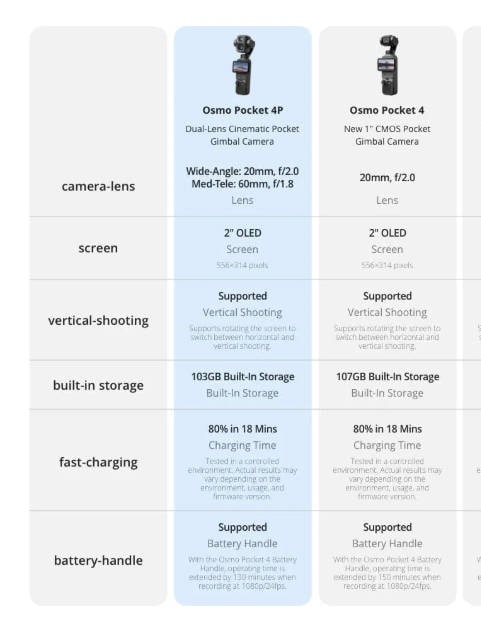
Storage is where this comparison becomes especially relevant for Recoverit readers. On paper, the Pocket 4 has 107GB available built-in storage and the 4P has 103GB. The 4GB difference is not the real decision. The bigger issue is that both cameras make it easier to keep shooting without swapping cards.
DJI's Osmo Pocket 4 guide says 107GB available storage can hold about 600 minutes of 1080p/24fps video or about 220 minutes of 4K/60fps video at standard bitrate. DJI's Osmo Pocket 4P support guidance similarly lists 103GB available storage, with about 570 minutes of 1080p/24fps or about 210 minutes of 4K/60fps at standard bitrate. Those are storage-duration figures, not battery-life promises.
Built-In Storage Changes User Behavior
Built-in storage is convenient because a creator can shoot even when the microSD card is missing, full, or still in a card reader. But larger built-in storage can also delay backup. Users may think, "I still have room," and keep recording for several days before offloading.
| Storage Feature | User Benefit | Hidden Risk |
| 107GB on Pocket 4 | More available internal space for simple travel shooting. | Users may store more clips before making a backup. |
| 103GB on Pocket 4P | Enough internal space for serious creator sessions. | Dual-lens shooting can create more clips because users capture more variations. |
| Card-free recording | Useful when a card is forgotten or full. | Users may be less clear about whether footage is on internal storage, microSD, phone, or laptop. |
| Large microSD cards | Useful for multi-day trips and high-volume shooting. | One unreadable or formatted card can affect a much larger batch of footage. |
This is why larger storage does not eliminate data recovery demand. It can increase urgency. When users store more valuable videos and photos in one location, a single deletion, format, or transfer failure can threaten an entire trip or paid creator project.
microSD Cards Still Matter
Both models support microSD expansion, and DJI guidance includes recommended 1TB card models. That matters for travel creators because 4K footage can fill internal storage during longer trips. However, microSD cards remain one of the most common loss points in camera workflows.
- Accidental format: the user formats the card after assuming the transfer finished.
- In-camera deletion: a clip is deleted during playback or cleanup.
- Reader disconnect: a card reader or USB hub disconnects during import.
- File system error: the card appears RAW, inaccessible, or asks to be formatted.
- Counterfeit or slow card: unreliable media causes recording and file integrity issues.
- Physical damage: tiny microSD cards are easy to bend, lose, or damage while traveling.
If the lost footage is on a memory card, Recoverit's SD card video recovery guide matches the user's next intent. For card maintenance after footage is backed up, the official SD Memory Card Formatter is a useful external resource.
Transfer Speed Does Not Equal Backup Safety
Fast export is helpful, but it can make creators overconfident. DJI support guidance for Osmo Pocket 4P lists wired export from built-in storage up to 800 MB/s under supported USB 3.1 cable conditions and wireless export up to 90 MB/s over Wi-Fi. DJI Store data for Pocket 4 also highlights 800 MB/s transfer from built-in storage. These are convenient, but a fast copy is not a verified backup.
Use this safer workflow for both cameras:
- Transfer the full folder structure, not just a few visible MP4 files.
- Open several important clips before clearing camera storage.
- Compare file count and folder size between source and destination.
- Make a second copy to an external SSD, NAS, or cloud storage.
- Format internal storage or the microSD card only after both copies are verified.
If a transfer is interrupted, do not keep trying to copy the same card while also recording new footage. Protect the original storage first, then scan it if files are missing.
Part 7. Battery, Handling, Accessories, and Availability
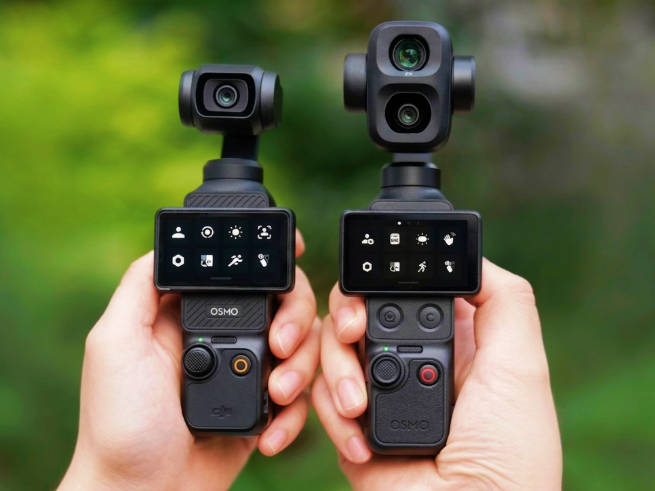
The Pocket 4 has the simpler handling story. It is the wide-lens model with fewer creative decisions and a longer listed operating time. DJI's guide lists up to 240 minutes under controlled test conditions for 1080p/24fps recording with Wi-Fi and screen off. Real runtime can be lower when shooting 4K, using the screen, transferring wirelessly, or filming in heat.
The 4P has a higher creative ceiling but a shorter listed operating time of up to 210 minutes under DJI test conditions. It is also a more deliberate device because lens choice becomes part of the shooting process. That is an advantage for editors and a potential distraction for beginners.
| Practical Factor | Osmo Pocket 4P | Osmo Pocket 4 |
| Battery confidence | Good, but listed lower than Pocket 4. | Better listed runtime under DJI test conditions. |
| Handling simplicity | More creative but slightly more complex. | Simpler for quick travel recording. |
| Accessories | More appealing for creators who use remote, mic, fill light, and planned setups. | Good for basic carry, grip, battery handle, and everyday shooting. |
| Durability mindset | Dual-lens head should be protected carefully. | Still a gimbal camera, not a rugged action camera. |
| Availability | More region-sensitive at the time checked. | Clearer default buy for regions where Pocket 4 is officially listed. |
Neither model should be treated like a waterproof action camera. If you shoot surfing, skiing, cycling POV, helmet-mounted clips, rain-heavy travel, or rough sports, a GoPro-style action camera is still safer. Osmo Pocket cameras are best for smooth handheld creator footage.
Part 8. Which One Is Better by Use Case?
A useful VS article should answer real scenarios. The winner changes depending on what you film.
| Use Case | Winner | Why |
| Daily travel vlog | Osmo Pocket 4 | It is simpler, stable, wide enough, and less demanding to operate. |
| Cinematic travel edit | Osmo Pocket 4P | The 60mm lens gives portraits, details, food, signs, and compressed backgrounds. |
| Family vacation | Osmo Pocket 4 | Faster operation and longer listed runtime matter more than advanced color workflow. |
| Product review | Osmo Pocket 4P | Tighter framing helps products look less distorted and more intentional. |
| Food or cafe content | Osmo Pocket 4P | Close details benefit from med-tele framing and subject separation. |
| Walking city tour | Osmo Pocket 4 | The wide lens and gimbal are already enough for most city movement. |
| Street photography-style video | Osmo Pocket 4P | 60mm compression helps isolate signs, people, and details. |
| Beginner social posting | Osmo Pocket 4 | Less to manage and easier to post without grading. |
| Professional B-roll companion | Osmo Pocket 4P | Better shot variety makes it more useful next to a larger camera kit. |
| Imported purchase in the U.S. | Osmo Pocket 4 | 4P warranty, repair, and support should be verified carefully before import. |
Best two-camera logic: many serious creators do not need both Pocket 4 and 4P. They need one Pocket camera plus the right companion. If you buy the Pocket 4, pair it with a phone or action camera for rougher scenes. If you buy the 4P, use it as a tiny travel storytelling camera and use an action camera only when water, impact, or mounting is the main issue.
Part 9. Data Recovery Advice for DJI Osmo Pocket 4 and 4P
Both cameras can create high-value video files quickly. The 4P may produce more shot variations because creators use both lenses; the Pocket 4 may be used more casually and more often because it is simple. Either way, storage loss is a realistic scenario.
For DJI-specific recovery steps, Recoverit has a guide on how to restore videos from a DJI Osmo camera. For broader camera storage loss, Recoverit's digital camera data recovery guide explains how recovery depends on preventing overwrite and scanning the correct storage device.
What to Do First After Footage Loss
- Stop recording immediately. New clips can overwrite deleted data, especially on microSD cards.
- Do not format the card or internal storage. If a computer asks to format the card, cancel the prompt if the footage matters.
- Identify the real source. Check whether the missing file was on internal storage, microSD, phone album, DJI app download folder, computer import folder, or external backup drive.
- Use a stable connection. For cards, use a reliable card reader. For internal storage exports, use a compatible USB-C cable and avoid unstable hubs.
- Recover to another drive. Never save recovered files back to the same card or source storage.
Recoverit Workflow for DJI Footage
| Step | Action | Why It Matters |
| 1. Confirm the loss location | Decide whether to scan the microSD card, external SSD, local import folder, or accessible storage backup. | Scanning the wrong location wastes time and can miss the original file source. |
| 2. Connect readable storage | Use a card reader or connect the affected drive to the computer. | Recovery software needs the storage to be detected before it can scan. |
| 3. Scan with Recoverit | Select the affected storage and scan for media files such as MP4, MOV, JPG, JPEG, and DNG. | These formats match common DJI camera video and photo workflows. |
| 4. Preview and filter | Use date, size, file type, and preview when available to identify valuable clips. | Travel shoots often contain many similar files. |
| 5. Save to a safe destination | Recover selected files to a different local drive or external SSD. | Writing to the source card can overwrite remaining recoverable data. |
| 6. Handle damaged videos carefully | If a recovered video is unplayable, keep the recovered original and work on a copy with a repair workflow. | Repeated editing or conversion of the only recovered file can make troubleshooting harder. |
Try Recoverit Before Reusing the DJI Storage
Security Verified. Over 7,302,189 people have downloaded it.
Recoverit is a data recovery tool, not a camera hardware repair service and not a guarantee of recovery. It can help scan readable storage for lost files, but it cannot recover overwritten footage, repair a physically undetected card, bypass encryption, or restore files that were never fully recorded.
When Software Recovery May Not Be Enough
- The card is physically broken and not detected by any computer, camera, reader, or adapter.
- The deleted clips have already been overwritten by new recordings.
- The recording stopped before the video file was finalized and no usable file data remains.
- The only copy was a partial wireless transfer and the original source was formatted and reused.
- The storage is encrypted or locked without the legitimate key or device access.
These limits are important because many creators start searching only after a stressful loss. The safest response is to stop recording, preserve the original storage, recover to a separate drive, and then rebuild a backup workflow before the next trip.
Part 10. Pros, Cons, and Final Recommendation
| Model | Pros | Cons |
| DJI Osmo Pocket 4 | Simpler workflow, 20mm travel-friendly lens, 3-axis stabilization, 107GB available storage, microSD expansion, longer listed runtime, good for daily vlogs. | No dedicated 60mm lens, less shot variety, lower dynamic range claim than 4P, less compelling for portraits and product footage. |
| DJI Osmo Pocket 4P | Dual-lens 20mm plus 60mm system, stronger creative framing, higher dynamic range claim in supported mode, D-Log 2, better for portraits, food, products, details, and cinematic edits. | Shorter listed runtime, slightly more complex shooting decisions, 103GB available storage instead of 107GB, and more region-sensitive availability. |
Final recommendation: buy the DJI Osmo Pocket 4 if you want the practical camera most people will use more often. It is easier, wide enough for travel vlogging, and strong for the main reason people buy Osmo Pocket cameras: smooth handheld footage from a small device.
Buy the DJI Osmo Pocket 4P if the 60mm lens will change your footage. If you shoot food, portraits, products, street details, cafe interiors, interviews, or polished travel B-roll, the 4P is not just a spec bump. It gives you a different way to build a video sequence.
Whichever model you choose, treat storage as part of the camera system. Built-in storage is a convenience, not a backup. microSD cards are capacity, not safety. After each important shoot, copy the full folder structure, verify playback, keep a second copy, and format only after the footage is confirmed. If DJI footage disappears, stop recording and scan the affected readable storage before doing anything destructive.
FAQ
-
Is DJI Osmo Pocket 4P better than Osmo Pocket 4?
Yes, if you need the 60mm med-tele lens, stronger creative framing, and D-Log 2 workflow in supported modes. No, if you mostly shoot simple travel vlogs and want a faster, cleaner workflow. -
What is the biggest difference between Osmo Pocket 4P and Osmo Pocket 4?
The biggest difference is the lens system. Osmo Pocket 4 has one 20mm wide-angle camera, while Osmo Pocket 4P adds a dedicated 60mm f/1.8 med-tele camera for portraits, products, food, details, and tighter B-roll. -
How much built-in storage does Osmo Pocket 4 have?
DJI's official Osmo Pocket 4 guide lists 107GB of available built-in storage. At standard bitrate, DJI says this can store about 600 minutes of 1080p/24fps video or about 220 minutes of 4K/60fps video. -
How much built-in storage does Osmo Pocket 4P have?
DJI support guidance lists 103GB of available built-in storage for Osmo Pocket 4P. At standard bitrate, DJI guidance lists about 570 minutes of 1080p/24fps video or about 210 minutes of 4K/60fps video. -
Do both cameras support microSD cards?
Yes. Both models support microSD expansion, and DJI guidance includes recommended 1TB microSD card models. Use reliable cards and back up footage before formatting or reusing them. -
Which model is better for travel vlogging?
Osmo Pocket 4 is the better default for most travel vloggers because it is simpler, wide enough for self-recording, and has longer listed operating time. Osmo Pocket 4P is better if your travel videos need portraits, food shots, details, and more cinematic B-roll. -
Is Osmo Pocket 4P officially available in the United States?
As of August 5, 2026, current buying coverage says UK and European availability is clearer, while there is no formal U.S. launch or authorized U.S. stock for the 4P at the time checked. U.S. buyers should verify warranty and support before importing. -
Can I recover deleted videos from Osmo Pocket 4 or 4P?
Recovery may be possible if the storage is readable and the deleted data has not been overwritten. Stop recording immediately, scan the affected card or backup drive, and save recovered files to a different destination. -
Should I format a DJI Osmo microSD card after transfer?
Only format after you copy the full folder structure, verify playback, compare file count, and create a second backup. If files are missing, do not format before attempting recovery. -
Can Recoverit recover overwritten DJI videos?
No recovery software can reliably recover overwritten footage. Recoverit can help scan readable storage for deleted or lost files, but recovery depends on whether the original data still exists and has not been overwritten.



