
 TL;DR:
If Disk Genius is too complex or Windows-centric for your data recovery needs, Wondershare Recoverit provides the best beginner-friendly, cross-platform alternative with specialized video repair and high success rates for everyday file loss.
● For IT professionals handling broken RAID arrays or multi-disk topologies, R-Studio offers advanced enterprise-level reconstruction tools that go far beyond standard consumer recovery software.
● Home users seeking simple file restoration can choose EaseUS, MiniTool, or Stellar Data Recovery, but must be aware that their free editions strictly limit the total amount of data you can restore before requiring a paid upgrade.
● To maximize recovery chances for corrupted data or lost stream recordings, you must install the replacement software on a completely different drive to prevent overwriting the missing files before running a deep scan.
Ask AI for a summary
 ChatGPT
 Perplexity
 Gemini
 Claude
 Grok
Grok
Disk Genius has long been used for data recovery and partition management, but it is not always the best fit for every scenario. Depending on your budget, technical comfort level, operating system, and the type of data loss you are facing, other tools may provide a simpler workflow, higher recovery rates, or broader format support.
Comparing several disk genius alternatives side by side helps you choose data recovery software that matches your real-world recovery needs instead of relying on a one-size-fits-all tool. By considering ease of use, supported platforms, and specific capabilities such as partition repair or video recovery, you can quickly narrow down the best diskgenius alternative for your situation.
Try Recoverit to Recover Lost Data
 Security Verified. 3,591,664 people have downloaded it.
In this article
What Is Disk Genius?
Disk Genius (often styled DiskGenius) is a Windows-based utility that combines disk repair tools, partition manager functions, and data recovery in one toolkit. It is commonly used to recover deleted or lost files, restore damaged or lost partitions, and clone or back up disks when working with windows data recovery scenarios.
Key features include support for multiple file systems such as NTFS, FAT, exFAT, EXT2/3/4, and basic RAID recovery, along with sector-level editors and a hex viewer for in-depth disk analysis. Typical use cases range from recovering data after accidental deletion or formatting, fixing partition table problems, and migrating data to new drives, to troubleshooting boot issues on professional service benches. While it can be powerful in the hands of experienced users, its interface and workflow are primarily designed with technically inclined Windows users in mind, which is why many people explore disk genius alternatives for a smoother experience.
Why You Might Need Alternatives for Disk Genius?
There are several reasons why you might need a substitute for Disk Genius. Here are a few:
- 🧭 Complex UI and steep learning curve: Disk Genius exposes many low-level options, which can overwhelm users who just want to run a quick hard drive recovery. Navigating sector editors, advanced partition flags, and manual repair options increases the risk of clicking the wrong function. A more streamlined diskgenius alternative with guided wizards can save time and reduce user error.
- 🧩 Feature gaps compared to modern suites: While Disk Genius covers core recovery and partition management, it lacks some convenience features that newer data recovery software offers, such as automated video repair workflows or dedicated crashed OS recovery modules. Users handling multimedia projects, livestream archives, or system-crash scenarios may find that leading disk genius alternatives support more file types and richer repair toolsets.
- 📉 Variable success on heavily damaged data: Disk Genius generally performs well on standard NTFS and FAT partitions, but users sometimes report mixed results with severely corrupted file systems, non-standard RAID layouts, or very large disks. In situations where every file matters, even a small improvement in recovery success rate is critical, prompting users to try another diskgenius alternative optimized for complex, modern storage.
- 🧪 Limited imaging and controlled deep-scan options: Best practices for safe windows data recovery recommend working from disk images and using tunable deep-scan modes to avoid stressing failing drives. Disk Genius provides some advanced tools but does not focus its UX around image-based workflows and non-destructive recovery in the way certain disk repair tools and professional suites do, pushing power users toward more specialized solutions.
- 💰 Licensing and value-for-money considerations: Although Disk Genius has a freemium model, restrictions in the free edition make it harder to fully validate its capabilities before paying. Depending on your needs, competing disk genius alternatives may offer clearer tiers, more generous free recovery caps, or cross-platform licenses that cover both Windows and macOS, resulting in better long-term value.
5 Best Disk Genius Alternatives
1. Wondershare Recoverit
Wondershare Recoverit is a modern, cross-platform data recovery software focused on simplicity and reliable results across desktops, external drives, and memory cards. Best for users who want an easy, guided recovery process with high success rates on everyday data loss, it provides a smoother experience than many technical disk repair tools, making it a top diskgenius alternative. Learn more on the official site at Recoverit.

If Disk Genius does not fully match your workflow, these five best disk genius alternatives provide safer, more intuitive, or more powerful options for hard drive recovery and partition management.
Key Features Offered by Recoverit
Recoverit is a cross-platform data recovery software solution designed to simplify complex recovery tasks into a few guided steps. It is particularly effective for everyday windows data recovery, external drives, USB sticks, SD cards, and camera media, making it a compelling diskgenius alternative for both home and professional use.
- High success rate for deleted, formatted, and inaccessible files across over 1000 formats, including photos, videos, office documents, archives, and audio.
- Support for a wide range of scenarios such as system crashes, partition loss, RAW drives, and external-device failures, with clear on-screen guidance.
- Extra utilities like advanced video recovery and repair that help restore large or corrupted clips from cameras, game capture tools, or streaming setups.
Step-by-Step Guide on How To Recover Lost Data
1. Choose a Location to Recover Data
Install Recoverit on a safe drive or partition that is different from the one where you lost data, then launch the program. From the main interface, select the affected location, such as a specific hard disk, partition, external drive, or removable card, that contained the missing files. This targeted selection ensures the scan focuses on the correct source and minimizes unnecessary stress on other storage devices.

2. Deep Scan the Location
After choosing the location, start the scan and allow Recoverit to analyze the disk sectors thoroughly. You can monitor discovered files in real time, filter by file type, or pause the process if you spot what you need, but letting the deep scan finish typically reveals more recoverable content. For large drives or severely corrupted volumes, expect the scan to take longer as the software reconstructs file structures and raw data.

3. Preview and Recover Your Desired Data
Once the scan completes, use the preview function to inspect photos, videos, documents, and other files before recovery, confirming their integrity and relevance. Select the items you want to restore, then choose a safe destination on a different drive to avoid overwriting remaining lost data. Save the recovered files and, if necessary, re-run focused scans on problem areas to capture anything you may have missed the first time.

2. EaseUS Data Recovery Wizard
EaseUS Data Recovery Wizard is a popular diskgenius alternative that recovers lost files from PCs, laptops, external drives, and memory cards with a straightforward workflow. It is best for home and small-business users who need a balance between usability and advanced options without diving into highly technical disk repair tools. You can visit the official website at https://www.easeus.com/datarecoverywizard/ to explore plans and features.

3. MiniTool Power Data Recovery
MiniTool Power Data Recovery is designed for straightforward file restoration from common storage devices, including internal drives, external HDDs, SSDs, and removable media. It is suited to users who primarily face routine deletion or formatting issues rather than highly complex RAID failures, making it a practical diskgenius alternative for home or small office environments. Explore the product details at https://www.minitool.com/data-recovery-software/.
4. R-Studio
R-Studio is a professional-grade data recovery software suite known for its fine-grained control, extensive file system support, and advanced RAID reconstruction. Best for IT professionals and advanced users handling complex RAID and multi-disk setups, it goes far beyond typical consumer disk repair tools. You can review capabilities and editions at https://www.r-studio.com/.
5. Stellar Data Recovery
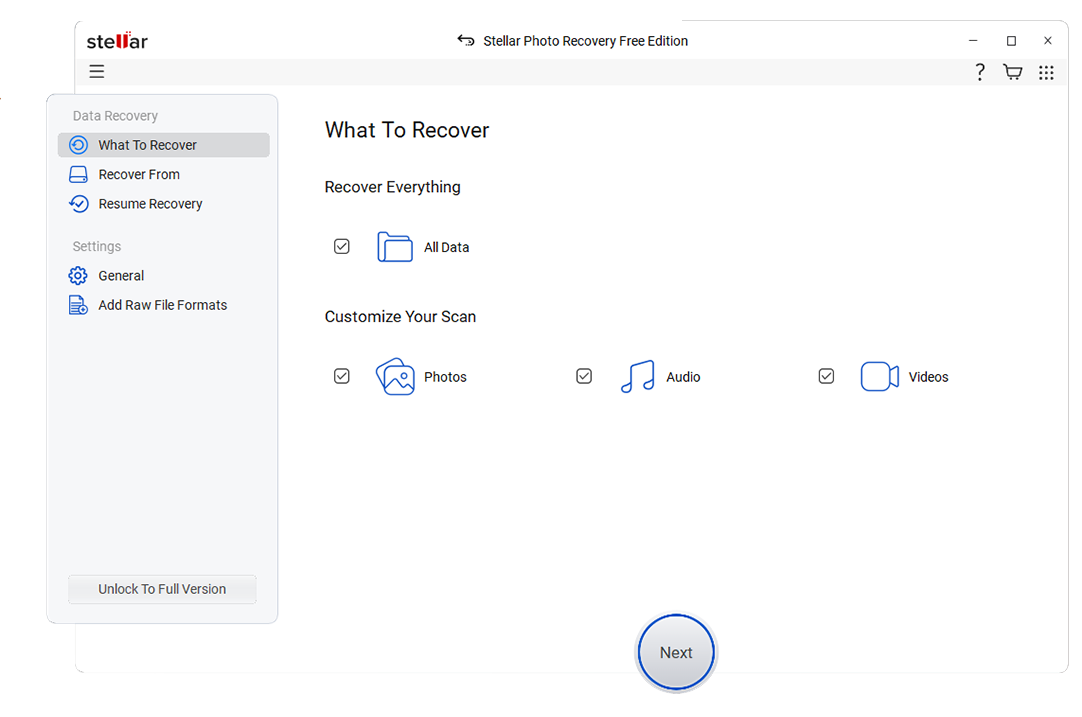
Stellar Data Recovery offers a refined interface and supports a broad range of file formats with targeted modes for multimedia files and common data loss scenarios. It is ideal for users who prioritize polished UX and strong support for documents, photos, and videos while still needing a powerful diskgenius alternative. Visit the official site at https://www.stellarinfo.com/data-recovery-software.php for details.
Pro tip: If you accidentally deleted stream recordings from platforms like OBS, Twitch, or game capture tools, act quickly and avoid writing new data to the same drive. Install a reliable data recovery software on a different partition or device, then run a deep scan on the drive that stored your recordings. Advanced disk genius alternatives can recognize and restore many video formats even when file names are lost, improving your chances of salvaging footage before it is overwritten.
Side-by-Side Comparison Table of Disk Genius Alternatives
| Software | File System Support | Price | Free Version | Ease of Use | Scan Speed | Recovery Success Rate | Key Features |
|---|---|---|---|---|---|---|---|
| Disk Genius | NTFS, FAT, exFAT, EXT2/3/4, basic RAID | Freemium, paid lifetime license | Yes, limited features and capacity | Technical, best for experienced users | Moderate on large disks | Good for Windows partitions, variable on severe damage | Data recovery, partition manager, disk cloning, sector editor |
| Wondershare Recoverit | NTFS, FAT, exFAT, HFS+, APFS, others | Subscription and perpetual plans | Yes, limited recoverable data | Very easy, guided wizards | Fast quick scans, solid deep scans | High on common deletion, format, and OS crash cases | File and partition recovery, video repair, crashed PC recovery |
| EaseUS Data Recovery Wizard | NTFS, FAT, exFAT, HFS+, APFS | Subscription-based and lifetime options | Yes, small data limit | Easy for beginners | Fast quick scans, average deep scans | High for everyday accidental deletions | Deleted file recovery, formatted drive recovery, lost partition recovery |
| MiniTool Power Data Recovery | NTFS, FAT, exFAT | Tiered licenses for home and business | Yes, low data cap | Beginner friendly | Moderate | Good for simple cases on Windows PCs | File recovery, partition recovery, removable media recovery |
| R-Studio | NTFS, FAT, exFAT, EXT, HFS, APFS, ReFS, more | Paid, editions for different platforms | Demo with file preview only | Complex, designed for experts | Fast and highly configurable | Very high in expert hands, especially on RAID and servers | Advanced RAID recovery, network recovery, hex editor, forensic tools |
| Stellar Data Recovery | NTFS, FAT, exFAT, HFS+, APFS | Multiple paid tiers | Yes, limited data recovery | User friendly, modern UI | Moderate to fast depending on mode | High for documents, photos, and videos | File and partition recovery, photo and video recovery, disk imaging |
Conclusion
Disk Genius is a capable tool, but its complexity, Windows-only focus, and limitations in the free edition mean it will not be ideal for every recovery job. Evaluating alternatives allows you to match your software choice to your actual skills, devices, and data loss scenarios instead of forcing everything through a single, technical interface.
For most users who value a guided, safer workflow, Recoverit stands out as a strong first option, with EaseUS, MiniTool, R-Studio, and Stellar each filling more specific niches. Compare features, test the free editions where possible, and choose the solution that offers the best balance of usability, price, and recovery reliability for your environment.
Next: Lazesoft Recovery Suite Alternatives
FAQ
-
Is Disk Genius safe to use for data recovery?
Disk Genius is generally safe when you understand which functions to



