
 TL;DR:
While Lazesoft Recovery Suite excels at offline Windows boot repairs and disk cloning, users needing higher file recovery success rates, modern interfaces, and cross-platform support should use dedicated alternatives like Wondershare Recoverit, EaseUS, Stellar, MiniTool, or Disk Drill.
● Wondershare Recoverit and Stellar Data Recovery are the most capable choices for media professionals, as both feature advanced photo and video repair modules to rescue severely corrupted files that Lazesoft struggles to rebuild.
● EaseUS Data Recovery Wizard and MiniTool Power Data Recovery offer highly guided workflows ideal for non-technical users facing basic data loss, while Disk Drill stands out by bundling S.M.A.R.T. disk health monitoring and native macOS compatibility.
● A crucial limitation when switching to these modern data recovery alternatives is that their free versions strictly restrict the total volume of recoverable data, requiring a paid subscription or license for large-scale restoration jobs.
Ask AI for a summary
 ChatGPT
 Perplexity
 Gemini
 Claude
 Grok
Grok
Lazesoft Recovery Suite is a popular toolkit for fixing unbootable systems and restoring lost data, but it is not the best fit for every scenario. Depending on your experience level, operating system, and recovery urgency, you may need software that is easier to use, updated more frequently, or more accurate at rescuing complex data loss cases.
This guide walks through the leading lazesoft recovery suite alternatives so you can choose a recovery tool that better matches your devices and workloads. You will see how dedicated hard drive recovery software compares on usability, success rates, platform coverage, and pricing.
Try Recoverit to Recover Lost Data
 Security Verified. 3,591,664 people have downloaded it.
In this article
What Is Lazesoft Recovery Suite?
Lazesoft Recovery Suite is a Windows based collection of utilities designed to repair unbootable systems and recover lost data. It typically runs from a bootable CD, DVD, or USB drive, allowing you to troubleshoot PCs that will not start normally. Key features include password recovery for Windows accounts, partition and disk cloning, file recovery from damaged or deleted partitions, and system snapshot restoration.
Typical use cases for Lazesoft Recovery Suite include bringing a crashed Windows installation back to a bootable state, restoring accidentally deleted files, cloning disks before migration, and fixing bootloader related issues. Because it bundles several repair and recovery tools in one package, it appeals to technicians and advanced users who troubleshoot multiple machines or need offline recovery options without relying on a working operating system.
Why You Might Need Alternatives for Lazesoft Recovery Suite?
There are several reasons why you might need a substitute for Lazesoft Recovery Suite. Here are a few:
- 🧭 UI/UX and workflow efficiency: The Lazesoft interface is functional but dated, with multiple panels and technical labels that can overwhelm non experts during stressful data loss incidents. Compared with modern file recovery tools, it takes more clicks and trial and error to locate the right module, slowing down your response when time is critical.
- 🧩 Feature limitations vs leading competitors: While Lazesoft covers boot repair, cloning, and basic recovery, it lacks some of the specialized options found in leading lazesoft recovery suite alternatives. Tools like Recoverit, EaseUS, and Stellar provide richer filters, better file previews, and targeted modules for photos, videos, and complex windows data recovery scenarios.
- 📉 Recovery success rate and stability gaps: Users sometimes report inconsistent results when scanning severely corrupted drives or newer storage formats, which can translate into fewer recoverable files. In contrast, top hard drive recovery software invests heavily in updated algorithms and QA, improving success rates in challenging cases such as RAW partitions and partially overwritten media.
- 🛠️ Missing advanced capabilities and controls: Lazesoft provides only limited control over deep scan parameters, and it does not emphasize forensics style disk imaging or advanced video repair. Professionals often prefer data recovery alternatives that let them create sector by sector images, pause and resume scans, and repair corrupted recordings rather than just copying them.
- 💰 Pricing, value, and platform coverage: Although Lazesoft offers free editions, its focus on Windows leaves macOS users and mixed device households relying on separate tools. Many modern lazesoft alternatives bundle cross platform licenses, clearer support options, and ongoing upgrades, delivering better value over time for businesses and creators who depend on reliable hard drive recovery software.
5 Best Lazesoft Recovery Suite Alternatives
If you want a more focused approach to windows data recovery and cross platform support, the following five tools are the most notable lazesoft recovery suite alternatives. Each shines in slightly different scenarios, from home users to IT technicians and content creators.
1. Wondershare Recoverit
Wondershare Recoverit is a dedicated hard drive recovery software solution built for users who need high success rates and straightforward workflows on modern Windows and macOS systems. It specializes in rescuing deleted, lost, or formatted files from computers, external drives, SD cards, and more, making it one of the strongest lazesoft alternatives available.
Recoverit stands out because it combines strong recovery rates with an interface that even first time users can navigate under pressure. It is especially effective for creators who need to salvage high resolution videos, photos, and project files without wrestling with complex technical menus.
Key Features Offered by Recoverit
- Supports over 1000 file formats and numerous devices, making it a versatile choice among lazesoft recovery suite alternatives for documents, media, and project files.
- Offers dedicated modes for deleted file recovery, formatted disk restoration, and crashed computer rescue, covering most windows data recovery emergencies.
- Includes advanced video recovery and repair that can rebuild fragmented clips from cameras, capture cards, or streaming setups, outperforming many generic file recovery tools.
Step-by-Step Guide on How To Recover Lost Data
1. Choose a Location to Recover Data
Install and launch Recoverit, then select the exact disk, partition, or folder where your lost files were originally stored. For the highest chance of success, avoid writing new data to that location while you prepare the scan, especially when dealing with formatted drives or deleted stream recordings.

2. Deep Scan the Location
Click to start a deep scan so Recoverit can search sector by sector for recoverable content, including files that no longer appear in the file system. Let the scan run to completion, and use filters such as file type or date to narrow down results as they appear in real time.

3. Preview and Recover Your Desired Data
Once the scan has finished, preview key documents, photos, and videos to confirm their integrity, then select the items you want to restore. Save the recovered data to a different drive than the source to avoid overwriting any remaining lost files and to maximize your overall recovery success.

2. EaseUS Data Recovery Wizard
EaseUS Data Recovery Wizard is a long standing file recovery tools suite designed for home and small business users who prefer a guided, wizard style workflow. It helps you retrieve deleted, formatted, or otherwise lost data from internal and external drives with clear step by step prompts.

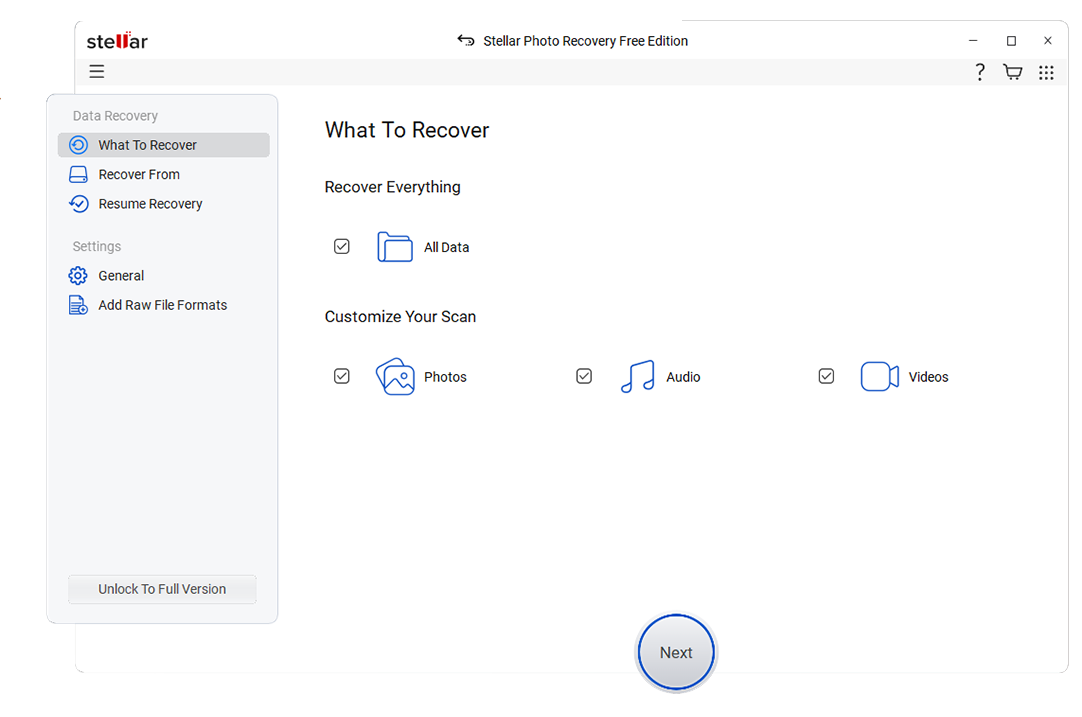
3. Stellar Data Recovery
Stellar Data Recovery is designed for professionals and media focused users who need robust file recovery tools alongside advanced repair capabilities. It can recover files from lost or damaged partitions while also repairing corrupted photos and videos for a complete workflow.
4. MiniTool Power Data Recovery
MiniTool Power Data Recovery is a Windows focused application that provides simple modules for recovering deleted files, lost partitions, and data from damaged drives. It is a good match for occasional users seeking straightforward windows data recovery without an overload of settings.
5. Disk Drill
Disk Drill is an all in one hard drive recovery software package that combines data recovery with useful extras such as S.M.A.R.T. disk health monitoring and cleanup tools. It supports both Windows and macOS, offering a polished interface that suits casual and advanced users alike.

Side-by-Side Comparison Table of Lazesoft Recovery Suite Alternatives
| Software | File System Support | Price | Free Version | Ease of Use | Scan Speed | Recovery Success Rate | Key Features |
|---|---|---|---|---|---|---|---|
| Lazesoft Recovery Suite | NTFS, FAT32, FAT16, some external drives | Free and paid editions, perpetual license | Yes, with feature limitations | Moderate, more technical layout | Moderate to slow on large disks | Good for basic cases, lower on badly corrupted drives | Boot repair, password reset, disk cloning, basic file recovery |
| Wondershare Recoverit | NTFS, FAT32, exFAT, HFS+, APFS, ReFS and more | Tiered plans, monthly or perpetual license | Yes, limited data recovery quota | Very easy, beginner friendly interface | Fast quick scans, efficient deep scans | High across common and complex loss scenarios | Deleted file recovery, formatted drive recovery, crashed computer recovery, advanced video repair |
| EaseUS Data Recovery Wizard | NTFS, FAT, exFAT, HFS+, EXT variants | Subscription and lifetime license options | Yes, small data cap for free recovery | Easy, wizard driven process | Fast quick scans, average deep scans | High for typical deletions and partitions | Deleted file recovery, partition recovery, RAW drive recovery, exportable scan results |
| Stellar Data Recovery | NTFS, FAT, exFAT, HFS+, APFS | Multiple editions from basic to technician | Yes, limited file recovery amount | Moderate, feature rich interface | Average, depends on scan depth | High, especially for photos and documents | File recovery, lost partition recovery, photo and video repair, RAID support in higher tiers |
| MiniTool Power Data Recovery | NTFS, FAT, exFAT on most consumer drives | Free, monthly, and lifetime licenses | Yes, fixed data recovery limit | Easy, module based workflow | Fast on smaller drives, average on large volumes | Good for mainstream consumer scenarios | Deleted file recovery, lost partition recovery, CD/DVD recovery modules |
| Disk Drill | NTFS, FAT, exFAT, HFS+, APFS, EXT variants | One time license with major version upgrades | Yes, with recovery size restrictions | Very easy, modern UI | Fast quick scans, moderate deep scans | High, especially on healthy but formatted media | File recovery, Recovery Vault, S.M.A.R.T. monitoring, duplicate finder and cleanup tools |
Conclusion
Lazesoft Recovery Suite can be helpful for repairing unbootable Windows systems and performing basic recovery, but it is not always the most efficient option for targeted file restoration. Users who value a cleaner interface, stronger success rates, and active development often prefer specialized recovery tools.
By comparing options like Recoverit, EaseUS, Stellar, MiniTool, and Disk Drill, you can match your budget, platform, and technical comfort level to the right solution. For many, a dedicated tool such as Recoverit delivers the best balance of ease of use, broad device support, and dependable recovery performance when every lost file matters.
Next: Remo Recover Alternatives
FAQ
-
Is Lazesoft Recovery Suite good for everyday file recovery?
Lazesoft Recovery Suite can restore deleted or lost files, but it is primarily designed as a Windows repair toolkit. For routine recoveries from USB drives, SD cards, or external disks, a dedicated data recovery program such as the lazesoft recovery suite alternatives covered here is usually faster, simpler, and more accurate. -
Which Lazesoft Recovery Suite alternative is best for non technical users?
Recoverit, Disk Drill, and EaseUS Data Recovery Wizard are strong lazesoft alternatives for non technical users because they use modern, guided interfaces with clear steps and previews. These tools simplify scanning, filtering, and restoring files, reducing the risk of mistakes during windows data recovery. -
Can I recover data from a formatted drive using these alternatives?
Yes, all the featured data recovery alternatives can scan formatted or RAW drives to locate recoverable files. For best results, stop using the drive immediately after formatting so that new writes do not overwrite the sectors that specialized hard drive recovery software needs to scan. -
Do any Lazesoft Recovery Suite alternatives work on macOS?
Several of the highlighted file recovery tools, including Recoverit, Stellar Data Recovery, and Disk Drill, provide native macOS versions. If you use both Windows and Mac, choosing one of these cross platform options lets you handle data loss on multiple systems with a single license. -
Is there a completely free Lazesoft Recovery Suite alternative?
Most reputable hard drive recovery software



