
 TL;DR:
Replacing PhotoRec's text-only interface with modern alternatives like Recoverit, Recuva, EaseUS, Disk Drill, or R-Studio enables you to preserve original folder structures, utilize real-time previews, and recover lost data without manual path selection.
● Recuva provides a free, lightweight quick-undelete solution strictly for Windows PCs, while Recoverit, EaseUS, and Disk Drill support both Windows and macOS for complex partition and video recovery but require paid licenses to bypass free-tier data caps.
● IT professionals managing severely corrupted file systems, NAS environments, or RAID arrays should use R-Studio, which offers network recovery and broad file system support (ReFS, UFS, ext, XFS) but possesses a steep learning curve for non-experts.
● To maximize recovery success across any of these tools, you must immediately stop writing new files to the affected storage device and save your recovered data to a completely different drive to prevent permanent overwriting.
Ask AI for a summary
 ChatGPT
 Perplexity
 Gemini
 Claude
 Grok
Grok
PhotoRec alternatives are worth exploring when you need to rescue critical files but do not have time to wrestle with a text-only interface. Modern data recovery software can streamline the process with visual guidance, smarter filtering, and safer workflows for both home and business environments.
PhotoRec is a respected open source tool, but if you want a more intuitive, feature-rich, or business-ready photorec replacement, upgrading to a current-generation solution helps you recover files faster, with higher confidence and less technical guesswork.
Try Recoverit to Recover Lost Data
 Security Verified. 3,591,664 people have downloaded it.
In this article
What Is PhotoRec?
PhotoRec is a free, open source data recovery software utility designed to restore lost files from a wide range of storage devices, including hard drives, memory cards, USB drives, and digital camera media. Developed by the creators of TestDisk, PhotoRec works by scanning storage at a low level and carving out files based on their signatures rather than relying on the file system metadata. This makes it effective even when partitions are damaged, formatted, or inaccessible.
Key features of PhotoRec include support for hundreds of file formats, cross-platform availability on Windows, macOS, and Linux, and the ability to recover data from severely corrupted or reformatted media. It is commonly used by power users, digital forensics enthusiasts, and system administrators who need a free tool to salvage photos, documents, archives, and multimedia files from failing or accidentally formatted drives.
Typical use cases for PhotoRec involve recovering deleted photos from SD cards, restoring user documents from corrupted partitions, and rescuing files from drives that no longer mount correctly. Because it runs in a console-style interface and focuses on raw data carving, it is particularly suited to users who are comfortable with technical workflows and manual path selection.
Why You Might Need Alternatives for PhotoRec?
There are several reasons why you might need a substitute for PhotoRec. Here are a few:
- 🖥️ UI/UX and workflow efficiency: PhotoRec uses a text-based, menu-driven interface that can feel intimidating and slow to navigate, especially when you are under pressure after accidental data loss. Without clear icons, thumbnails, or drag-and-drop actions, even simple choices like selecting the right disk or output folder can lead to mistakes or repeated scans.
- 🧩 Feature limitations compared to competitors: While PhotoRec is powerful at raw carving, it lacks many convenience features that top file recovery tools now treat as standard, such as rich previews, scan session saving, and detailed filters by file type, date, or size. This means you may spend extra time manually sorting anonymous files rather than quickly pinpointing the documents or photos you actually care about.
- 📉 Recovery success rate and stability gaps: PhotoRec can perform well when data has not been overwritten, but the absence of guided modes for specific scenarios (like formatted SD cards or lost partitions) can hurt real-world success rates for non-experts. If you accidentally misconfigure scan options or choose an inappropriate target, you may end up with incomplete recoveries or need to rerun lengthy scans.
- 🛠️ Missing advanced capabilities and safety tools: Modern photorec alternatives frequently bundle disk imaging, S.M.A.R.T. monitoring, and cloning features so you can work from a safe copy of a failing drive rather than the original media. PhotoRec does not provide this kind of integrated protection or fine-grained deep scan controls, so users handling failing disks or RAID/NAS systems may be better served by a more advanced suite.
- 💰 Pricing, support, and value-for-money: Although PhotoRec is free, it comes without official technical support, guaranteed updates, or business-ready documentation. For companies, content creators, and IT teams, investing in a commercial photorec replacement with customer service, clear licensing, and long-term maintenance can be more cost-effective than relying on a free tool that offers no formal help if something goes wrong.
5 Best PhotoRec Alternatives
1. Wondershare Recoverit
Wondershare Recoverit is a comprehensive photorec replacement best for users who want an intuitive, full-featured recovery solution on Windows and macOS with strong video and stream recording recovery. It combines a clean graphical interface with powerful deep scanning and wide file type support, making it suitable for both personal data rescue and professional workloads.
If you are looking for a smoother experience than PhotoRec, Recoverit stands out among photorec alternatives for its straightforward interface, strong video and stream recovery, and dependable performance on both Windows and macOS.
Key Features Offered by Recoverit
- Supports over 1,000 file formats across photos, videos, documents, archives, and more, making it a versatile option for best data recovery for windows and macOS users.
- Provides targeted modes for crashed computers, formatted drives, external devices, and advanced video recovery so you can match the scan to your exact scenario.
- Offers real-time file previews, flexible filters, and clear folder reconstruction that simplify decisions compared to console-based file recovery tools.
Step-by-Step Guide on How To Recover Lost Data
1. Choose a Location to Recover Data
Launch Recoverit and select the drive, partition, or external device where you lost data, such as an internal SSD, USB flash drive, SD card, or external HDD. For deleted stream recordings or camera footage, ensure you pick the original storage location and avoid writing new files to that device to maximize recovery chances.

2. Deep Scan the Location
Click Start to begin scanning; Recoverit will first run a quick scan and then automatically proceed into deep analysis to search for lost, deleted, or formatted data. You can monitor discovered files in real time, apply filters for specific file types, and pause or stop the scan if you have already located the content you need.

3. Preview and Recover Your Desired Data
Once the scan finishes, browse the results using the folder tree or file-type categories, then preview photos, videos, and documents to confirm they are intact. Finally, select the items you want and recover them to a different drive or partition to avoid overwriting any remaining lost data on the original device.

2. Recuva
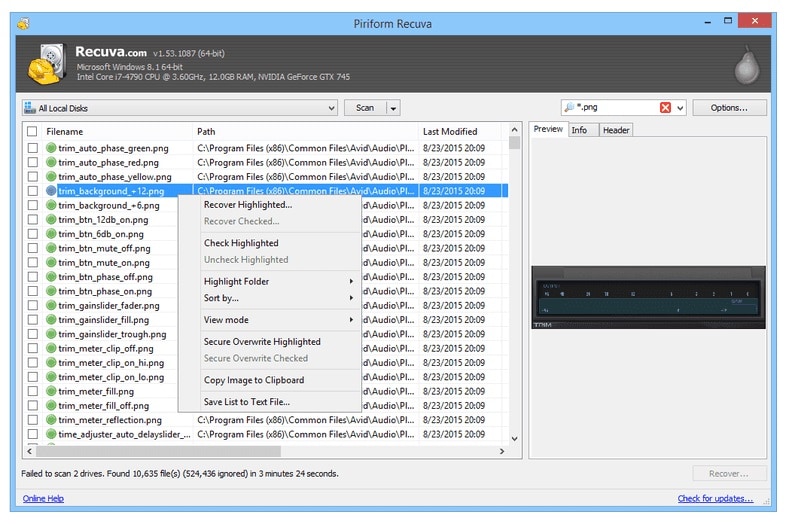
Recuva is a popular Windows-only data recovery software best for users who need a lightweight, low-cost solution for quick undelete and simple recovery tasks. Developed by the makers of CCleaner, it focuses on recovering recently deleted files from internal and external drives with a straightforward wizard.
3. EaseUS Data Recovery Wizard
EaseUS Data Recovery Wizard is a commercial photorec alternatives option best for users who want a polished, guided experience with strong partition and format recovery on Windows and macOS. It emphasizes usability and broad scenario coverage, from accidental deletion to partition loss and formatting.

4. Disk Drill
Disk Drill is a versatile photorec alternatives choice for macOS and Windows users who value strong preview options and extra disk tools like backup and health monitoring. It combines data recovery with disk management features and is particularly strong on macOS environments.

5. R-Studio
R-Studio is a professional-grade suite best for IT specialists handling complex RAID, NAS, and multi-disk recovery, including linux file recovery and server environments. It is designed for technicians who need low-level control, network recovery, and detailed analysis of damaged file systems.
If you accidentally deleted your stream recordings from OBS, Twitch exports, or other capture tools, avoid writing new data to the drive and try recovery immediately. A graphical solution like Recoverit makes this much easier than PhotoRec by letting you visually select the drive, filter for large video files, and preview them before restoring. Go to the Recoverit site and choose the affected disk, then run a deep scan focused on video formats such as MP4, MKV, MOV, and FLV. This workflow greatly increases the chances of bringing back complete, playable stream recordings without needing to memorize file paths or navigate a text-only interface.
Side-by-Side Comparison Table of PhotoRec Alternatives
| Software | File System Support | Price | Free Version | Ease of Use | Scan Speed | Recovery Success Rate | Key Features |
|---|---|---|---|---|---|---|---|
| PhotoRec | FAT, exFAT, NTFS, ext2-4, HFS+, others via raw scan | Free, open source | N/A (fully free) | Low; text-based interface | Moderate to slow on large drives | High for raw file carving when data not overwritten | Signature-based carving, cross-platform, works on severely damaged partitions |
| Wondershare Recoverit | NTFS, FAT, exFAT, HFS+, APFS, ext2-4 | Paid plans with lifetime and subscription options | Yes; limited data recovery for testing | High; graphical wizard and clear workflow | Fast quick scan; deep scan depends on disk size | High on common loss scenarios including formatted and corrupted drives | Video and stream recovery, file preview, bootable media, corrupted video repair |
| Recuva | FAT, exFAT, NTFS | Free with optional Pro upgrade | Yes; core features available | High for basic undelete tasks | Fast for quick scans; deep scans moderate | Good for recent deletions on healthy drives | File undelete, secure overwrite, simple wizard interface |
| EaseUS Data Recovery Wizard | NTFS, FAT, exFAT, HFS+, APFS | Paid with tiered licenses | Yes; limited recoverable data cap | High; scenario-based interface | Moderate; deep scans thorough but can be lengthy | High on formatted and accidentally deleted data | Partition recovery, formatted drive recovery, preview, export/import scan sessions |
| Disk Drill | NTFS, FAT, exFAT, HFS+, APFS, ext2-4 | Freemium with paid Pro | Yes; limited recovery quota | Medium to high; feature-rich GUI | Fast quick scan; deep scans moderate to slow | High when disk is readable and not heavily overwritten | Multiple scan modes, Recovery Vault, extensive preview, extra disk tools |
| R-Studio | NTFS, ReFS, FAT, exFAT, HFS+, APFS, ext, UFS, XFS, RAID | Paid, professional-grade licenses | Demo; limited file size recovery | Low to medium; designed for experts | Fast with advanced tuning options | Very high on complex RAID and severely damaged file systems | RAID reconstruction, network recovery, hex editor, S.M.A.R.T. monitoring |
Conclusion
PhotoRec remains a powerful free linux file recovery and cross-platform utility, but its console-style interface, limited previews, and lack of guidance mean it is not ideal for everyone. Whether you are restoring family photos, business documents, or long-form stream recordings, a more user-friendly and specialized tool can save time and stress.
Alternatives like Recoverit, Recuva, EaseUS Data Recovery Wizard, Disk Drill, and R-Studio give you modern interfaces, better file organization, and targeted features for simple and advanced recovery tasks. By matching your technical comfort level, operating system, and data-loss scenario to the right tool, you can significantly improve the odds of a successful recovery.
Next: Diskwarrior Alternatives
FAQ
-
Is PhotoRec still safe and reliable to use?
Yes, PhotoRec is generally safe and reliable when downloaded from its official site, and it performs read-only scans that do not modify the source drive during recovery. However, because it is a low-level tool with a text-based interface, you must carefully choose the correct disk and output folder to avoid overwriting data or saving recovered files in the wrong location. -
Which PhotoRec alternative is easiest for beginners?
For most beginners, Recoverit and EaseUS Data Recovery Wizard are the easiest photorec alternatives thanks to their clear graphical interfaces and guided wizards. Both provide file previews and straightforward filters, so you can visually confirm what you are recovering instead of navigating complex text menus. -
Can PhotoRec or its alternatives recover formatted drives?
Yes, PhotoRec and most alternatives can attempt to recover data from formatted drives as long as the data has not been heavily overwritten. Tools like Recoverit, EaseUS, and Disk Drill provide dedicated formatted-drive or lost-partition modes that simplify the process for non-technical users, improving success rates compared with manual raw carving. -
Do PhotoRec alternatives keep original file names and folders?
Many commercial photorec alternatives, such as Recoverit and Disk Drill, can often reconstruct original file names and folder structures when file system metadata is still available. PhotoRec relies heavily on raw carving, so recovered files are frequently renamed and placed into generic folders, which can make sorting and organizing your data more time-consuming. -
Are there good free alternatives to PhotoRec?
If you want to stay free, Recuva is a solid choice on Windows for simple undelete scenarios, and tools like Disk Drill or Recoverit offer limited free recovery quotas for testing.



