

 TL;DR:
When replacing Stellar Data Recovery due to slow deep scans or high upgrade costs, Wondershare Recoverit offers the best guided workflow for high-success media recovery, while R-Studio and Recuva cater to complex IT environments and basic Windows undelete tasks, respectively.
● Wondershare Recoverit and EaseUS are ideal for non-technical users needing strong media and partition restoration, whereas R-Studio provides granular RAID and network recovery controls strictly for IT professionals.
● Disk Drill bundles proactive disk monitoring tools best suited for multi-drive environments, while Recuva serves as a lightweight, Windows-only free option that is fast but ineffective on severely damaged or formatted drives.
● To prevent permanent data loss, you must install any chosen alternative on a separate drive or USB stick rather than the disk containing the missing files, as downloading software directly over lost data will overwrite recoverable sectors.
Ask AI for a summary
 ChatGPT
 Perplexity
 Gemini
 Claude
 Grok
Grok
When Stellar Data Recovery alternatives are on your radar, it usually means you are dealing with important files you cannot afford to lose. Choosing the right tool can determine whether you get back every photo, video, and document, or only partial fragments.
This guide explains what Stellar Data Recovery does, where it may fall short, and how the top five Stellar alternatives compare across pricing, usability, and recovery success. Use the side-by-side data recovery software comparison and detailed breakdowns to decide which file recovery tools best match your specific situation.
Try Recoverit to Recover Lost Data
 Security Verified. 3,591,664 people have downloaded it.
In this article
What Is Stellar Data Recovery?
Stellar Data Recovery is a commercial disk recovery application used to restore deleted, lost, or inaccessible files from a wide range of storage media, including HDDs, SSDs, memory cards, and USB drives. It supports popular file systems such as NTFS, FAT, exFAT, HFS+, and APFS, enabling recovery of photos, videos, documents, emails, and other everyday data from both internal and external devices.
The software offers both quick and deep scan modes so users can search for recently deleted items or dig into formatted or damaged partitions. It also provides partition recovery, formatted drive recovery, and disk imaging features that reduce the risk of further damage when working with failing drives. For media professionals, Stellar includes dedicated photo and video repair modules that can fix corrupted images and footage. Typical users range from home users who have accidentally deleted files, to small businesses recovering from OS crashes or partition loss, to technicians managing structured recoveries across multiple client machines.
Why You Might Need Alternatives for Stellar Data Recovery?
There are several reasons why you might need a substitute for Stellar Data Recovery. Here are a few:
- 🧭 Interface learning curve and workflow friction: While functional, Stellar's interface can feel dense, with multiple steps and tabs needed to locate and preview specific files. Beginners may find it confusing to choose between scan types and locations, which slows down urgent recovery tasks and increases the risk of selecting the wrong drive or partition.
- 🧪 Feature set versus leading competitors: Some users notice that competitors in the best data recovery software space bundle extra utilities such as real-time disk monitoring, proactive data protection, and smarter filtering. When compared side by side, Stellar can look less comprehensive, especially for users who want one tool to handle both recovery and ongoing drive health checks.
- 📉 Recovery success and performance on tough cases: Reports from users indicate that deep scans on large or heavily formatted drives can be slower in Stellar than in some Stellar Data Recovery alternatives. In difficult scenarios, like severely corrupted volumes, you might see fewer recoverable files or more damaged outputs than with competitors optimized for those edge cases.
- 🧰 Advanced capabilities locked behind higher tiers: Features such as advanced RAID handling or extended network recovery are restricted to premium editions. Power users and IT teams who need granular control over imaging, scanning, and reconstruction may find that they need to upgrade substantially or switch to tools with more flexible advanced options.
- 💰 Pricing structure and long-term value: Stellar's tiered licensing and upgrade model can feel expensive if you only run recovery occasionally or prefer lifetime licenses over subscriptions. For some users, alternative file recovery tools offer clearer, one-time pricing, higher data limits in free tiers, or better value when equipping multiple devices or team members.
5 Best Stellar Data Recovery Alternatives
The tools below represent the top stellar data recovery alternatives, giving you options that range from beginner-friendly to highly advanced. Each solution has different strengths, so consider your platform, budget, and technical comfort level before deciding.
1. Wondershare Recoverit
Wondershare Recoverit is a full-featured data recovery software comparison winner for many users, best for those who want high recovery success rates with an easy, guided workflow on Windows and macOS. It focuses on reliability and simplicity, making it ideal if you need to restore photos, videos, documents, or other files from internal drives, external disks, SD cards, and more.
Key Features Offered by Recoverit
- Supports recovery of over 1000 file formats from internal drives, external disks, SD cards, USB drives, and more, making it one of the most versatile file recovery tools available.
- Specialized video recovery and repair modes that can restore long or fragmented clips, ideal for creators, streamers, and videographers.
- Clear, guided interface with high success rates on common disk recovery scenarios like accidental deletion, formatting, and OS crashes.
Step-by-Step Guide on How To Recover Lost Data
1. Choose a Location to Recover Data
Launch Recoverit and select the drive, partition, or specific folder where you lost your data. For external devices, make sure they are properly connected and recognized before starting. Choosing the most accurate location helps Recoverit scan more efficiently and improves your chances of finding all recoverable files.

2. Deep Scan the Location
Click "Start" to begin scanning the selected location. Recoverit will run a comprehensive deep scan to search for deleted, lost, or corrupted files, displaying results in real time. You can use filters and search tools to narrow down file types or names while the scan continues in the background.

3. Preview and Recover Your Desired Data
When the scan finishes, browse the results, use the preview feature to check file content, and select the items you want to restore. Finally, click "Recover" and choose a safe destination on a different drive to avoid overwriting remaining lost data. This workflow minimizes risk while helping you quickly get back critical documents, photos, and videos.

2. EaseUS Data Recovery Wizard
EaseUS Data Recovery Wizard is a widely used stellar data recovery alternatives option, best for home and small business users who want straightforward recovery and strong partition restore tools. It supports a wide range of storage devices and offers a simple interface that non-technical users can navigate easily.

3. Disk Drill
Disk Drill is a powerful disk recovery suite best for users managing multiple drives who also want disk monitoring and protection tools. Beyond recovery, it includes utilities that help reduce future data-loss risks through backup, cleanup, and data protection features.

4. R-Studio
R-Studio is a professional-grade suite among Stellar Data Recovery alternatives, best suited for IT professionals and technicians who need advanced RAID and network recovery. It supports many file systems, including Windows, macOS, and Linux variants, and offers extensive configuration options for complex scenarios.
5. Recuva
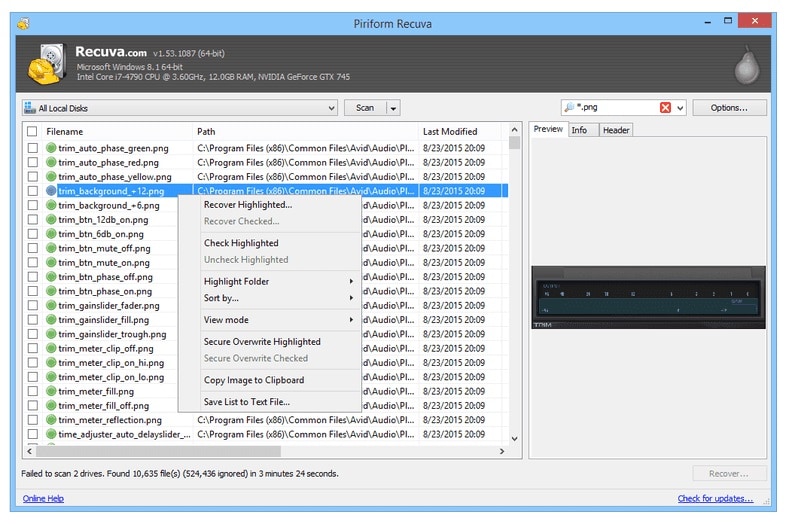
Recuva is a lightweight, budget-friendly Windows-only option among Stellar alternatives, best for users who need quick recovery of recently deleted files. It offers a wizard-style interface that walks you through selecting file types and locations, making it comfortable for beginners.
Side-by-Side Comparison Table of Stellar Data Recovery Alternatives
| Software | File System Support | Price | Free Version | Ease of Use | Scan Speed | Recovery Success Rate | Key Features |
|---|---|---|---|---|---|---|---|
| Stellar Data Recovery | NTFS, FAT, exFAT, HFS+, APFS | Mid to high, tiered editions | Yes, limited recovery | Moderate | Moderate to slow on large drives | Good on common scenarios, mixed on severe damage | Quick and deep scan, partition recovery, photo/video repair, disk imaging |
| Wondershare Recoverit | NTFS, FAT, exFAT, HFS+, APFS, others | Mid-range with lifetime options | Yes, limited data volume | Very easy | Fast quick scans, efficient deep scans | High, especially for photos and videos | Crashed PC recovery, video repair, bootable media, wide device support |
| EaseUS Data Recovery Wizard | NTFS, FAT, exFAT, HFS+ | Subscription and perpetual licenses | Yes, small recovery limit | Easy | Moderate | High for deleted and partition loss cases | Deleted file and partition recovery, RAW drive recovery, file preview |
| Disk Drill | NTFS, FAT, exFAT, HFS+, APFS, EXT variants | One-time and business licenses | Yes, limited recovery on some platforms | Easy to moderate | Fast quick scans, moderate deep scans | Good overall, very good on macOS | Data protection, disk health, cleanup tools, partition recovery |
| R-Studio | NTFS, FAT, exFAT, HFS+, APFS, EXT, XFS, ReFS, others | High, modular licensing | Demo with file size limits | Hard for beginners | Fast but complex to configure | Very high in expert hands, especially RAID | RAID reconstruction, network recovery, hex editor, advanced imaging |
| Recuva | NTFS, FAT, exFAT | Low, one-time Pro upgrade | Yes, core features | Very easy | Very fast on small drives | Decent for recent deletions, weaker on damage | Wizard-based undelete, deep scan mode, secure file overwrite |
Conclusion
Stellar Data Recovery remains a capable solution, but it is not always the best match for every budget, device, or recovery scenario. Depending on whether you prioritize ease of use, advanced RAID options, or low-cost basic undelete, another tool may serve you better.
By comparing feature sets, pricing, and recovery strengths across Recoverit, EaseUS, Disk Drill, R-Studio, and Recuva, you can choose a Stellar alternative that fits how you actually store and use data. Testing a free version before committing to a paid plan is the safest way to confirm which tool delivers the best results on your own devices.
Next: Wise Data Recovery Alternatives
FAQ
-
Is Stellar Data Recovery still good enough for basic file recovery?
Yes, Stellar Data Recovery is generally reliable for common cases like accidental deletion or simple formatting on healthy drives. However, many users compare Stellar Data Recovery alternatives such as Recoverit or EaseUS to see if they can achieve faster scans, better usability, or higher success in tricky scenarios. -
Which Stellar Data Recovery alternative has the highest success rate?
Success rates vary by situation, but Recoverit and R-Studio are frequently praised for strong performance. Recoverit tends to excel in consumer-focused recoveries like photos, videos, and everyday documents, while R-Studio is favored by professionals handling complex RAID, servers, and mixed OS environments. -
What is the best free alternative to Stellar Data Recovery?
If you need something fully free on Windows, Recuva is a solid basic option for recent deletions. To evaluate scan quality more broadly, you can also use the free tiers of leading Stellar alternatives like Recoverit, EaseUS, or Disk Drill, which allow limited recovery volume but full previews. -
Can I use a Stellar alternative to recover data from a failed external drive?
Yes, most data recovery software comparison contenders, including Recoverit, EaseUS, and Disk Drill, can scan external HDDs and SSDs. If the drive is making clicking sounds, disconnects frequently, or is not detected reliably, avoid repeated attempts, consider creating a disk image first, or consult a professional lab to prevent further damage. -
Is it safe to install recovery software on the same drive where I lost data?
Installing any tool, including Stellar Data Recovery alternatives, on the same drive that lost data can overwrite recoverable sectors. Whenever possible, install software on another internal drive or a USB stick, then scan the problem disk as a secondary device to maximize your recovery chances.


