

 TL;DR:
While TogetherShare handles basic file recovery, users facing severely corrupted drives, complex media projects, or enterprise storage should switch to specialized alternatives to improve recovery odds and access advanced features like disk imaging or video repair.
● Choose Wondershare Recoverit for high success rates with complex RAW photos and corrupted video projects (video repair requires higher-tier plans), or EaseUS Data Recovery Wizard for a beginner-friendly workflow tailored to restoring formatted partitions.
● Opt for Stellar Data Recovery to handle enterprise-grade RAID, server, and email database repairs, Disk Drill for macOS-optimized recovery paired with disk health monitoring, or MiniTool Power Data Recovery for budget-conscious Windows home use.
● Across all alternative tools, you must save recovered files to a separate destination drive to prevent overwriting source data, and expect free versions to strictly limit recovery volume or only allow scanning and file previewing.
Ask AI for a summary
 ChatGPT
 Perplexity
 Gemini
 Claude
 Grok
Grok
TogetherShare Data Recovery is a popular tool for restoring deleted, formatted, or lost files, but it is not the only option. If you need higher success rates, faster scans, or more flexible licensing across Windows and macOS, exploring top-rated togethershare data recovery alternatives can help you choose the right balance of ease of use, performance, and cost for your specific data loss situation.
By comparing data recovery software like togethershare, you can find the best match for tasks such as recover deleted files, repairing problematic video recordings, or restoring partitions across windows mac data recovery scenarios without overspending on features you do not need.
Try Recoverit to Recover Lost Data
 Security Verified. 3,591,664 people have downloaded it.
In this article
What Is TogetherShare Data Recovery?
TogetherShare Data Recovery is a file recovery program designed to help users restore lost data from hard drives, SSDs, USB flash drives, memory cards, and other storage media. It focuses on recovering files deleted accidentally, lost after formatting, or erased due to partition errors, system crashes, or mild corruption.
Key features typically include quick and deep scan modes, preview before recovery, support for common file types like photos, videos, documents, and archives, and compatibility with mainstream file systems such as NTFS, FAT32, exFAT, and sometimes HFS+. It is frequently used by home users and small offices that need to recover personal files, work documents, and media from Windows or macOS computers without relying on complex forensic tools. TogetherShare aims to provide a simple, wizard-style recovery experience that guides users from device selection through scanning to restoring their files onto a safe destination drive.
Why You Might Need Alternatives for TogetherShare Data Recovery?
There are several reasons why you might need a substitute for TogetherShare Data Recovery. Here are a few:
- 🧭 Interface and workflow limitations: While TogetherShare is designed to be simple, its interface can feel dated and less streamlined than leading tools. This can slow you down when you need to quickly switch between drives, pause scans, or filter large result sets. An inefficient workflow increases the risk of overlooking critical files during stressful data loss situations.
- 🧰 Feature gaps versus top competitors: Compared with leading togethershare competitor tools, TogetherShare may offer fewer options for specialized tasks such as RAW camera photo handling, advanced video repair, or bootable recovery from a crashed OS. If you frequently deal with complex camera cards, 4K projects, or external RAID enclosures, richer feature sets in other togethershare data recovery alternatives can save significant time.
- 📉 Variable recovery success and stability: Users sometimes encounter mixed results on severely corrupted disks, long-deleted files, or large video archives. When the scan engine cannot interpret a damaged file system effectively, key files might not appear in the results or may be recovered in an unusable state. In those cases, trying another best data recovery tools solution with different algorithms can improve your recovery odds.
- 🧱 Missing advanced safety and control options: More advanced suites provide disk imaging, sector-by-sector cloning, and granular deep scan controls that let you work safely with failing drives. TogetherShare may not always offer the same depth of control for creating backup images before scanning or tuning how deep scans handle bad sectors. This can matter if you are working with physically unstable media where every read operation counts.
- 💸 Pricing and licensing flexibility: TogetherShare uses a per-device, mid-range pricing model that may not scale well if you maintain multiple PCs or Macs. Some alternatives provide lifetime licenses, technician editions, or more flexible subscriptions that reduce costs over time. Evaluating value-for-money across several replace togethershare options helps ensure you do not overpay for light, occasional use.
5 Best TogetherShare Data Recovery Alternatives
When evaluating data recovery software like togethershare, it helps to compare how each tool handles different file systems, drive types, and severity levels of data loss. Below are five leading alternatives that cover everything from quick home recoveries to complex professional scenarios.
1. Wondershare Recoverit
Wondershare Recoverit is a comprehensive recoverit alternative to TogetherShare that targets everything from accidental deletions to complex drive failures. Best for users who want high success rates, strong video and photo recovery, and an easy interface on Windows and macOS, it guides you through a clean, step-based workflow for fast, accurate results. Learn more on the official site at Recoverit.
Recoverit focuses on maximizing recovery outcomes while keeping the process simple for non-technical users, making it a strong first choice whenever you need to recover deleted files or rescue corrupted video projects.
Key Features Offered by Recoverit
- High recovery success rates for a wide range of file formats, including complex video projects and RAW photos, across windows mac data recovery environments.
- Advanced video recovery and repair modules that help restore corrupted or incomplete stream recordings, camera clips, and screen captures.
- User-friendly interface with flexible scan modes, powerful filters, and file previews that simplify complex recovery tasks even for first-time users.
Step-by-Step Guide on How To Recover Lost Data
1. Choose a Location to Recover Data
Launch Recoverit, then select the drive, partition, or external device where you lost files, such as the folder that stored your OBS recordings or project documents. Picking the most specific location possible reduces scan time and helps the software focus on the area where data loss actually occurred.

2. Deep Scan the Location
Click to start the scan and allow Recoverit to run a full deep analysis of the selected location, especially for formatted or corrupted drives. During the scan you can monitor progress, pause if needed, and use filters or search to narrow down specific file types such as videos, photos, or documents.

3. Preview and Recover Your Desired Data
Once the scan completes, preview recoverable files to verify their integrity, then select the items you need and click Recover. Always choose a different, healthy drive or external disk as the destination to avoid overwriting remaining lost data on the original source.

2. EaseUS Data Recovery Wizard
EaseUS Data Recovery Wizard is one of the most user-friendly best data recovery tools and a strong TogetherShare alternative. It is best for beginners who want a straightforward recovery experience and solid support for formatted or deleted partitions. You can use it to scan everything from laptop drives to USB sticks with minimal configuration.

With its clear wizard-based interface, EaseUS makes it easy to preview discovered items before recovery, reducing the risk of restoring the wrong version of an important file or folder.
3. Stellar Data Recovery
Stellar Data Recovery is a powerful togethershare competitor aimed at professional and business environments. It is best for users who need advanced features like RAID, servers, and email recovery, along with support for highly corrupted or inaccessible drives. Stellar offers multiple editions so you can match features to your technical requirements and budget.
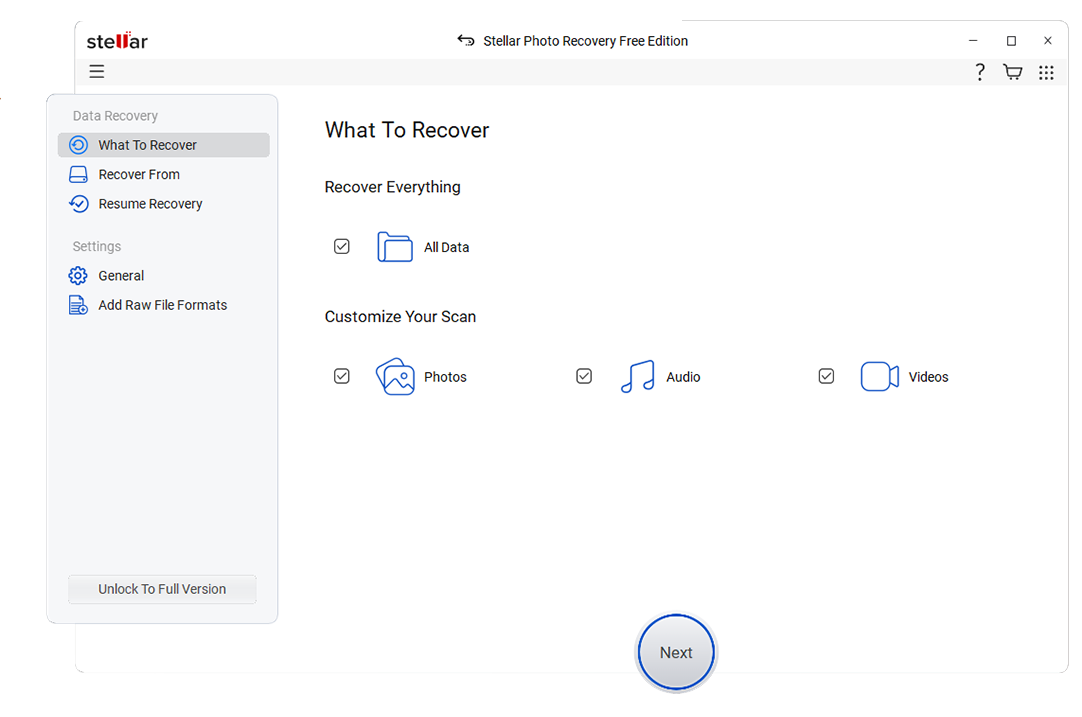
If you manage mission-critical storage, virtual machines, or corporate email systems, Stellar's focus on complex, enterprise-grade recoveries can complement simpler tools you use for everyday incidents.
4. Disk Drill
Disk Drill is a versatile togethershare data recovery alternatives solution that combines powerful recovery with extra disk utilities. It is best for users who want a balance of recovery power, disk health tools, and a clean interface, especially on macOS. Disk Drill's visual approach to scans makes it easier to see what the software is doing and how far along the recovery process is.

Beyond its core ability to restore lost partitions and files, Disk Drill includes data protection features that can help you prevent future data loss incidents on frequently used drives.
5. MiniTool Power Data Recovery
MiniTool Power Data Recovery is a straightforward data recovery software like togethershare that emphasizes simplicity and affordability. It is best for budget-conscious home users who need occasional recovery for deleted or lost files on Windows. Scenario-based modules make it easy to choose the right mode for accidental deletion, lost partitions, or basic drive failures.
If you mainly deal with small personal projects and do not require extensive enterprise features, MiniTool can be an economical addition to your toolkit for replace togethershare in everyday situations.
Side-by-Side Comparison Table of TogetherShare Data Recovery Alternatives
| Software | File System Support | Price | Free Version | Ease of Use | Scan Speed | Recovery Success Rate | Key Features |
|---|---|---|---|---|---|---|---|
| TogetherShare Data Recovery | NTFS, FAT32, exFAT, some HFS+ | Mid-range, per-device license | Yes, small recovery limit | Easy | Moderate | Good on simple cases, mixed on severe damage | Quick and deep scan, file preview, partition recovery |
| Wondershare Recoverit | NTFS, FAT/FAT32, exFAT, HFS+, APFS, EXT variants | Tiered plans for individuals and businesses | Yes, recover a limited data amount | Very easy | Fast to moderate depending on drive size | High, especially for media and recent deletions | Advanced video recovery and repair, crashed PC recovery, wide format support |
| EaseUS Data Recovery Wizard | NTFS, FAT/FAT32, exFAT, HFS+ | Subscription and perpetual options | Yes, low data cap | Very easy | Fast | High for formatted and deleted partitions | Partition loss recovery, formatted drive recovery, file preview |
| Stellar Data Recovery | NTFS, FAT/FAT32, exFAT, HFS+, APFS (editions vary) | Higher, especially for tech and RAID editions | Yes, limited recovery | Moderate | Moderate | High on complex and business-grade scenarios | RAID and server recovery, email database recovery, corrupted drive handling |
| Disk Drill | NTFS, FAT/FAT32, exFAT, HFS+, APFS, EXT variants | One-time license with major upgrades paid | Yes, limited recovery or scan-only (varies by OS) | Very easy | Fast | High on damaged partitions and external media | Data protection tools, disk health monitoring, partition search |
| MiniTool Power Data Recovery | NTFS, FAT/FAT32, exFAT, some HFS+ | Budget-friendly tiers | Yes, small data cap | Easy | Moderate to fast | Good for common home-use cases | Scenario-based modules, lost partition recovery, file filters |
Conclusion
TogetherShare Data Recovery can handle many everyday data loss issues, but it is not always the best fit if you need higher recovery success, faster scans, or more advanced features. Exploring alternatives like Recoverit, EaseUS, Stellar, Disk Drill, and MiniTool gives you a wider range of tools to match your budget, operating system, and technical needs.
By comparing capabilities such as file system support, scan speed, and specialized media recovery, you can select the solution that best protects your personal projects, recorded streams, and business data going forward. Trying more than one tool is often worthwhile, because different scan engines may surface additional files that a single solution cannot detect, especially in complex, high-stakes data loss scenarios.
Next: Stellar Data Recovery Alternatives
FAQ
-
Is TogetherShare Data Recovery safe to use?
TogetherShare Data Recovery is generally considered safe when downloaded from the official website, as it performs read-only scans and does not modify the source disk during analysis. Still, you should always recover files to a separate drive to avoid overwriting data and to keep the original device intact in case you need to try another tool. -
What is the best alternative to TogetherShare for video and stream recovery?
Wondershare Recoverit is one of the strongest TogetherShare alternatives for video and stream recovery because it supports large video formats, offers advanced video repair, and can handle corrupted or partially overwritten recordings from OBS, cameras, and capture cards. For creators and streamers, running a deep scan soon after data loss greatly improves the chances of restoring full, playable clips. -
Can I recover data for free with TogetherShare alternatives?
Many TogetherShare alternatives, including Recoverit, EaseUS, Stellar, Disk Drill, and MiniTool, offer free versions that let you scan and preview files, and often recover a limited amount of data. Free tiers are useful for testing recovery quality, but for large projects, full drives, or business workloads, upgrading to a paid license is usually necessary. -
Will switching from TogetherShare improve my recovery success rate?
Switching can improve your recovery success rate in some situations because different tools use distinct scan algorithms and file signature databases. If TogetherShare could not find or open certain files, trying an alternative such as Recoverit or Stellar may detect additional recoverable data, especially on severely corrupted or partially formatted drives. -
Which TogetherShare alternative is best for non-technical users?
EaseUS Data Recovery Wizard, Recoverit, and Disk Drill are particularly friendly for non-technical users thanks to their guided workflows, clear scan progress indicators, and preview functions. These tools reduce configuration steps and technical jargon so you can focus on selecting the right drive, reviewing results, and restoring only the files you actually need.


