
 TL;DR:
Before using data recovery software or rolling back your app history, search the original WhatsApp chat, device storage folders, and connected computer drives, because a deleted message entry does not automatically erase an already downloaded PDF file.
● Locate surviving local copies on Android by navigating to Internal storage/Android/media/com.whatsapp/WhatsApp/Media/WhatsApp Documents, or on iPhone by checking the Files app and its Recently Deleted folder where items remain for up to 30 days.
● Restoring an earlier Google Account or iCloud backup will overwrite your current WhatsApp database, meaning you must export and safeguard any newer conversations before proceeding with the recovery.
● Wondershare Recoverit PDF Recovery can extract lost documents from readable computer drives, external HDDs, SSDs, USB drives, or removable memory cards, but it cannot directly scan Android or iPhone internal storage.
Ask AI for a summary
 ChatGPT
 Perplexity
 Gemini
 Claude
 Grok
Grok
A missing WhatsApp PDF is not always a deleted file. The message may be gone while a downloaded copy remains, or the message may still exist while the attachment is no longer available. A WhatsApp community case involving lost media and documents shows why identifying which copy disappeared must come before reinstalling the app or running recovery software.
Quick answer: First search the chat, Android Documents folder, iPhone Files app, computer Downloads folder, and other participants' copies. Restore WhatsApp only if a verified backup predates the deletion. Use drive recovery software only when the PDF had been saved to a computer, external drive, USB drive, or removable memory card.
Try Recoverit to Recover a Deleted PDF
 Security Verified. Over 7,302,189 people have downloaded it.
In this article
Part 1. Can You Recover a Deleted PDF From WhatsApp?
Yes, sometimes. The best route depends on whether the PDF message disappeared, the downloaded file was deleted, or both copies are gone. WhatsApp backup restoration and storage-device recovery solve different problems, so using the wrong one can add risk without recovering the document.
If you need to know how to download a deleted PDF from WhatsApp, start with the surviving chat or another participant's copy. If you need to know how to recover a deleted PDF from WhatsApp after its local copy was erased, first identify whether that copy was on a phone, computer, or removable card.
Deleted WhatsApp Message vs. Deleted PDF File
A WhatsApp document has at least two components: a message entry in the chat and the PDF bytes stored or downloaded somewhere. Deleting the message does not necessarily erase a PDF that was saved to Files, Downloads, a computer, cloud storage, or another chat. Conversely, a message can remain visible even when the local PDF is missing and can no longer be downloaded.
PDF Missing From WhatsApp vs. Deleted From Device Storage
A message that still shows a download icon means the PDF is not currently stored where WhatsApp expects it. Try downloading it again, but availability is not guaranteed. If the message was deleted but a downloaded copy remains in Files, Downloads, WhatsApp Documents, cloud storage, or a computer folder, search that storage instead of rolling WhatsApp back.
Recovery With a Backup vs. Without a Backup
A WhatsApp backup restores a prior state of chats and included media. It is not a browsable folder from which you can select one PDF. Storage recovery software instead scans a readable drive for a deleted local file. It does not reconstruct a WhatsApp message or decrypt a WhatsApp backup.
Android vs. iPhone PDF Recovery Limits
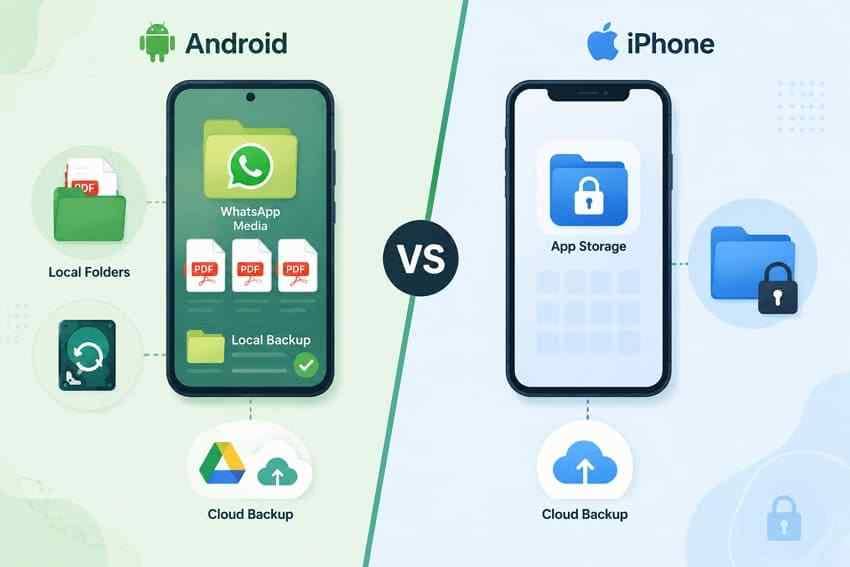
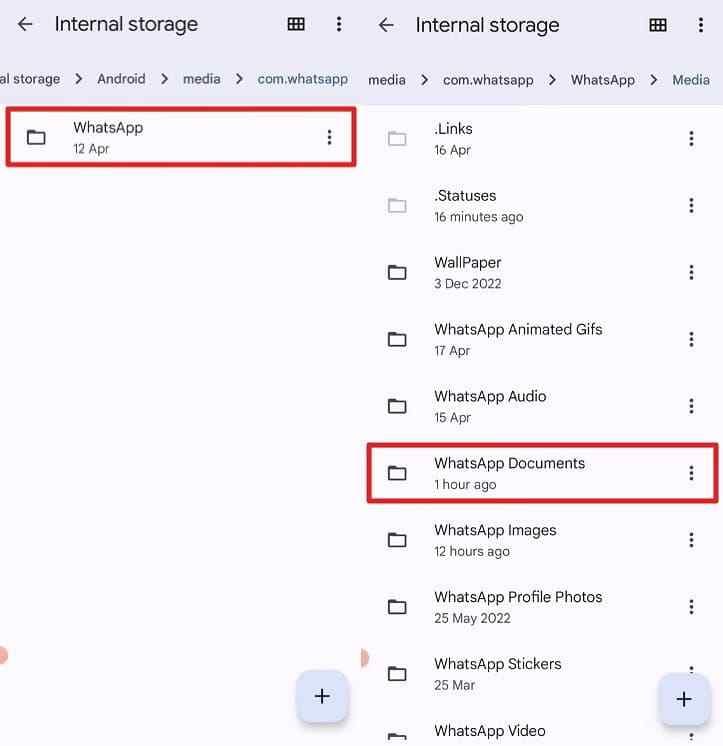
Android exposes more local media storage to file managers. Current installations commonly place received documents under Internal storage/Android/media/com.whatsapp/WhatsApp/Media/WhatsApp Documents, although the exact path may vary by Android version, manufacturer, storage choice, and whether WhatsApp Business is used.
On iPhone, WhatsApp's private app storage is not browsable through the Files app. Files can help only when the PDF was explicitly saved to On My iPhone, iCloud Drive, or another Files provider. Apple's current guidance says files deleted from iCloud Drive or On My iPhone remain in Recently Deleted for up to 30 days unless they were permanently removed.
When a Deleted WhatsApp PDF May Still Be Recoverable
Your odds are strongest when one of these statements is true:
- The chat still contains an active document attachment.
- The PDF was downloaded to Android storage, the iPhone Files app, WhatsApp Desktop, or a browser download folder.
- The sender, recipient, or another group member still has a copy.
- A WhatsApp backup completed before deletion and contains the relevant chat and document.
- The PDF was deleted from a readable computer drive, USB drive, or removable memory card and its data has not been overwritten.
Part 2. Why WhatsApp PDF Files Disappear
The same symptom, a PDF that will not open, can come from several different failures. Use the table to identify what likely happened before choosing a recovery method.
| Situation | What likely happened | Recovery possibility |
| PDF was deleted from the WhatsApp chat | The message entry was removed for you, for everyone, or with the entire conversation | Look for an independent saved copy, another participant's copy, or a backup made before deletion |
| Downloaded PDF was deleted from device storage | The message may still exist, but the local file was removed | Re-download if available; otherwise check Files, Downloads, Recently Deleted, or storage backups |
| Entire WhatsApp chat was deleted | All visible message references in that chat disappeared from the current database | An older backup may restore the chat, but it also rolls back current history |
| WhatsApp was reinstalled or moved to a new phone | The correct backup, phone number, Google Account, or Apple Account may not have been used during setup | Possible if the matching backup still exists and can be authenticated |
| Phone storage or SD card became corrupted | The file may exist but the storage or file system cannot read it | Stop using the storage; review SD card corruption options before formatting |
| PDF was never fully downloaded | No complete local file was written | Ask for a resend or retry the download; file recovery cannot recover bytes that never arrived |
| PDF is present but fails to preview | The download may be incomplete, zero length, encrypted, or structurally damaged | Try another viewer, obtain another copy, or review fixes for PDF preview errors |
Part 3. What to Check Before Recovering a WhatsApp PDF
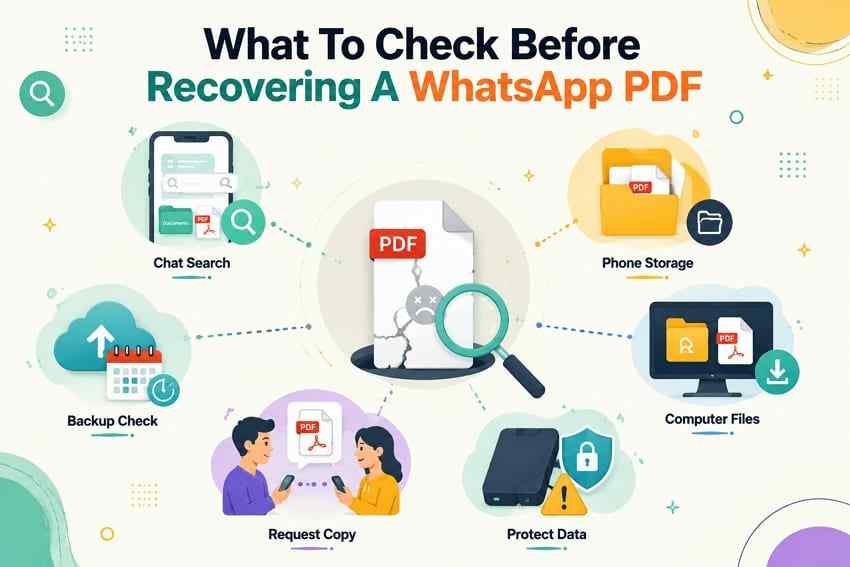
Work from the least disruptive option to the most disruptive one. Do not uninstall WhatsApp until you have confirmed that a useful backup exists and preserved any newer chats or documents you cannot afford to lose.
- Search the original chat: Open the contact or group, search by the likely file name or pdf, and review Media, links, and docs.
- Search device storage: On Android, check WhatsApp Documents and Downloads. On iPhone, search Files, On My iPhone, iCloud Drive, Downloads, and Recently Deleted.
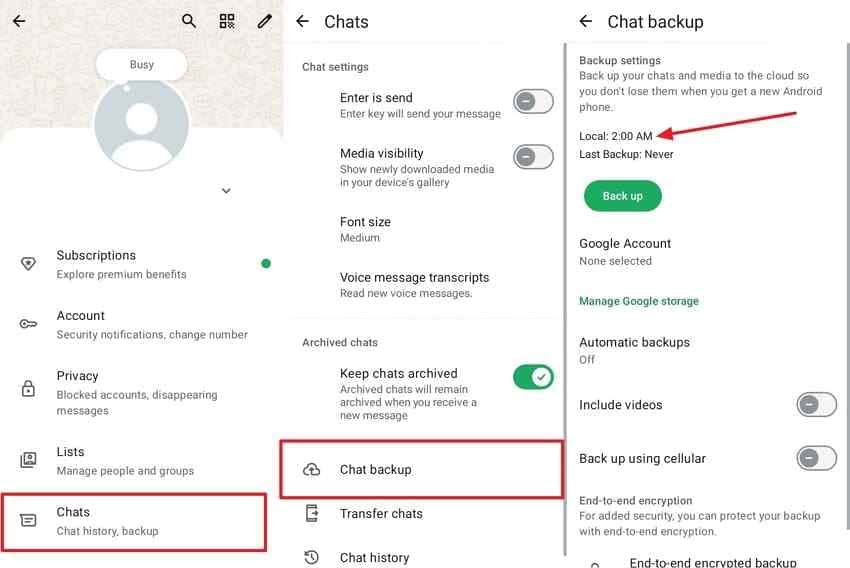
- Verify backup timing: In WhatsApp, open Settings > Chats > Chat backup. Continue only if the displayed backup predates deletion and likely includes the document.
- Check computer copies: Search Downloads, Documents, Recycle Bin or Trash, WhatsApp Desktop's chosen save location, browser downloads, and email attachments.
- Ask another participant: A sender, recipient, or group member may still have the fastest and cleanest copy.
- Stop writing to affected storage: If a local computer, USB, or memory-card copy was deleted, do not install software or save new files to that same drive.
Do not confuse two Google Drive areas: A PDF you manually saved to Drive is a normal file and may be restored from Trash under Google Drive Help. A WhatsApp backup is app backup data, not a folder of individually downloadable PDFs.
Part 4. How to Recover Deleted PDF Files From WhatsApp
Start with the method that changes the least. The following six methods move from re-downloading or locating an existing copy to backup restoration and, only for supported computer or removable storage, deleted-file scanning.
Method 1. Download the PDF Again From the WhatsApp Chat
Best for: The message is still visible and WhatsApp still offers the attachment for download.
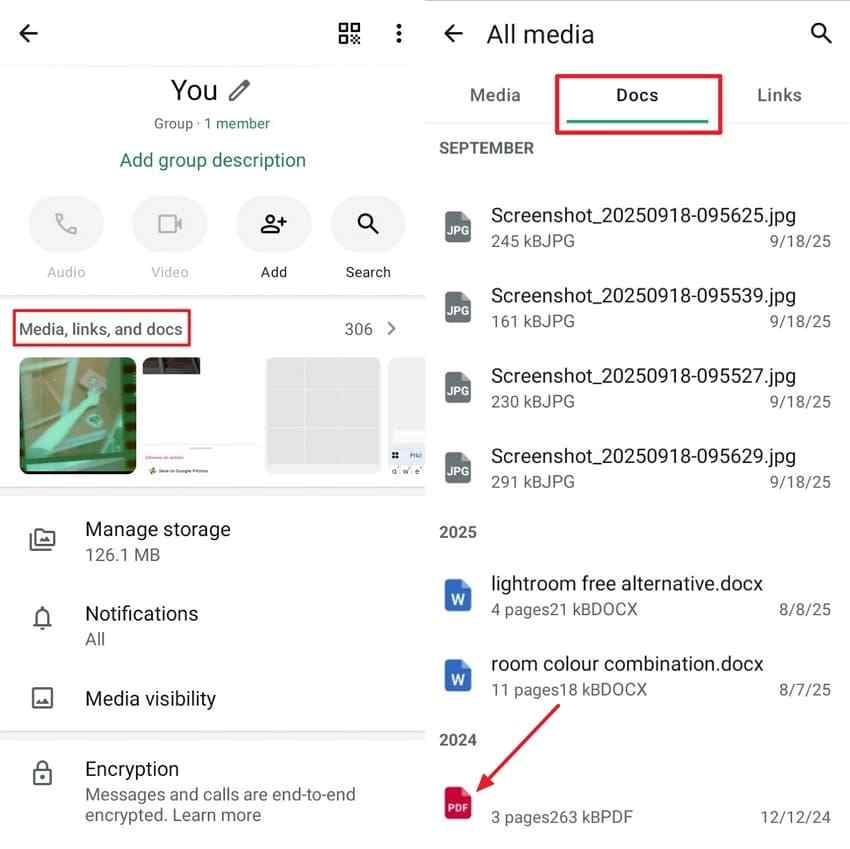
Instructions. Open the original contact or group chat > Tap the contact or group name > Open Media, links, and docs > Select Docs > Open the PDF > Tap the download icon if it appears. After the download finishes, save or share an independent copy to Files, Drive, a computer, or another permanent location.
If WhatsApp reports that the file is unavailable, repeated tapping will not recreate it. Move to the sender-copy or backup methods.
Method 2. Check WhatsApp Documents, Downloads, or the Files App
Android can expose downloaded WhatsApp documents through a file manager, while iPhone Files can show only documents saved outside WhatsApp's private app storage. Use the matching instructions below.
For Android
- On newer Android devices, open Files by Google, Samsung My Files, or another trusted file manager. Browse to Internal storage > Android > media > com.whatsapp > WhatsApp > Media > WhatsApp Documents.
- On older devices, try Internal storage > WhatsApp > Media > WhatsApp Documents. Search or sort by date, and check the Sent subfolder if you originally sent the document. Copy any found PDF to a safe independent folder.
Important: Do not grant unknown recovery apps broad access to private chats and storage. A file manager can locate existing files, but it does not undelete data from encrypted phone storage.
For iPhone
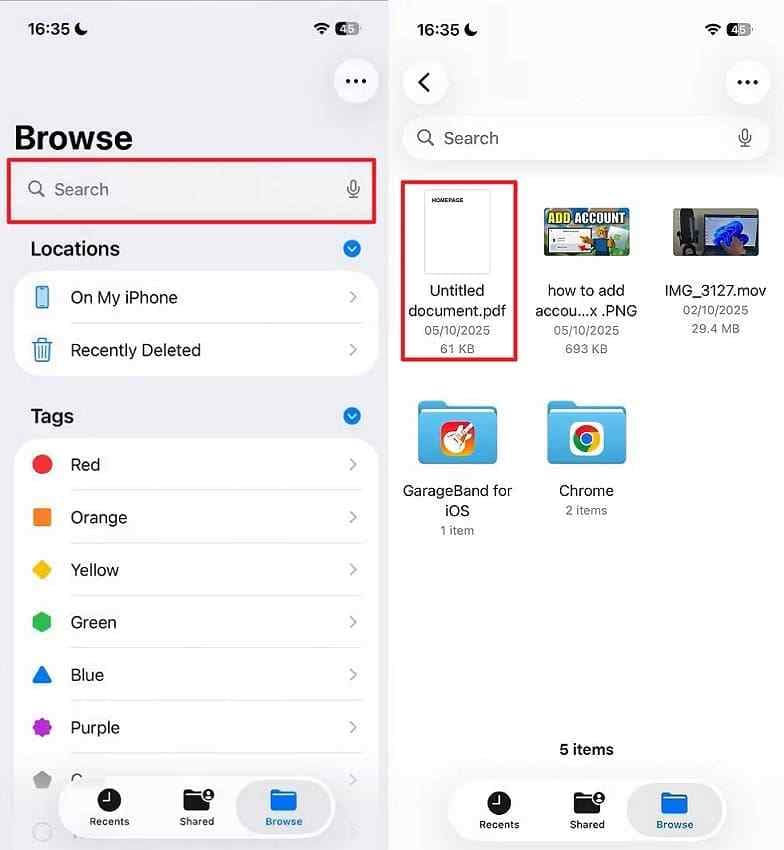
- Open Files and search by the document name, a keyword, or pdf. Check Recents, Downloads, On My iPhone, iCloud Drive, and any enabled third-party cloud location.
- If the PDF is not there, open Browse > Recently Deleted. Select the PDF and tap Recover if it is present. This can show only files that were saved outside WhatsApp's private app storage.
This method finds only a PDF that was saved outside WhatsApp's private app storage. According to Apple Support, Files app items remain in Recently Deleted for 30 days unless they were permanently deleted sooner.
Method 3. Restore WhatsApp From an Earlier Google Account or iCloud Backup
Best for: The chat or document is absent from the current installation, and a confirmed WhatsApp backup from before deletion exists.
Risk: WhatsApp restoration is not a one-file restore. The restored history reflects the backup. Newer messages and attachments that are not in that backup can disappear from the restored app view. Export or save anything important first, and do not create a new backup that could replace the older one you need.
For Android
Step 1. Open WhatsApp > Settings > Chats > Chat backup > Record the backup date, Google Account, and backup size > Stop if the backup was created after deletion. After preserving newer content, uninstall WhatsApp.
Step 2. Reinstall WhatsApp from Google Play > Verify the same phone number while using the same Google Account > Approve the required access > Tap Restore when WhatsApp finds the backup.
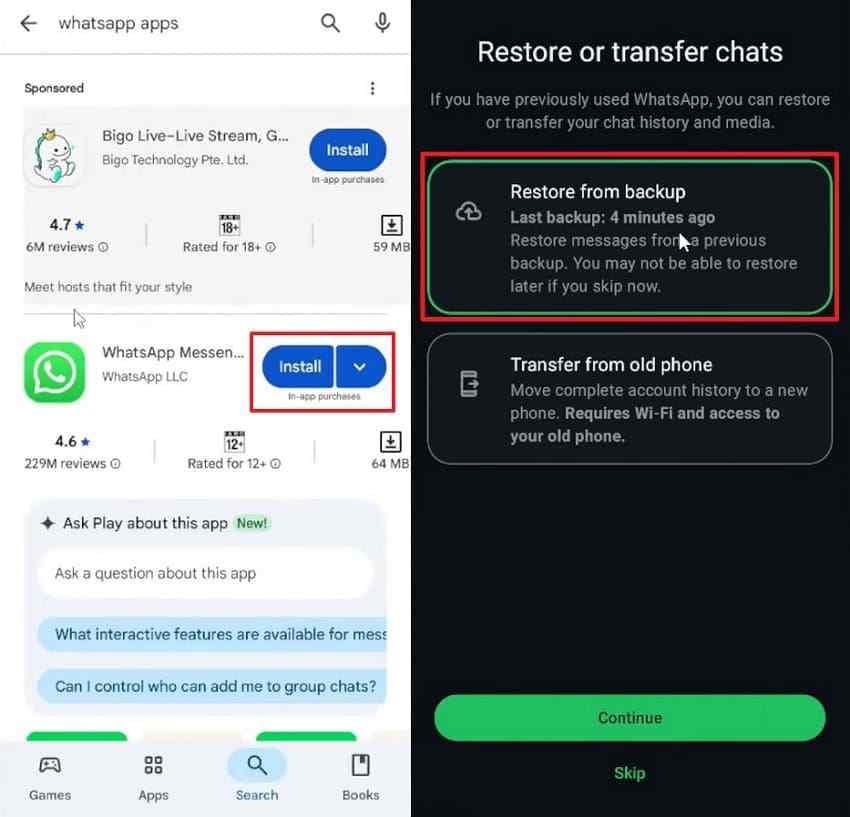
Wait for both messages and media to finish restoring, then check the relevant chat and WhatsApp Documents folder.
For iPhone
Step 1. Open WhatsApp > Settings > Chats > Chat Backup > Verify that the iCloud backup predates deletion > Confirm that the same Apple Account and iCloud Drive are available. After preserving newer content, remove and reinstall WhatsApp from the App Store.
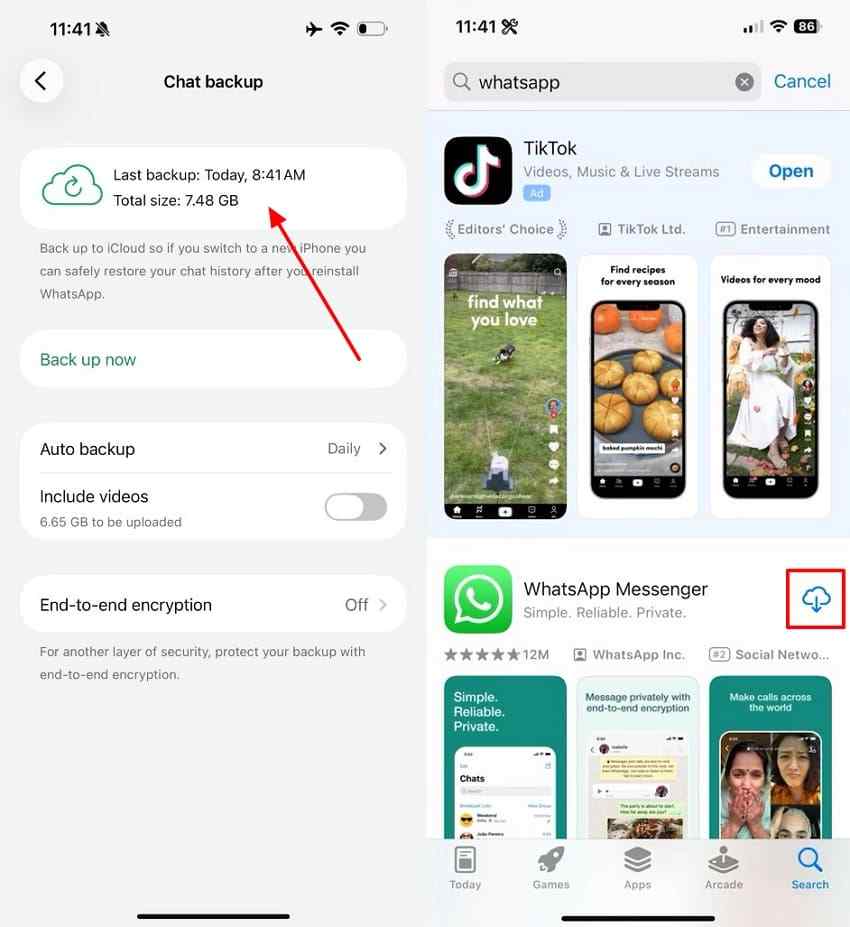
Step 2. Open WhatsApp setup > Verify the same phone number > Choose Restore Chat History or Restore from backup when prompted > Continue with Restore.
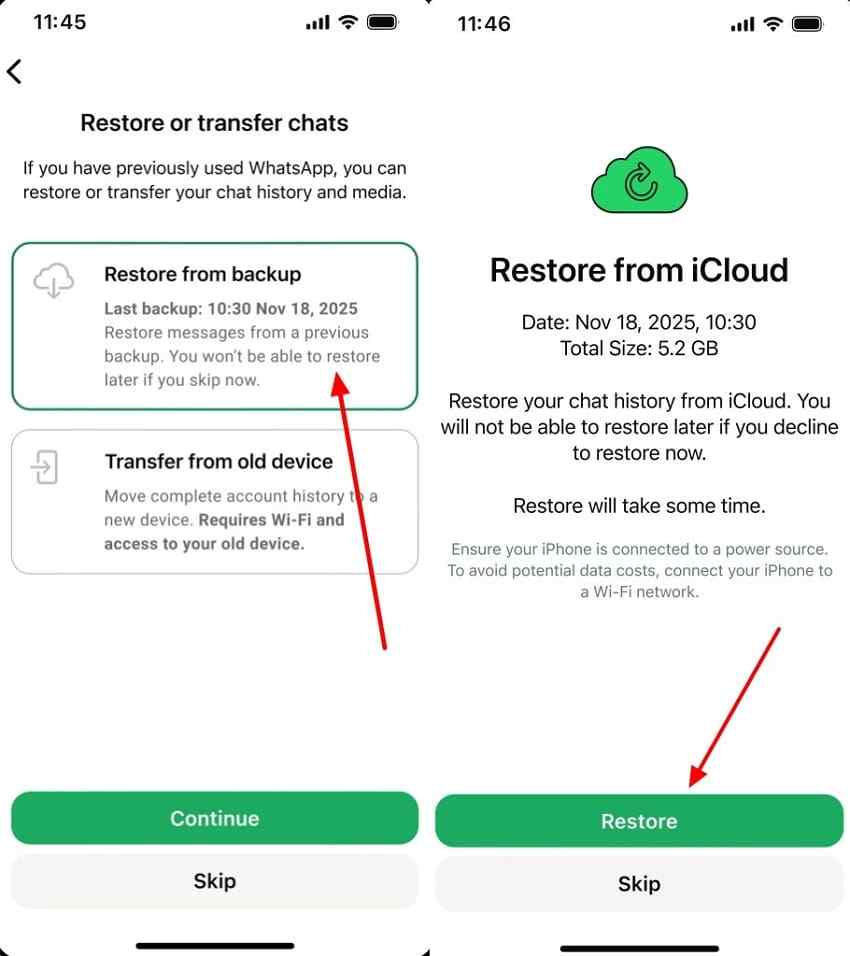
After messages and media finish restoring, open the relevant chat and save the PDF outside WhatsApp.
WhatsApp's current backup and restore guidance should be treated as the source of truth for the latest prompts. If end-to-end encrypted backups are enabled, restoration also requires the configured password, 64-digit key, or available passkey method. Neither WhatsApp nor a recovery program can bypass a missing encryption credential.
Method 4. Check a Local Android WhatsApp Backup
Best for: An advanced Android user has a local database backup that predates deletion, and cloud restoration is not the right path.
Critical limitation: A msgstore file is an encrypted chat database. It does not by itself contain the PDF bytes stored in WhatsApp Documents. Restoring it may bring back the message reference, but the PDF still needs to survive in the Media folder, be included in another backup, or remain downloadable.
Step 1. Before changing anything, copy both the Databases folder and Media/WhatsApp Documents folder to a computer or external drive. A current path is commonly Internal storage/Android/media/com.whatsapp/WhatsApp/Databases.
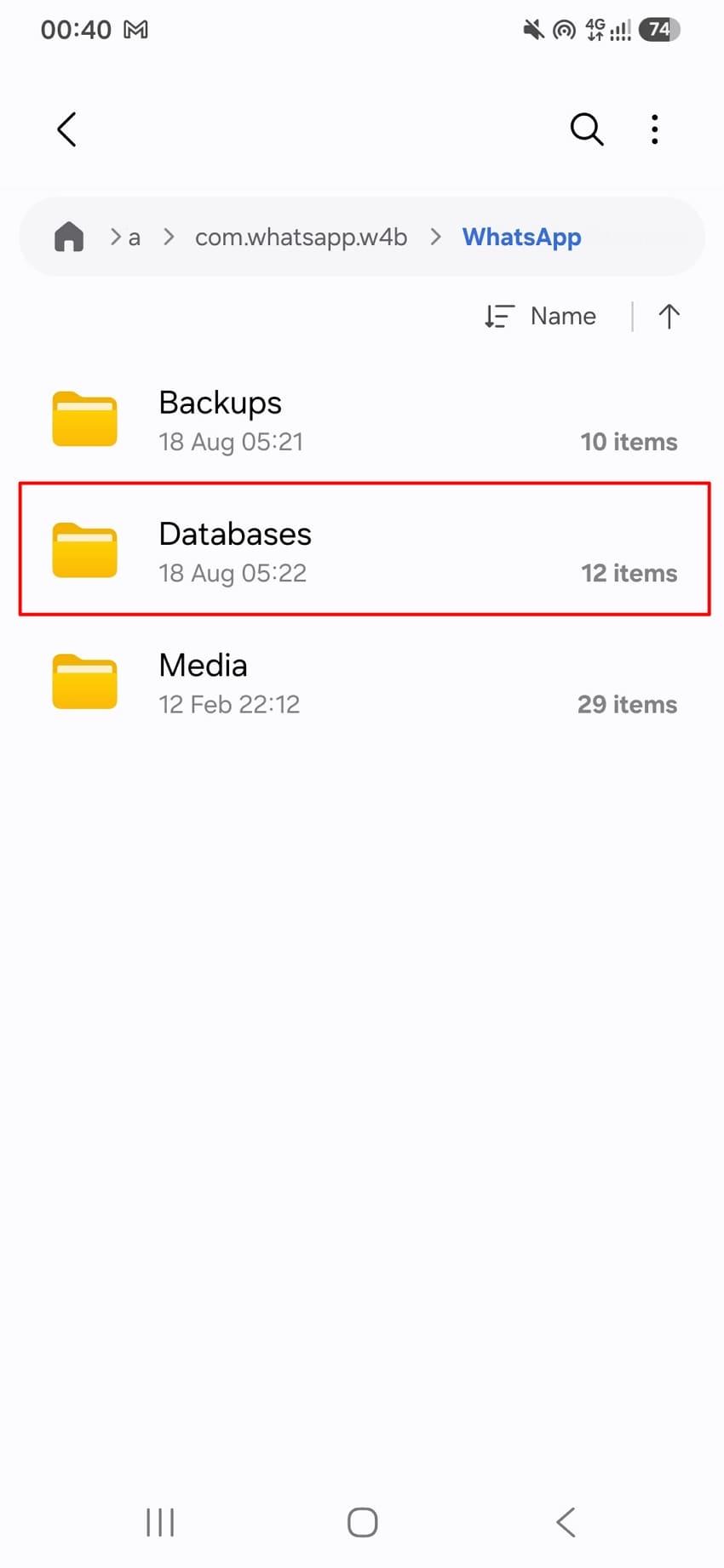
Step 2. Identify a dated msgstore backup from before deletion. If your device-specific restore workflow requires renaming it, preserve its actual encryption suffix exactly. For example, rename msgstore-YYYY-MM-DD.1.db.crypt14 to msgstore.db.crypt14. Do not change crypt14 to crypt15, or vice versa.
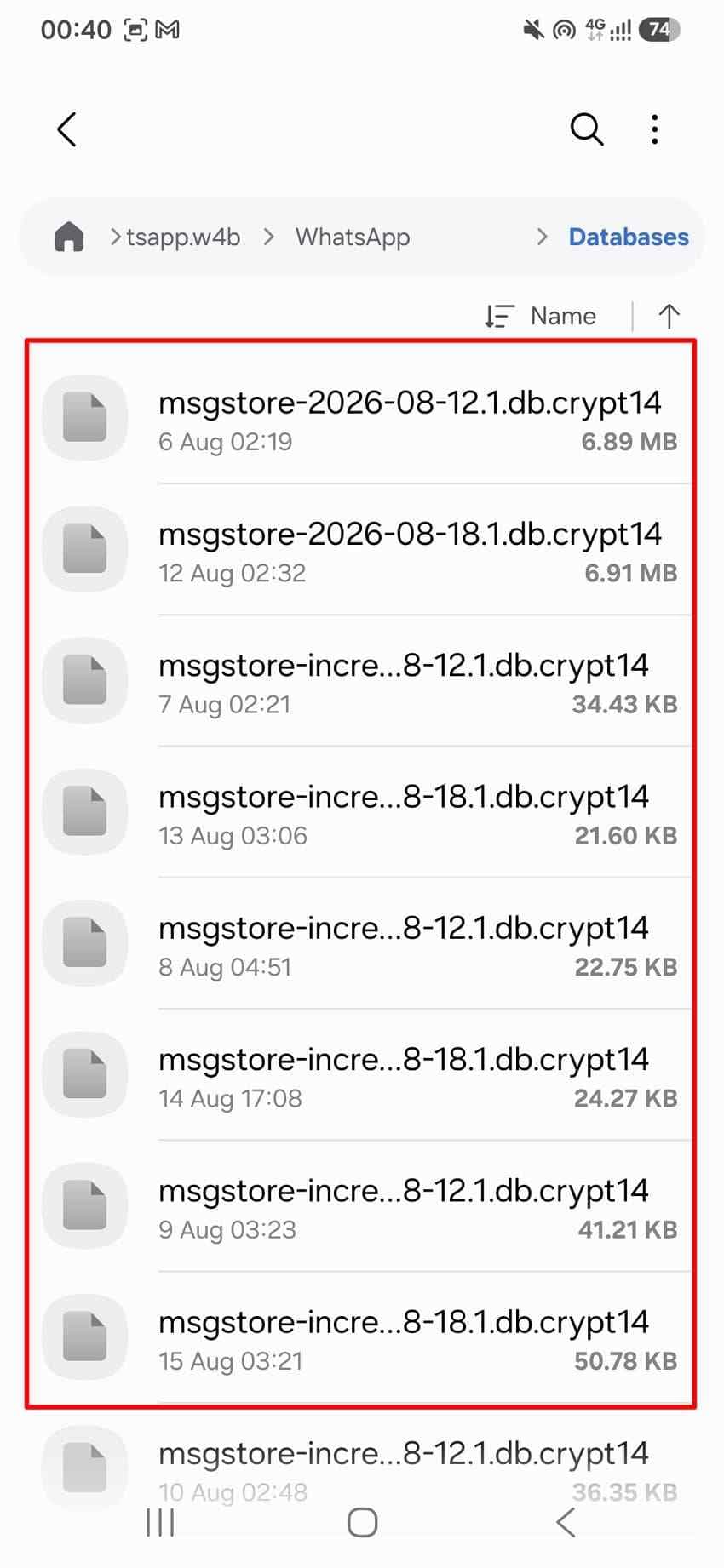
Step 3. Reinstall WhatsApp only after safeguarding newer data > Verify the same number > Tap Restore if WhatsApp recognizes the local backup > Check both the chat and WhatsApp Documents folder. If the message returns but the PDF does not open, the database restore did not restore the missing media bytes.
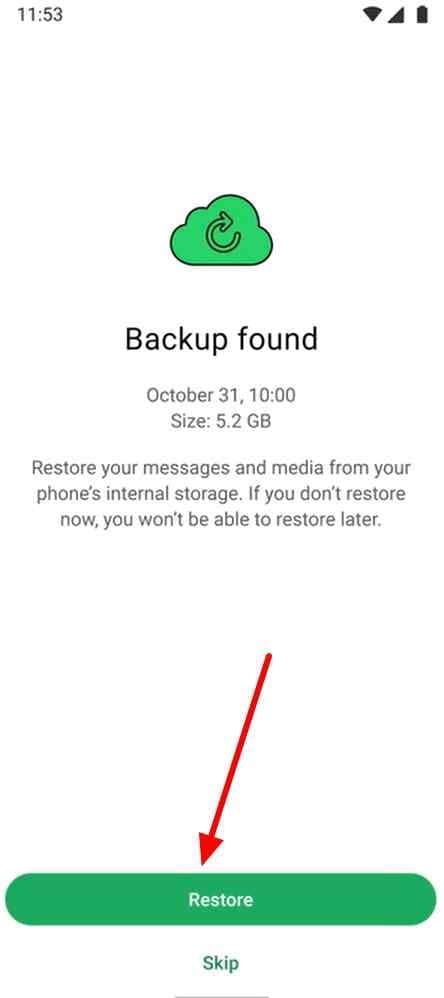
Local backup paths, retention, encryption suffixes, and restore prompts change across WhatsApp and Android versions. If the copy is legally or operationally important, preserve the original phone and folders before experimenting.
Method 5. Ask the Sender or Recipient to Send the PDF Again
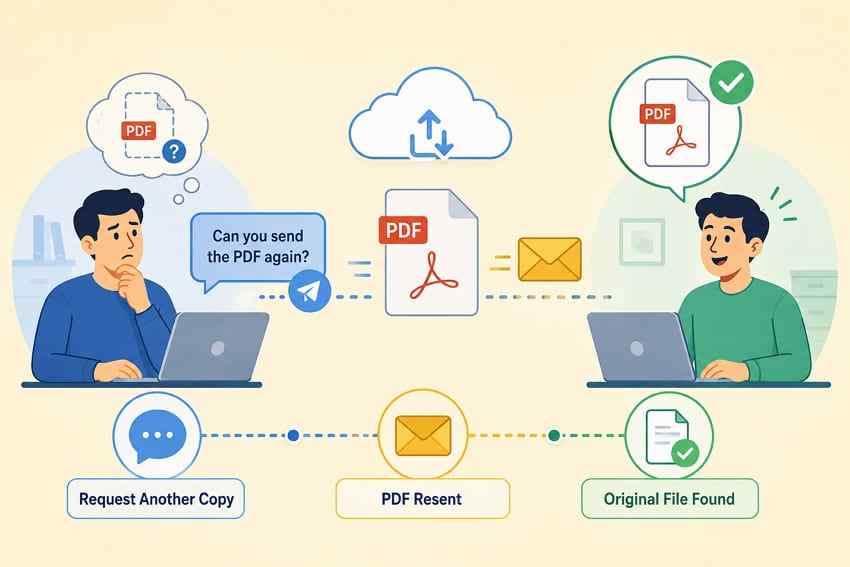
This is often the fastest method and carries no backup rollback or overwrite risk. Ask the sender to attach the original PDF again rather than sending a screenshot. In a group, ask whether another participant downloaded or forwarded the file. Also search your other WhatsApp chats because a forwarded copy is independent of the missing message.
For contracts, invoices, medical records, or evidence, confirm that the resent file is the correct version. Compare the file name, size, page count, creation date, or a trusted checksum when authenticity matters.
Method 6. Recover Deleted Local PDF Copies With Wondershare Recoverit
Best for: The WhatsApp PDF had been downloaded or copied to a Windows or Mac drive, external HDD or SSD, USB drive, or removable memory card, and that local copy was later deleted, formatted, or lost after file-system damage.
Not for: Direct scanning of Android or iPhone internal storage. Wondershare's current user guide explicitly lists mobile devices among unsupported recovery sources. For a phone microSD card, remove it only when it is portable storage, connect it through a card reader, and scan the card as a separate device. An SD card formatted as encrypted internal or adopted storage cannot be treated as an ordinary removable card.
Wondershare Recoverit PDF Recovery can scan supported computer and removable storage for recoverable PDF and PDF/A files. Use it after Recycle Bin, Trash, backup, and cloud-copy checks fail, and only when the affected drive remains readable.
Key Features
- PDF-focused filtering: Narrow scan results to documents and PDF files instead of reviewing every discovered item.
- File-system and signature scanning: Locate PDFs through surviving file records or recognizable PDF structure when names and folders are missing.
- Broad readable-storage support: Scan internal computer drives, external HDDs and SSDs, USB drives, and removable memory cards listed in the current Recoverit technical specifications.
- PDF preview: Preview supported, intact PDFs before recovery. Preview is evidence that the tool can parse the found file, not a guarantee that every page or embedded object is perfect.
- Selective recovery: Recover only the needed files and save them to a different destination to reduce overwrite risk.
How to Recover a Deleted WhatsApp PDF From Computer or Removable Storage
Step 1. Select the Original Storage Location
Install and run Recoverit from a different drive whenever practical. Under Hard Drives and Locations, select the computer partition or connected device where the WhatsApp PDF was last saved, then start the scan.

Step 2. Scan and Filter for PDFs
Let the scan examine the selected location. Use File Type, File Location, file-name search, or a .pdf filter to narrow the results. If the original file-system record is gone, also review files with generated names.

Step 3. Preview and Recover to Another Drive
Preview candidate PDFs when available. Select the correct file, click Recover, and save it to a different physical drive. Do not write the result back to the source device while other deleted data may still be recoverable.

For more detail about deleted-document behavior, see how to recover deleted PDF copies. Recovery remains impossible when the relevant blocks have been overwritten, securely erased, rendered inaccessible by device encryption, or lost with physically failed hardware.
Try Recoverit to Recover a Deleted PDF
Security Verified. Over 7,302,189 people have downloaded it.
Part 5. Where Else Can a Deleted WhatsApp PDF Still Exist?
Search by the file's subject, sender, likely date, and .pdf, not only by the exact original name. WhatsApp documents are frequently renamed during forwarding, browser downloads, or manual saving.
- Android WhatsApp Documents folder: The file may remain in received documents or the Sent subfolder even if it is hard to find in the chat.
- iPhone Files locations: Check On My iPhone, iCloud Drive, Downloads, third-party providers, and Recently Deleted for PDFs that were explicitly saved outside WhatsApp.
- WhatsApp Desktop or browser downloads: Search the computer's Downloads folder, browser download history, Documents, Desktop, Recycle Bin, and Trash.
- Email and cloud storage: Look in sent and received email attachments, Google Drive, OneDrive, Dropbox, iCloud Drive, and their trash or deleted-file areas. These apply only to PDFs manually stored there, not to the hidden contents of a WhatsApp backup.
- Other WhatsApp chats: A forwarded copy in another conversation may remain available even after the original message is removed.
- Other participants' devices: Senders and group members may have the original file or an earlier version.
- External storage and backups: Search USB drives, external disks, SD cards, Time Machine, File History, NAS snapshots, and other backups used before the deletion.
Writer note: On Android, a PDF can remain in local WhatsApp media storage even when it is no longer obvious inside a chat. The outcome depends on whether the user deleted only the message, deleted media from device storage, cleared app data, or uninstalled the app with local content removed.
Part 6. When WhatsApp PDF Recovery May Not Work
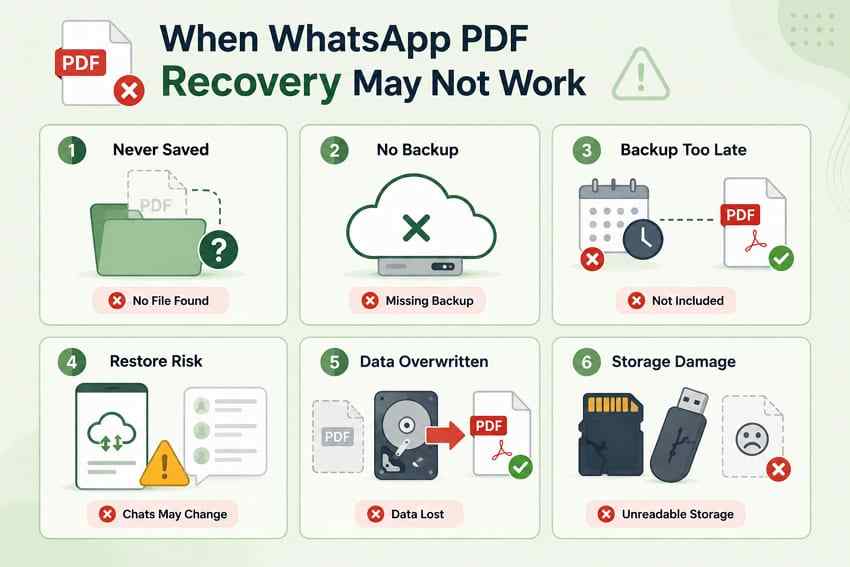
Not every missing document leaves a recoverable copy. The following conditions explain when another method, another source, or a professional assessment is more realistic than repeated software attempts:
- The PDF was never downloaded or saved: A failed or incomplete transfer leaves no complete local file for storage recovery.
- No backup predates deletion: A later backup normally preserves the newer state in which the chat or attachment is already missing.
- The useful backup was replaced or deleted: Google's current storage guidance says deleting an Android WhatsApp backup from account storage is permanent. Android WhatsApp backups also count toward Google Account storage.
- The backup cannot be authenticated: The wrong phone number, account, or missing end-to-end encrypted backup credential can prevent restoration.
- Restoration risk is unacceptable: An older backup may recover the document but roll the visible chat history back past important newer messages.
- Deleted blocks were overwritten: New downloads, app activity, operating-system writes, TRIM on an SSD, or continued memory-card use can eliminate the old PDF data.
- Storage is encrypted or physically damaged: A computer tool cannot bypass phone encryption, and software is inappropriate for a clicking, electrically failed, or undetected device.
Part 7. How to Prevent Losing WhatsApp PDF Files
Once an important PDF is available again, move it outside the chat and protect it as a normal document. These habits reduce the chance that one deleted message, expired attachment, or unusable backup becomes permanent data loss:
- Save important PDFs outside WhatsApp: Use Files, a managed Documents folder, or an approved records system as soon as the file arrives.
- Keep a second independent copy: Store critical contracts, reports, tickets, invoices, and records on a computer or another controlled location.
- Review WhatsApp backup status: Confirm that backups complete successfully and that the selected account has enough storage. Google states that Android WhatsApp backups count toward Google Account storage.
- Protect encrypted backup access: Store the password or recovery method securely. A backup you cannot authenticate is not a usable recovery plan.
- Use cloud versioning or trash intentionally: For PDFs saved outside WhatsApp, services such as iCloud Drive, Google Drive, and OneDrive can provide a separate deletion-recovery path under their own retention rules.
- Back up computer and removable copies: Use File History, Time Machine, NAS snapshots, or another tested backup for exported and downloaded documents.
- Test restoration: A backup is only trustworthy when you know the account, credentials, scope, and restore procedure work.
- Do not use chat as the only archive: Messaging apps are communication tools, not permanent document-management systems.
Conclusion
To recover a deleted PDF from WhatsApp, identify which copy is missing before changing the app. Re-download from the chat, search device and computer folders, or ask another participant first. Restore a verified older backup only when its date and rollback consequences are acceptable. If a separate PDF copy was deleted from a readable computer drive or removable card, Recoverit can scan that storage, but it cannot directly recover WhatsApp data from phone internal memory.
Try Recoverit to Recover a Deleted PDF
Security Verified. Over 7,302,189 people have downloaded it.
FAQs
-
Can a WhatsApp PDF keep its original file name after recovery?
Yes, when the surviving chat, backup, or file-system record retains the original name. A raw storage scan may assign a generated name if the directory record is gone, so identify the PDF by preview, size, content, and dates rather than name alone. -
Why does a recovered PDF show 0 KB or fail to open?
A 0 KB result can be an empty source file, an incomplete download, or a surviving directory entry whose content is gone. A nonzero PDF may still fail if blocks were overwritten or its structure is damaged. Obtain another copy when possible and preview recovery results before saving. -
Can encrypted PDF files still be recovered?
The encrypted file bytes may be recoverable, but recovery does not remove the PDF password or encryption. You still need authorized credentials to open it. WhatsApp backup encryption is separate and likewise cannot be bypassed by PDF recovery software. -
Does deleting a WhatsApp chat delete a PDF already saved elsewhere?
Not normally. A PDF saved to Files, Downloads, cloud storage, a computer, another chat, or an external drive is an independent copy. Deleting the WhatsApp chat removes that conversation from the current history, but it does not automatically erase unrelated copies. -
Can I download a deleted PDF from WhatsApp without a backup?
Only if another copy still exists. Try the surviving message, Android WhatsApp Documents folder, iPhone Files app, computer downloads, another chat, or the sender. If the attachment was never downloaded and is no longer available in the chat, local recovery software has no PDF bytes to restore. -
Can Recoverit recover a WhatsApp PDF directly from Android or iPhone?
No. Recoverit does not directly scan Android or iPhone internal storage. It can help when the PDF was deleted from a supported computer drive, external drive, USB device, or removable memory card that the computer can read.