

 TL;DR:
Yidio's high ad density, cluttered UI, and spotty coverage push many users to seek better streaming guide alternatives that offer cleaner interfaces, robust filters, and improved regional support.
● Reelgood is a feature-rich, all-in-one guide ideal for US users wanting accurate tracking, modern design, and cross-platform availability.
● JustWatch excels globally by showing pricing and quality options, making it the best choice for international viewers and cost-conscious movie fans.
● TV Time focuses heavily on episode tracking, watch history, and community engagement, suiting serial binge-watchers rather than movie discoverers.
● Plex Discover integrates personal media libraries with streaming content into one polished hub, perfect for users combining local files with online services.
● Apple TV app is a seamless aggregator specifically for the Apple ecosystem, restricted by its lack of integration outside Apple hardware.
● Screen recordings from streams or watch parties can be recovered using Wondershare Recoverit, which requires deep scanning the original drive and restoring files to a different location to prevent overwriting.
Ask AI for a summary
 ChatGPT
 Perplexity
 Gemini
 Claude
 Grok
Grok
Yidio helps you see where movies and shows are streaming, but its interface, ads, and limited features push many viewers to look for better options. This guide walks through the best free Yidio alternatives, how they compare, and how to avoid losing your own stream recordings along the way.
In this article
Part 1. Yidio vs Other Streaming Guide Websites
Streaming guide sites all promise the same thing: quickly show you where a movie or series is available to watch. However, they differ a lot in ad density, catalog coverage, and how easy they are to use. Below is a comparison of Yidio and five popular alternatives to help you decide which discovery tool fits your habits best.
| Website Name | Ad Density | Subtitles | Video Quality | Anime Catalog | UI/UX | Notes |
|---|---|---|---|---|---|---|
| Yidio | High display ads and popups on web | Depends on linked streaming service | No native playback; discovery only | Limited, spotty coverage | Cluttered with occasional outdated links | Good aggregation concept but feels dated and ad-heavy. |
| Reelgood | Moderate, generally unobtrusive | Handled by connected streaming platforms | Tracks availability up to 4K where supported | Decent, stronger via services like Crunchyroll | Clean layout, strong filters, solid watchlist | Great Yidio replacement with robust search and alerts. |
| JustWatch | Low to moderate banner ads | Managed by destination service | Shows SD/HD/4K availability per title | Good in regions with anime-focused platforms | Modern UI, powerful filters by price and quality | Excellent for global users and price-conscious viewers. |
| TV Time | Low; app-focused monetization | Not applicable, tracking only | Not applicable, no hosting | Strong for tracked series, weaker for movies | Social feed style, great episode tracking and reminders | Best for tracking shows, not for deep movie discovery. |
| Plex Discover | Low inside apps; some promotion of Plex content | Supports subtitles for personal and free content | Can index up to 4K for supported services | Depends on connected services and personal library | Polished apps, unified guide across sources | Ideal if you use Plex as a central media hub. |
| Apple TV app | Very low, mainly Apple TV+ promotion | Strong subtitle support on Apple devices | Excellent 4K HDR support where available | Moderate; varies by regional partners | Smooth, consistent across Apple ecosystem | Great aggregator for Apple users but limited outside ecosystem. |
Yidio still handles basic aggregation, but newer tools provide better filters, cleaner layouts, and more reliable availability information, especially if you live outside the US or watch a lot of anime and 4K content.
Part 2. Top 5 Free Yidio Alternatives for Streaming Discovery
The following free services stand out as the best Yidio alternatives for finding where to watch movies and TV shows, tracking what you have seen, and getting alerts for new episodes or price drops.
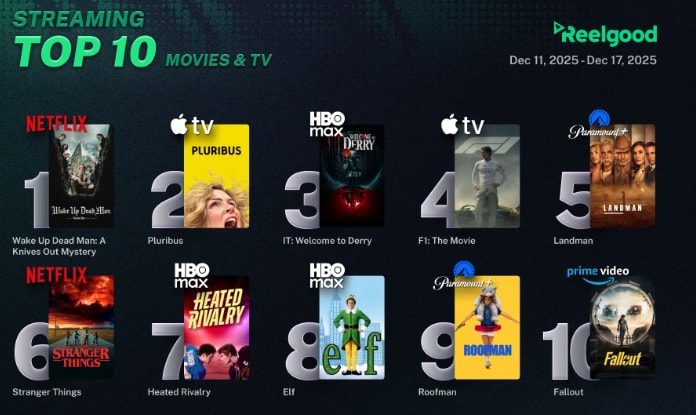
1. Reelgood
Reelgood is a feature-rich streaming aggregator that tracks movies and shows across dozens of platforms with accurate availability, strong filters, and personalized alerts. It is best for users who want a modern, accurate, all-in-one streaming guide that works smoothly on web and mobile.
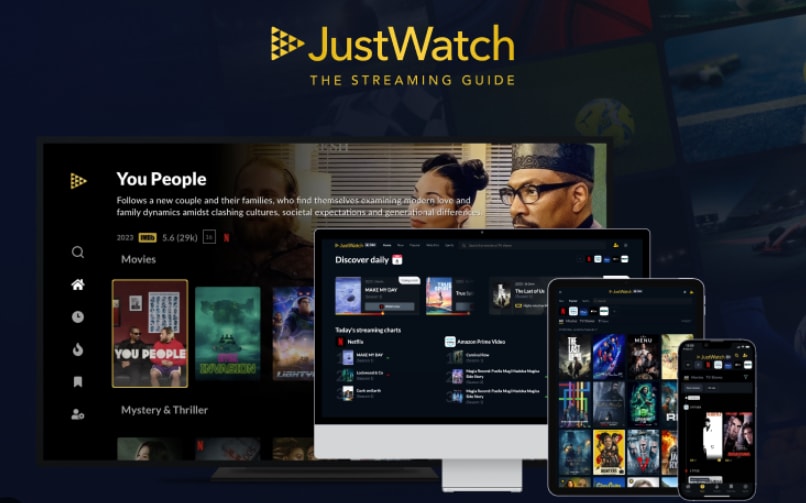
2. JustWatch
JustWatch is a global streaming guide with extensive regional support and granular filters, especially around pricing and video quality. It is best for international users and movie fans who compare rental, purchase, and subscription options before they watch.
3. TV Time
TV Time is designed around tracking what you watch instead of pure discovery. It helps you log episodes, get reminders for upcoming releases, and see what friends and the wider community think. It is best for binge-watchers who mainly care about tracking TV episodes and seasons.

4. Plex Discover
Plex Discover combines streaming discovery with your own media library, live TV, and free ad-supported channels inside one polished app. It is best for viewers who mix personal media with free and paid streaming services and want everything searchable in one hub.
5. Apple TV app
The Apple TV app acts as a hub for Apple TV+ and many partner services, bringing unified search and an Up Next queue to Apple devices. It is best for users who live in the Apple ecosystem and subscribe to multiple services connected to their Apple ID.
Part 3. How To Protect and Recover Streaming Recordings
If you record streams, watch parties, or live events from Yidio-linked services, losing those files can be frustrating. With Recoverit, you can often restore deleted or corrupted video recordings from your PC, external drive, or SD card before they are overwritten.
Key Features Offered by Recoverit
- Advanced video recovery that can reconstruct deleted, fragmented, or partially overwritten recordings from cameras, capture cards, and screen recorders.
- Support for a wide range of video formats and storage devices, including HDDs, SSDs, memory cards, USB drives, and action camera media.
- Built-in preview so you can verify recovered clips before saving them back to a safe location, reducing the risk of overwriting important data.
Step-by-Step Guide on How To Recover Lost Videos
1. Choose a Location to Recover Data
Install and launch Recoverit, then select the specific drive, partition, or external device where your streaming recordings were originally saved so the software knows where to search for deleted video files.

2. Deep Scan the Location
Start the scan and let Recoverit run a deep analysis of the selected location; it will automatically look for lost, deleted, and corrupted video clips, showing you recoverable files as the scan progresses.

3. Preview and Recover Your Desired Data
When the scan completes, filter and preview the found videos, select the recordings you want to restore, and click Recover, saving them to a different drive or folder to avoid overwriting remaining lost data.

Part 4. Which Yidio Alternative Should You Use?
Yidio remains a useful entry-level tool for checking where content is streaming, but its ads, navigation, and sometimes outdated links make it less appealing than newer options. Reelgood offers the most balanced mix of accurate data and easy filters, while JustWatch is ideal for international users and movie renters. TV Time is excellent if you mainly follow ongoing series, Plex Discover is perfect when you mix personal and streaming media, and the Apple TV app shines for users fully invested in Apple hardware.
Consider which devices you watch on most, whether you prioritize global availability, episode tracking, or unified libraries, and pick the alternative that best aligns with your habits. To avoid losing important recordings, keep a recovery plan in place so you can quickly restore deleted highlight reels, tutorials, or reaction videos when accidents happen.
Next: Reelgood
FAQ
-
What is Yidio used for?
Yidio is a streaming aggregator that tells you where movies and TV shows are available to watch across different platforms, including subscription, rental, and free services. -
Is Yidio free to use?
Yes, Yidio is free to use as a discovery tool, but it shows ads and you still need valid subscriptions or rentals on the services where the content is actually hosted. -
Which Yidio alternative is best for international users?
JustWatch is generally the best Yidio alternative for international users because it supports many countries, local services, and currencies with accurate price and availability data.


