 TL;DR:
Apple Intelligence is a system-wide AI layer for newer iPhones, iPads, and Macs that processes basic tasks directly on your device and handles complex requests via secure Private Cloud Compute without building advertising profiles.
● Compatibility is strictly limited to recent Apple devices equipped with modern Apple silicon chips, as the on-device language and image models require dedicated neural engines to function.
● Installing beta software or major OS updates to access these new Siri and AI features introduces the risk of system crashes, sync problems, and unexpected data loss.
● If files disappear during an OS upgrade, immediately stop writing new data to the affected disk and use a tool like Wondershare Recoverit to perform a deep scan and extract the lost files to a separate storage location.
Ask AI for a summary
 ChatGPT
 Perplexity
 Gemini
 Claude
 Grok
Grok
Apple Intelligence is Apples new personal intelligence system that brings advanced AI features directly to your iPhone, iPad, and Mac. Built to work on device and in the cloud with a strong focus on privacy, Apple Intelligence promises smarter writing tools, more capable Siri interactions, and context aware suggestions that understand your personal content without exposing it unnecessarily. As these features roll out, users will see AI deeply integrated into everyday apps like Mail, Notes, and Photos. Understanding what Apple Intelligence is, how it works, and what it means for your data is essential if you want to take full advantage of the benefits while keeping your files safe and recoverable when something goes wrong.
Try Recoverit to Perform Data Recovery
 Security Verified. 3,591,664 people have downloaded it.
In this article
What Is Apple Intelligence
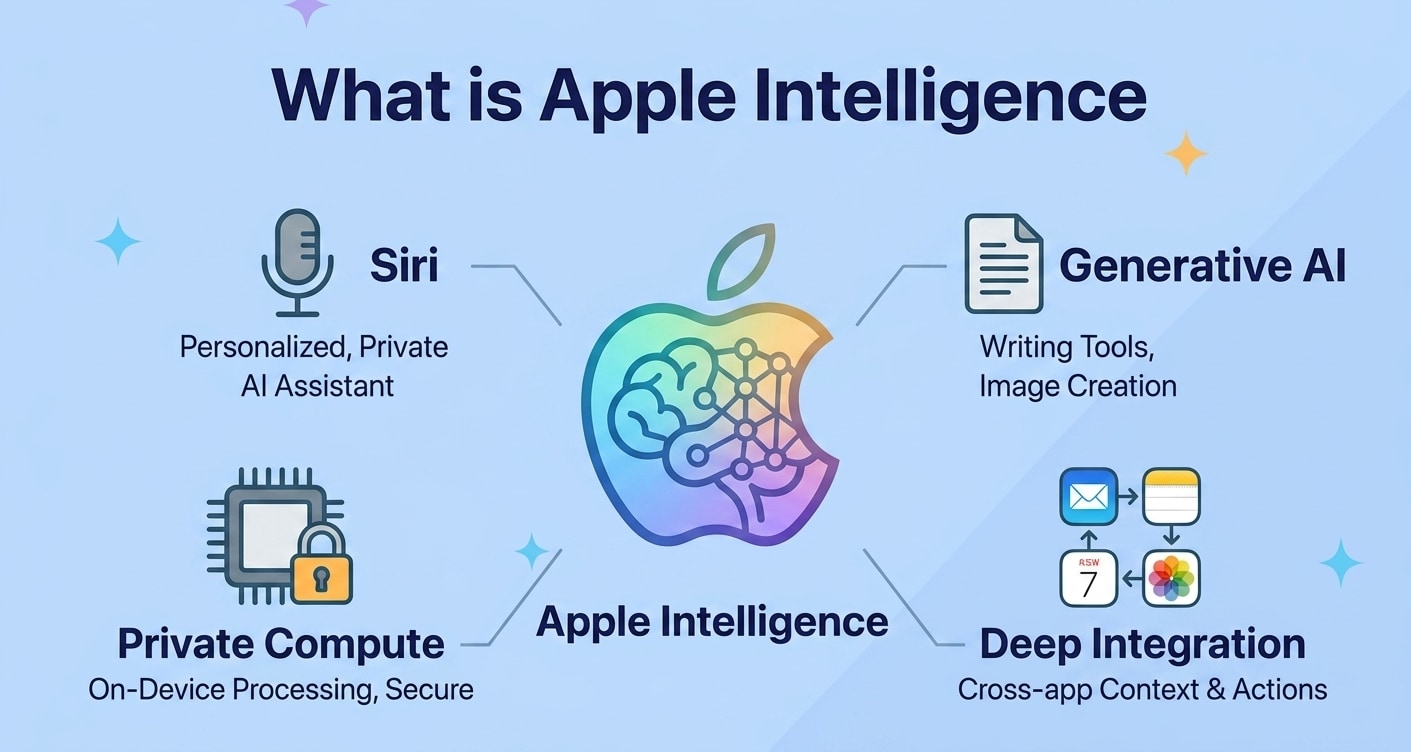
Apple Intelligence is Apples branding for its systemwide AI layer that enhances how you interact with iPhone, iPad, and Mac. Instead of being a single app, it is embedded into the operating system to understand your context, content, and actions so it can offer more relevant help.
Core goals of Apple AI include:
- Delivering natural language understanding for messages, mail, and notes.
- Powering smarter image, photo, and media tools on iOS, iPadOS, and macOS.
- Upgrading Siri with better recognition, memory, and the ability to act across apps.
- Running as much intelligence as possible on your device for privacy and responsiveness.
In practice, this means features like rewriting emails with a tap, summarizing long notifications, pulling details from your calendar or files when you ask Siri, and organizing photos automatically based on people, events, or objects.
How Does Apple Intelligence Work
Under the hood, Apple Intelligence combines several technologies to bring on device intelligence and cloud intelligence together while trying to keep your data locked down.
On-device models optimized for Apple silicon
Recent iPhone, iPad, and Mac models have powerful chips with dedicated neural engines. Apple Intelligence runs many language and image models directly on this hardware so tasks like text editing, translation, or identifying content in photos can happen locally, without sending data elsewhere.
Private Cloud Compute for heavier tasks
When an AI request is too large to process on your device alone, Apple Intelligence can tap into what Apple calls Private Cloud Compute. With this approach, your data is sent to Apple managed servers running special versions of iOS, iPadOS, or macOS that are locked down, audited, and stripped of long term logging designed to build advertising profiles.
This lets Apple Intelligence perform more advanced mac AI tools or iPhone AI features such as complex image generation or large scale summarization while still focusing on security.
Deeper Siri upgrade and system integration
Apple is reworking Siri so it understands your requests in context and can move fluidly between apps. Assisted by Apple Intelligence, Siri can:
- Read your on screen content and act on it (for example, "Add this date to my calendar").
- Use your email, messages, and files as references without exposing them to third parties.
- Combine multiple steps into one request, like drafting and sending an email with specific attachments.
Across the system, you will see Apple Intelligence integrated into Quick Actions, search, and built in apps, enabling highly personalized responses that feel less like a one size fits all chatbot and more like a device that understands your personal workspace.
What are the Types of Apple Intelligence
Apple Intelligence touches different layers of the platform. It is useful to think of it in two main categories: features that run directly on your device and those that rely on a secure cloud connection for extra power.
On-device Apple Intelligence features
On-device Apple Intelligence focuses on speed, reliability, and privacy. These capabilities are especially important for users who want iphone ai features to work even when offline or on poor connections.
- Writing tools in system apps such as rephrase, correct, or summarize in Mail, Notes, and supported third party apps.
- Notification and content summaries that compress long chats, emails, or articles into short overviews directly on your iPhone or Mac.
- Photo and media understanding for faster search ("photos of my trip to Paris in 2023") and on device categorization.
- System level language understanding for Siri so common queries can be answered quickly without a server round trip.
These features make frequent tasks more efficient, while the processing stays tightly coupled to the chip inside your device.
Private cloud and integrated Apple Intelligence experiences
Some experiences need more compute than even the latest chips can provide comfortably. For those, Apple Intelligence leverages Private Cloud Compute to extend what your device can do.
- Advanced language models for long form rewriting, complex document analysis, and extended conversations.
- Richer image generation or editing capabilities that require large neural networks and more memory than your device provides.
- Cross device context that may combine data from your iPhone, iPad, and Mac when you grant permission.
From the user perspective, the transition between on device and cloud processing should feel seamless. The system decides when to keep work local and when to call out to the cloud based on performance and privacy policies, while Apple states that data used in the cloud is not retained to build marketing profiles.
| Type of Apple Intelligence | Main Benefits |
|---|---|
| On-device processing | Fast responses, offline support, and stronger privacy since data rarely leaves your device. |
| Private Cloud Compute | More powerful AI, better handling of large documents and media, and deeper cross app intelligence. |
Practical Tips for Apple Intelligence
You can prepare for Apple Intelligence and use it more effectively by following a few practical steps.
1. Check device and OS compatibility
Because Apple Intelligence depends on modern chips, only newer iPhone, iPad, and Mac models support all features. Before updating, review Apples official list to confirm your device and planned iOS AI version are compatible.
2. Review privacy and data settings
Spend time in Settings reviewing analytics, Siri, and personalization options. Decide how much on device learning you are comfortable with, and verify what content Siri and Apple Intelligence can access (Mail, Messages, Photos, Calendar, and so on).
3. Keep regular backups
Whenever major AI upgrades roll out, it is wise to have good backups. Use Time Machine on Mac, iCloud or local backups for iPhone and iPad, and consider additional external drive copies for irreplaceable photos and documents.
4. Be cautious with beta software
Early previews of Apple Intelligence may be tempting to install, but beta systems can introduce bugs, app crashes, or sync problems that may impact files. Run betas on secondary devices when possible and keep tools for data recovery on standby.
5. Understand how AI uses your content
Apple Intelligence often works best when it can see your messages, emails, and files, but you stay in control. Learn which prompts access personal content so you know what is being analyzed when using new mac ai tools or upgraded Siri experiences.
How to Use Recoverit to Recover Lost Data
Recoverit by Wondershare is a professional data recovery tool designed to help you restore deleted, lost, or formatted files from computers, external drives, memory cards, and more. Whether you are exploring new capabilities like Apple Intelligence or simply updating your system, unexpected data loss can still happen. With an intuitive interface and powerful scanning engine available at the Recoverit official website, Recoverit helps you get important photos, documents, videos, and other files back in just a few steps.
Key Features Offered by Recoverit
- Supports recovery from computers, external drives, USB sticks, and memory cards so you can restore files from a wide range of devices affected by system updates or AI experiments.
- Deep scan mode to search for lost, deleted, or formatted files in detail, which is helpful after OS upgrades or partition issues linked to new Apple Intelligence features.
- Preview files before restoring them to ensure you recover exactly what you need, including critical work documents, AI generated media, or personal photos.
Step-by-Step Guide on How To Recover Lost Data
1. Choose a Location to Recover Data
Launch Recoverit and select the drive, external device, or specific folder where you lost your files. This could be your Mac internal disk after a macOS upgrade, an external SSD used for Apple Intelligence media projects, or a memory card connected to your device. Confirm the location so the software can focus its search on the most likely place where the deleted or missing data once lived.

2. Deep Scan the Location
Click Start to begin scanning the selected volume. Recoverit will quickly run a basic check and then continue with a more thorough deep scan, reconstructing file structures, tracing fragments, and locating hidden items in the background. You can monitor progress, filter by file type, and pause or stop the scan at any time if you already see the AI related files, project folders, or personal documents you need.

3. Preview and Recover Your Desired Data
When the scan finishes, browse the found files by type or path, or use the search bar to locate specific names related to your Apple Intelligence workflows. Use the preview feature to verify photos, videos, and documents before recovery. Finally, select the items you want and click Recover, saving them to a different, safe storage location (such as another drive) to avoid overwriting the very data you are trying to restore.

Conclusion
Apple Intelligence marks a new phase in how Apple devices use AI, blending on device processing with private cloud support to deliver smarter, more personal features. From upgraded Siri to richer writing tools, it is designed to be helpful while keeping privacy at the center.
As with any major platform shift, there is always a small risk of data issues during updates, testing beta software, or managing large AI enhanced libraries. Keeping a reliable recovery tool like Recoverit in your toolkit ensures that, if important files ever go missing, you have a practical way to bring them back and continue enjoying Apples latest innovations with confidence.
Next: Gemini
FAQ
-
What is Apple Intelligence?
Apple Intelligence is Apples personal intelligence system that brings advanced AI features to iPhone, iPad, and Mac. It combines on device processing with Private Cloud Compute to power tools like upgraded Siri, writing assistance, and content understanding while emphasizing privacy and security. -
Which devices support Apple Intelligence?
Apple Intelligence is designed for newer hardware with powerful Apple silicon chips, such as recent iPhone, iPad, and Mac models. Exact support depends on the installed version of iOS, iPadOS, or macOS and your device processor, so you should check Apples official compatibility list before updating. -
Can Apple Intelligence cause data loss on my device?
The features themselves are not meant to delete files, but major system updates, beta software, or sync problems during Apple Intelligence rollouts can occasionally lead to missing or inaccessible data. To reduce risk, keep backups and use a recovery tool like Recoverit if you notice files have disappeared. -
How do I protect my privacy while using Apple Intelligence?
Review your Siri and analytics settings, limit which apps and data Siri can access if needed, and understand when requests may be processed using Private Cloud Compute. Apple Intelligence performs many tasks on device, but you can always adjust permissions if you prefer stricter privacy controls. -
How can I recover lost files after an Apple Intelligence or system update?
If files vanish after an update, stop writing new data to the affected disk, connect the device or drive to a computer, and run Recoverit. Choose the correct location, perform a full deep scan, preview the discovered items, and then recover important documents, photos, or videos to another safe storage destination.



