
 TL;DR:
To resolve Arc Raiders DX12 fatal errors and crashes triggered by high engine load or driver conflicts, players must verify game files via Steam, disable hardware overclocking, and remove interfering mods.
● Revert CPU and GPU overclocks to their default speeds to prevent timing and voltage instabilities during heavy DX12 rendering tasks.
● Temporarily disable real-time antivirus protection and roll back recent Windows updates if the game is blocked from writing essential shader config files during startup.
● If standard troubleshooting fails, a full reinstall or the use of Wondershare Recoverit is required to replace missing or corrupted game dependencies.
Ask AI for a summary
 ChatGPT
 Perplexity
 Gemini
 Claude
 Grok
Grok
Arc Raiders is a joint action game intent on intense battles and team survival. While playing, many gamers face problems like Arc Raiders crashing screens or the game not starting. Fatal errors and crashes mean the game stops itself or displays error messages. However, there are various solutions available to fix these game data issues without technical things. Hence, this guide explains simple ways to help you play again without stress.
Try Recoverit to Perform Game Data Recovery
 Security Verified. 3,591,664 people have downloaded it.
In this article
- Fix 1: Verify Game Files via Steam / Game Launcher
- Fix 2: Update Graphics Drivers and DirectX
- Fix 3: Run the Game as Administrator
- Fix 4: Disable Antivirus or Security Software Temporarily
- Fix 5: Reinstall Arc Raiders Completely
- Fix 6: Roll Back Recent Windows Updates if Needed
- Fix 7: Remove Conflicting Mods or Third-Party Plugins
- Fix 8: Check Hardware Stability and Disable Overclocking
- Fix 9: Update Windows and System Drivers
- Fix 10: Adjust Compatibility Settings for Older OS Versions

Part 1. Understanding Arc Raiders Crashes and Fatal Errors
Many gamers play Arc Raiders on PC but face sudden crashes often. These issues include freezes, fatal errors, or the game failing to launch. Such problems usually come from outdated drivers or missing system component files. However, low hardware limits or unmet requirements can also trigger repeated instability issues. Arc Raiders crashing may happen when background apps conflict during the startup process.
Sometimes, overlays or anti-cheat conflicts often cause unexpected shutdowns. Also, DirectX or Visual C++ issues can stop the game from loading properly. Old Windows updates or unstable system settings may worsen crash frequency. Therefore, understanding these causes helps players focus on fixes that actually work.
Why Arc Raiders Crashes and DX12 Errors Happen
Arc Raiders crashes often appear when DX12 struggles to work on certain PC setups. This section explains the causes of the Arc Raiders fatal errors and the reasons behind them:
- Driver Issues: New or unstable GPU drivers can misread DX12 commands during heavy scene loads. This also causes sudden crashes when the engine sends many graphics tasks together.
- DX12 Path: Arc Raiders uses a modern DX12 path that stresses graphics drivers often. Small faults inside this path can trigger freezes or instant shutdowns during gameplay.
- Overclock Stress: CPU or GPU overclocking can destabilize the timing needed for DX12 operations under load. Even stable systems may fail when clocks push hardware beyond safe margins.
- Engine Load: Unreal Engine 5 pushes shadows and effects harder than older games do. However, high load moments increase the likelihood of memory or command-handling failures.
- System Limits: Systems near minimum requirements struggle when DX12 features demand more resources than available. Low memory or weak processors often raise crash chances during busy gameplay moments.
Part 2. Step-by-Step Solutions for Arc Raiders DX12 / DirectX Crashes
Players experience Arc Raiders DX12 & DirectX-related errors that prevent smooth gameplay. Below are various ways to resolve these crashes step by step for better stability:
Fix 1: Verify Game Files via Steam / Game Launcher
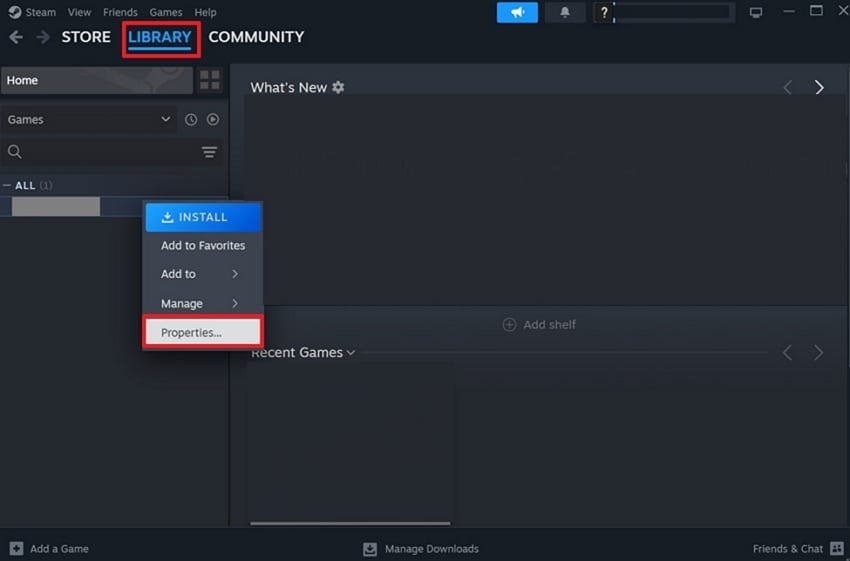
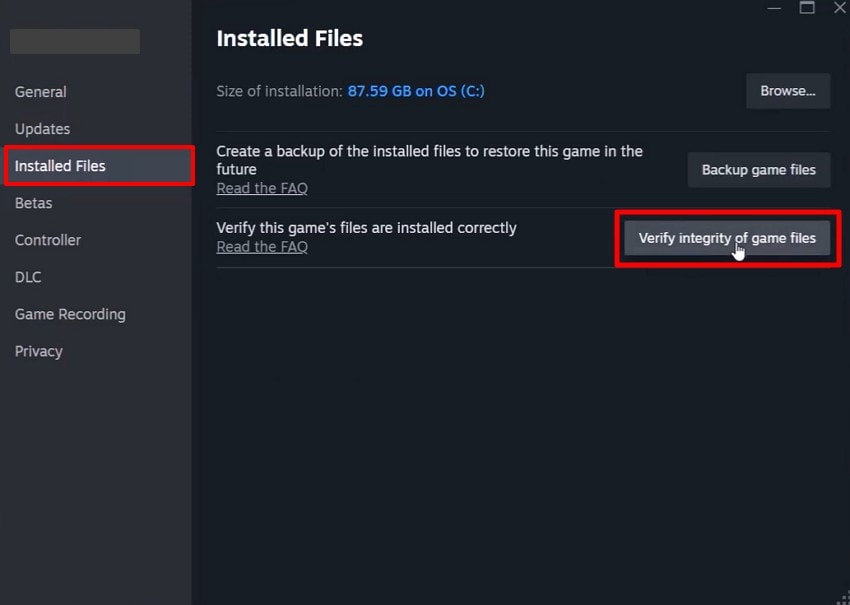
If crashes occur, checking game files is a good first step. Verifying game files checks installed data against official versions stored on online servers. Also, it restores missing shader configs and assets needed for DirectX stability. Arc Raiders relies on accurate data, so corrupted files can cause DX12 errors. Take guidance from the steps below to verify game files via Steam:
- To initiate, search for the Arc Raiders in Steam and right-click on it, then select "Properties."
- Upon accessing it, pick the "Installed Files" tab and then press the "Verify Integrity of Game Files" option.
Fix 2: Update Graphics Drivers and DirectX
You should update graphics drivers because they help the GPU handle DX12 tasks. Outdated drivers cause errors during heavy graphics loading moments. Arc Raiders crashing is also linked to driver bugs affecting DX12 rendering tasks. However, DirectX updates repair missing system files used for rendering and shader loading. Keeping both updated reduces DX12 errors and improves game stability. Follow the given steps to update the graphics driver and DirectX:
Update the Graphics Driver
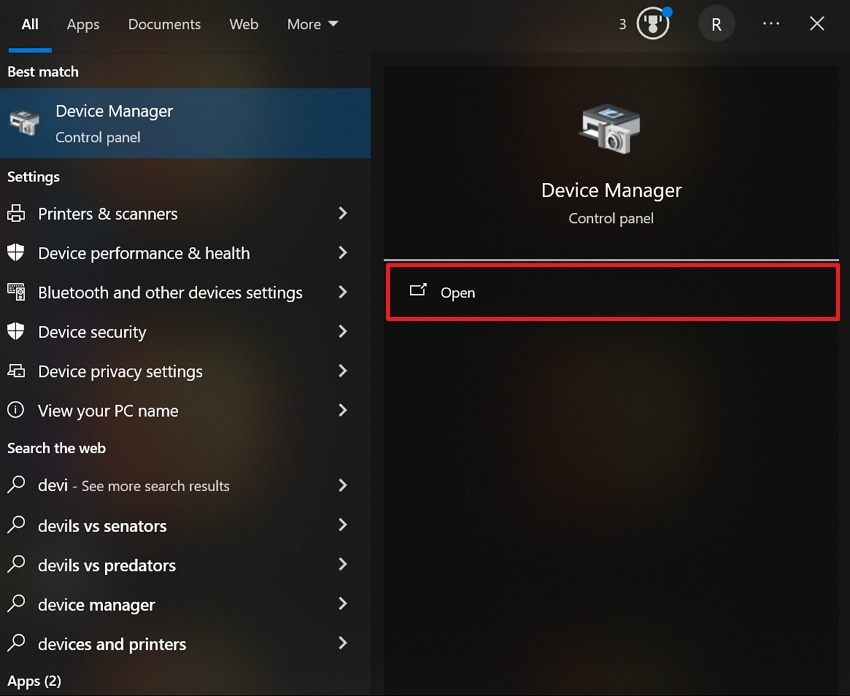
- From the "Start" menu, search for "Device Manager" and choose "Open."
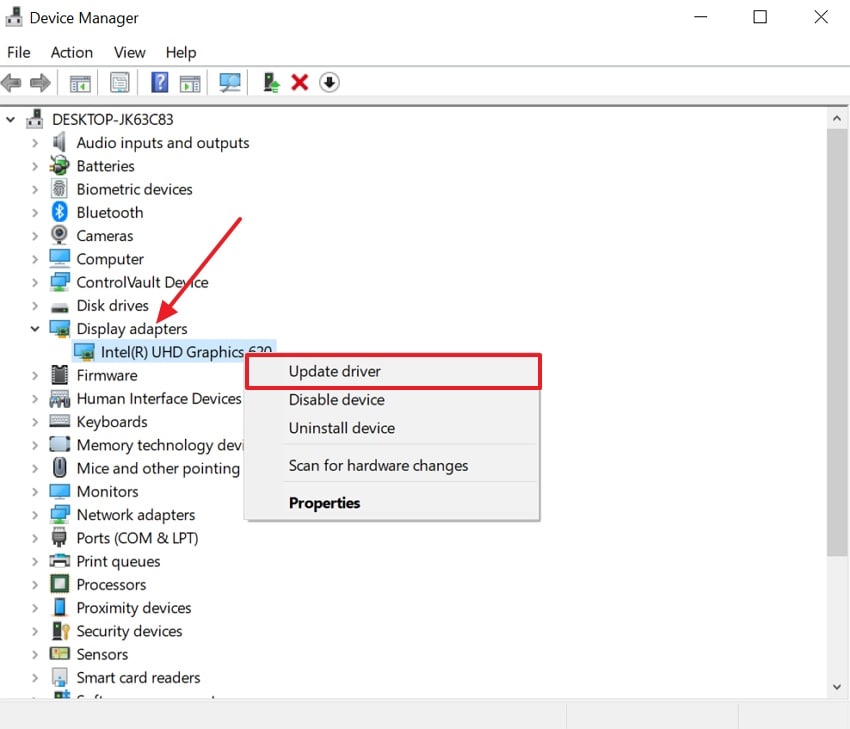
- Next, head to the "Display Adapters" section and right-click the graphics driver. After that, choose the "Update Driver" option from among all.
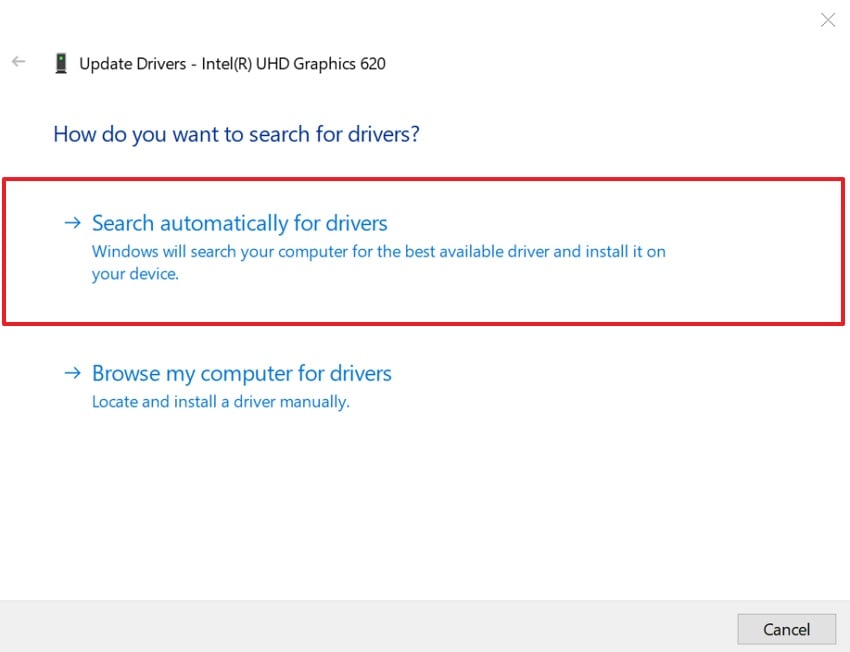
- At last, click the "Search Automatically For Driver" option to update graphic driver.
Update the DirectX
- To initiate, go to the official site of "DirectX" and click the "Download" button.

- When it is downloaded, enable the "I Accept the Agreement" option and click the "Next" button.
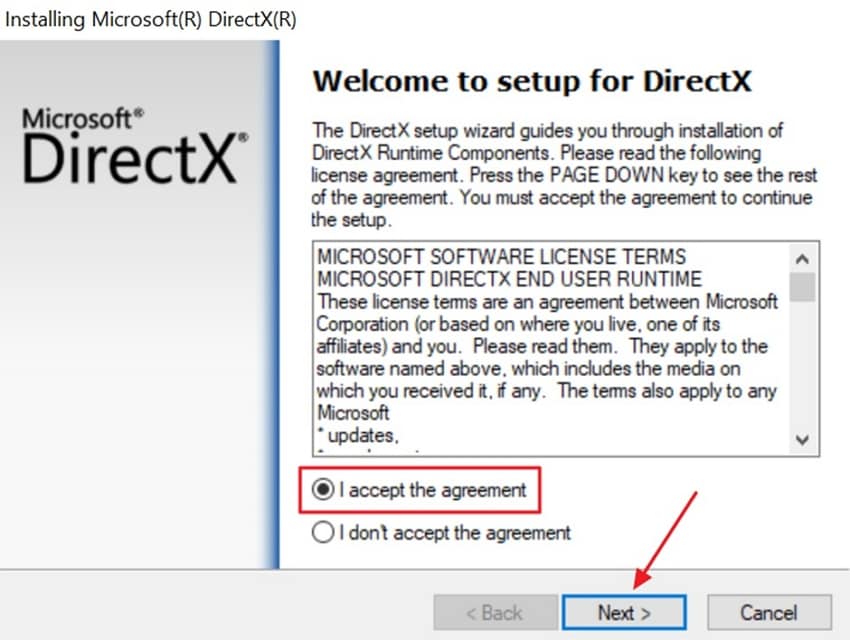
- After accessing it, hit the "Next" button at the bottom.
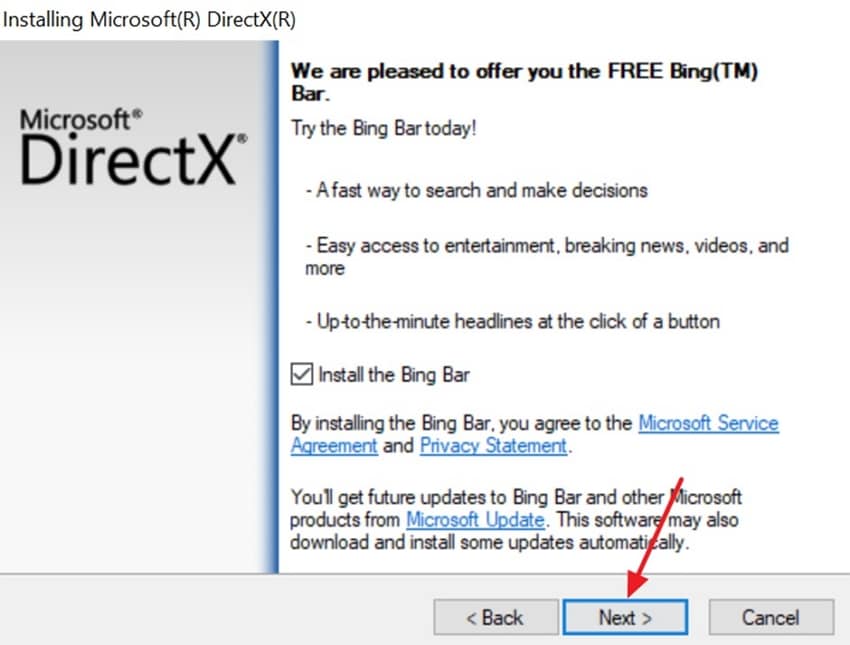
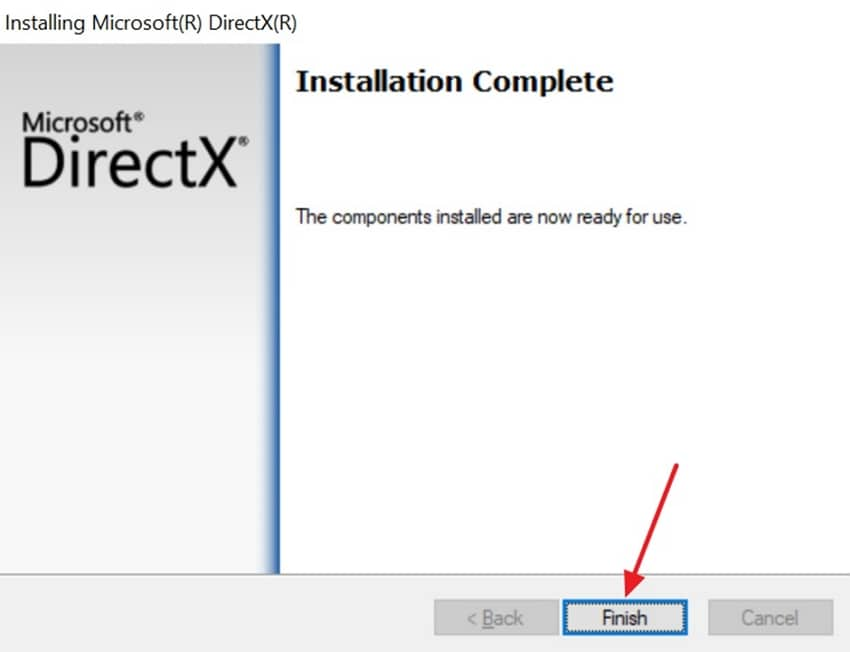
- Once it is installed, opt for the "Finished" button and restart your computer to implement all updates.
More related: Unlock DirectX 12 Ultimate in Windows 11: Easy Step-by-Step Tutorial.
How to Fix "DirectX 12 Is Not Supported on Your System?"
Fix 3: Run the Game as Administrator
Sometimes running the game as administrator removes Windows permission blocks during startup. This access lets the game read and write the shader cache and config files. Without access limits, DirectX parts install and reduce launch failures. It helps prevent Arc Raiders fatal error caused by blocked system actions. Therefore, you need to review the steps below to run Arc Raiders as an administrator:
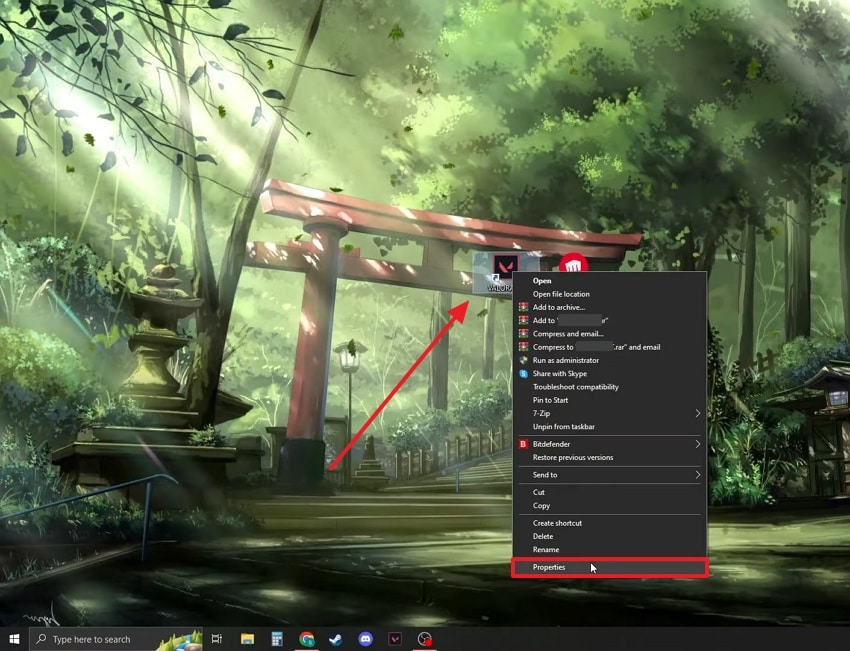
- To initiate, right-click the "Arc Raiders" icon and opt for "Properties" from the context menu.
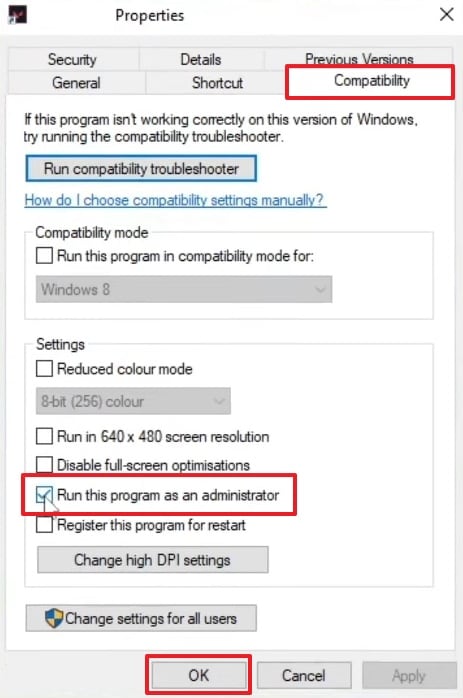
- In the "Properties" window, open the "Compatibility" tab, turn on "Run this program as an administrator," and then choose "OK" to apply the setting.
Fix 4: Disable Antivirus or Security Software Temporarily
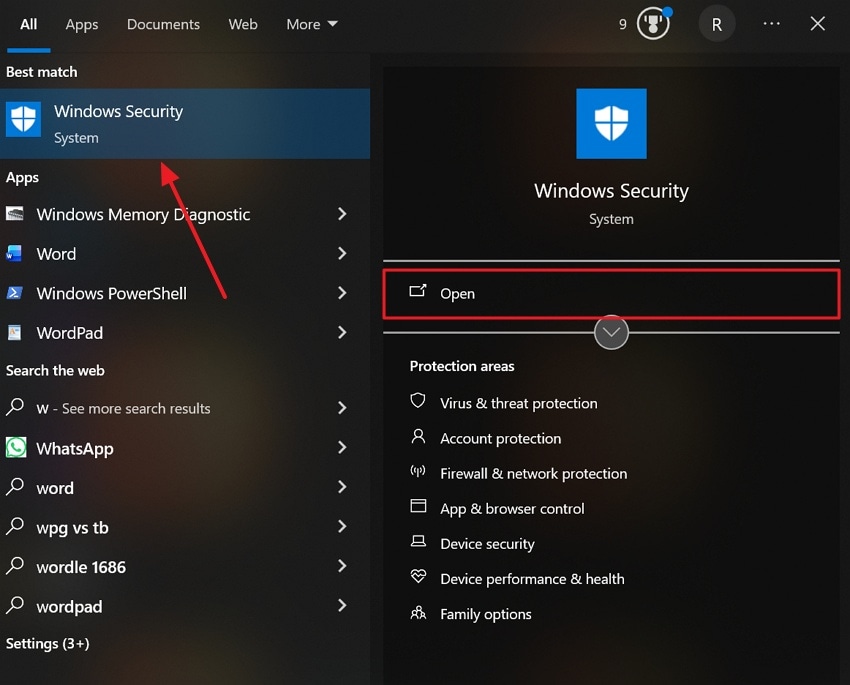
Another way to reduce crashes is to disable antivirus tools that block game files. Security software stops DX12 from loading shader configs or anti-cheat services. This interference appears as Arc Raiders DX12 & DirectX-related errors without warnings. As a result, controlled folder access can block file writing and corrupt the graphics loading process. Hence, go through the given guide below to learn how you can disable third-party antivirus software:
- Go to the "Start" menu and search for "Windows Security" and choose "Open."
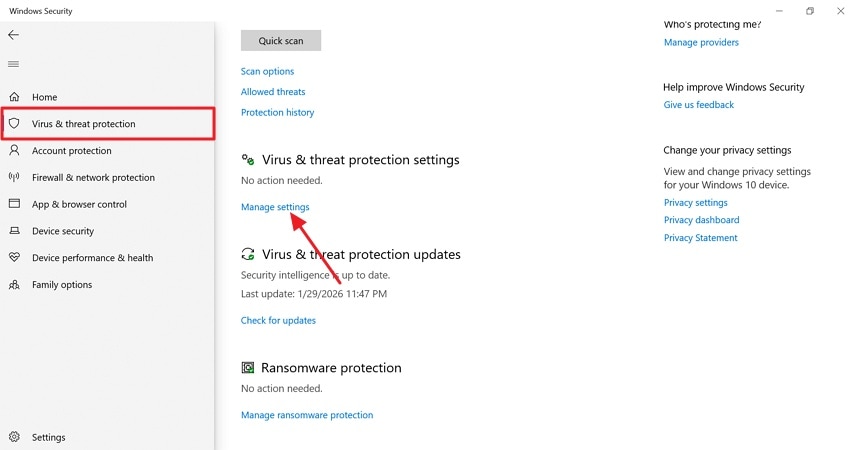
- Upon accessing it, select the "Virus & Threat Protection" option, then click "Manage Settings."
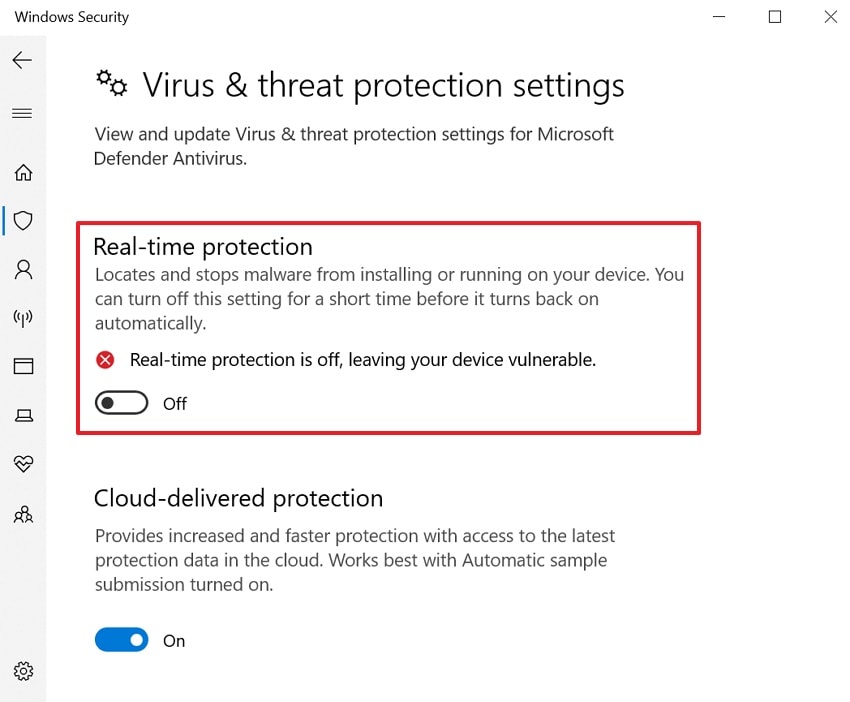
- At last, turn off the "Real-Time Protection" and confirm the prompt.
Fix 5: Reinstall Arc Raiders Completely
If Arc Raiders keeps crashing, reinstalling the game also fixes persistent errors. This process replaces corrupted files, along with clearing bad shaders. Sometimes, corrupted game assets trigger DX12 or DirectX errors during startup or scene loads. A full reinstall removes leftover mods and invalid DirectX references. It also forces the game to rebuild shader caches and re-register required dependencies. Adhere to the given guidance to reinstall the game:
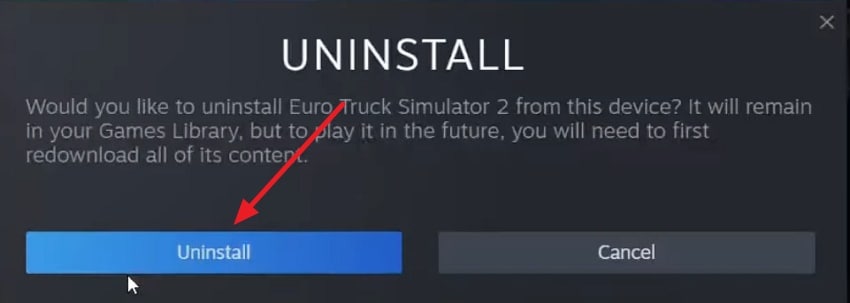
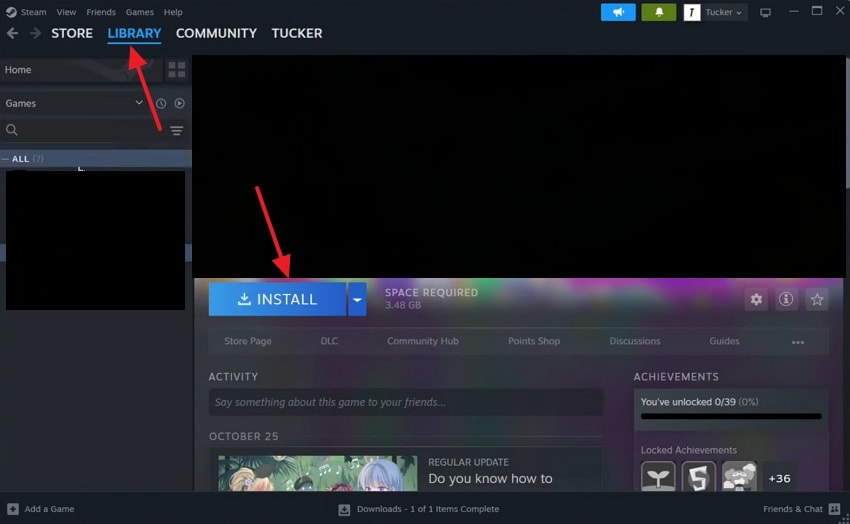
- Open the "Steam" and go to "Library," then select an "Arc Raiders." Afterward, right-click the game to choose the "Manage" option, and click the "Uninstall" option.
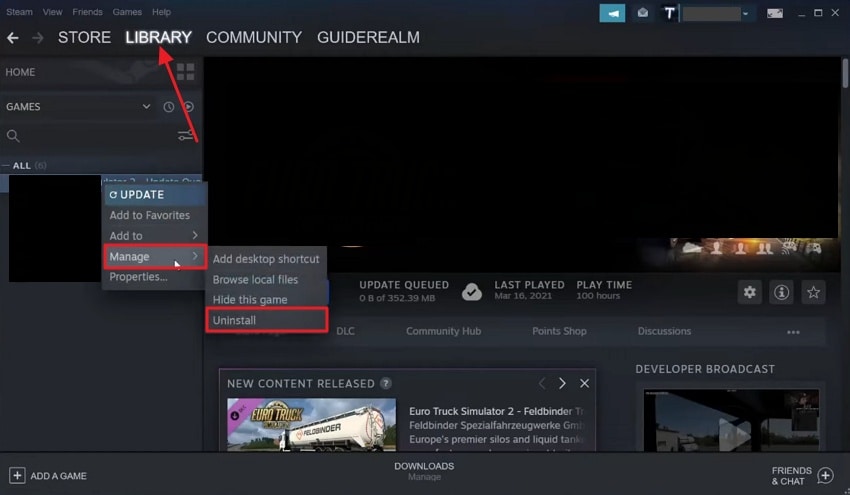
- After clicking, a dialog box will appear, and then click the "Uninstall" button.
- Now, open the "Steam" to go to "Library" and select the "Arc Raiders" to press the "Install" button.
Fix 6: Roll Back Recent Windows Updates if Needed
When Arc Raiders crashing started after a Windows update, rolling it back helped. Some updates change low-level graphics components, causing DX12 and DirectX errors. These changes can disrupt GPU communication and trigger device-hung or device-removed faults. Also, reverting updates restores previous stable DirectX and driver interactions for smoother gameplay. Hence, take guidance to roll back recent Windows Updates:
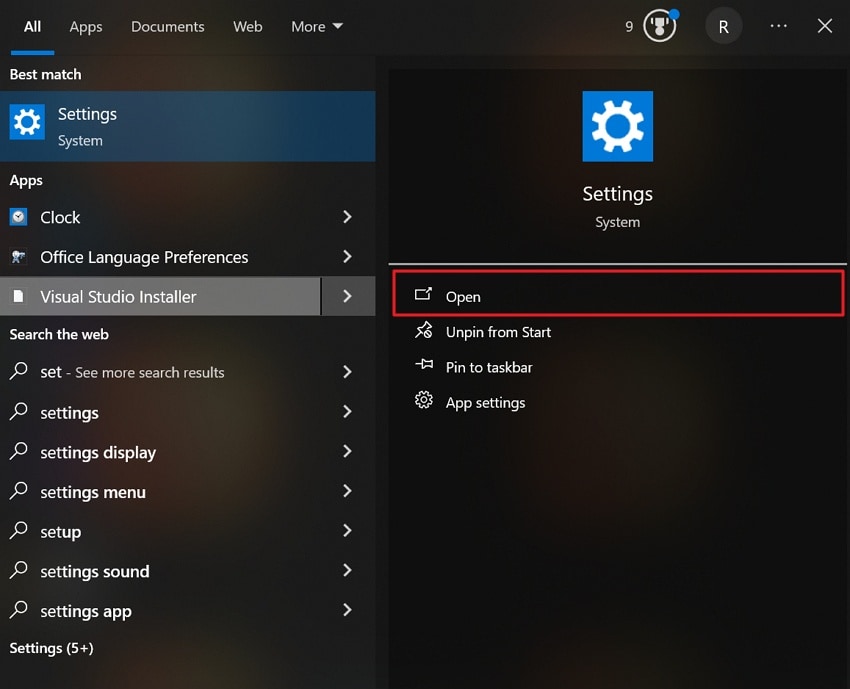
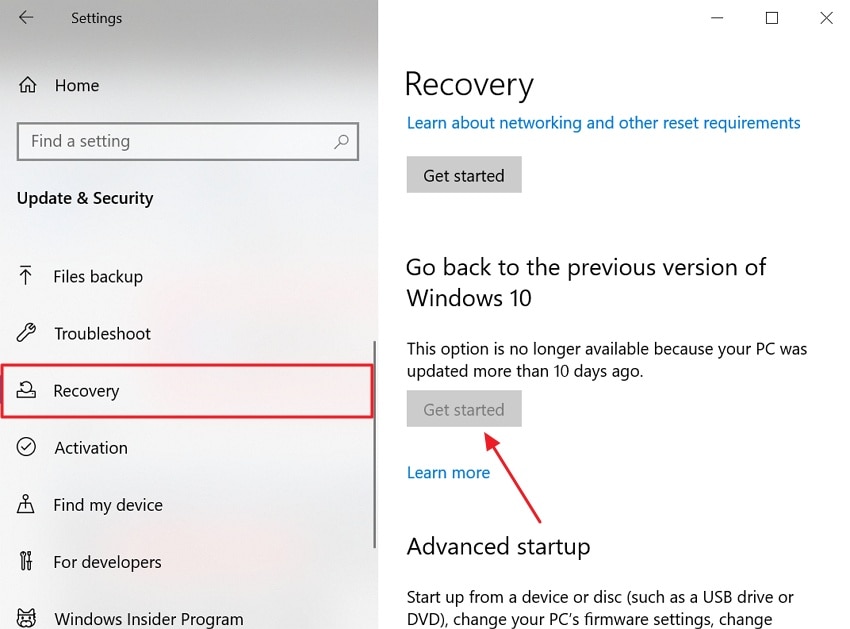
- Find the "Settings" app from the "Start" menu and opt for the "Open" option
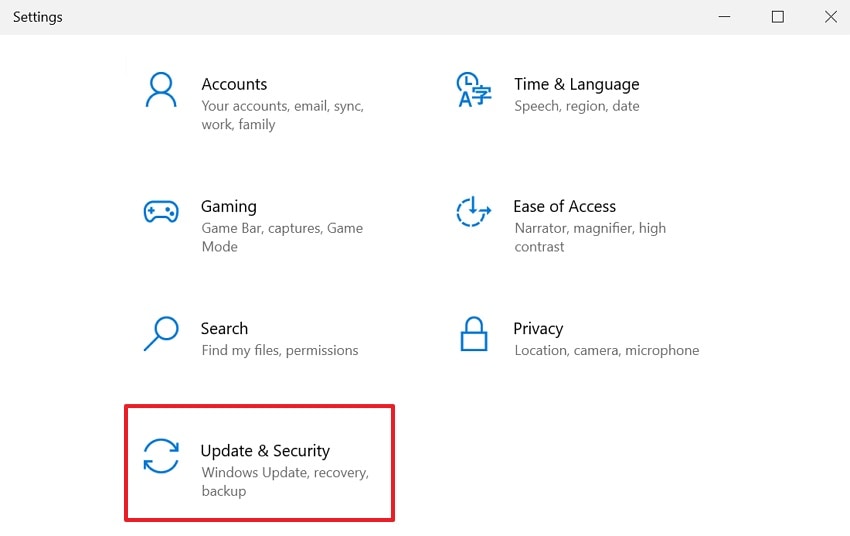
- After accessing it, head to the "Update & Security" option.
- Afterward, go to the "Recovery" section and click the "Get Started" button if available. At last, follow the on-screen instructions when the rollback is complete.
Fix 7: Remove Conflicting Mods or Third-Party Plugins
Users also experience crashes when mods or third-party plugins interfere with the game. These tools hook DirectX calls, breaking Arc Raiders' DX12 renderer. Conflicting shaders or injected DLLs trigger Arc Raiders fatal error during gameplay. Removing all mods and plugins helps the game run in its original, stable state. Once the game works normally, you can reinstall compatible mods one at a time to identify the cause.
Fix 8: Check Hardware Stability and Disable Overclocking
This solution is crucial because an unstable GPU or RAM triggers crashes. Even mild overclocks often make Arc Raiders more likely under heavy DX12 loads. DX12 uses low-level GPU control, so small timing or voltage issues cause access violations. Returning components to default speeds restores proper DirectX calls and prevents errors. Thus, review the steps below to disable CPU overclocking with ease:
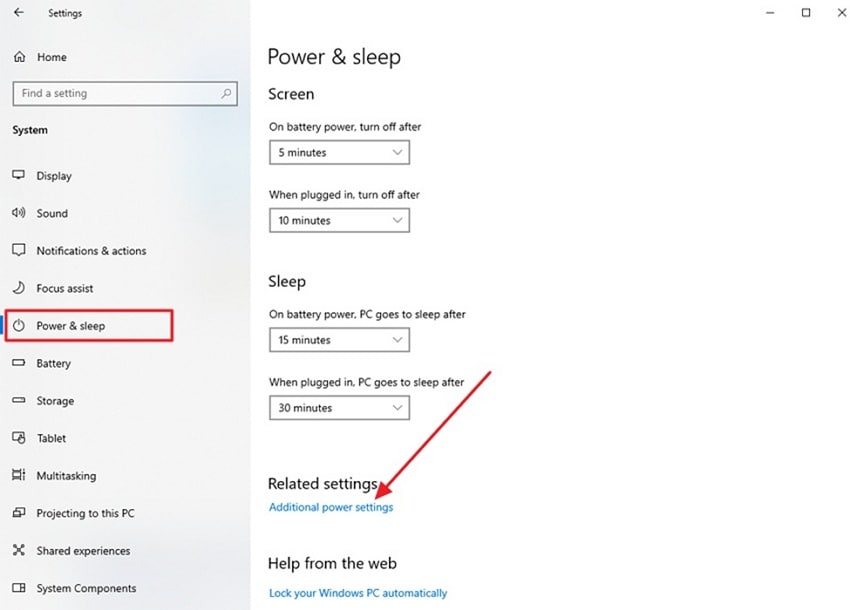
- To initiate, open the settings and access the "Power and Sleep" option from the left. Now, find the "Additional Power Settings" option and press on it.
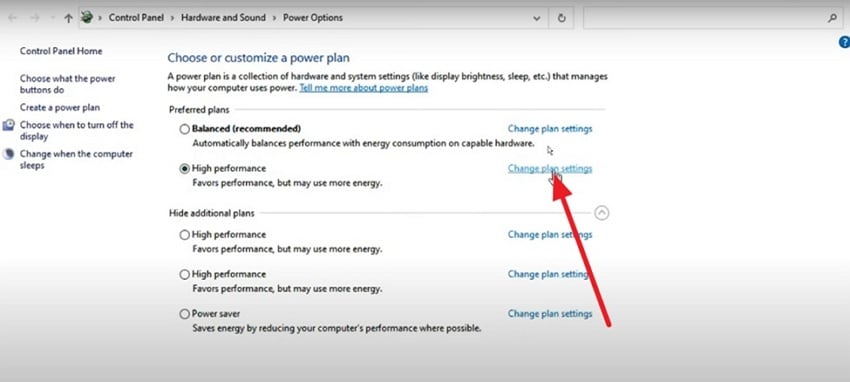
- Later, click on "Change Plan Settings" to proceed further with the process.
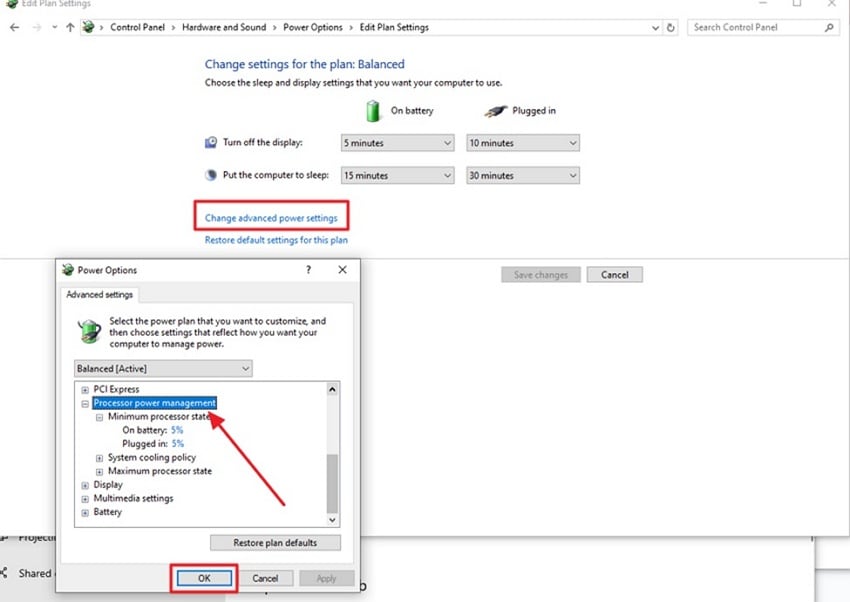
- Next, press the "Change Advanced Power Settings" option to open a new window. Here, find the "Processor Power Management" option and set the maximum state. Click the "OK" button to save the applied changes successfully.
Fix 9: Update Windows and System Drivers
A simple update of Windows and system drivers also fixes Arc Raiders DX12 & DirectX-related errors. New updates refresh graphics parts that help the game talk with the GPU. Updated system drivers also reduce crashes by fixing broken links between hardware and software. These updates improve stability and prevent crashes during heavy gameplay. Follow the guide below to update Windows and system drivers:
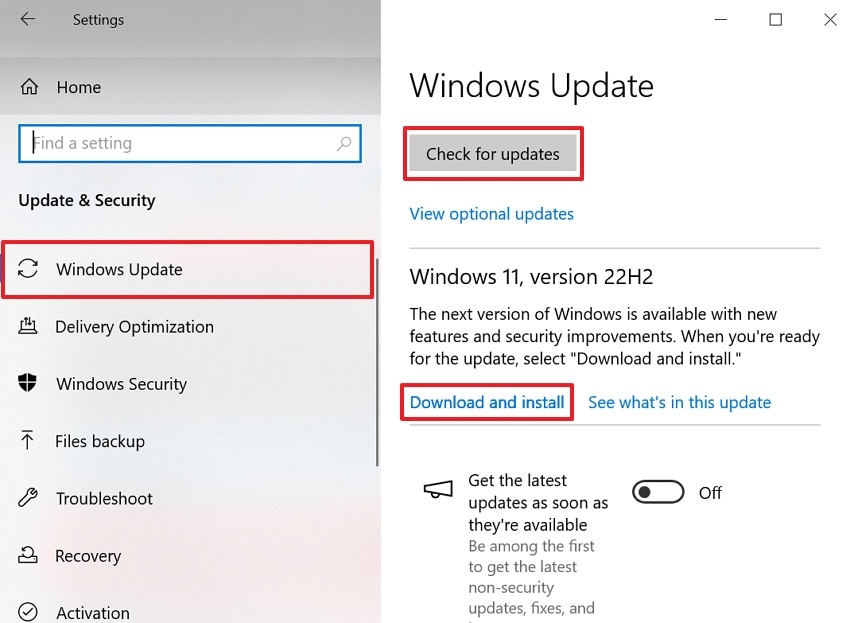
Instructions. Open the "Settings" app from the "Start" menu and opt for the "Update and Security" option. Afterward, in the "Windows Update" section, click the "Check for Updates" button. If updates are available, click "Download and Install" and restart your PC after installation.
Fix 10: Adjust Compatibility Settings for Older OS Versions
If the above fixes do not fully stop Arc Raiders from crashing, changing compatibility settings can help. This option lets Windows handle the game in a more stable way. Running the game in an older Windows mode avoids newer system features that may conflict. In the meantime, some PCs have a smoother-running game with fewer crashes. Go through the given guide to adjust compatibility settings for older OS versions:
- To initiate, look at the "Arc Raiders.exe File" from the file explorer and right-click on it, then choose "Properties."
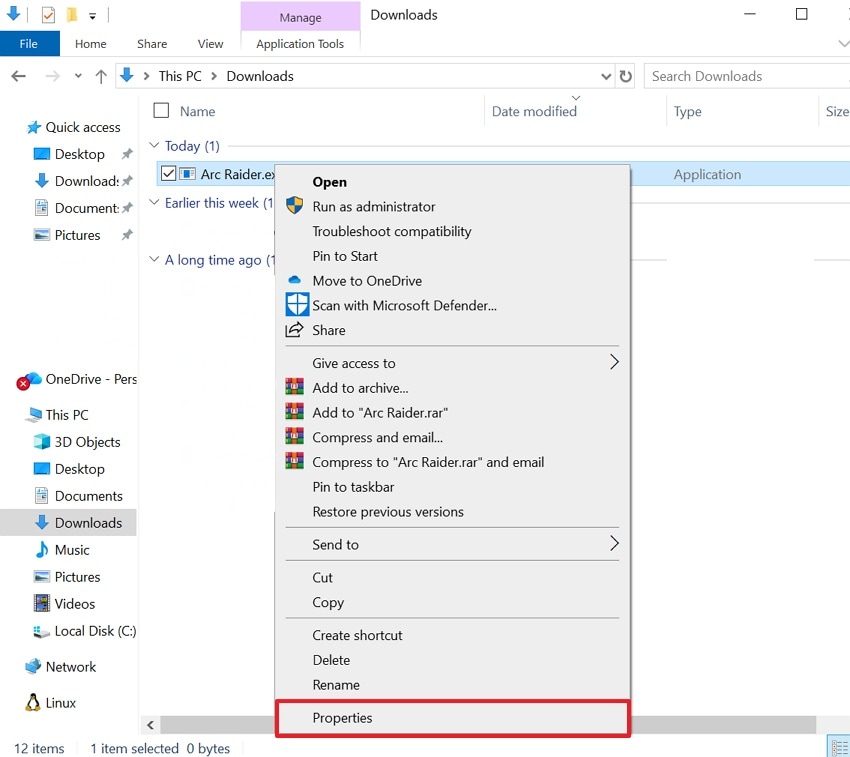
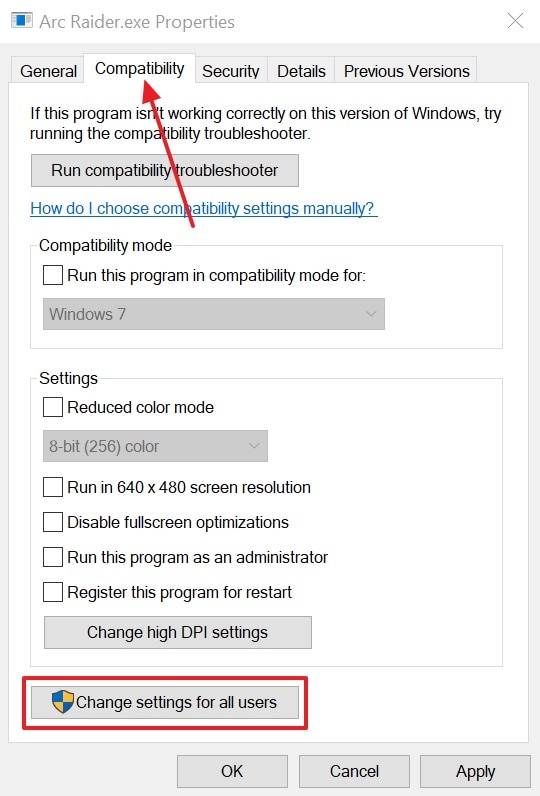
- After accessing it, go to the "Compatibility" tab and choose "Change Settings for All Users."
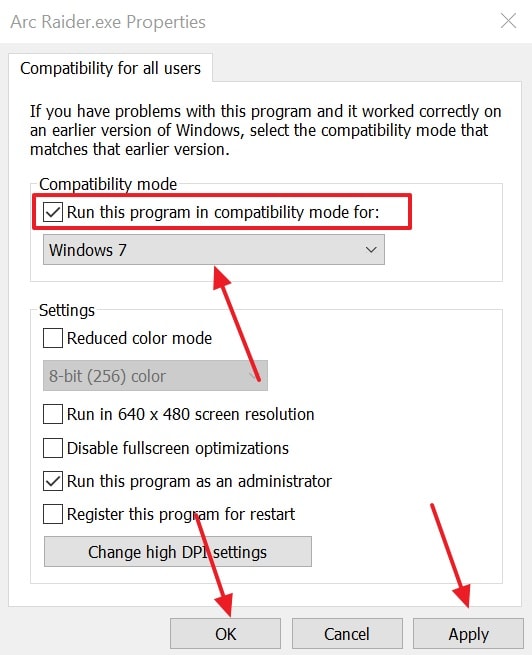
- Now, check the "Run This Program in Compatibility Mode for" option. At last, select the preferred older version of Windows from the "Drop-down" menu and click "Apply," then hit "OK."
Pro Tip: Recoverit: Recover Corrupt or Missing Files Triggering Arc Raiders Crashes
While fixing the Arc Raiders crashing issue, it is also possible that the issue may occur due to missing or corrupted game files. To fix it, Recoverit is the best option to recover your lost or corrupted files. This advanced tool can recover more than 1000 file formats, including media and gaming. It performs a deep scan within 5 minutes and achieves 99.5% recovery rate for lost files while offering 500MB in free data recovery.
Additionally, the tool uses AI to restore deleted or lost files from 1M+ various devices. You can even recover data from internal and external hard drives and SSDs. It also gets back files damaged or deleted by viruses or ransomware attacks. Apart from that, Recoverit offers professional, customized file recovery tailored to device type. After recovering a corrupted file, it also allows you to enhance and preview it.
Key Features
- NAS Recovery: Restore lost or deleted files of NAS devices and RAID storage.
- Targeted Recovery: Get back only specific files for faster and more efficient recovery.
- Recycle Recovery: Retrieve forever deleted files from the Recycle Bin instantly without effort.
Guide to Recover Lost or Corrupted Gaming Files Using Recoverit
You need to review the steps below to restore your lost gaming files with ease:
- Pick a Storage of Lost Files
Open the software and choose the location where you want to recover deleted or lost gaming files.
- Deep Scan the Selected Storage
Now, the tool will start a deep scan of the picked location, and you can see the scanning results in real time.
- Preview and Recover Files Using Recoverit
Once the scan is finished, click the "Preview" button to verify the output. At last, opt for the "Recover" button to recover your lost gaming files from the PC.
Conclusion
In conclusion, Arc Raiders crashes and fatal errors can disrupt gameplay and cause frustration for gamers. It often happens because files are missing or drivers are old. This guide explored various ways to fix these problems and get the game running again. However, if Arc Raiders still keeps crashing, it might be that some game files are lost. In that case, Recoverit can recover them and let you play again.
FAQ
1. Why do DX12 errors appear only in Arc Raiders and not in other games?
Arc Raiders uses specific Unreal Engine DX12 paths, stressing GPU drivers differently. Small driver bugs or shader issues may trigger crashes unique to Arc Raiders. Other games may remain stable because they do not load identical DirectX instructions.2. Will adjusting compatibility mode always fix Arc Raiders' crashing issues?
Compatibility mode helps only when Windows builds or driver interactions cause unstable DX12. It modifies APIs and DPI handling to avoid device_hung or access violation errors. Other causes, like corrupted files or hardware instability, still require additional troubleshooting.3. How long does it take to fix Arc Raiders crashes with Recoverit?
Recoverit performs a deep scan on drives, completing within 5 minutes on average. Also, recovered files can be previewed before restoring to confirm accuracy and relevance quickly. This speed ensures minimal downtime and a faster return to uninterrupted Arc Raiders gameplay.4. Why do mods or overlays break Arc Raiders?
Mods inject extra files that may conflict with Unreal Engine or DirectX calls. Overlays can hook graphics APIs, preventing the game from executing commands properly. Removing conflicting mods restores normal GPU communication and prevents the Arc Raiders fatal error.


