
 TL;DR:
Opening Canon CR2 RAW files requires downloading specific OS extensions on Windows or using compatible editing software, whereas macOS handles the proprietary format natively.
● Windows requires installing the "RAW Extension" from the Microsoft Store to view CR2 images in the built-in Photos app, while macOS devices natively open them directly in Preview or the Photos app without extra software.
● For advanced editing, open the file in Adobe Photoshop and select "Open in Photoshop as Smart Object" to preserve editable data; on mobile devices, use the Raw.PICS.io online viewer or upload the files to Google Photos via a PC browser, as the mobile app lacks direct upload support for CR2.
● If CR2 files are missing or fail to open due to data loss, Wondershare Recoverit can retrieve the lost Canon images from storage devices using its Quick or Deep Scan batch-recovery modes across Windows and macOS.
Ask AI for a summary
 ChatGPT
 Perplexity
 Gemini
 Claude
 Grok
Grok
Every photographer looks forward to seeing the images captured at an event. When CR2 images are shot on Canon, you may struggle to open them. Opening them can be tricky because standard photo viewers often don’t support this format. Whether you’re on Windows, Mac, or even a mobile device, knowing how to open CR2 files is essential for photographers.
In this guide, we will explore the easiest methods so you can view and edit your Canon RAW images effortlessly. We will also look into the solutions for when you have missing Canon files.
Try Recoverit to Perform Data Recovery
 Security Verified. 3,591,664 people have downloaded it.
In this article

Part 1. What Are CR2 Files and Why They Don’t Open Easily
Discover why Canon CR2 files often don’t open easily and learn how to manage them effectively. Read the points below to understand the main reasons and solutions for working with CR2 files:
- Proprietary Format: CR2 files are Canon RAW images that store unprocessed sensor data. This format is not supported by all software, making it hard to open.
- Large File Size: They contain high-quality uncompressed data. Standard image viewers often cannot interpret this information without specialized programs.
- Limited OS Support: Many operating systems do not natively support CR2 files. Users must rely on plugins, converters, or photo editing applications.
- Compatibility Issues: Attempting to open a CR2 file without proper software can cause errors or blank previews. Ensuring compatibility prevents frustration and data loss.
Part 2. How to Open CR2 Files Using Built-In Tools on Windows & macOS
In case you are unable to open a Canon-shot image, there are various workable methods. The following section outlines the effective techniques for cr2 file how to open across Windows and Mac:
On Windows
On Windows, CR2 files can be viewed using the built-in Photos app, though support depends on having the RAW Image Extension and Microsoft Camera Codec Pack installed. Once enabled, users can open Canon RAW images without additional software. While it doesn’t offer advanced editing features, this built-in solution is fast, reliable, and ideal for casual photo viewing. Follow the guide below and learn how you can open a CR2 file on Windows:
- First, access the CR2 file on your system and double-click on it to open. If it does not open, open the Microsoft Store and search for and install “RAW Extension.”
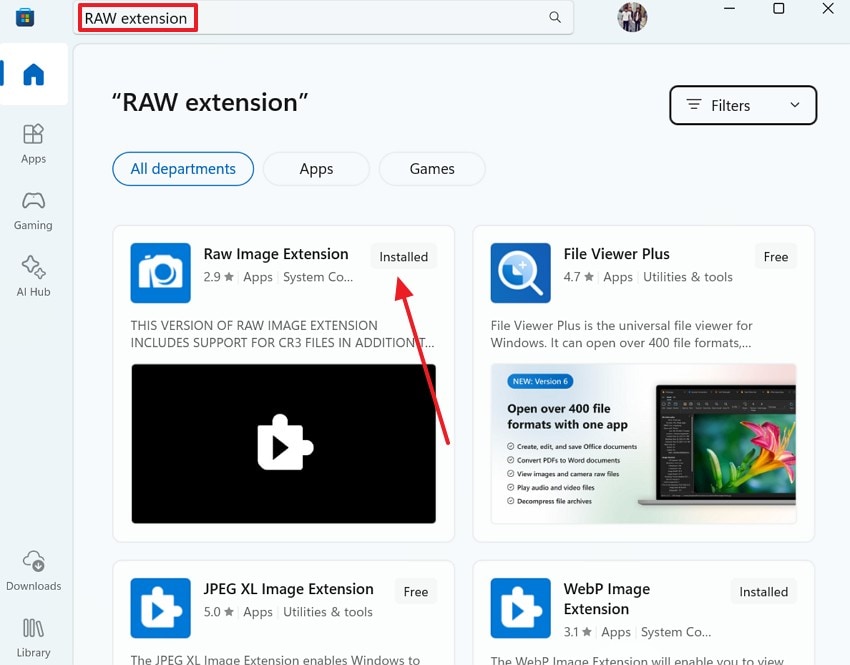
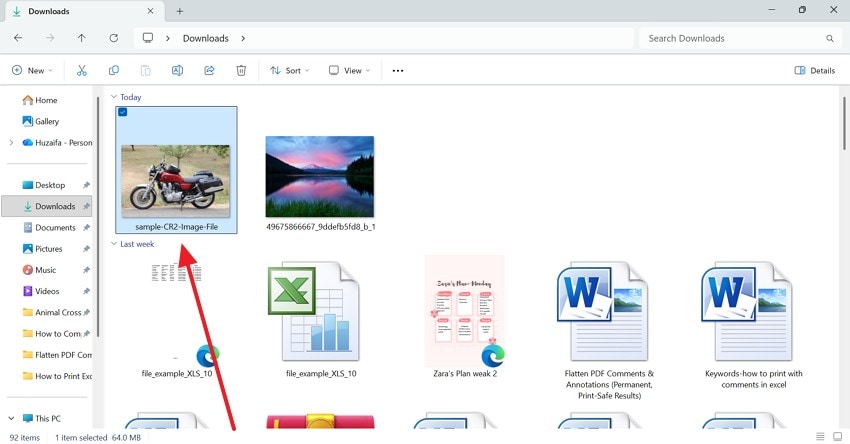
- Upon installing the app, access the CR2 photo again and double-click to open it in the built-in image preview app.
On macOS
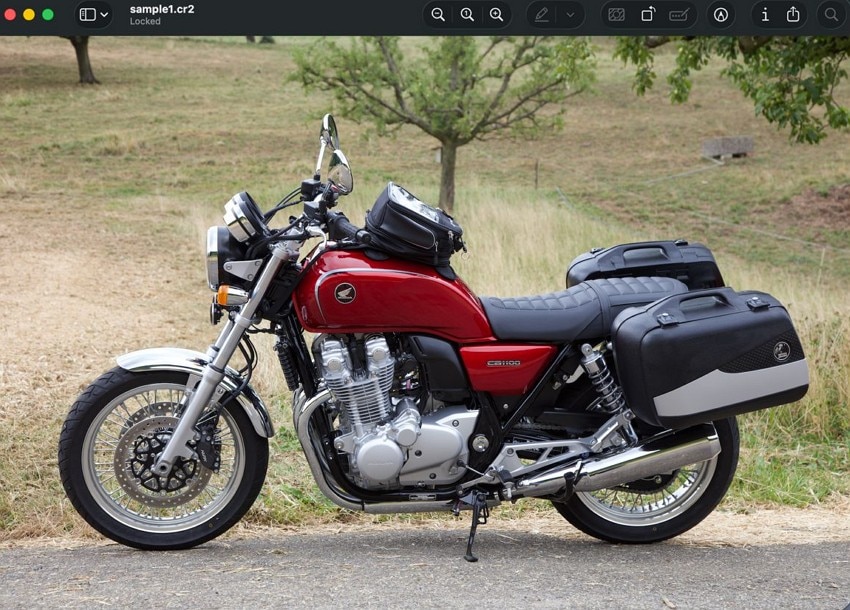
macOS devices natively support CR2 files, allowing users to open them directly in Preview or import them into the Photos app. This makes viewing Canon RAW images quick and convenient without installing extra software. After learning how to open a cr2 file in windows 10, follow these steps to execute the process on your macOS:
Instructions. On your MacBook, locate the Canon file in the Finder app and access it via the Preview app.
Part 3. How to Open a CR2 File in Photoshop (Step-by-Step Guide)
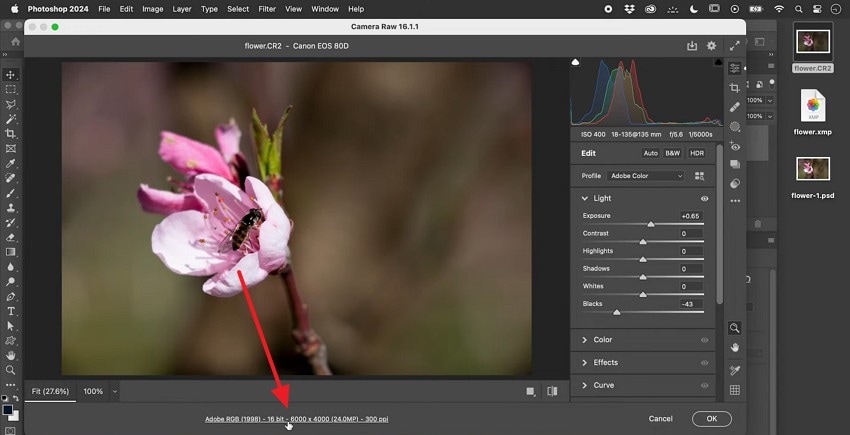
Adobe Photoshop fully supports CR2 files, offering professional-grade tools to view and edit Canon RAW images. By opening a CR2 file in Photoshop, users gain access to precise adjustments such as exposure, color correction, and layer-based editing. To learn how to open a cr2 file in photoshop, follow the guide below:
- To start, open Photoshop and import an image onto the canvas. Now, select the “Adobe RGB” option to access a new window.
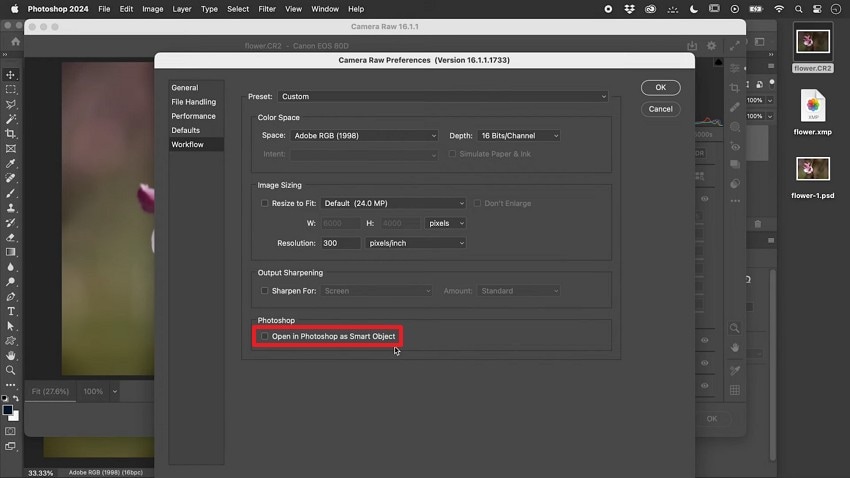
- Using the next window, check the “Open in Photoshop as Smart Object” box to ensure that the CR2 files are editable in the future.
Part 4. How to Open CR2 Files on Mobile (Android & iPhone)
Now that we have explored the methods of opening a Canon image on the PC, let's look into the mobile methods. The following section looks into Google Photos and an online tool for this purpose:
1. Google Photos
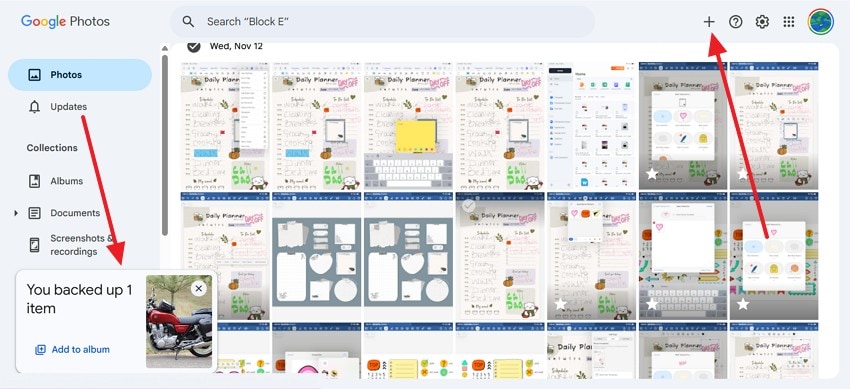
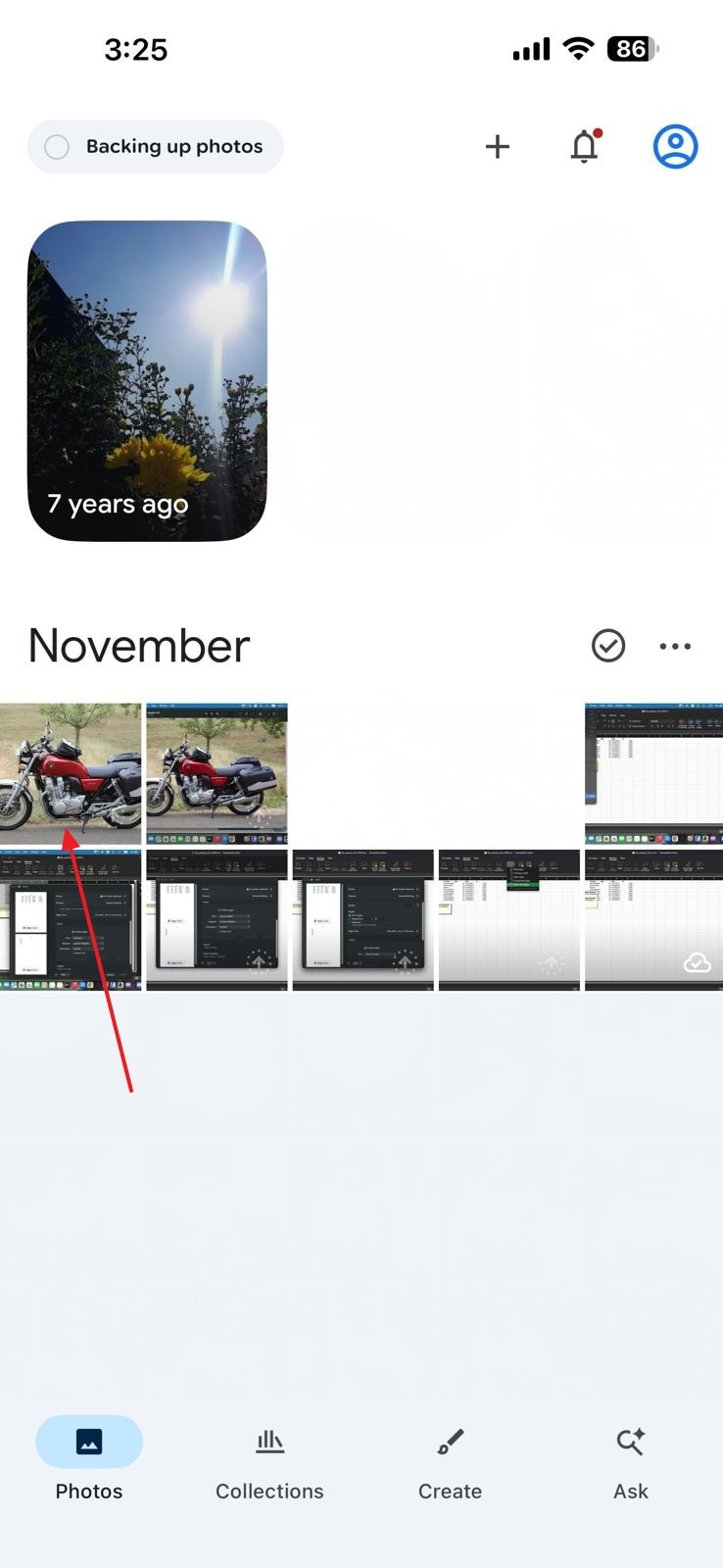
Google Photos allows users to upload and view CR2 files on the phone, making it a convenient option for accessing Canon RAW images. The CR2 format is not supported on the Google Photos mobile app. Therefore, you will have to upload that image to Google Photos using your PC’s browser. The steps below feature a detailed guide on how to open cr2 image file on Google Photos:
- First, open Google Photos on the browser and upload the CR2 image using the “+” icon.
- Now, access the Google Photos app on the phone and access the CR2 image that you synced on the browser recently.
2. Online Viewers
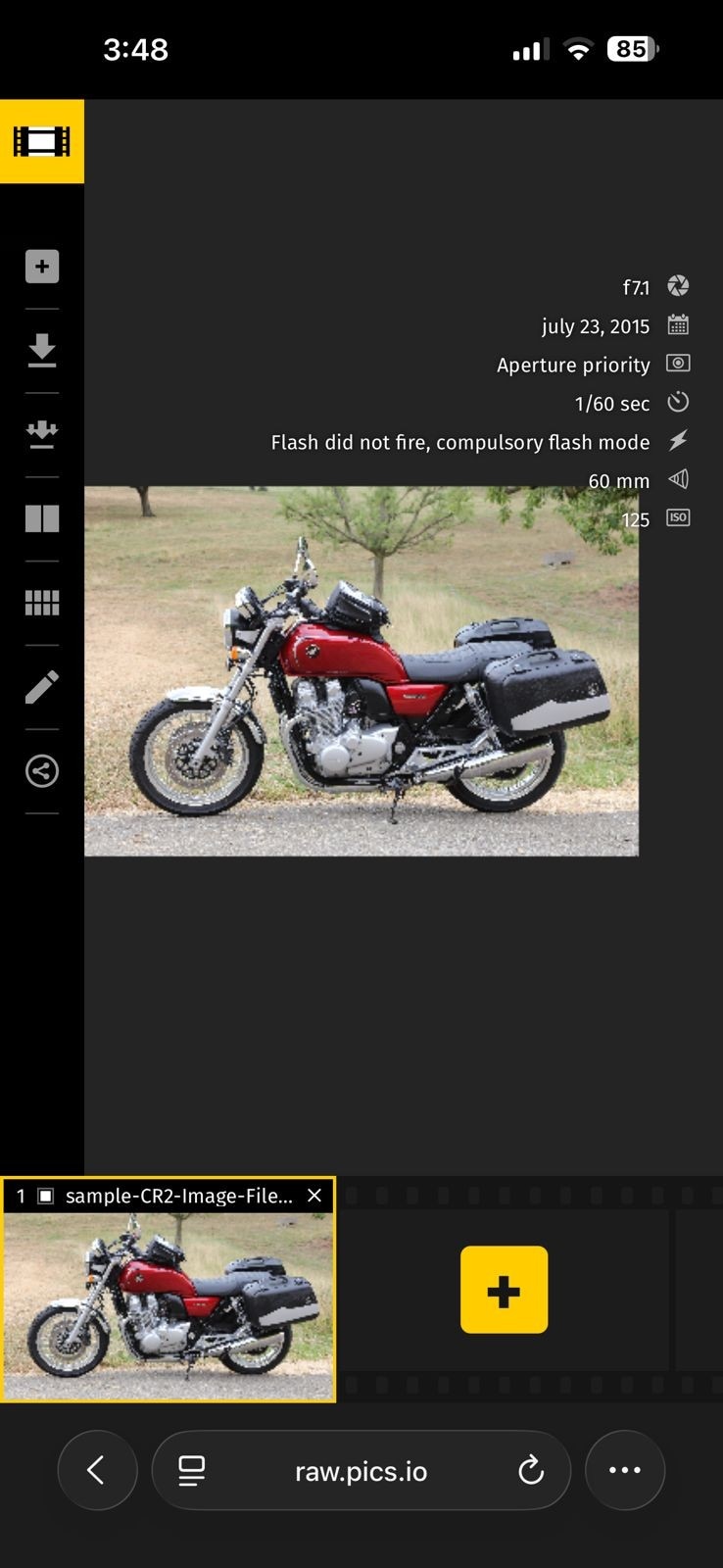
Online CR2 viewers allow users to open Canon RAW files without installing any software, making them ideal for quick access across devices. These tools typically support basic viewing and simple edits like cropping or exposure adjustment. Raw.PICS.io is an online viewer convenient for photographers who need to quickly share previews or convert files to more common formats. Follow these steps and learn the cr2 file how to open online:
Instructions. To start, open Raw.PICS.io in the mobile browser and upload the CR2 image from your device. When the image opens, review it and process as needed.
Pro Tip: Stuck With Lost CR2 Files? Recoverit Is Your RAW-Saving Lifeline
Many users wonder how to open CR2 files, as they are missing for some reason. To get back your missing Canon images, Recoverit is an ideal tool. It offers quick image restoration by supporting more than 1,000 file formats for versatility. This tool has a success percentage of 99.5%, which is higher than most tools on the market.
Recoverit supports Mac and Windows devices to cater to a wider range of audiences. It enhances your user experience by offering 2 modes of file scanning. Besides using the automated search method, you can also add search filters to get a customized search. Users who fail to locate their lost files through the Quick Scan can run Deep Scan for an extensive search.
Key Features
- Lost File Scenario: Recoverit caters to over 10,000 scenarios of a missing file to cater to multiple circumstances.
- Batch Recovery: This tool allows you to restore multiple photos in a single task to elevate productivity.
- Compatible Devices: Users can recover their lost files through over 1M+ storage devices, including hard drives, memory cards, and flash drives.
Using Recoverit to Retrieve Missing Canon Image Files
After learning cr2 file how to open process, let's see how missing images can be retrieved. The following guide explores how this tool can be used for immediate retrieval of media files shot by Canon:
1. Select the Location of a Missing Canon Image File
To begin with, open Recoverit and select the location of your missing file from the left panel.

2. Choose the Missing Files and Recover
When the missing files appear on the next interface, select them and click “Recover” to retrieve them.

3. Preview the Recovered File
As the Canon image files are recovered, preview them and hit the “Recover” button to save them.

Conclusion
In essence, opening a Canon Raw image is important but challenging at the same time. This article catered to this issue by offering effective solutions. We looked into various methods on how to open CR2 files. Having a lost RAW file could also be a reason why you are unable to access it.
We introduced Recoverit as a robust solution for restoring a lost CR2 file. With a success rate of 99.5%, this tool effectively regains access to missing Canon images.
FAQ
-
1. Can I open CR2 files on mobile devices?
Apps like Google Photos can open CR2 files on smartphones or tablets. You can view and perform simple edits directly on your device. -
2. Why won’t my CR2 file open?
Your system may not have the required RAW support, such as the RAW Image Extension on Windows. It could also be that your software does not recognize Canon RAW files. When your CR2 file is missing, it will not open on your device. If the latter is the case with you, you can use Recoverit to regain access to your missing Canon-shot photos. -
3. How can I recover 7 missing RAW Canon files?
If you lost 7 CR2 files, you could use Recoverit to restore them. With its batch-processing facility, this tool effectively retrieves bulk files. -
4. Which Recovery tool is the most reliable for retrieving a Canon file?
Although there are many options available on the market, Recoverit is the most reliable tool. With a success rate of 99.5%, this tool ensures that you successfully retrieve missing images.


