 TL;DR:
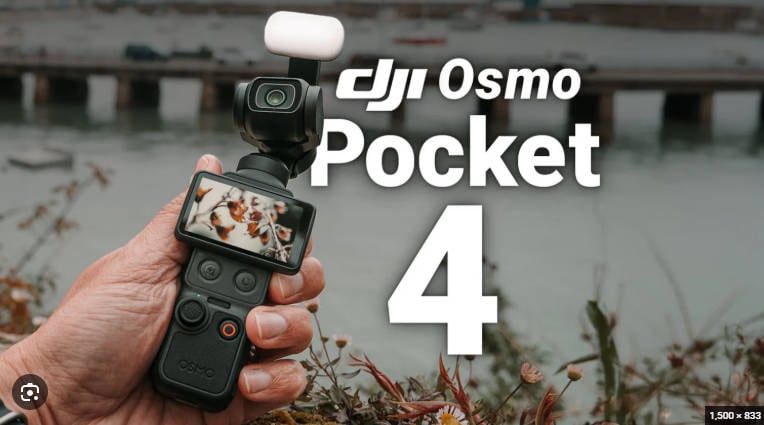
The DJI Osmo Pocket 4 is a highly effective tool for solo travel vloggers who need smooth handheld 4K video, utilizing a 3-axis mechanical gimbal, a 1-inch CMOS sensor, and 107GB of usable built-in storage to outperform standard smartphones.
● Choose the standard Osmo Pocket 4 for simple one-camera filming, switch to the Osmo Pocket 4P if you specifically require dual-lens framing, or use a dedicated action camera for waterproof, high-impact environments.
● The convenience of 107GB internal capacity and up to 1TB microSD support increases data-loss risks by encouraging longer shooting sessions, making it critical to manually verify USB-C file transfers before formatting the storage.
● If files are accidentally deleted or lost during transfer, stop recording immediately to prevent overwriting the HEVC data, as recovery software can only function if the internal storage or SD card remains physically readable by a computer.
Ask AI for a summary
 ChatGPT
 Perplexity
 Gemini
 Claude
 Grok
Grok
DJI Osmo Pocket 4: The Quick Verdict
Is the DJI Osmo Pocket 4 worth buying? Yes, for travel vloggers, solo creators, and daily video shooters who want smoother handheld footage than a phone can usually deliver without carrying a larger camera and gimbal kit. Its strongest advantages are the 3-axis mechanical gimbal, 1-inch CMOS sensor, 2-inch OLED touchscreen, 3 built-in microphones, 107GB available built-in storage, microSD expansion, and fast USB-C transfer.
- Overall editorial rating: 4.2/5 for travel vlogging and compact creator workflows.
- Best for: travel vlogs, walking tours, daily creator clips, family travel, street videos, food content, room tours, and lightweight YouTube or social media production.
- Not ideal for: underwater action, helmet-mounted POV, harsh sports, optical telephoto work, or creators who do not want to manage large 4K video files.
- Storage warning: the 107GB internal storage is convenient, but it also encourages creators to keep more valuable footage in one place. If storage becomes unreadable or videos disappear, the urgency to recover footage becomes higher, not lower.
The DJI Osmo Pocket 4 is not just a small camera with a gimbal. It is a pocket video system for people who film while moving: travel creators, solo vloggers, lifestyle shooters, product reviewers, and users who want stabilized 4K footage without the friction of a mirrorless camera setup.
This 2026 DJI Osmo Pocket 4 review focuses on the buying decision and the creator workflow around it. We cover the official spec signals, real use cases, image quality expectations, storage design, microSD risks, transfer habits, pros, cons, and what to do if DJI Osmo videos are deleted, formatted, corrupted, or lost during transfer.

Important model note: This review is about the standard Osmo Pocket 4. DJI Osmo Pocket 4P has received separate media attention because of its dual-camera design, but Pocket 4 and Pocket 4P are not the same buyer decision. If you searched for "DJI Osmo Pocket 4 review," the standard model is the more direct match for one-camera travel vlogging, built-in storage, and lightweight shooting.
Try Wondershare Recoverit to Recover Lost DJI Videos
 Security Verified. Over 7,302,189 people have downloaded it.
In this article
Part 1. DJI Osmo Pocket 4 Review Verdict
The DJI Osmo Pocket 4 is worth considering if your main problem is movement. Phones are convenient, action cameras are rugged, and mirrorless cameras are flexible, but none of those choices solve handheld walking footage in the same simple way as a pocket gimbal camera. The Osmo Pocket 4 is built for people who want to pull out one compact device and record a smoother scene immediately.
The camera's value is not only about the headline specs. It is about the complete field workflow: shoot quickly, frame on the 2-inch screen, record stabilized 4K footage, use built-in storage when you do not have a card ready, expand with microSD when you need longer sessions, and move files over USB-C or Wi-Fi.
That workflow is powerful, but it is also where data loss happens. A creator may film a full travel day, leave dozens of HEVC clips on internal storage or a microSD card, transfer them quickly to a laptop, then format the card before verifying the copy. The camera did its job, but the file workflow failed.
Review Scorecard
| Review Area | Rating | 2026 Review Notes |
| Travel creator value | 4.5/5 | Compact, discreet, fast to start, and strong for walk-and-talk footage, city clips, room tours, and daily content. |
| Stabilization | 4.6/5 | 3-axis mechanical stabilization remains the main reason to choose it over phone-only handheld shooting. |
| Image quality potential | 4.2/5 | The 1-inch sensor and 4K recording make it more serious than a casual pocket camera, though lighting and mode choices still matter. |
| Ease of use | 4.3/5 | The screen, simple body, built-in storage, and fast transfer make quick shooting easy for solo users. |
| Storage flexibility | 4.4/5 | 107GB available built-in storage plus microSD support reduces friction, especially when a card is missing or full. |
| Data safety pressure | 3.3/5 | Large internal storage and high-bitrate footage encourage longer shooting sessions, so backup discipline becomes more important. |
| Action durability | 3.1/5 | It is a gimbal camera, not a waterproof action camera. Use the right case and avoid rough mounting scenarios. |
How We Evaluated It
This review uses the original Recoverit draft, DJI's current product page, DJI support information, storage-card guidance in the official Osmo Pocket 4 guide, and live search-intent analysis around "DJI Osmo Pocket 4 review," "Osmo Pocket 4 specs," "travel vlogging camera," and "recover deleted DJI videos." The goal is not to repeat a spec sheet. It is to answer what buyers and creators actually need to know before trusting a pocket camera with travel footage.
| Evaluation Question | Why It Matters | Finding |
| Does it solve a real creator problem? | Creators need stable footage while walking, filming alone, and moving quickly. | Yes. The mechanical gimbal is still its biggest practical advantage. |
| Is built-in storage a real upgrade? | Many creators forget cards, fill cards, or do quick clips without planning. | Yes. 107GB available storage makes spontaneous shooting easier. |
| Does storage reduce recovery intent? | Some users may buy fewer SD cards when internal storage is large enough. | Not necessarily. Bigger storage can concentrate more valuable clips in one place, increasing recovery urgency when something goes wrong. |
| Is it better than a phone? | Many buyers already own a strong phone camera. | For movement and discreet one-handed filming, yes. For instant sharing and apps, the phone still wins. |
| Is it better than an action camera? | Many buyers compare DJI Pocket devices with GoPro-style cameras. | For smooth handheld creator footage, yes. For waterproof and impact-heavy action, no. |
Part 2. DJI Osmo Pocket 4 Specs at a Glance
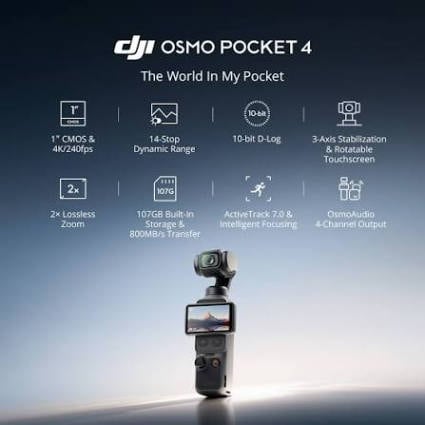
The Osmo Pocket 4 spec sheet reads like a creator-focused upgrade rather than a simple travel gadget. The important pieces are the 1-inch sensor, mechanical stabilization, built-in screen, internal storage, microSD support, and fast transfer options.
| Feature | DJI Osmo Pocket 4 | Review Interpretation |
| Camera type | Pocket gimbal camera | Designed for stabilized handheld video, not rough action-camera abuse. |
| Core audience | Travel vloggers, daily creators, solo shooters | Best when speed, size, and stabilized movement matter. |
| Sensor | 1-inch CMOS listed in DJI product information | Useful for creator footage and stronger image quality than many small-sensor devices. |
| Stabilization | 3-axis mechanical gimbal | The defining advantage over phone-only handheld shooting. |
| Screen | 2-inch OLED touchscreen | Good for quick framing, settings, playback, and solo creator use. |
| Microphones | 3 built-in microphones | Useful for ambient sound, quick vlogs, and travel clips when you do not attach external audio. |
| Built-in storage | 128GB total, about 107GB available to users | Practical for quick shooting, but it makes backup and recovery planning more important. |
| Expandable storage | microSD support, with Osmo Pocket 4 series guidance listing up to 1TB | Good for longer trips, but microSD cards remain a common point of deletion, formatting, and corruption. |
| File system | exFAT listed in specification information | Supports large video files better than older FAT32 workflows, but does not prevent data loss. |
| Video format | MP4 HEVC listed in specification information | Efficient for high-quality 4K footage, but recovered HEVC clips may require proper players or repair handling if damaged. |
| Photo format | JPEG, DNG, and JPEG+DNG listed in specification information | Good for users who want quick sharing or more editing flexibility. |
| Max bitrate | Up to 180 Mbps listed in specification information | Large enough to make transfer verification and backup routines important. |
| Wired transfer | Up to 800 MB/s from built-in storage via USB-C under supported conditions | Fast, but a fast copy still must be verified before storage is formatted. |
| Wireless transfer | Up to 90 MB/s over Wi-Fi under supported conditions | Convenient for mobile workflows, but less ideal as the only copy of important footage. |
Spec interpretation: the Osmo Pocket 4 is not trying to beat every mirrorless camera or every action camera. It is trying to be the camera that is actually in your hand when a travel moment happens. That makes handling, storage, transfer, and recovery planning just as important as resolution.
Part 3. Design, Handling, and Stabilization
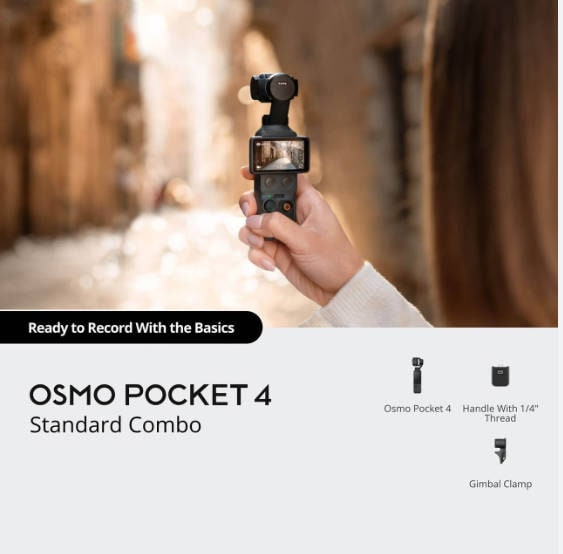
The design value of the Osmo Pocket 4 is simple: it is small enough to carry, quick enough to start, and stable enough to make walking footage usable. That combination is hard to reproduce with a phone unless you add a separate gimbal, and once you add a separate gimbal, the phone setup becomes less pocketable.
The 2-inch OLED touchscreen also changes the field experience. A travel creator can frame a hotel-room pan, check exposure, switch shooting modes, and review a clip without mounting a phone as a monitor. For creators filming in public, that lower-profile setup can feel less intrusive than a larger camera rig.
The 3-axis mechanical gimbal is the core reason the camera still matters. Electronic stabilization can be impressive, but it often relies on cropping, digital correction, and scene-dependent processing. A mechanical gimbal gives walking shots, slow pans, and handheld movement a more natural feel.
| Real-World Scene | How Osmo Pocket 4 Helps | What to Watch |
| Walking vlog | Smoother forward movement and less phone-like shake. | Keep steps controlled; no small gimbal removes every bounce. |
| Street market clip | Small body draws less attention and starts quickly. | Monitor highlights, people movement, and audio noise. |
| Hotel or room tour | Good for slow pans through narrow interiors. | Avoid whipping the camera too fast in low light. |
| Food and cafe video | Stable tabletop movement and quick B-roll shots. | Close-focus limits and lighting still matter. |
| Family travel footage | Easy to handhold while walking and talking. | Back up daily because casual clips are often irreplaceable. |
Durability is the tradeoff. The Osmo Pocket 4 is not a GoPro-style action camera. The gimbal head has moving parts, the lens area needs protection, and the device should not be tossed into a bag without a case. For rain, surfing, skiing, cycling mounts, or impact-prone filming, use an action camera instead.
Part 4. Image Quality, Audio, and Vlogging Experience
The Osmo Pocket 4 is strongest when a creator wants polished footage without building a rig. The 1-inch sensor, 4K recording, stabilization, built-in mics, and internal storage all support the same goal: capture usable footage quickly.
Video Quality and HEVC Files

DJI's product information positions Osmo Pocket 4 around serious 4K creator footage. The 1-inch CMOS sensor helps it move beyond a basic tiny-camera look, while HEVC recording keeps high-quality video more storage-efficient than older codecs at similar quality levels.
That efficiency does not mean small files. High-bitrate 4K footage can still become large quickly, especially when shooting travel days, slow-motion clips, long walk-throughs, or repeated takes for social videos. A creator may return from a day trip with dozens of files, and the most valuable clip may be mixed among ordinary test shots.
This is where recovery intent becomes very real. A deleted MP4 is not just a file extension. It might be the only take of a proposal, ceremony, client product shot, city scene, or once-in-a-trip travel moment. The more footage the camera encourages users to store, the higher the emotional and business cost of data loss.
Audio and Solo Shooting
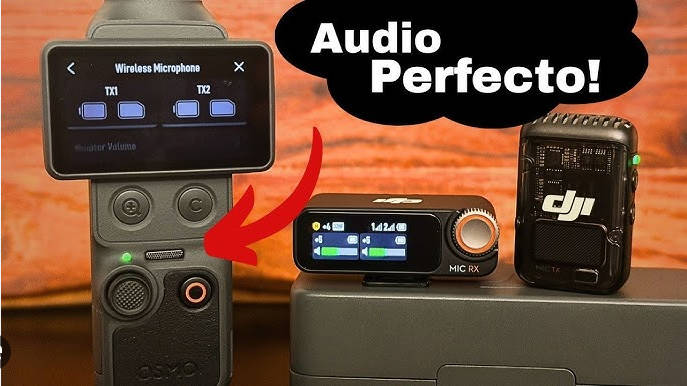
The 3 built-in microphones make the Osmo Pocket 4 more practical for casual vlogs and fast travel updates. Built-in audio will not replace a dedicated wireless mic for every creator, but it reduces setup friction when a user wants to record a quick walking scene, ambient sound, room note, food clip, or short voice segment.
For solo creators, this matters. A camera that is always waiting for external audio is a camera that may miss the moment. Osmo Pocket 4 works best when it gives you acceptable capture quality with minimal setup, then leaves the more serious audio workflow for planned shoots.
Part 5. Storage Review: 107GB Built-In Storage Changes the Risk
Storage is the most underrated part of the Osmo Pocket 4 review. DJI lists 128GB total built-in storage, with about 107GB available to users. At first glance, this sounds like a convenience feature. In practice, it changes how creators shoot, how they buy cards, and how urgently they respond when footage disappears.
Why Bigger Built-In Storage Is Useful
The obvious benefit is that users can shoot without a card inserted. This helps in normal travel situations: you forgot a card, your microSD card is full, you are taking a few quick clips, or you want the internal storage as a temporary buffer before copying footage to a laptop.
- Card-free capture: shoot short clips even when the microSD card is missing or full.
- Travel flexibility: keep filming during a walk, layover, day trip, or quick creator session.
- Reduced card swaps: fewer moments where users remove cards in public or under time pressure.
- Emergency storage: useful when a card reader, spare card, or laptop is not available.
- Fast offload: USB-C transfer from internal storage can be much faster than older camera workflows when supported cables and devices are used.
This may reduce the number of times some users buy or swap SD cards. That argument is reasonable: if a camera has enough internal storage for short trips or daily clips, some casual creators will rely less on removable media.
Why Bigger Storage Can Increase Recovery Urgency
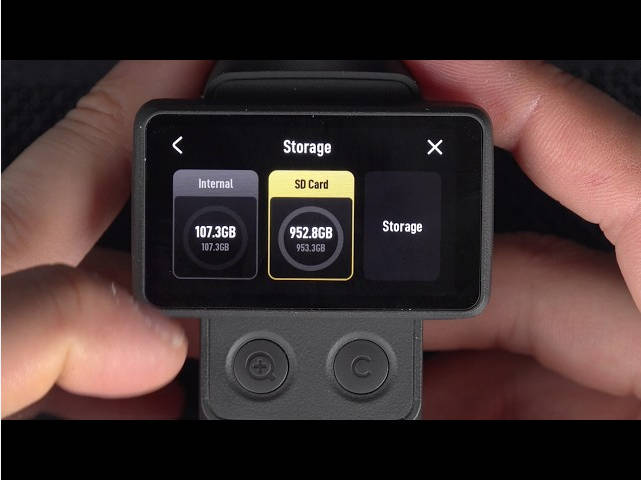
For data recovery intent, the bigger story is different. Larger storage does not remove data loss risk. It concentrates more footage in one place. When users believe storage is "big enough," they often keep recording for longer before offloading and backing up. That means one unreadable card, one accidental format, or one transfer mistake can affect more important files at once.
This is especially relevant to Recoverit readers. If a 16GB card fails, the user may lose one short session. If a 512GB or 1TB microSD card fails, or if a creator leaves many clips on the 107GB internal storage until the end of a trip, the recovery intent becomes stronger because the storage may hold several days of travel footage, paid creator work, or irreplaceable family clips.
| Storage Behavior | User Benefit | Recovery Risk |
| Shooting to built-in storage | No card required and fewer interruptions. | Users may delay offloading because the camera still has room. |
| Using a large microSD card | Long recording capacity for travel or events. | One card problem can affect a much larger batch of footage. |
| Fast USB-C transfer | Faster copy from camera to computer. | Users may assume transfer completed without checking file count or playback. |
| Wireless mobile transfer | Convenient for phone-first creators. | Wi-Fi interruptions can create incomplete copies or confusion about which clips are backed up. |
| In-camera deletion | Quick cleanup during a trip. | Deleted clips may be overwritten by new recordings if the user keeps filming. |
microSD Support and Failure Points
Osmo Pocket 4 series storage guidance lists microSD support up to 1TB. That is useful for long trips and high-volume shooting, but removable cards are still a frequent data loss point in camera workflows.
- Accidental formatting: the card is formatted in-camera before the user confirms all files were copied.
- In-camera deletion: clips are deleted during playback or quick cleanup.
- Transfer interruption: the USB-C cable, card reader, phone connection, or laptop sleep state interrupts copying.
- File system errors: the card becomes unreadable, asks to be formatted, or appears as RAW on a computer.
- Counterfeit or slow cards: unreliable cards can cause recording or file integrity problems.
- Physical card damage: tiny microSD cards are easy to bend, lose, or damage during travel.
Because Osmo Pocket 4 uses large video files, avoid using old, unknown, or suspiciously cheap cards. Format cards only after the footage is backed up, and do not keep shooting on a card after files are lost.
Part 6. Transfer Workflow and Data Loss Scenarios
Fast transfer is a strength of Osmo Pocket 4, but speed can create a false sense of safety. A transfer is not a backup until the files have been copied, opened, counted, and stored in at least one additional location.
DJI lists USB-C transfer from built-in storage up to 800 MB/s under supported conditions and wireless transfer up to 90 MB/s. Those numbers are useful for creators moving files quickly, but many failures still happen after shooting, not during shooting.
| Problem | Likely Cause | Safer Response |
| Videos are missing after transfer | Only part of the folder was copied, or the transfer was interrupted. | Stop using the original storage, compare file count, then scan the original card or backup drive if files are gone. |
| Camera or card asks to format | File system corruption, unsafe removal, or card reader issue. | Do not format if footage matters. Try another reader, then scan the readable storage. |
| MP4 file has size but will not play | Incomplete transfer, corrupted metadata, fragmented recovery, or recording interruption. | Copy the damaged file to another drive and use a video repair workflow on the copy. |
| Computer does not detect the card | Reader, port, adapter, driver, or card damage issue. | Test another reader and port. If no device detects it, software recovery may not be possible until the card is readable. |
| Footage was deleted in-camera | User cleanup mistake or wrong clip selected. | Stop recording immediately and scan the card or storage backup before writing new data. |
| Internal storage clips were erased after import | User assumed import was complete without verifying files. | Check destination folder, app library, and backups before recording new clips to the same storage. |
A better Osmo Pocket 4 workflow is simple:
- Record to built-in storage or a reliable microSD card.
- Transfer the full folder structure to a laptop, external SSD, or desktop drive.
- Open several copied clips before deleting anything from the camera.
- Check file count and folder size against the source storage.
- Create a second backup before formatting the card or clearing internal storage.
- Format storage only after both copies are verified.
This process sounds slower, but it is much faster than trying to recover a full travel project after a card format or incomplete transfer.
Part 7. DJI Osmo Pocket 4 vs Osmo Pocket 4P, Phone, and Action Camera
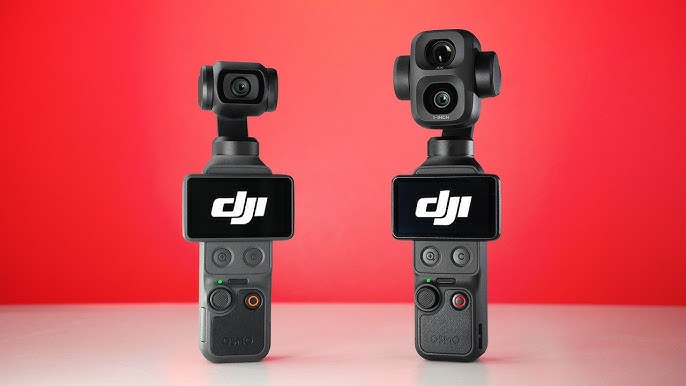
The Osmo Pocket 4 makes the most sense when you compare it by shooting job, not by brand loyalty. A phone, a GoPro-style camera, a mirrorless camera, and Osmo Pocket 4 each solve different problems.
| Camera Choice | Choose It If You Need | Skip It If You Need |
| DJI Osmo Pocket 4 | Compact stabilized travel video, simple vlogging, internal storage, and fast handheld capture. | Dual-lens framing, waterproof action, or advanced interchangeable-lens work. |
| DJI Osmo Pocket 4P | A higher-end dual-camera pocket setup with more shot variety for creators who edit. | A simpler camera, lower complexity, or a model with clearer local availability in every market. |
| Smartphone | Instant sharing, apps, social upload, navigation, calls, and always-on convenience. | Smoother mechanical gimbal movement, long creator sessions, or separate camera storage. |
| GoPro-style action camera | Waterproof action, helmet or chest mounts, cycling, skiing, surfing, diving, or rough POV footage. | Gimbal-like pans, less wide-angle distortion, discreet travel vlogging, or delicate handheld B-roll. |
| Mirrorless camera | Interchangeable lenses, larger sensors, controlled production, serious audio rigs, and advanced manual control. | Pocket carry, fast one-handed shooting, or filming discreetly while walking. |
Buying logic: choose Osmo Pocket 4 if the main problem is smooth handheld travel video. Choose Osmo Pocket 4P if you specifically need more lens variety in a pocket camera. Choose an action camera if the main problem is water, impact, and mounting. Keep the phone for sharing and quick backup, but do not assume it replaces a dedicated gimbal camera for every walking shot.
Comprehensive comparison: DJI Osmo Pocket 4P vs Osmo Pocket 4: Which Is Better for Travel Vlogging?
Part 8. How to Recover Deleted or Lost DJI Osmo Pocket 4 Videos
If DJI Osmo Pocket 4 videos disappear, the first step is not software. The first step is to stop using the affected storage. Do not record more clips, do not format the card, do not run repair commands on the card, and do not save recovered files back to the same place.
For DJI-specific recovery guidance, Recoverit has a guide on how to restore videos from a DJI Osmo camera. For broader video-loss cases, Wondershare Recoverit Video Recovery can help scan readable storage such as SD cards, microSD cards, USB drives, external drives, computer drives, and local camera backups for deleted or lost videos.
Before You Scan the Storage
- Stop recording immediately. New DJI footage can overwrite deleted video data, especially on a microSD card.
- Do not format the card. If the computer asks to format it, cancel the prompt if the footage matters.
- Use a reliable card reader. A bad adapter can make a healthy card look unstable.
- Recover to another drive. Save recovered videos to a computer drive or external SSD, not back to the same card.
- Work from copies when possible. If a recovered MP4 is damaged, repair a duplicate rather than the only recovered file.
Recoverit Workflow for DJI Footage
| Step | What to Do | Why It Matters |
| 1. Identify the source | Confirm whether the lost footage was on internal storage, microSD, phone transfer folder, computer import folder, or external backup drive. | Scanning the wrong device wastes time and may miss the real source. |
| 2. Connect readable storage | Connect the microSD card with a stable reader or connect the drive where DJI files were copied. | Recovery software needs readable storage to scan deleted or lost file records. |
| 3. Scan with Recoverit | Open Recoverit, select the affected storage, and scan for video and photo formats such as MP4, MOV, JPG, JPEG, and DNG. | Filtering helps separate DJI media from unrelated files. |
| 4. Preview and select | Preview recoverable files when available and prioritize the clips with correct dates, names, sizes, or folder paths. | Large trips can contain many similar clips, so selection matters. |
| 5. Recover to another drive | Save found files to a different local drive or external SSD. | Writing back to the same card may overwrite remaining recoverable data. |
| 6. Handle unplayable clips carefully | If recovered MP4 files do not play, keep the originals and try video repair on copies. | Fragmented or interrupted DJI clips may need repair after recovery. |
Recover Lost DJI Osmo Pocket Videos with Recoverit
Security Verified. Over 7,302,189 people have downloaded it.
Recoverit is a recovery tool, not a hardware repair or camera firmware fix. It may help when the storage is detected and the missing files have not been overwritten. It cannot recover overwritten videos, repair a physically failed card that no device can detect, bypass encryption, or guarantee every clip will be restored.
When Recovery May Not Work
- The deleted footage has been overwritten by new recordings.
- The microSD card is physically damaged and not detected by any device.
- The file was never fully written because recording stopped during a severe power or storage error.
- The only remaining file is an incomplete transfer copy, and the original source was formatted and reused.
- The storage is encrypted or inaccessible without the proper key or device access.
These limits should be stated clearly because creators often search for recovery help under pressure. A cautious recovery workflow protects the remaining data better than repeated formatting, copying, and trial-and-error repair.
Part 9. Pros, Cons, and Buying Advice
| Pros | Cons |
| Pocket size makes it easy to carry for travel and daily shooting. | Not as rugged or waterproof as an action camera. |
| 3-axis mechanical stabilization is excellent for walking footage. | High-bitrate 4K clips increase storage and backup pressure. |
| 1-inch CMOS sensor gives the camera stronger creator potential. | Internal storage recovery workflow is less familiar than simple SD card recovery. |
| 2-inch OLED touchscreen helps with framing, playback, and settings. | Wireless transfer is convenient but should not be treated as the only backup. |
| 107GB available built-in storage is genuinely useful for spontaneous shooting. | Large storage may encourage users to delay offloading and backup. |
| microSD expansion supports longer shooting sessions. | microSD cards can still be formatted, corrupted, lost, or damaged. |
| Fast USB-C transfer helps creators move footage quickly. | Regional availability, bundles, and warranty terms should be checked before purchase. |
| User Type | Should You Buy It? | Reason |
| Travel vlogger | Yes. | It is small, stable, and fast enough for daily travel clips. |
| Solo creator | Yes. | The screen, microphones, and gimbal support one-person shooting. |
| Family traveler | Yes, if you will back up often. | It can capture smooth memories, but lost family footage is hard to replace. |
| Action sports user | Use a different camera. | An action camera is safer for water, impact, and mounts. |
| Professional filmmaker | Use as a companion camera. | It is useful for quick B-roll, but not a full cinema system. |
| Phone-only creator | Maybe. | Buy it if stabilization and separate camera storage matter more than instant app posting. |
| Storage-careless user | Only with a better backup habit. | Large 4K projects demand organized offload, verification, and backup. |
The buyer who gets the most value from Osmo Pocket 4 is not simply the person who wants the newest DJI camera. It is the person who shoots while moving and wants less friction between seeing a moment and recording a stable clip.
Part 10. Final Verdict
The DJI Osmo Pocket 4 is a strong travel vlogging camera because it reduces the effort required to capture smooth footage. Its gimbal, screen, microphones, 1-inch sensor, built-in storage, microSD support, and fast transfer workflow make it a serious compact tool for creators who film often.
Its biggest hidden issue is not image quality. It is storage behavior. The 107GB available built-in storage is a real selling point and may reduce dependence on SD cards for some users. But from a recovery and content-operations perspective, it also creates a stronger data-loss moment: users will store more photos and videos because they feel they have enough space. If that storage or a large microSD card becomes unreadable, the value of recovery rises because the footage is more concentrated, more important, and often harder to recreate.
Buy the Osmo Pocket 4 if you need smooth handheld travel footage and you are willing to build a simple backup routine. After every important shoot, copy the files, verify playback, keep a second backup, and format only after you know the footage is safe. If DJI videos are deleted or lost, stop using the affected storage and recover to another drive before doing anything else.
FAQ
-
Is DJI Osmo Pocket 4 good for travel vlogging?
Yes. Its pocket body, 3-axis mechanical gimbal, 2-inch OLED touchscreen, built-in microphones, and internal storage make it a strong choice for travel vlogs, walking clips, and solo creator videos. -
How much built-in storage does DJI Osmo Pocket 4 have?
DJI product information lists 128GB total built-in storage, with about 107GB available to users. The usable amount may vary depending on system files and future firmware behavior. -
Does Osmo Pocket 4 support microSD cards?
Yes. DJI Osmo Pocket 4 series storage guidance lists microSD support up to 1TB. Use reliable cards and back up footage before formatting or reusing the card. -
Is built-in storage safer than a microSD card?
It reduces card-related problems such as forgetting or swapping cards, but it does not remove data loss risk. Files can still be deleted, erased, lost during transfer, or affected by device access issues. -
What video format does DJI Osmo Pocket 4 use?
DJI specification information lists MP4 HEVC for video recording. HEVC is efficient, but high-bitrate 4K files can still be large and should be backed up carefully. -
Can I recover deleted videos from DJI Osmo Pocket 4?
Recovery may be possible if the deleted video data has not been overwritten and the storage is readable. Stop recording immediately, connect the card or backup drive to a computer, scan it with recovery software, and save recovered files to another drive. -
Can Recoverit recover videos from DJI internal storage directly?
Recoverit can scan readable storage locations that the computer can access, such as memory cards, drives, and local backups. Direct recovery from internal camera storage depends on how the device exposes that storage to the computer and whether the files have been overwritten. -
What should I do if a DJI Osmo video will not play after transfer?
First, check whether the transfer completed and whether another copy exists on the original storage. If the file is damaged or incomplete, recover the original file when possible and try video repair on a separate copy. -
Is Osmo Pocket 4 better than Osmo Pocket 4P?
It depends on the user. Osmo Pocket 4 is better for buyers who want a simpler pocket vlogging camera. Osmo Pocket 4P is more relevant if you specifically want a dual-camera workflow and its regional availability works for you. -
Should I format the Osmo Pocket 4 microSD card after transferring files?
Only format after you verify the copied clips, check file count and folder size, and create a second backup. If files are missing, do not format the card before recovery.



