
 TL;DR:
WeRecoverData is a professional, quote-based data recovery lab suited for physically damaged hardware and complex enterprise storage, but prospective users in 2026 must carefully verify all fees due to an F rating on the BBB and poor Trustpilot scores.
● Verify where your device will actually be opened and evaluated, as the company currently operates only 5 full-service laboratories in New York, Pasadena, Aventura/Miami, Austin, and Toronto, alongside 53 forwarding drop-off points.
● Request a written contract clarifying all non-refundable costs and what constitutes a partial or successful recovery, since recent user complaints repeatedly cite unexpected $95 to $100 diagnostic charges and high return-shipping fees.
● Reserve lab recovery for physically damaged, unreadable, or complex RAID, SAN, and NAS systems; if your storage device is still readable and suffers from logical deletion or formatting, scan it locally with software like Wondershare Recoverit as a first step.
Ask AI for a summary
 ChatGPT
 Perplexity
 Gemini
 Claude
 Grok
Grok
WeRecoverData: Quick Review
WeRecoverData may be worth considering for high-value, complex, or physically damaged storage, but it is not the easiest recommendation for everyday deleted-file recovery. Its own site highlights 24/7 emergency service, no-data-no-recovery-charge messaging, cleanroom facilities, RAID recovery, SSD recovery, and worldwide service areas. However, current third-party reviews show serious complaints about pricing, communication, drop-off locations, and return handling.
- Best for: enterprise storage, RAID/NAS/SAN, SSD electronics failure, physically damaged drives, tape, digital forensics, and emergency business recovery.
- Not ideal for: simple accidental deletion, a formatted but readable drive, low-value personal files, or users who want transparent software pricing.
- Official location model: 5 full-service recovery laboratories plus 53 service areas and drop-off points, according to the current WeRecoverData locations page.
- Service modes: in-lab, onsite, and remote recovery options, with emergency support advertised 24/7/365.
- Pricing: quote-based. Recent public reviews and BBB complaints repeatedly mention diagnostic/evaluation fees and high quotes, so confirm all fees in writing before sending media.
- Recoverit fit: a local software alternative for readable storage with deletion, formatting, lost partition, or interrupted transfer issues.
WeRecoverData is a professional data recovery service, not a DIY recovery app. It can be relevant when a hard drive is physically damaged, an SSD is no longer readable, a RAID/NAS/SAN system has failed, or business data needs engineer-led recovery. But in 2026, users should also look closely at pricing transparency, actual lab locations, and recent third-party reviews before shipping irreplaceable media.
This WeRecoverData data recovery review covers its services, recovery process, lab and drop-off model, security claims, turnaround, pricing concerns, user feedback, pros, cons, and when Wondershare Recoverit is a more practical first step for readable drives with logical data loss.
In this article
Part 1. WeRecoverData Review: Quick Verdict
WeRecoverData is best understood as a professional recovery provider for complex storage failures. Its current official site describes professional recovery for hard drives, SSDs, RAID arrays, and other media; 24/7 emergency service; controlled lab environments; and no-data-no-recovery-charge messaging. Its landing pages also describe ISO 4 Class 10 and ISO 5 Class 100 clean rooms, GSA contract status, HIPAA positioning, and secure encrypted delivery.
The concern is not whether WeRecoverData markets a broad service range. It does. The concern is whether its service model fits a user's case and budget. In 2026, independent review platforms show a sharper caution signal than the original article reflected. Trustpilot currently lists WeRecoverData with a low TrustScore from 23 reviews, BBB lists an F rating with unanswered complaints, and Yelp's New York listing shows a lower score than older versions of the article claimed.
Review Scorecard
| Review area | Score | Editorial notes |
| Recovery scope | 4.2/5 | Official pages cover hard drives, SSDs, RAID, SAN/NAS, servers, virtual machines, tape, mobile devices, and digital forensics. |
| Physical and enterprise recovery fit | 4.1/5 | The service is better suited to damaged media and complex storage than to simple logical file loss. |
| Location clarity | 3.2/5 | The current locations page clearly says there are 5 full-service labs and 53 service/drop-off points, but older marketing around 50+ locations can still confuse users. |
| Pricing transparency | 2.5/5 | No universal public price table. Recent user reviews and BBB complaints repeatedly mention diagnostic fees, return-shipping costs, and high quotes. |
| Customer feedback | 2.4/5 | Recent Trustpilot and BBB data are weak, while Yelp is mixed and older review sources may not represent current service quality. |
| Security claims | 3.8/5 | Official pages cite cleanrooms, HIPAA, GSA, SSAE16/SOC-related credentials, chain of custody, and encrypted delivery, but buyers should request written handling terms. |
| Recoverit alternative fit | 4.0/5 | Recoverit is a better first step only when storage is readable and the issue is logical, not physical. |
Lab Service vs Software: The First Decision
| Choose a lab like WeRecoverData when... | Try recovery software first when... |
| The hard drive clicks, beeps, was dropped, has fire or water damage, or is not detected. | The drive appears in Windows or macOS and the problem is deletion, formatting, or partition loss. |
| An SSD, RAID, NAS, SAN, server, tape, or virtual machine contains business-critical data. | You need to scan a readable internal drive, external drive, USB drive, SD card, or camera card. |
| You need forensic handling, enterprise security, onsite recovery, or emergency business support. | You want to preview recoverable files locally before paying for software recovery. |
| The device is encrypted and you need professional help with legitimate credentials. | You have the password/key and the storage can still be mounted or scanned. |
Safety note: If the device is physically damaged, stop powering it on and do not run repeated scans. If the drive is readable, stop saving new data to it and recover files before formatting, reinstalling, rebuilding RAID, or accepting disk repair prompts.
Part 2. What Is WeRecoverData?
WeRecoverData is a professional data recovery company that provides in-lab, onsite, and remote recovery services. The company positions itself for both home users and enterprise customers, with services for physical damage, logical corruption, RAID, SAN, NAS, servers, virtual machines, tape, mobile devices, digital forensics, and emergency recovery.
The current official locations page is especially important. It says WeRecoverData operates 5 full-service data recovery laboratories in New York, Pasadena, Aventura/Miami, Austin, and Toronto, plus 53 service areas and drop-off points. That means a nearby WeRecoverData listing may not be a full lab. Media collected at many listed locations is routed to one of the full-service labs.
This distinction matters for cost, timing, custody, and expectation-setting. Before dropping off or shipping a device, ask whether the location is a full-service lab or a forwarding/drop-off point, where your media will actually be opened, how it will be packaged, and who is responsible for return shipping if you decline the quote.
Part 3. WeRecoverData Services and Recovery Options
WeRecoverData's service range is broad. Its homepage and service pages mention hard drives, SSDs, RAID arrays, all storage media, RAID/SAN/NAS, digital forensics, SSD electronics failure, inaccessible drives, corruption, accidental reformatting, deletion, fire and water damage, and virtual or enterprise storage.
Supported Devices and Cases
| Recovery category | What WeRecoverData claims to handle | Practical warning |
| Hard drives | Mechanical, electrical, logical, fire, water, and accidental damage cases. | Do not keep powering on a clicking or beeping hard drive. |
| SSDs and flash media | SSD controller issues, inaccessible SSDs, USB drives, SD cards, and memory chips. | TRIM, encryption, failed controllers, and overwritten blocks can limit recovery. |
| RAID, NAS, SAN, and servers | Enterprise RAID, SAN, NAS, server volumes, and virtual infrastructure. | Record disk order and do not rebuild arrays repeatedly before evaluation. |
| Tape and legacy media | Tape drives, archives, and less common storage environments. | Pricing can vary heavily because old media may need special equipment. |
| Mobile devices | Phones, tablets, and mobile storage cases. | Encryption, passcodes, account locks, and hardware condition can block recovery. |
| Digital forensics | Deleted-file analysis, hidden data, evidence recovery, and legal/eDiscovery work. | Ask for chain-of-custody terms before submitting legally sensitive media. |
In-Lab, Onsite, and Remote Recovery
WeRecoverData advertises three main service routes. In-lab recovery means you ship or drop off media for engineer work in a controlled facility. Onsite recovery means engineers come to the customer's location, typically for enterprise or highly sensitive cases. Remote recovery is used when a system can be accessed securely over the internet and physical shipment is not required.
| Service route | Best fit | Timing from official pages |
| In-lab | Physically damaged drives, SSDs, RAID, flash, tape, and devices needing lab tools. | Standard 3-5 business days; Priority 1-3 business days; Weekend 1-3 days; Emergency 12-24 hours, with actual duration varying by case. |
| Onsite | Enterprise environments where data cannot leave the premises. | Advertised as available on client premises, 365 days a year and 24/7. |
| Remote | Logical server, virtual machine, NAS/SAN, or enterprise cases where remote access is feasible. | Advertised as emergency 24/7 and around-the-clock ASAP. |
Customer Support and Case Intake
WeRecoverData advertises phone and case-intake support across multiple regions, plus a 24/7 emergency critical response option for urgent cases. This can be useful for business incidents, but home users should still ask support to confirm evaluation fees, return-shipping terms, the exact lab location, and whether the quote covers partial or complete recovery goals.

Part 4. WeRecoverData Cost, Quote Model, and Turnaround
WeRecoverData does not publish a clear universal price table on its main site. The official wording focuses on consultation, estimate/case submission, and no-data-no-recovery-charge messaging. That means users should not assume a fixed cost from a generic article or from another customer's case.

The source article cited public price reports ranging from around $1,000-$2,000, a Reddit user report for a 3TB HDD quote between $2,400 and $4,650, and a Yelp user report of $5,000-$9,000 for 500GB from an LTO tape. Current third-party reviews also mention $95-$100 diagnostic or evaluation fees, return-shipping charges, and four-figure quotes. These are user-reported experiences, not official price guarantees, but they are relevant because the same complaints appear across multiple platforms.
Before you approve anything, ask for the following in writing:
- Whether the evaluation is free or requires a diagnostic fee for your specific device and location.
- Whether any fee is non-refundable, including emergency, weekend, R&D, material, vault, cloud access, or return-shipping fees.
- What "no data, no recovery charge" means for your case and whether partial recovery counts as successful recovery.
- Where your device will physically go if you use a drop-off point.
- Whether a file list, sample verification, or preview is available before payment.
- How long WeRecoverData keeps recovered data and how it is erased after delivery.
Cost verdict: WeRecoverData can be justified for high-value business, enterprise, legal, or severe hardware cases. For common deleted-file or formatted-drive scenarios on readable storage, a quote-based lab can be far more expensive than a local software scan.
Part 5. Security, Cleanrooms, and Location Transparency
WeRecoverData's official data security page says the company uses security protocols, encrypted return media when needed, SSAE16/SOC-related claims, HIPAA compliance, GSA contractor status, chain of custody for legal/forensic cases, and forensic credentials such as CCE, MCP, EnCE, and CHFI. Its landing pages also reference ISO 4 Class 10 and ISO 5 Class 100 cleanrooms.

These are meaningful claims for a data recovery provider, especially for damaged drives and regulated business data. Still, users should request current documentation if the case involves healthcare, legal discovery, government work, trade secrets, or other sensitive records. Website badges are not a substitute for a signed service agreement, chain-of-custody form, privacy terms, and clear media-return instructions.
The location issue also deserves attention. WeRecoverData currently says it has exactly five full-service labs and many service areas/drop-off points. If a nearby listing matters to your decision, ask whether engineers are actually present there or whether the location is only a forwarding point.
Part 6. WeRecoverData Reviews and User Complaints
Current third-party feedback is the weakest part of this WeRecoverData review. The company's own site includes positive testimonials and recognizable organization names. However, independent review platforms show a more difficult picture in 2026.

| Review source | Current or source-article context | What users should take from it |
| Trustpilot | Currently shows WeRecoverData with a low TrustScore and 23 reviews, with many recent one-star reviews. | Recent complaints focus on location clarity, fees, quotes, communication, and device handling. |
| BBB | Shows WeRecoverData.com as not BBB accredited, with an F rating, 7 complaints in the last 3 years, and 1.27/5 from 11 customer reviews. | BBB data is a strong caution signal, especially because the listed reason includes unanswered complaints. |
| Yelp New York listing | Shows 2.6 stars from 54 reviews in the listing checked, lower than the older 3.6/33-review figure in the original article. | Reviews are mixed: some users report successful recovery, while others report very high quotes and slow or poor communication. |
| Reddit user report | The original article linked a Reddit thread discussing a high quote range for a 3TB HDD. | Treat it as anecdotal, but useful for understanding why users search for WeRecoverData cost before sending a device. |
| ReviewCentre | The original article cited a 4.3/5 rating from 44 reviews. | Because current independent signals are more negative, do not rely on this older score alone. |
Source-linked Yelp examples show both sides. One user reported a successful SD card recovery, while another reported a $5,000-$9,000 quote for an LTO tape case. More recent Yelp and Trustpilot reviews mention issues around emergency timing, forwarding locations, evaluation fees, and device return. These are individual experiences, but the pattern is strong enough that users should proceed carefully.
Part 7. Pros and Cons of WeRecoverData
| Pros | Cons |
| Broad professional service scope across HDD, SSD, RAID, SAN/NAS, servers, tape, mobile, and forensics. | Pricing is not transparent enough for users who need a quick budget decision. |
| Officially advertises in-lab, onsite, and remote recovery options. | Recent Trustpilot, BBB, and Yelp feedback includes serious complaints. |
| Official pages mention no-data-no-recovery-charge policy and 24/7 emergency service. | Users should confirm whether evaluation, emergency, return, vault, or material fees are refundable. |
| Current location page clarifies 5 full-service labs and 53 service/drop-off points. | Drop-off locations may not be actual labs, which can affect expectations and timing. |
| Security pages list cleanroom, HIPAA, GSA, SSAE16/SOC-related, chain-of-custody, and encrypted delivery claims. | For sensitive data, users still need current documentation and signed handling terms. |
| Can be useful for cases that software should not touch, such as physically damaged drives. | Often overkill for deleted files or formatted partitions on readable storage. |
Part 8. WeRecoverData Alternative: Wondershare Recoverit
WeRecoverData and Wondershare Recoverit should not be presented as direct replacements in every case. WeRecoverData is a lab service for severe or complex storage failures. Recoverit is local recovery software for Windows and Mac users who still have readable storage and need to recover files from logical data loss.
That distinction is important. Recoverit can help scan readable drives for files lost through deletion, formatting, partition loss, system crash-related file loss, transfer interruption, and similar software-level problems. It cannot repair damaged hardware, open drives in a cleanroom, rebuild a failed SSD controller, bypass encryption, or recover overwritten data.
When Recoverit Is a Better First Step
| Scenario | Useful Recoverit path |
| Deleted files from a healthy internal or external drive. | File recovery before installing new apps or saving new files. |
| Formatted partition or lost partition on a readable disk. | Partition recovery before reformatting again. |
| External drive, USB drive, or SSD is detected but files are missing. | External drive recovery with preview before saving. |
| SD card, camera card, or action-camera storage lost photos or videos. | Memory card recovery while the card remains readable. |
| NAS data is missing but the NAS is still accessible and not physically damaged. | NAS recovery for supported logical NAS recovery workflows. |
How to Recover Lost Files with Recoverit
- Select the location. Launch Recoverit, choose Hard Drives and Locations, and select the readable drive, partition, folder, USB drive, SD card, or external disk you want to scan.

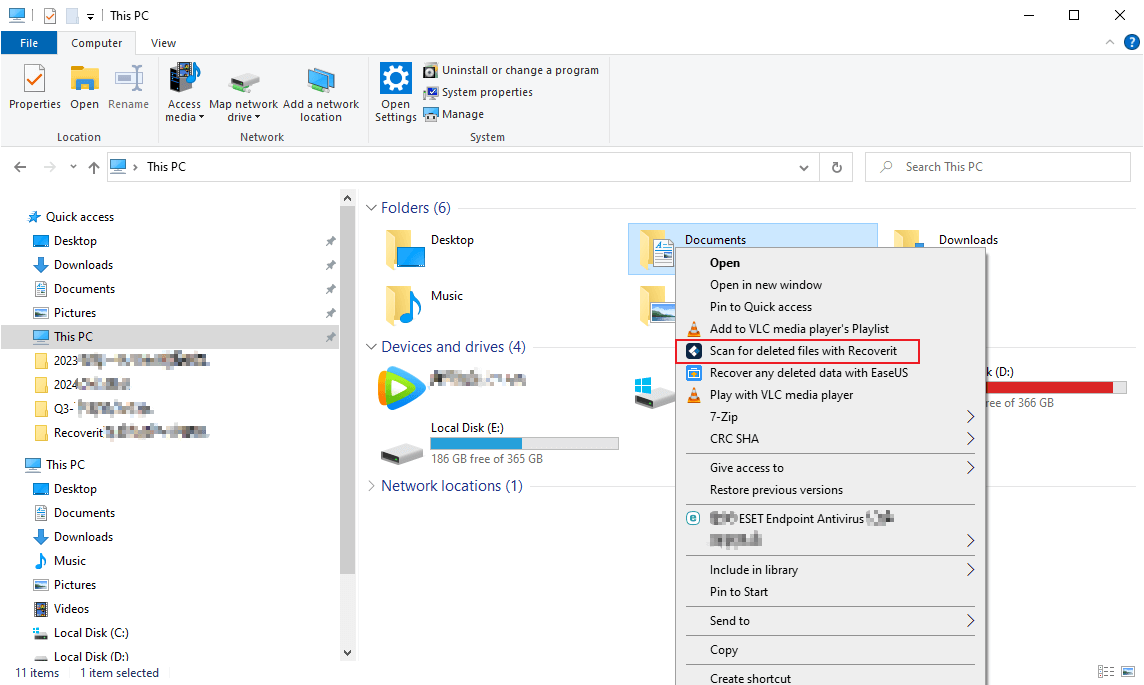
- Use File Explorer scanning if it fits your workflow. On Windows, you can also right-click a folder or drive and choose the Recoverit scan option when available.
- Let the scan run. Recoverit scans the selected location for recoverable files. For large drives, allow the scan to continue until key file types appear.

- Filter the results. Narrow results by file type, path, size, date, or other available filters.
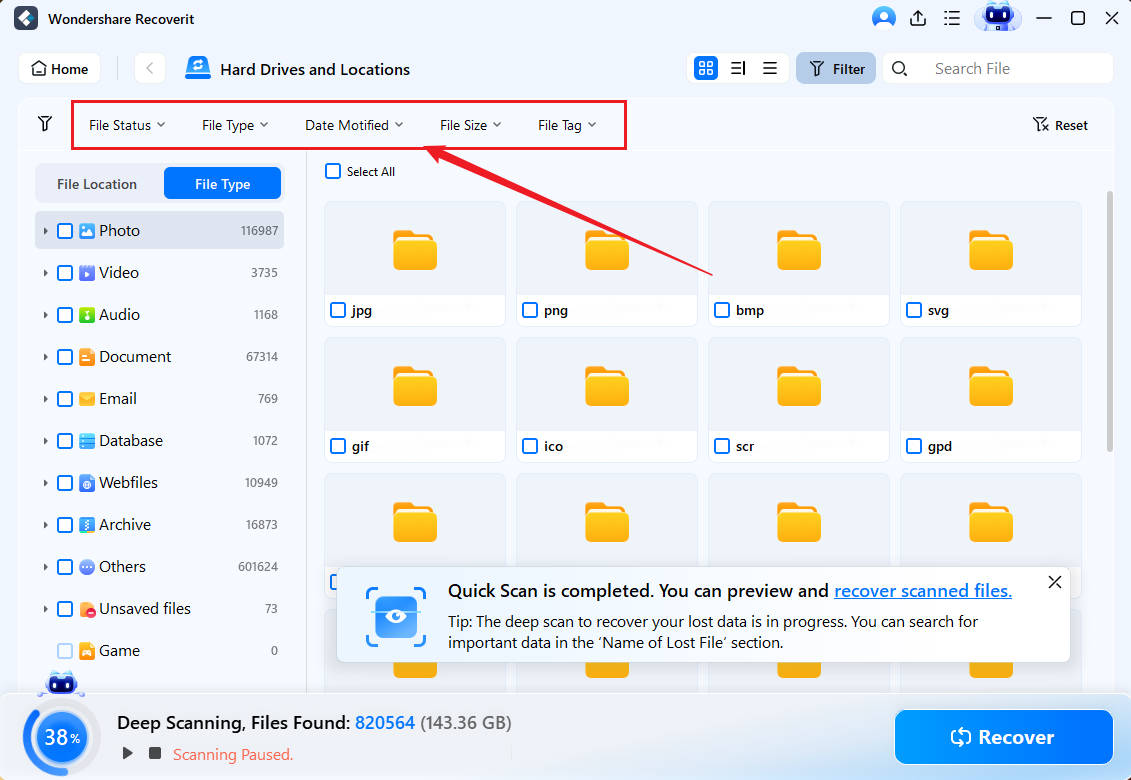
- Search by keyword. Use keyword search when you remember a file name, extension, folder name, or project term.
- Preview and recover to another drive. Preview supported files to confirm they are the right ones, then save recovered files to a different storage device.

Part 9. WeRecoverData vs Recoverit: Which One Do You Need?
| Comparison point | WeRecoverData | Wondershare Recoverit |
| Recovery method | Professional service with in-lab, onsite, and remote options. | Desktop software that scans readable storage locally. |
| Best for | Physical damage, RAID/SAN/NAS, enterprise servers, tape, phones, and high-value cases. | Deleted files, formatted drives, lost partitions, interrupted transfers, and readable external media. |
| Device handling | You ship or drop off the device unless the case is onsite or remote. | You keep the device and scan it on your own computer. |
| Location clarity | 5 full-service labs plus many drop-off/service points, according to the official locations page. | No shipment needed for local readable drives. |
| Cost model | Quote-based, with public user reports of diagnostic fees and high quotes. | Software pricing with scan and preview workflow before saving files. |
| Turnaround | Hours to days for emergency cases, or longer depending on shipment and complexity. | Minutes to hours for many logical scans, depending on drive size and scan depth. |
| Hardware damage | Appropriate for damaged or undetected storage that needs professional tools. | Not suitable for physically damaged or undetected storage. |
| Encryption | May help if legitimate keys or recoverable device states are available. | Cannot bypass BitLocker, FileVault, phone passcodes, or other encryption. |
| Customer confidence | Recent third-party reviews create caution around pricing, communication, and device handling. | Local preview helps users decide what to recover before saving files. |
The practical recommendation is not "WeRecoverData or Recoverit for everyone." Use a lab when the hardware, storage architecture, or business risk demands it. Use Recoverit first when the storage device is readable and the loss is logical.
Conclusion
WeRecoverData is a broad professional recovery service with official claims around controlled lab environments, emergency support, RAID/SSD recovery, digital forensics, onsite work, remote recovery, and secure delivery. It can make sense for physically damaged storage, enterprise RAID, legacy tape, business-critical servers, and cases where DIY software would be risky.
Its weak points are pricing transparency and current public feedback. The official location page now clarifies that WeRecoverData has 5 full-service labs and 53 drop-off/service points, while Trustpilot, BBB, and Yelp show complaints about fees, high quotes, location clarity, delays, and communication. Before sending a device, confirm the lab location, evaluation fee, return-shipping terms, no-data-no-charge conditions, and partial-recovery policy in writing.
If the device is physically damaged or not detected, stop using it and contact a professional lab. If the device is readable and the data loss is deletion, formatting, partition loss, or transfer failure, try a non-destructive recovery scan first. Recoverit can help scan readable storage for recoverable files, but recovery depends on drive condition, overwriting, encryption, and detectability.
FAQ
-
Is WeRecoverData legit?
WeRecoverData is a real professional data recovery company with official service pages, phone support, listed full-service labs, and drop-off/service points. However, recent Trustpilot, BBB, and Yelp reviews show serious complaints, so users should verify fees, location, return terms, and service conditions before sending a device. -
How many WeRecoverData labs are there?
The current WeRecoverData locations page says the company operates 5 full-service data recovery laboratories in New York, Pasadena, Aventura/Miami, Austin, and Toronto, plus 53 service areas and drop-off points that route media to those labs. -
How much does WeRecoverData cost?
WeRecoverData is quote-based and does not publish one fixed price list for every case. Public user reports mention diagnostic fees and four-figure quotes, but the only relevant price is the written quote for your device. Confirm evaluation, return-shipping, emergency, material, vault, and partial-recovery terms before approving. -
Does WeRecoverData have a no data, no fee policy?
WeRecoverData advertises "No Data, No Recovery Charge" and similar messaging. Users should still ask what counts as successful recovery, whether partial recovery triggers payment, and whether any diagnostic, emergency, material, or return-shipping fee remains payable. -
How long does WeRecoverData recovery take?
Some WeRecoverData pages list in-lab Standard at 3-5 business days, Priority at 1-3 business days, Weekend at 1-3 days, and Emergency at 12-24 hours. Actual turnaround can vary with device type, damage severity, data volume, shipment, and quote approval. -
Can WeRecoverData recover physically damaged drives?
Yes, WeRecoverData is positioned for physically damaged hard drives, SSDs, RAID arrays, flash media, and other complex storage. For clicking, burned, water-damaged, or undetected drives, a professional lab is safer than repeated DIY scanning. -
When should I use Recoverit instead of WeRecoverData?
Use Recoverit first when the storage device is readable and the problem is logical, such as accidental deletion, formatting, lost partitions, or missing files from a healthy external drive. Use a lab when the device is physically damaged, not detected, or part of a complex RAID/server environment. -
Can Recoverit recover data from a physically failed drive?
No. Recoverit can scan readable storage for recoverable files, but it cannot repair physically failed hardware, recover from undetected devices, bypass encryption, or recover data that has already been overwritten.


