

 TL;DR:
You can recover deleted Excel files that bypass the Recycle Bin by utilizing Windows backup features, checking cloud service trash directories, or running advanced command-line and third-party data recovery tools.
● Files typically skip the Recycle Bin when deleted via the Shift + Delete shortcut, removed directly from USB or external drives, or when they exceed the designated storage size limits.
● For immediate retrieval without third-party software, check the "Previous Versions" tab within the original folder's properties, restore from Windows File History, or inspect the independent trash bins of synced cloud services like Google Drive.
● If native backups are empty, use the Windows File Recovery tool via Command Prompt (`winfr`) as an administrator or third-party software like Recoverit to scan raw data blocks and unused drive areas before new data overwrites the hidden traces.
Ask AI for a summary
 ChatGPT
 Perplexity
 Gemini
 Claude
 Grok
Grok
Confusion rises fast when an Excel file vanishes without a clue. Many people feel stress when a sheet slips out of sight, and nothing appears in the Recycle Bin. Moreover, work slows, tasks pause, and pressure builds during busy hours. This guide explains why Excel files go missing and shows each cause in clear steps.
Furthermore, it teaches how to recover deleted excel file not in recycle bin by checking key folders, cloud paths, and hidden spots where recent copies are stored. These steps help you stay calm, find lost data, and keep your work on track.
Try Recoverit to Perform Excel File Recovery
 Security Verified. 3,591,664 people have downloaded it.
In this article

Part 1. Where Do Deleted Files Go If Not In the Recycle Bin?
When a file is deleted, its data does not vanish right away. Only the file’s link is removed, and the space becomes marked for new data. Besides, the real content stays on the drive until new files replace it. This is why recovery works in many cases, even when files do not show in regular folders or the Recycle Bin on your system.

Common Reasons a Deleted Excel File Is Not in the Recycle Bin
Here are the common causes of this issue that explain why a deleted excel file not in recycle bin:
- Shortcut Delete: It skips the Recycle Bin when you use Shift + Delete. Moreover, this action removes its link fast and marks the space ready for new data.
- External Drive: Files on USB or external drives skip the system’s Recycle Bin. The system marks their space open at once when users delete them.
- Large Files: A file bigger than the set limit skips the Recycle Bin space. Windows remove it fast because the Bin cannot store huge items.
- Bin Settings: The Recycle Bin may use a setting that blocks normal storage. A full or broken Bin can also push deleted files out instantly.
- Cloud Storage: Cloud folders use their own trash instead of the Windows Bin. Thus, deleted local files may move to the cloud trash instead of Windows.
Part 2. Deleted Excel File Not in Recycle Bin? Try 5 Ways Now!
If your deleted Excel files are not found in the Recycle Bin, you still have the following strong options to restore them:
1. Restore Previous Versions via File History
This method uses Windows’ record of older folder states to help recover lost data. When a deleted excel file not in recycle bin blocks normal recovery, these saved states often hold earlier copies of your sheet. Furthermore, it provides a safe way to restore the file, since Windows stores version snapshots multiple times. To use this fix, the following steps will guide you through the process:
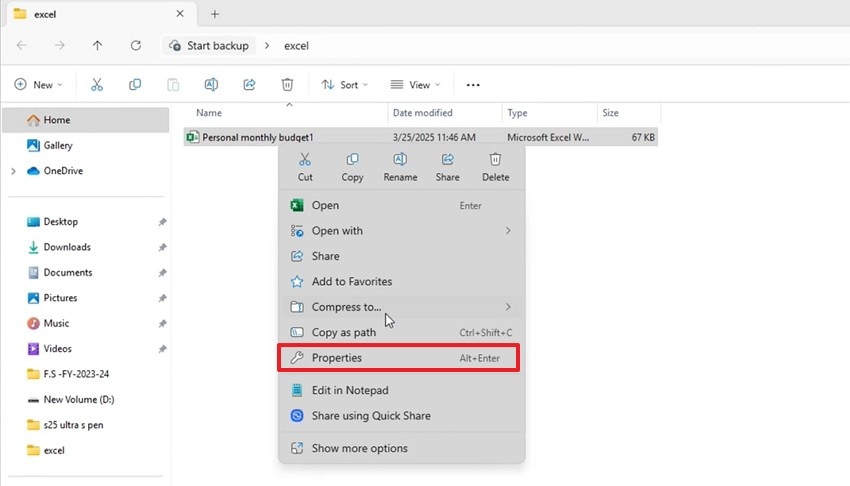
- To start, go to the folder that has your lost Excel file, right-click the file. Then, from the menu, choose the “Properties” option to proceed further.
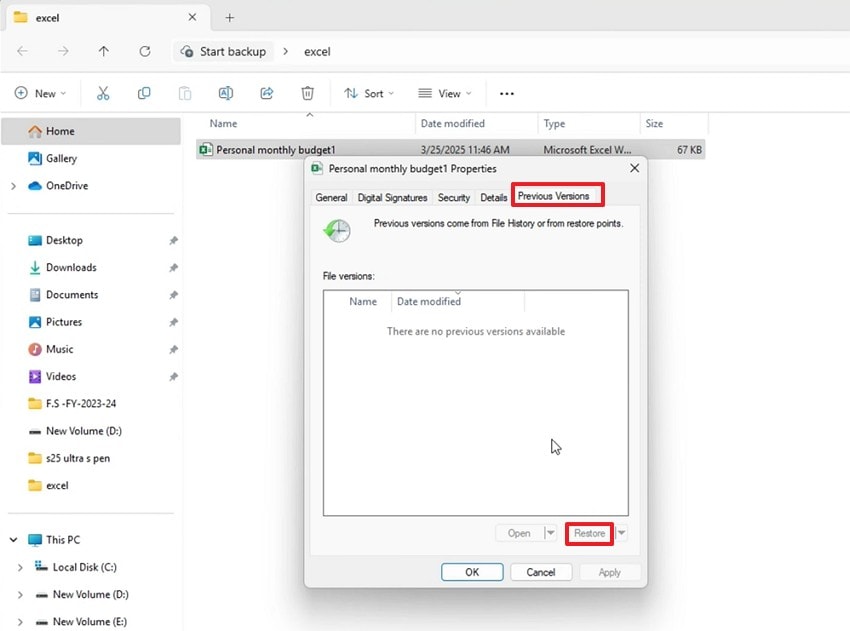
- Next, in the properties window, click on the “Previous Versions” tab at the top. Afterwards, if a previous version appears, select it and click the “Restore” button at the bottom right.
2. Recover With Data Recovery Software - Recoverit
When files disappear without warning, many users need a tool that digs deeper than built-in options. Recoverit offers that depth by scanning unused drive areas that still hold hidden traces. In a recover deleted excel file not in recycle bin case, it reads parts of the drive that Windows skips.
Furthermore, it adds another layer of support by analyzing damaged paths and broken clusters that often block recovery. Its structured scan modes highlight fragments that remain safe and group them into clear results. The tool also works well with large spreadsheets and older Excel formats. With this organized approach, users have a reliable path to restore essential data confidently.
Key Features
- File Preview Option: Lets you view Excel sheets before recovery to confirm content and avoid wrong restores.
- Multi-Device Support: Works with internal drives, USBs, SD cards, and external disks for flexible recovery needs.
- Deep Scan Precision: Scans all drive layers to detect hidden traces and improve Excel file recovery accuracy.
Stepwise Guide to Recover Lost Excel Files with Recoverit
Let’s walk through the step-by-step guide below to see how to recover a deleted Excel file with Recoverit:
- Choose the Location to Recover
First, access the “Hard Drives and Locations” option in the left sidebar to start the Recovery process.

- Start Scanning to Proceed
After the scanning process starts, all the recoverable files will appear under the “File Location” tab.

- Preview the Files and Recover
Lastly, preview the files, select the ones you want to recover, and click the “Recover” button to complete the recovery.

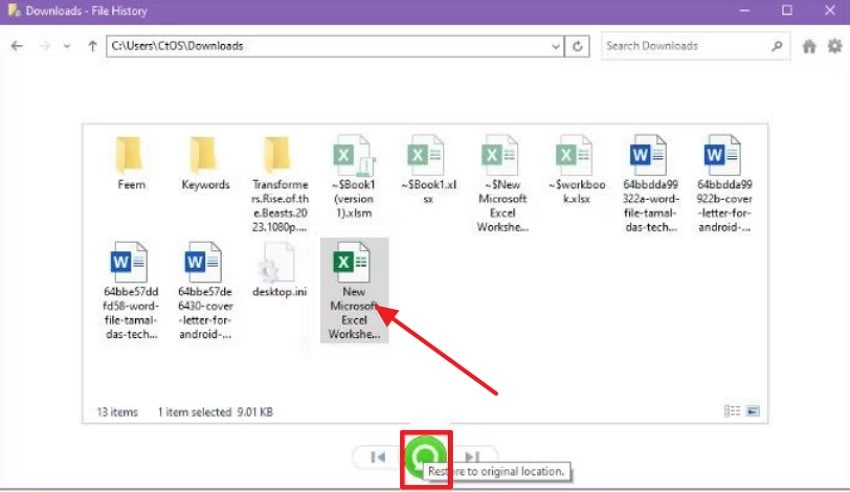
3. Restore from File History Backup
Windows’ backup system saves earlier versions of files and protects important work from sudden loss. When an accidentally deleted excel file not in recycle bin causes stress, the backup often still holds a working copy. Besides, it helps you regain access because these backups save past versions even when normal folders look empty. The steps below explain how this method helps restore your lost sheet:
- First, open “File History” and navigate to the “Home” section showing your folder list. Then select the correct folder and browse backup dates using the bottom-left and right “Arrows.”
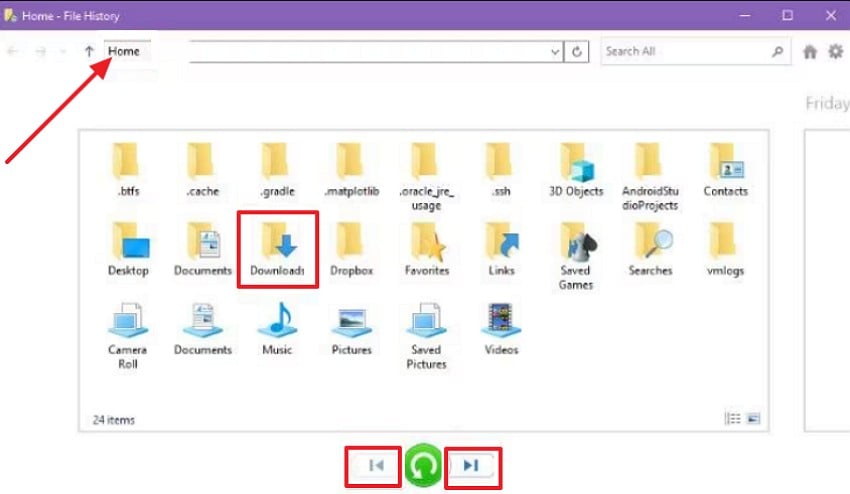
- Later, select the file, click on the green “Restore” button, and retrieve it safely.
4. Check Cloud Sync Services
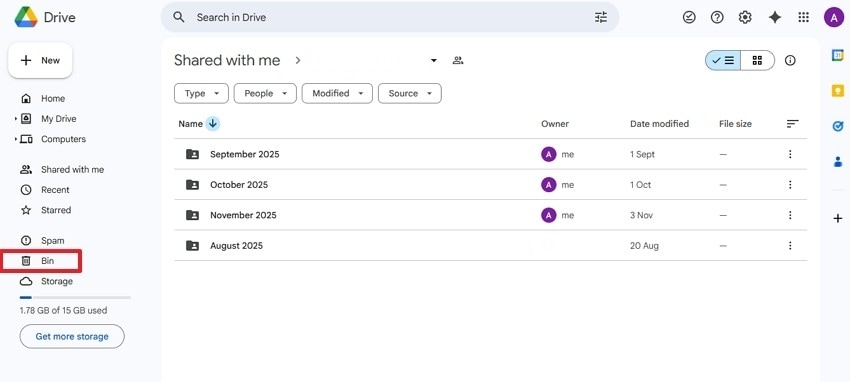
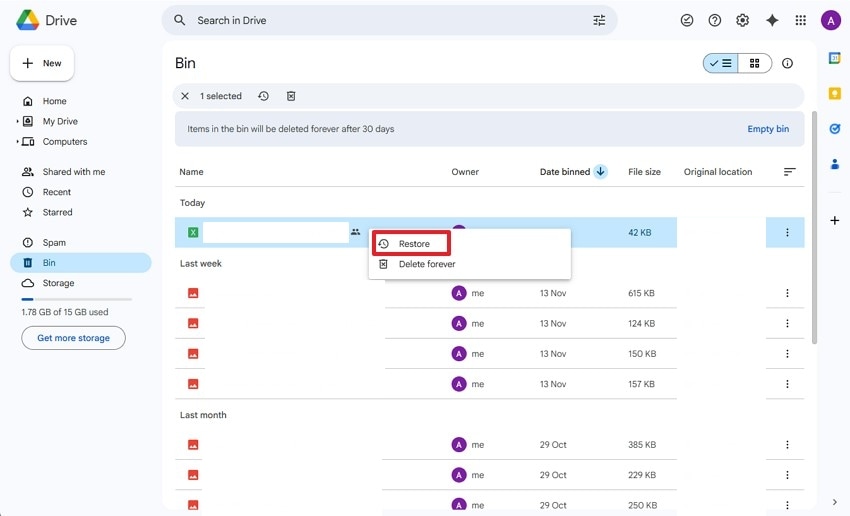
Cloud storage keeps separate trash folders that hold removed items for many days. This helps you retrieve deleted excel file not in recycle bin because synced services often keep older versions or cached copies. Even when your local system shows nothing, cloud trash can restore the sheet and return earlier data. Adhere to the steps below to use this fix for recovery:
- Start by signing in to your “Google Drive” and in the left sidebar, then click on the “Bin” or “Trash” option.
- Next, locate your “Excel File,” right-click on it, and select “Restore” from the options.
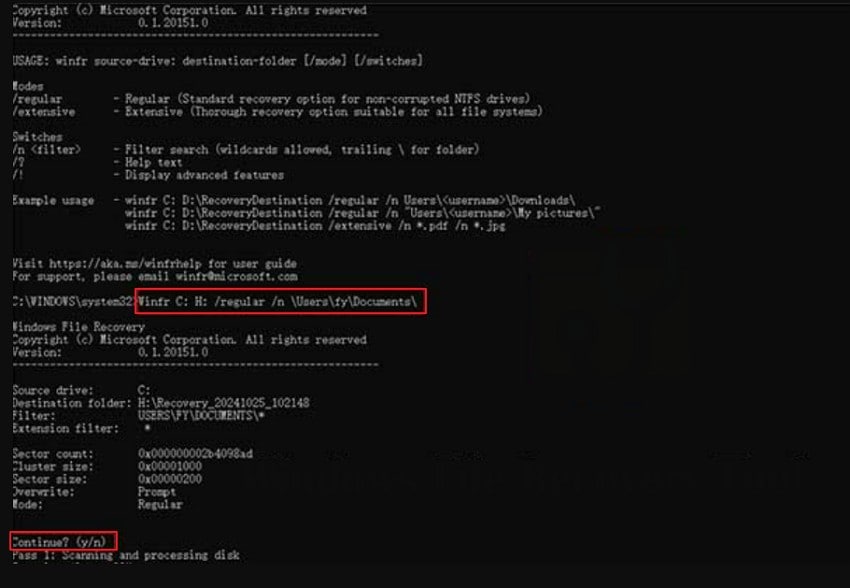
5. Try Windows File Recovery Tool/Command Prompt
This method scans the drive for traces left after deletion, enabling recovery before the overwrite occurs. Furthermore, it helps you recover deleted excel file not in recycle bin by reading raw data blocks and rebuilding what is still intact. It works when normal restore options fail, and files seem fully lost. The steps listed next will show how this method supports recovery:
- First, open “Command Prompt” as an administrator and type “winfr” to set the recovery mode.
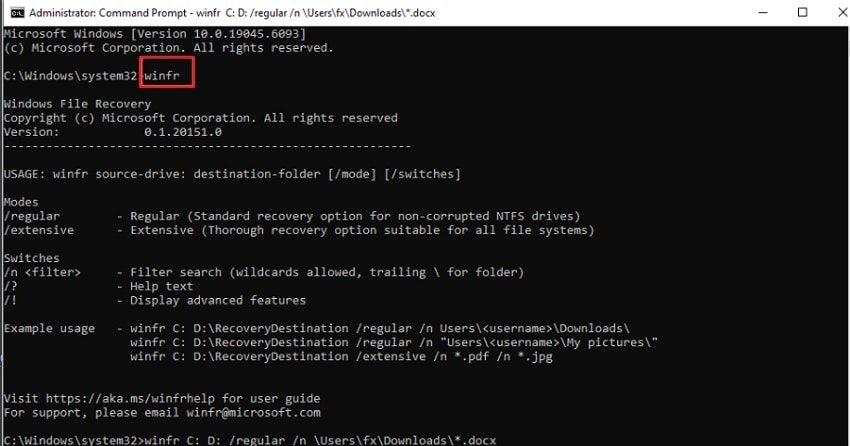
- Next, enter “winfr C: H: /regular /n \Users\ty\Documents\” command and replace “H” with your destination drive and “\Users\ty\Documents.” When the tool shows “Continue? (y/n), type “y” to start recovery.
Part 3. Tips to Prevent Losing Excel Files Without a Recycle Bin
The following are a few valuable tips to help you prevent losing Excel files when an accidentally deleted excel file not in recycle bin:

- Automatic Backup: Enable Excel’s backup option to create a second file that updates during saves. This backup supports recovery by giving access to earlier versions saved without extra steps.
- Cloud Storage: Save your Excel files on cloud platforms to activate continuous AutoSave protection online. Cloud recovery features help restore older versions or quickly retrieve recently deleted sheets.
- Backup Tools: Use Excel-friendly backup add-ins that save your work across several secure destinations. Moreover, these tools offer version tracking and maintain dependable duplicate copies for safer recovery.
- External Copies: Export your Excel files to external drives to create consistent, secure offline backups. Keeping several dated copies helps restore earlier versions during corruption or accidental loss.
- Version Control: Follow clear naming rules to organize incremental file versions for safer Excel management. Version history reduces the risk of overwriting and allows tracking changes across important workbook updates.
Conclusion
To conclude, recovering a deleted excel file not in recycle bin can feel stressful, especially when no copy appears in familiar folders. In this article, you learned why files disappear, where they go, and which proven methods can bring them back safely. For deeper scans and better results, a trusted recovery tool makes the process easier, and Recoverit offers a strong, reliable choice for secure restoration.
FAQ
1. Why doesn’t my deleted Excel file appear in the Recycle Bin?
Deleted Excel files may bypass the Recycle Bin due to shortcuts or settings issues. These factors send files elsewhere, creating confusion during urgent recovery attempts for users.2. Can I recover a missing Excel file without special software?
Windows tools like File History restore earlier versions when deleted Excel files vanish. Cloud platforms also maintain trash folders, helping restore missing sheets across different devices.3. How does cloud storage help when my Excel file disappears?
Cloud services store removed files longer, offering reliable fallback options during unexpected losses. Their trash sections preserve versions, allowing easy restores when local folders appear empty.4. When should I use data recovery software for an Excel file?
Use recovery software when system tools fail or deeper scans become urgently necessary. Such programs find hidden traces, rebuilding files overlooked by normal Windows recovery options.


