
Quick Answer: What is a Magnetic Drive & How Does It Work?
The Definition: A magnetic drive (such as a Hard Disk Drive or HDD) is a non-volatile, secondary storage device that uses spinning flat circular platters coated with a magnetic material to store digital data permanently.
How it Works: Data is written binary style as millions of ones and zeros (1s and 0s) onto microscopic tracks. An automated actuator arm positions a read/write head fractions of a millimeter above the spinning platter, altering the magnetic polarity (North vs. South poles) of individual sectors to encode files.
Main Advantage: Magnetic drives remain the most cost-effective solution for high-capacity local data storage, providing significantly more gigabytes per dollar than high-speed RAM or Solid-State Storage (SSDs).
Core Weakness: Because they rely on moving mechanical parts, magnetic drives are vulnerable to physical damage from drops, heat, magnetic fields, and have slower seek times than modern flash storage.
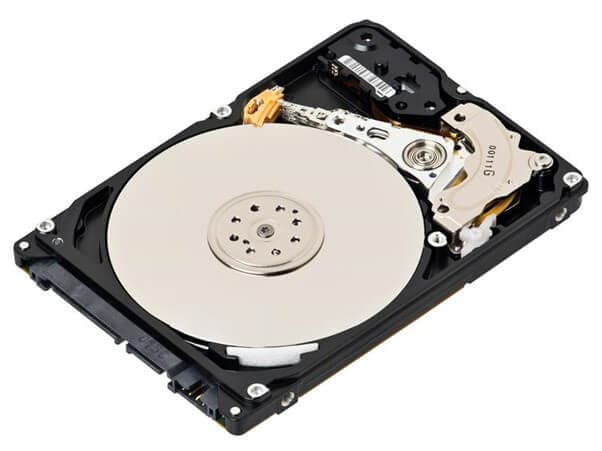
Magnetic Disks are something people have used throughout the computer ages. Large floppy disks held whole applications in the early days of storage technology. These gradually progressed to compact floppies that could store higher amounts of data. Computers use hard drives to store all software files and anything else that a company or individual wants to save. Magnetic approaches entail encoding data into the drive using magnetism. Then, it can be saved or deleted at any time. Secondary storage in computers is often made up of stacked magnetic discs stacked on top of one another.
What Is A Magnetic Disk?
A Magnetic Disk is a type of secondary memory that consists of a flat disc with a magnetic coating that stores data. It's where you keep all of your apps and files. One represents polarised information in one direction and vice versa. The direction is denoted by the number 0.
Magnetic discs are less expensive than RAM and can store vast amounts of data; however, secondary memory slows data access compared to main memory. In the magnetic disc memory, data can be easily edited or removed. It also provides for data access at any time.
IBM produced the first magnetic hard drive in 1956, a big system with 50 21-inch (53-cm) discs. Unfortunately, it could only store 5 megabytes of data despite its size. Since then, magnetic discs have expanded their storage capacity by orders of magnitude while shrinking.
Architectural Breakdown: Hard Disk Component Geometries
To understand how data maps to physical hardware, computer architectures segment the internal layout of a magnetic drive into four distinct geometric layers:
Component Name |
Physical Form Factor |
Technical Function |
Smallest Allocatable Unit |
| Platter | Flat, circular aluminum or glass disk. | Holds the microscopic magnetic substrate coating layer where data resides. | N/A (Global Medium Base) |
| Track | Concentric circular rings drawn around the platter. | Guides the path of the read/write head during a full spin cycle loop. | 1 Complete Concentric Ring |
| Sector | Pie-shaped sub-divisions slicing across every track. | The standard geometric segment used by the host operating system to locate files. | 512 Bytes to 4 KB (Standard Block) |
| Cluster | A grouped collection of adjacent sectors. | Created by file systems (NTFS/exFAT) to speed up access to large documents. | Scalable depending on configuration |
How Does A Magnetic Disk Work?
When I click save, how does it work?
- The spindle rotates the platter.
- The actuator arm makes a cross-over motion across the plate.
- The actuator arm sends your saved data to the read/write head.
- The head alters the polarity of a sector (a section of the platter - see below) on the platter to one or more north poles or south poles.
- North pole, South pole, North, North, South, and so on are analogous to binary ones and zeros (as per the diagram on the left).
The magnetic disk's functioning
The disk's surface is divided into tracks, which are concentric circles. The outermost track has a number of 0, and the last track has a number of 1. Tracks are subdivided further into sectors. A sector is a slice of the pie that cuts through all of the tracks. Sectors are used to store data on the disc. A sector is the smallest unit that may be read or written on a disc. Each track on a disc has eight or more sectors.
Pro Tip 2026: Shingled Magnetic Recording (SMR) vs. Conventional Tracks (CMR)
In modern high-capacity magnetic drives, manufacturers use an advanced data layout strategy known as SMR (Shingled Magnetic Recording) to push drive capacity past 20 TB. Unlike legacy CMR (Conventional Magnetic Recording) where data tracks run side-by-side with protective gaps, SMR drives overlap data tracks like shingles on a roof. While this significantly lowers production costs and maximizes storage space for cold archiving, it slows down random write speeds. Because writing to one track forces the drive to update adjacent overlapping tracks, running data recovery or heavy file adjustments on an SMR drive requires uninterrupted background processing time to let the internal controller stabilize data lines.
For access, a magnetic disc is put into a magnetic disc drive. The drive is made up of a read/write head connected to a disc arm that moves the head. On the disc, the disc arm can move inside and outward.
The motor of a disc drive moves the disc at a rapid speed (60–150 times/sec.) when reading or writing to it.
Pros And Cons of Magnetic Disk
The magnetic disc is the most common direct-access secondary device, as we all know. The magnetic discs are also the device's most popular online secondary storage, available in various sizes. In addition, they might be portable or fixed in their storage devices or disc drives.
There are various advantages and disadvantages of magnetic disk memory.
Pros
This is a low-cost memory.
Data can be accessed quickly and directly.
It has the ability to store vast volumes of data.
It can transport data faster than magnetic tapes.
When opposed to tapes, it is less vulnerable to data corruption.
The magnetic disc can be used for both online and offline data storage.
Magnetic disc systems often have a faster data transfer rate than tape systems.
Cons
They cost less than RAM but more than magnetic tape memories.
It must be stored in a clean, dust-free environment.
Sequential access is not possible with these.
When a disc drive or disc fails, all of its data is lost.
Information security is challenging to maintain.
Not appropriate for devices that require sequential access rather than direct or random access.
Unified Data Grid: Magnetic vs. Tape vs. Optical Media
Choosing the correct storage type requires balancing speed, cost, and physical durability. The breakdown below contrasts the primary secondary memory technologies used across computer platforms:
Engineering Metric |
Magnetic Disk (HDD) |
Magnetic Tape (LTO) |
Optical Disk (Blu-Ray/DVD) |
| Data Access Mode | Direct / Random Access (Instant jump to any sector) | Sequential Access (Must wind through entire ribbon length) | Direct / Random Access (Laser tracking arm sweep) |
| Read/Write Engine | Electromagnetic Read/Write Head | Physical Tape Deck Magnetic Read Block | Focused Laser Light Reflectivity (Pits & Lands) |
| Primary System Use | Everyday Local Operating Storage & High-Capacity PCs | Enterprise Mass Backups & Long-Term Cold Archiving | Media Distribution, Console Video Games, & Software |
| Cost Per Gigabyte | Exceptionally Low | Absolute Lowest (Only for ultra-massive scales) | Moderate to High |
| Data Transfer Rates | Fast (150 MB/s - 250 MB/s) | Slow Initial Seek / Fast Stream Once Positioned | Slow (10 MB/s - 50 MB/s) |
| Susceptibility to Magnetic Failure | High Risk (Strong magnets can wipe tracking maps) | High Risk (Requires shielded climate control vaults) | Zero Risk (Completely immune to magnetic fields) |
Conclusion
While many types of disk drives are available in the market, they all have pros and cons. The important thing is their reliability, characteristics, and importance should match your personal needs. Magnetic Disk drives are a good option if you are searching for a lot of space. One of the plus points is that magnetics disks are less expensive than RAM. However, proper handling is required. Dropping it, exposure to severe heat, or strong magnetic fields can cause harm. On the other hand, a magnetic disk is extremely dependable if not destroyed.
Final Technical Checklist: Maximizing Magnetic Drive Lifespan
- Avoid Sudden Rotational Shocks: Never move, tilt, or jostle a desktop computer enclosure or external hard drive casing while the internal drive platters are actively spinning at high speeds (7200 RPM). Doing so can cause a "head crash," where the read head physically scratches the platter surface, causing permanent data loss.
- Keep Storage Away from Magnets: Avoid placing external backup enclosures on top of large audio speakers, subwoofers, or directly next to unshielded electric motors, as strong magnetic fields will corrupt the disk's internal formatting tables.
- Monitor Drive Health with S.M.A.R.T.: Regularly use utility software to check your drive's internal diagnostic parameters (Self-Monitoring, Analysis, and Reporting Technology) to catch reallocated sectors or spin-retry errors before a total drive failure happens.
- Maintain Constant Air Circulation: Ensure your PC case fans are free of dust blockages. Magnetic disk bearings run under strict heat rules; running them above 50°C speeds up lubricant breakdown and can cause electronic components to fail early.
- Pre-Stage Emergency Data Carving Assets: Because a logical file deletion doesn't erase raw data until new files write over those sectors, keep a recovery engine like Wondershare Recoverit installed on your main system drive. This allows you to scan and pull files off a failing magnetic drive before its mechanical parts break down completely.


